Quasar: Import markdown file in script tag to display help
I'm trying to read the content of a markdown file (.md) stored in statics or assets folder of my quasar project and I have updated the quasar.conf.js file with the following change to support raw file loading after adding raw-loader to my project
  extendWebpack(cfg) {
    cfg.module.rules.push({
      test: /\.md$/i,
      use: "raw-loader"
    });
I'm trying to load the markdown, using import command from one of the .vue component script tag as below
import md from "~statics/help.md";
But when I run the project, it compiles to 100% and throws the below error
• Compiling:
 └── SPA ████████████████████ 100% done in ~13s


 ERROR  Failed to compile with 1 errors                                                                                     8:22:43 AM

This dependency was not found:

* ~statics/help.md in ./node_modules/babel-loader/lib??ref--1-0!./node_modules/@quasar/app/lib/webpack/loader.auto-import.js?kebab!./node_modules/vue-loader/lib??vue-loader-options!./src/pages/Help.vue?vue&type=script&lang=js&

To install it, you can run: npm install --save ~statics/help.md
 joyalkj
All 9 comments
Did you define an alias ~statics?
 pdanpdan
on 25 May 2020
pdanpdan
on 25 May 2020
@joyalkj Use the assets folder inside your js files when importing because Webpack will auto-embed it. Example: import md from 'assets/help.md'. Lose the tilde char (~) as it has no meaning in js. That only has meaning in the template area.
 rstoenescu
on 25 May 2020
rstoenescu
on 25 May 2020
@joyalkj Alternatively, in quasar.conf.js add an alias for a markdown folder:
      chainWebpack (chain) {
        chain.resolve.alias.merge({
          markdown: path.resolve(__dirname, './src/markdown')
        })
      }
Then you can do:
import md from 'markdown/help.md'
 hawkeye64
on 25 May 2020
hawkeye64
on 25 May 2020
I tried all possibilities, unfortunately, nothing worked.
joyalkj
on 25 May 2020
@joyalkj Are you sure help.md is in the markdown folder?
hawkeye64
on 26 May 2020
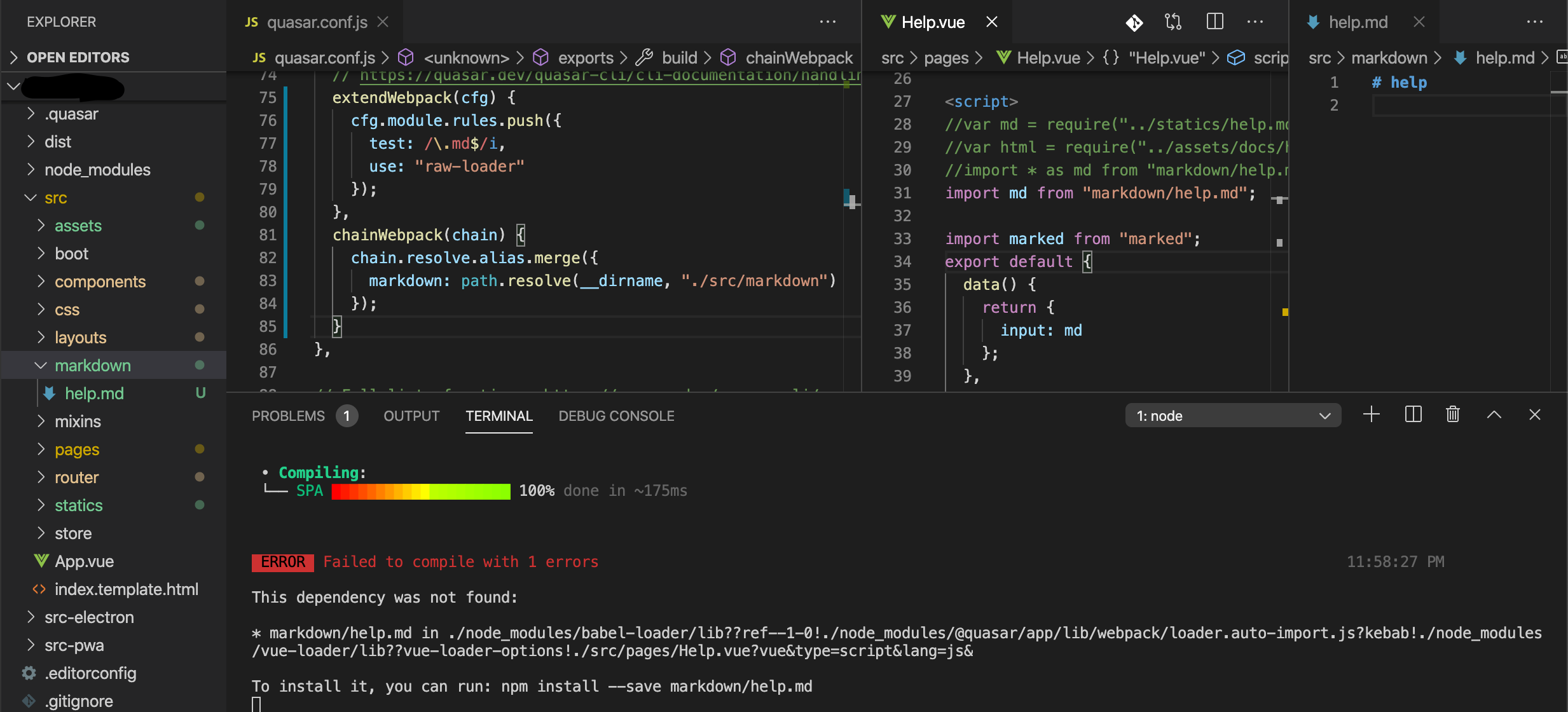
@hawkeye64 @pdanpdan @rstoenescu Yes, please refer to the above snapshot, which contains folder tree, config file, vue component file & the sample markdown. The issue is with webpack integration, I believe. If I remove the loader configuration in quasar.conf.js, it throws the error about the invalid character '#' at the beginning of the .md file, which means the path is correct. But it cannot work with raw-loader or other similar loaders.
joyalkj
on 27 May 2020
That's because:
cfg.module.rules.push({
      test: /\.md$/i,
      use: "raw-loader" // << NO
    });
is not good. Instead of "use" put loader: 'raw-loader'
rstoenescu
on 27 May 2020
@rstoenescu Thanks. It's working now. I've never expected a quick response from the author of the framework. I was referring to the official Webpack documentation of raw-loader. However, now I've noticed that it's a little different in quasar.conf. Thank You.
joyalkj
on 27 May 2020
If u've seen "use" instead of "loader" then it's a mistake in Webpack's docs. Meaning: we're not using "our own Webpack" but the official one :)
rstoenescu
on 28 May 2020
Related issues
 hctpbl
·
3Comments
hctpbl
·
3Comments
 lukadriel7
·
3Comments
lukadriel7
·
3Comments
 fnicollier
·
3Comments
fnicollier
·
3Comments
 tombarfoot
·
3Comments
tombarfoot
·
3Comments
 wc-matteo
·
3Comments
wc-matteo
·
3Comments