Quasar: "platform-ios/android" body class no longer attaching on Cordova
The body class "platform-ios/android" is no longer attaching to the body if the app is run in Cordova mode.
Previously it would.
I now no longer have a way to differentiate between iOS and Android via CSS on Cordova.
If I run the app directly in the browser, the classes will attach.
(Problem is happening on iPad Pro)
 nicholaszuccarelli
All 23 comments
Hi,
Seems like it's working (nothing changed in regards to that area).
Can you supply more information though pls? What cordova version are you using, what's the device's OS version (emulator or phisical device)?
 rstoenescu
on 30 Apr 2020
rstoenescu
on 30 Apr 2020
I see your edit. iPad. It's because the iPad requests the desktop version by default. But we have code in place to detect that. Will also hook the platform-* classes into that.
rstoenescu
on 30 Apr 2020
Hmm, seems to be working for iPad too. What OS is the iPad on?
rstoenescu
on 30 Apr 2020
Tried with iPad Pro 9.7" with iOS 13.4 (simulator). Both dev and prod build. Works correctly.
Also:
$ cordova -v
9.0.0 ([email protected])
Quite odd. I'm off my PC now but if you give me half hour or so I will report back and test it on emulators and my devices again.
I was using an iPad Pro 11" (2018 model).
Both are running the latest versions of IOS 13
The iPhone was a 4.7" 6S (correctly detected on the iPhone)
Also will note that this was happening while using quasar dev - m cordova - T ios
nicholaszuccarelli
on 30 Apr 2020
Results from running quasar dev -m cordova -T ios
Also to note, this is being built on a Mac Mini (macOS Catalina)
Cordova version:
9.0.0 ([email protected])
iPhone 6S: body classes
mobile touch platform-ios cordova native-mobile q-ios-padding body--light q-body--prevent-scroll
iPad Pro 11 (2018): body classes
mobile touch cordova native-mobile body--light
iPad Pro (2018): body classes when running in browser (with regular quasar dev)
mobile touch platform-ios body--light browser-safari-13
iPad Pro (11 (2nd Gen)) VIA EMULATOR
mobile touch cordova native-mobile body--light
iPhone 11 Pro Max VIA EMULATOR
mobile touch platform-ios cordova native-mobile q-ios-padding body--light
iPad Air (3rd gen) VIA EMULATOR
mobile touch cordova native-mobile body--light
iPad Mini (5th Gen) VIA EMULATOR
mobile touch platform-ios cordova native-mobile q-ios-padding body--light
So going off this, it's only not adding that body class when building for larger screen iPads? (Since it added the class for iPad Mini).
Let me know if I can supply you with any other details.
nicholaszuccarelli
on 30 Apr 2020
Just ran it on a physical iPad (6th Gen) 9.7" runing iOS 13.2
mobile touch cordova native-mobile body--light
And if it helps, booting up the app in landscape/portrait mode does not affect the result of appended body classes.
nicholaszuccarelli
on 30 Apr 2020
Can you post the user agent for all the devices that seem to not work correctly pls? (navigator.userAgent || navigator.vendor)
rstoenescu
on 30 Apr 2020
iPad 6th gen (physical)
Mozilla/5.0 (Macintosh; Intel Mac OS X 10_15) AppleWebKit/605.1.15 (KHTML, like Gecko) Mobile/15E148
iPad Mini (which did work) VIA EMULATOR
Mozilla/5.0 (iPad; CPU OS 13_4_1 like Mac OS X) AppleWebKit/605.1.15 (KHTML, like Gecko) Mobile/15E148
iPad Pro 11 Inch (2nd gen) VIA EMULATOR
Mozilla/5.0 (Macintosh; Intel Mac OS X 10_15_4) AppleWebKit/605.1.15 (KHTML, like Gecko) Mobile/15E148
iPad Pro 11 Inch (1st gen) (physical)
Mozilla/5.0 (Macintosh; Intel Mac OS X 10_15) AppleWebKit/605.1.15 (KHTML, like Gecko) Mobile/15E148
iPhone 6S (which did work) (physical)
Mozilla/5.0 (iPhone; CPU iPhone OS 13_4_1 like Mac OS X) AppleWebKit/605.1.15 (KHTML, like Gecko) Mobile/15E148
I can get the rest of the user agent strings if you need, but the theme I see here is that the iPad Mini is being recognised as an iPad, but the other devices I tried are being recognised as a Macintosh with no reference to iPad at all.
nicholaszuccarelli
on 30 Apr 2020
Also via iPad Air (3rd gen) VIA EMULATOR
Mozilla/5.0 (Macintosh; Intel Mac OS X 10_15_4) AppleWebKit/605.1.15 (KHTML, like Gecko) Version/13.1 Safari/605.1.15
nicholaszuccarelli
on 30 Apr 2020
Thank you! Got everything that I need for now. Will keep investigating.
rstoenescu
on 30 Apr 2020
And sorry, I forgot to mention which version of iOS they are running.
Physicals:
iPhone 6S - 13.4.1
iPad Pro 11 - 13.3.1
iPad 6th Gen - 13.2
Emulators are all running 13.4
nicholaszuccarelli
on 30 Apr 2020
It's so weird cause I can't reproduce it with the emulator for iPad Air (3rd gen) - iOS 13.4.1.
But will make a fix taking into account the "offending" user agents that you provided.
rstoenescu
on 30 Apr 2020
Thanks! Appreciate it :)
nicholaszuccarelli
on 30 Apr 2020
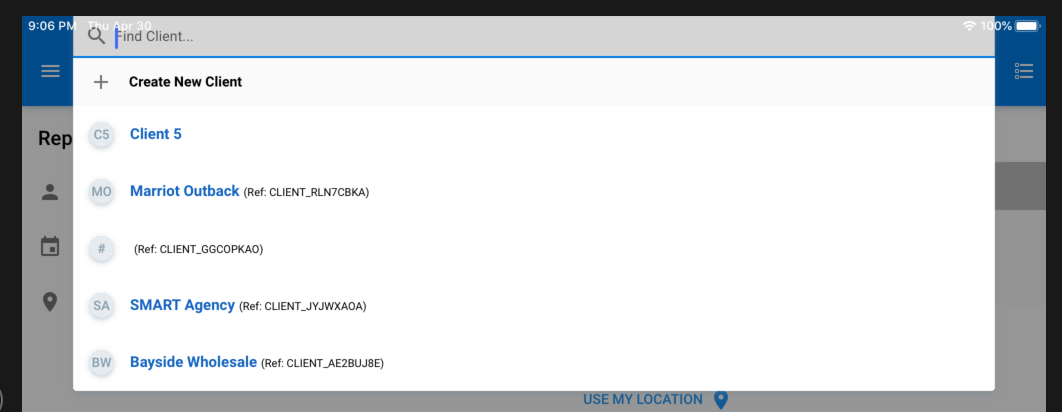
Also I will mention, as a result of this error, any QSelects which open in dialog mode from the top of the screen will not be offset for the statusbar on the affected devices.
But as the iPad Mini works as expected, it leaves space for the titlebar.
nicholaszuccarelli
on 30 Apr 2020
Yep, lots are happening due to this. Fixing it.
rstoenescu
on 30 Apr 2020
We knew it happens on mobile browsers (and fixed it), but it's just surprising that it now happens on Cordova too.
rstoenescu
on 30 Apr 2020
Could one of my Cordova packages perhaps have updated the agent strings for the devices? Say, ionic-webview?
nicholaszuccarelli
on 30 Apr 2020
That is definitely the culprit. But regardless, I'd still recommend having ionic-webview installed. I'll just add the workaround for this case as well.
rstoenescu
on 30 Apr 2020
Can you confirm that by using safari mobile browser on all those devices (so outside of Cordova/Capacitor) the platform is detected correctly?
rstoenescu
on 30 Apr 2020
Quickly checked on my iPad 6th Gen and the agent is
Mozilla/5.0 (Macintosh; Intel Mac OS X 10_15) AppleWebKit/605.1.15 (KHTML, like Gecko) Version/13.0.3 Safari/605.1.15but it has correctly added 'platform-ios' to the class list.
nicholaszuccarelli
on 30 Apr 2020
iPad Pro 11 (fine on here as well)
Mozilla/5.0 (Macintosh; Intel Mac OS X 10_15) AppleWebKit/605.1.15 (KHTML, like Gecko) Version/13.0.5 Safari/605.1.15
nicholaszuccarelli
on 30 Apr 2020
Thank you for providing all this quality feedback!! It was instrumental to fixing this.
Will be available in "quasar" v1.10.0.
rstoenescu
on 30 Apr 2020
Related issues
 florensiuslaylim
·
3Comments
florensiuslaylim
·
3Comments
 mesqueeb
·
3Comments
mesqueeb
·
3Comments
 slowaways
·
3Comments
slowaways
·
3Comments
 jippy89
·
3Comments
jippy89
·
3Comments
 victorborgaco
·
3Comments
victorborgaco
·
3Comments
Most helpful comment
Thank you for providing all this quality feedback!! It was instrumental to fixing this.
Will be available in "quasar" v1.10.0.