Describe the bug
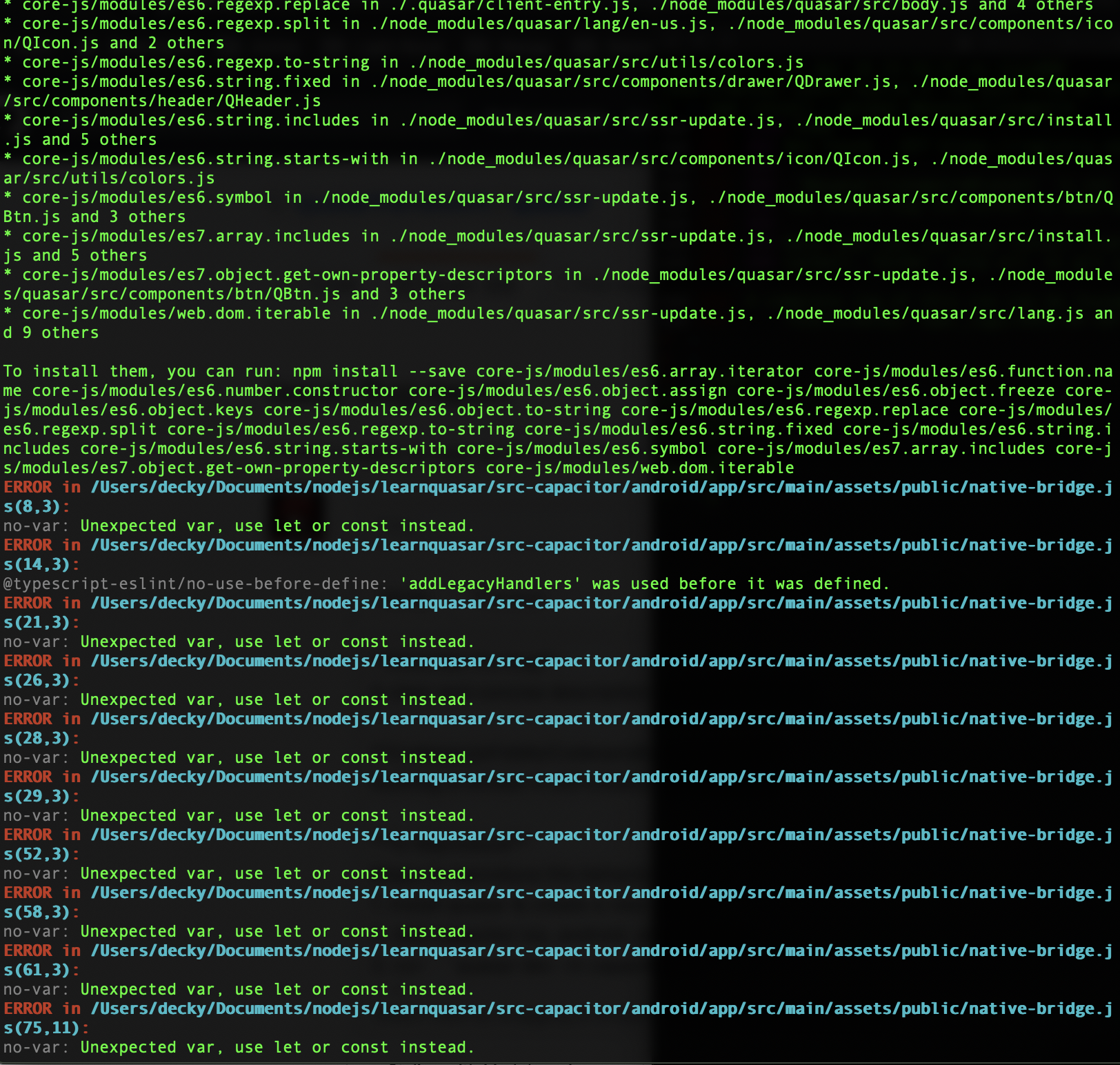
Starting Dev server on a fresh project gives 105 Errors
Codepen/jsFiddle/Codesandbox (required)
Nothing is written it still initializing the project
To Reproduce
Steps to reproduce the behavior:
- Install quasar & create a new project
- Add capacitor ios, android, and electron
- run
quasar dev -m capacitor -T - See error
Expected behavior
Should be clean start dev server
Screenshots


Platform (please complete the following information):
OS: macOS Catalina 10.15.4
Node: v10.19.0
NPM: 6.13.4
Yarn: 1.22.0
Browsers: not yet
iOS: not yet
Android: not yet
Electron: not yet
Additional context
Just started a new project and add capacitor android ios, and electron, but when I build it, it returns with 105 Error and some missing dependencies, also here is what I got when I tried to open and build the android project inside capacitor-src

 deckyfx
All 5 comments
It looks like node_modules is broken - did you install using npm install?
If yes then remove node_modules and package-lock.json and install using yarn or repeat npm install and the delete phase a few times if it's not working the first time.
Also:
- add the output of
quasar infoin the project folder, as requested in the issue template. - paste the errors as text instead of images - images are useless in case of text
 pdanpdan
on 19 Apr 2020
pdanpdan
on 19 Apr 2020
@pdanpdan Hey I wanted to open up an issue myself but saw this one still open so I'm gonna post in here. I can reproduce both errors as described above. Both because i don't think they have the same cause.
The multiple errors ( I haven't counted if its 105) are because of the combination of TS and ESLint.
Here are the settings of the new Project
? Project name (internal usage for dev) androidtseslintyarn
? Project product name (must start with letter if building mobile apps) Quasar App
? Project description A Quasar Framework app
? Author Andrew Almost
? Pick your favorite CSS preprocessor: (can be changed later) Sass
? Pick a Quasar components & directives import strategy: (can be changed later) Auto import
? Check the features needed for your project: ESLint, TypeScript
? Pick a component style: Composition
? Pick an ESLint preset: Standard
? Cordova/Capacitor id (disregard if not building mobile apps) org.cordova.quasar.app
? Should we run npm install for you after the project has been created? (recommended) yarn
These settings produce the huge error stack if you try to build for android
quasar dev -m capacitor -T android
Here is a pastebin to my personal stacktrace https://pastebin.com/bJ6SNNGW
The second error is the one in the additional context (the screenshot)
Manifest merger failed : Attribute application@appComponentFactory value=(android.support.v4.app.CoreComponentFactory) from [com.android.support:support-compat:28.0.0] AndroidManifest.xml:22:18-91
    is also present at [androidx.core:core:1.2.0] AndroidManifest.xml:24:18-86 value=(androidx.core.app.CoreComponentFactory).
    Suggestion: add 'tools:replace="android:appComponentFactory"' to <application> element at AndroidManifest.xml:5:5-44:19 to override.
This one i get even when building without ESLint and TS support. To reproduce just create a new quasar project add capacitor and build for android. The deployment from android studio fails with the error message above. It doesn't matter if I initiate the project with yarn or npm or if i add ts support or not. I could solve the problem with the help of this issue https://github.com/quasarframework/quasar/issues/6768
Both ways work for migrating to android x - or changing AndroidManifest.xml & gradle.properties myself. In the issue it's said it should be fixed in 1.7.0 release but it seems it's still there.
By the way after migrating to android x the big stacktrace from the TS+ESLint combination doesn't seem to cause any problems and i can deploy the app without problems.
Here is the output of my quasar info
Operating System - Darwin(16.7.0) - darwin/x64
NodeJs - 12.16.1
Global packages
NPM - 6.14.4
yarn - 1.22.4
@quasar/cli - 1.0.7
cordova - Not installed
Important local packages
quasar - 1.10.0 -- Build high-performance VueJS user interfaces (SPA, PWA, SSR, Mobile and Desktop) in record time
@quasar/app - 1.8.3 -- Quasar Framework local CLI
@quasar/extras - 1.7.0 -- Quasar Framework fonts, icons and animations
vue - 2.6.11 -- Reactive, component-oriented view layer for modern web interfaces.
vue-router - 3.1.6 -- Official router for Vue.js 2
vuex - 3.3.0 -- state management for Vue.js
electron - Not installed
electron-packager - Not installed
electron-builder - Not installed
@capacitor/core - Not installed
@capacitor/cli - Not installed
@capacitor/android - Not installed
@capacitor/ios - Not installed
@babel/core - 7.9.6 -- Babel compiler core.
webpack - 4.43.0 -- Packs CommonJs/AMD modules for the browser. Allows to split your codebase into multiple bundles, which can be loaded on demand. Support loaders to preprocess files, i.e. json, jsx, es7, css, less, ... and your custom stuff.
webpack-dev-server - 3.10.3 -- Serves a webpack app. Updates the browser on changes.
workbox-webpack-plugin - 4.3.1 -- A plugin for your Webpack build process, helping you generate a manifest of local files that workbox-sw should precache.
register-service-worker - 1.7.1 -- Script for registering service worker, with hooks
Quasar App Extensions
None installed
Networking
Host - Andrews-MacBook-Pro.local
en1 - 192.168.0.9
If you need any more info regarding this issue I would gladly help.
 AndrewAlmost
on 2 May 2020
AndrewAlmost
on 2 May 2020
As usual, we get the hammer for Cordova's trouble with Android X. There's some manual changes that are needed for in a Cordova project (/src-cordova) but can't find the link atm. Will get back to this (and add it docs for easy access too).
Meanwhile some references though:
 rstoenescu
on 2 May 2020
rstoenescu
on 2 May 2020
@rstoenescu Thank you for the clarification! I just started using quasar and can't tell what is actually a problem with quasar and what problems are caused by cordova. I think a mention in the docs that if you get that merge error you need to upgrade to android x once is a good idea and would be pretty helpful for newbies like me! Like the warning not to upgrade gradle.
And sorry I didn't want to blame anyone I was just too dumb to understand the actual problem. :D
Keep up the awesome work guys!
AndrewAlmost
on 2 May 2020
Will do. We’re always keen on keeping perfect documentation.
And welcome to Quasar!
rstoenescu
on 2 May 2020
Related issues
 hctpbl
·
3Comments
hctpbl
·
3Comments
 wc-matteo
·
3Comments
wc-matteo
·
3Comments
 xereda
·
3Comments
xereda
·
3Comments
 florensiuslaylim
·
3Comments
florensiuslaylim
·
3Comments
 jippy89
·
3Comments
jippy89
·
3Comments