Quasar: q-menu is not always perfectly alligned
Describe the bug
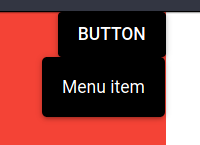
When using q-menu with anchor="bottom right" self="top right" it is not perfectly aligned to the edge of a button.
Codepen/jsFiddle/Codesandbox (required)
https://codepen.io/demivan/pen/zYGmdem
To Reproduce
Steps to reproduce the behavior:
- Go to 'https://codepen.io/demivan/pen/zYGmdem'
- Click on button
- See that right edge of menu is not aligned to the right edge of a button
Expected behavior
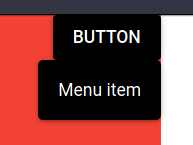
When using anchor="* right" self="* right" right edges should be aligned.
Screenshots
Right now:
Should be:
Platform (please complete the following information):
OS: Arch Linux
Browsers: Firefox 75, Chromium 80
Reproducible on Windows too
 Demivan
All 13 comments
I'm sorry but I cannot reproduce it - can you reproduce it using that codepen?
 pdanpdan
on 24 Mar 2020
pdanpdan
on 24 Mar 2020
I can reproduce it there. First screenshot is directly from that codepen. Second one is me changing left: 408px; to left: 409px; on q-menu element manually.
What left value do you get in your browser?
It feels like there is some rounding error. So browsers round position of the button one way and q-menu position is rounded other way in code.
Demivan
on 24 Mar 2020
It must be some rounding. I'll try to see if there is something that can be done.
pdanpdan
on 24 Mar 2020
Something that is a frequent "gotcha" for me on trying to reproduce small spacing differences: be sure to consider your browser zoom level... I run at 125% zoom due to my large monitor size. And over the months I've noticed that zoom can contribute to issues....
 rfox12
on 18 Apr 2020
rfox12
on 18 Apr 2020
I can reproduce the problem sometimes, the problem is that it's related to internal rounding in browser. When I have some spare time I'll try to see if I can do something.
pdanpdan
on 18 Apr 2020
Any updates on that?
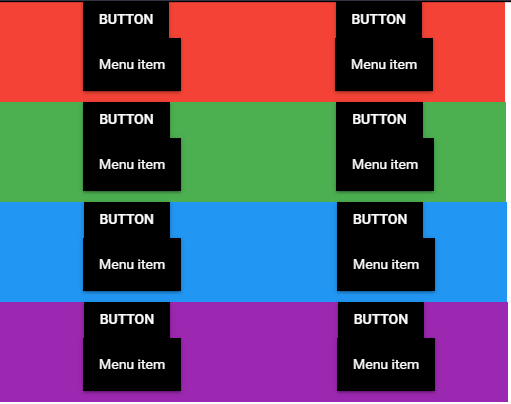
I prepared new reproduction on codepen (based on the above one).
The only thing is changing is width of the colored box (1px with each loop).
The effect could change depending on the OS and browser (in my case Windows and Chrome). I asked colleagues if they can reproduce that. Results on iOS and Chrome is usually the same but on Safari and FF is even worse.
 ThiefSoul
on 26 May 2020
ThiefSoul
on 26 May 2020
It seems the button's width is determined by text in it, so width will be something like 86.265625.
Then put the button in a flex-box with justify-content: space-around, the left will be 83.109375.
In chrome (my be also in other browsers), 83.109375 will render as 83, but value bigger than 83.5 will render as 84.
q-menu use some code in position-egine.js, always Math.floor() then value, cause the current situation we saw.
 XiongLiding
on 17 Jun 2020
XiongLiding
on 17 Jun 2020
Can you please test:
This is with the fixed floor -> round.
I would need some checks on Firefox and Safari.
pdanpdan
on 17 Jun 2020
Fix will be available in "quasar" v1.12.6.
 rstoenescu
on 17 Jun 2020
rstoenescu
on 17 Jun 2020
Seems still have problem in "retina display" or zoom page to 200%,
Browsers render button “round” to physical pixel, not logical one.
So maybe just don't fix the ugly original value, no floor, no round. Just leave it alone.
XiongLiding
on 18 Jun 2020
Can you please compare the following and report the best option:
if you can please also report the OS/browsers tested
pdanpdan
on 18 Jun 2020
Checked Android. Chrome and Firefox Preview both look better without rounding.
Firefox on Linux without rounding looks better too and stays aligned even when zooming.
Demivan
on 18 Jun 2020
Upcoming 1.12.6 will have no rounding. From our tests we concluded the same. Thanks for helping out!
rstoenescu
on 18 Jun 2020
Related issues
 victorborgaco
·
3Comments
victorborgaco
·
3Comments
 lukadriel7
·
3Comments
lukadriel7
·
3Comments
 sskwrl
·
3Comments
sskwrl
·
3Comments
 mesqueeb
·
3Comments
mesqueeb
·
3Comments
 nueko
·
3Comments
nueko
·
3Comments
Most helpful comment
Fix will be available in "quasar" v1.12.6.