Quasar: QIntersection sometimes does not render elements properly
Describe the bug
Using QIntersection, sometimes when items are re-arranged, items that are moved into the viewport are not being rendered.
In these cases, I need to scroll down in my list, and then back up for it to be rendered properly.
Codepen/jsFiddle/Codesandbox (required)
https://codepen.io/hognevevle/pen/PoqbZrv
To Reproduce
It seems random when the issue appears, so just keep pressing "Change some data" repeatedly.
Usually pressing the button rather quickly (i.e. not waiting for every animation to complete before next click) seems to help the issue manifest itself quicker.
Eventually you should see the issue, for example as shown below:
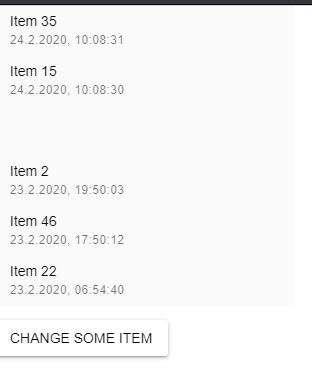
For such empty items, you can scroll down in the the list so that the elemement disappears outside the viewport. Then, as you scroll back up, it will render correctly.
Expected behavior
Elements should always render properly.
Platform (please complete the following information):
OS: Windows
Node: 12.13.0
NPM: 6.12.0
Yarn: 1.21.1
Browsers: Chrome
iOS: N/A
Android: N/A
Electron: N/A
 hognevevle
All 4 comments
I am trying to narrow things down. In this image, the one that is not showing up has some peculiar information (it's the second one down).

isIntersecting: true, intersectionRation: 1 and intersectingRect is valid. What is peculiar, is the target which has div.q-intersection.example-item.conversation-item-move while all other targets have div.q-intersection.example-item. The conversation-item-move comes from the css:
.conversation-item-move
  transition: transform .5s
and, the transition-group uses this:
<transition-group name="conversation-item">
And usage is defined here: https://vuejs.org/v2/guide/transitions.html#List-Move-Transitions
So, it appears possibly a bug in the Vue v-move code that never finished with the transition.
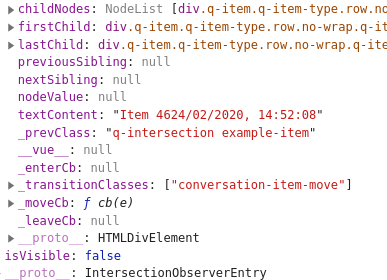
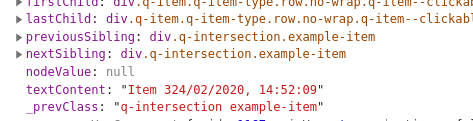
Others that moved and did display properly also have previousSibling and nextSibling, but the above one that failed does not. It appears not to be inserted into the DOM correctly.
 hawkeye64
on 25 Feb 2020
hawkeye64
on 25 Feb 2020
@hawkeye64 I'm probably getting this wrong, but just for fun I tried to reproduce the transition part in plain Vue, just to see if any transitions were left with the "conversation-item-move" class after the transition should have finished. Doesn't seem to be the case (nor in the quasar codepen I created for this issue).
https://codesandbox.io/s/festive-hooks-rcgh6
If you still think this is a bug with v-move - do you have any ideas on how it can possibly reproduced for a bug report to the Vue team?
hognevevle
on 27 Feb 2020
@hognevevle Seems like @pdanpdan has some ideas
hawkeye64
on 27 Feb 2020
Fix will be available in "quasar" v1.9.5
 rstoenescu
on 27 Feb 2020
rstoenescu
on 27 Feb 2020
Related issues
 sskwrl
·
3Comments
sskwrl
·
3Comments
 victorborgaco
·
3Comments
victorborgaco
·
3Comments
 hctpbl
·
3Comments
hctpbl
·
3Comments
 fnicollier
·
3Comments
fnicollier
·
3Comments
 lukadriel7
·
3Comments
lukadriel7
·
3Comments
Most helpful comment
Fix will be available in "quasar" v1.9.5