Quasar: Content below QField hint slot is displayed on top of hint
Describe the bug
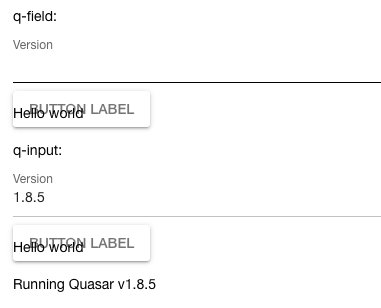
Content bellow the hint slot is displayed on top of the hint.
Codepen/jsFiddle/Codesandbox (required)
https://codepen.io/moanderpen/pen/rNVVeoj
Screenshots
Platform (please complete the following information):
OS: macOS 10.14.6
Browsers: Chrome 79.0.3945.130
 moander
>All comments
Check this: https://codepen.io/rstoenescu/pen/qBddqar
The Material Guidelines specify that the hint should be a one-liner. So, by default, the QField/QInput/etc uses a predefined area of fixed height -- this way we can provide a nice animation when hint/error's visibility toggles; however, when the hint/error content overflows this fixed height area, the area itself does not expands. Apart from providing the animation (otherwise impossible), this is also so that the hint/error visibility toggle won't shift content below the QField/QInput/etc creating an unwanted visual effect.
This is why hide-bottom-space was introduced. Apart from not using a fixed height area, it disables the hint/error animation and what you're most interested in -> it stretches according to its content.
We'll try to better explain the "hide-bottom-space" prop in docs on the next deployment.
 rstoenescu
on 10 Feb 2020
rstoenescu
on 10 Feb 2020
Related issues
 jippy89
·
3Comments
jippy89
·
3Comments
 green-mike
·
3Comments
green-mike
·
3Comments
 Bangood
·
3Comments
Bangood
·
3Comments
 tombarfoot
·
3Comments
tombarfoot
·
3Comments
 alexeigs
·
3Comments
alexeigs
·
3Comments
Most helpful comment
Check this: https://codepen.io/rstoenescu/pen/qBddqar
The Material Guidelines specify that the hint should be a one-liner. So, by default, the QField/QInput/etc uses a predefined area of fixed height -- this way we can provide a nice animation when hint/error's visibility toggles; however, when the hint/error content overflows this fixed height area, the area itself does not expands. Apart from providing the animation (otherwise impossible), this is also so that the hint/error visibility toggle won't shift content below the QField/QInput/etc creating an unwanted visual effect.
This is why
hide-bottom-spacewas introduced. Apart from not using a fixed height area, it disables the hint/error animation and what you're most interested in -> it stretches according to its content.We'll try to better explain the "hide-bottom-space" prop in docs on the next deployment.