Quasar: Hydration error with SSR and q-drawer
Describe the bug
We have a project which uses SSR rendering, which uses a layout with 3 drawers. When we load this page on a desktop we get a hydration error with the q-drawer component.
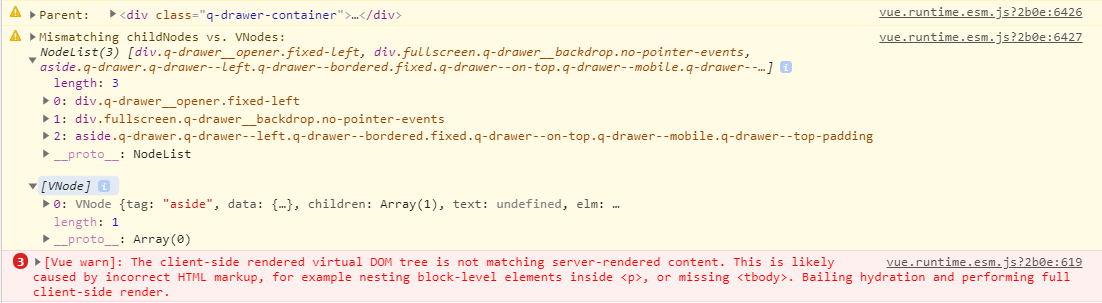
As you can see on the image the server side renders the drawer as fixed (due to < breakpoint) and on the desktop it doesn't. Indeed when we simulate a small screen in the developer tools and reload the page we don't get this hydration error.
Is this something in our setup or in quasar? I can't imagine that nobody else uses SSR with q-drawers and ran into this but I also don't know what could be wrong with our project.
Info: Our drawers are v-modelled through the store, using a setter and getter instead (as Vuex docs describe)
Codepen/jsFiddle/Codesandbox (required)
Codesandbox example here: Link
Expected behavior
Of course I expect SSR to work without hydration errors :)
Screenshots
Platform (please complete the following information):
OS: Windows
Node: 12.13.1
NPM: 6.12.1
Browsers: Get this on Chrome & Firefox
quasar: 1.8.5
@quasar/app: 1.5.3
Additional context
Add any other context about the problem here.
 Evertvdw
All 21 comments
QDrawers work with SSR - I use them in my project.
Are your drawers empty?
 webnoob
on 5 Feb 2020
webnoob
on 5 Feb 2020
Hi,
I can assure you that QDrawer works correctly on SSR. The hydration error is definitely from devland and not from this component.
Have you investigated who's the culprit? https://quasar.dev/quasar-cli/developing-ssr/client-side-hydration#Handling-Hydration-Errors
Also, if you switch from normal to mobile (or backwards) in browser's devtool, make sure that you refresh the page then test it out otherwise the old Platform will still be in action.
Bottom line, if upon investigation (link above) you find that the culprit is indeed Quasar (highly unlikely at this point though), feel free to reopen this ticket.
 rstoenescu
on 5 Feb 2020
rstoenescu
on 5 Feb 2020
Hi there, thanks for the quick response! I went through those steps and I still think it is something Quasar related. The SSR renders inside the a q-drawer three elements:
<div class="q-drawer__opener fixed-left"></div>
<div class="fullscreen q-drawer__backdrop no-pointer-events"></div>
<aside class="q-drawer q-drawer--left q-drawer--bordered fixed q-drawer--on-top q-drawer--mobile q-drawer--top-padding" style="width:300px;"></aside>
On the client side the top two div's are missing and there the hydration fails, as it compares the aside element to a div. Why those two components are missing on the client side I don't know, but that is something which is handled by the q-drawer component right?
Evertvdw
on 5 Feb 2020
Try to make a minimal example that can reproduce the problem, starting from a new template, and share the modified files, please.
 pdanpdan
on 5 Feb 2020
pdanpdan
on 5 Feb 2020
Yes, I'm currently working on trying to make that but with no success yet, I'll post it here here if I can get it to break. Other suggestions on how to approach this are welcome!
Evertvdw
on 5 Feb 2020
Put here:
- the
q-drawertag in html (just the opening tag) and the values in data for the props passed to it - when the values of props come from store specify the value they have in store in state
- specify if you change any of the values passed as props in a lifecycle hook (beforeCreated, created, ...)
pdanpdan
on 5 Feb 2020
Ok @pdanpdan, I can share what I made as a minimal example here, replace in a new project (with Vuex, SCSS and auto import) the Layout file with this:
<template>
  <q-layout :view="layoutView">
    <q-header elevated>
      <q-toolbar>
        <q-btn
          flat
          dense
          round
          @click="menu = !menu"
          icon="menu"
          aria-label="Menu"
          v-show="$q.screen.lt.md"
        />

        <q-toolbar-title>
          Quasar App
        </q-toolbar-title>

        <div>
          <q-btn
            flat
            dense
            round
            @click="actionBar = !actionBar"
            icon="search"
            aria-label="Search"
          />
        </div>
      </q-toolbar>
    </q-header>

    <q-drawer v-model="menu" v-show="$q.screen.lt.md" side="left" bordered>
      <q-scroll-area class="fit">
        <q-toolbar>
          <q-toolbar-title>Menu</q-toolbar-title>
          <q-btn
            flat
            icon="close"
            round
            @click="setMenu(false)"
            class="float-right"
          />
        </q-toolbar>
      </q-scroll-area>
    </q-drawer>

    <q-drawer
      v-model="toolbar"
      show-if-above
      :mini="miniState"
      @mouseover="miniState = false"
      @mouseout="miniState = true"
      mini-to-overlay
      :width="250"
      :breakpoint="$q.screen.sizes.md"
      content-class="bg-primary text-white"
    >
      <q-scroll-area class="fit">
        <div
          class="mett-toolbar-header q-pa-md"
          v-show="(!menu && $q.screen.lt.md) || $q.screen.gt.sm"
          :style="{ top: offsetTop }"
        >
          <q-avatar
            :size="miniState ? '28px' : '76px'"
            @click="onClick"
            class="shadow-4"
          >
            <img src="https://cdn.quasar.dev/img/avatar.png" />
          </q-avatar>

          <div
            v-show="!miniState && $q.screen.gt.sm"
            class="mett-toolbar-header-content column"
          >
            <span class="text-center q-pa-sm text-bold">Someone</span>
            <q-btn label="Log out" rounded outline />
          </div>
        </div>
      </q-scroll-area>
    </q-drawer>

    <q-drawer v-model="actionBar" side="right" overlay bordered>
      <q-btn flat icon="close" round @click="setActionBar(false)" />

      <div>
        Hi there!
      </div>
    </q-drawer>

    <q-page-container>
      <router-view />
    </q-page-container>
  </q-layout>
</template>

<script>
import { mapGetters, mapMutations } from "vuex";

export default {
  name: "MainLayout",

  components: {},

  data() {
    return {
      miniState: true,
      offsetTop: "auto",
      headerHeight: 0
    };
  },

  methods: {
    ...mapMutations(["setMenu", "setToolbar", "setActionBar"]),
    onClick() {
      if (this.$q.screen.lt.md) {
        this.setToolbar(!this.toolbar);
      }
    },
    onScroll() {
      let header = this.$root.$el.querySelector("header");

      if (this.$q.screen.lt.md) {
        if (header && !header.classList.contains("q-header--hidden")) {
          this.headerHeight = header.clientHeight;
        } else {
          this.headerHeight = 0;
        }
        this.offsetTop = this.headerHeight + "px";
      } else {
        this.offsetTop = "auto";
      }
    }
  },

  computed: {
    ...mapGetters(["layoutView"]),
    menu: {
      get() {
        return this.$store.getters["menu"];
      },
      set(body) {
        this.$store.commit("setMenu", body);
      }
    },
    toolbar: {
      get() {
        return this.$store.getters["toolbar"];
      },
      set(body) {
        this.$store.commit("setToolbar", body);
      }
    },
    actionBar: {
      get() {
        return this.$store.getters["actionBar"];
      },
      set(body) {
        this.$store.commit("setActionBar", body);
      }
    }
  },

  mounted() {
    this.onScroll();
    window.addEventListener("scroll", this.onScroll);
    window.addEventListener("resize", this.onScroll);
  },

  beforeDestroy() {
    window.removeEventListener("scroll", this.onScroll);
    window.removeEventListener("resize", this.onScroll);
  }
};
</script>

<style lang="scss" scoped>
.mett-toolbar {
  transition: all 0.15s, border-radius 0.15s 0.1s, z-index 0s;

  &-header {
    height: 175px;
    align-items: center;
    display: flex;
    flex-direction: column;
    justify-content: flex-start;
    transition: all 0.1s;

    @media (max-width: $breakpoint-sm-max) {
      position: fixed;
      top: 50px;
      left: 0;
      transform: translateX(250px);
      height: auto;
      background: $primary;
      border-radius: 50%;
      padding: 4px;
      margin: $space-base / 2;
      box-shadow: $shadow-4;
    }

    & > * {
      transition: inherit;
    }
  }

  &-content {
    &:not(.is-mini) {
      background-color: rgba($secondary, 0.1);
    }

    @media (max-width: $breakpoint-sm-max) {
      // margin-top: 175px;
    }
  }
}
</style>
And the example-module/index.js should be:
export default {
  state: {
    menu: false,
    toolbar: false,
    actionBar: false,
    layoutView: "lHr LpR lff"
  },

  getters: {
    menu: state => state.menu,
    toolbar: state => state.toolbar,
    actionBar: state => state.actionBar,
    layoutView: state => state.layoutView
  },

  mutations: {
    setMenu(state, payload) {
      state.menu = payload;
    },
    setToolbar(state, payload) {
      state.toolbar = payload;
    },
    setActionBar(state, payload) {
      state.actionBar = payload;
    },
    setLayoutView(state, payload) {
      state.layoutView = payload;
    }
  }
};
And uncomment the import of that module in the index.js in the root of the store folder.
Except for the content of the drawers this is exactly as we define them in our project that does not work.
Evertvdw
on 5 Feb 2020
@Evertvdw Please put this into a codesandbox (https://codesandbox.quasar.dev) --> hit "Fork" before doing anything, otherwise you'll get some errors (codesandbox at fault, sorry). Help us help you faster -- we have a ton on our plates currently so a direct working reproduction would speed this up greatly.
rstoenescu
on 5 Feb 2020
I'm sorry but I cannot reproduce the problem. Does it show for you with that 2 files?
pdanpdan
on 5 Feb 2020
No it does not reproduce the problem, I guess I have to add more of the
general app buildup, but this is atleast the html of the drawers. I will
try and make a codesandbox with the error.
Op wo 5 feb. 2020 17:47 schreef Popescu Dan notifications@github.com:
I'm sorry but I cannot reproduce the problem. Does it show for you with
that 2 files?—
You are receiving this because you were mentioned.
Reply to this email directly, view it on GitHub
https://github.com/quasarframework/quasar/issues/6296?email_source=notifications&email_token=ABL5RZ5M2OUG6IGGY3OFKALRBLUTVA5CNFSM4KQI3EJ2YY3PNVWWK3TUL52HS4DFVREXG43VMVBW63LNMVXHJKTDN5WW2ZLOORPWSZGOEK4EESI#issuecomment-582500937,
or unsubscribe
https://github.com/notifications/unsubscribe-auth/ABL5RZ5CVUWVIU2DYYSIZDDRBLUTVANCNFSM4KQI3EJQ
.
Evertvdw
on 5 Feb 2020
Please first investigate directly on your app by following the Vue SSR hydration error guide: https://quasar.dev/quasar-cli/developing-ssr/client-side-hydration#Handling-Hydration-Errors
"No guessing allowed" :)
Otherwise I can see this building up with frustration on both sides and lots of lost time...
rstoenescu
on 6 Feb 2020
I already did that and posted the results here, the mismatch is in the
q-drawer-container where there are two divs and one aside on SSR and only
the aside on client side. Also we tried emptying the drawers of any content
and commenting out 2 of 3 drawers, but the error persists.
Op do 6 feb. 2020 01:41 schreef Razvan Stoenescu notifications@github.com:
Please first investigate directly on your app by following the Vue SSR
hydration error guide:
https://quasar.dev/quasar-cli/developing-ssr/client-side-hydration#Handling-Hydration-Errors
"No guessing allowed" :)Otherwise I can see this building up with frustration on both sides and
lots of lost time...—
You are receiving this because you were mentioned.
Reply to this email directly, view it on GitHub
https://github.com/quasarframework/quasar/issues/6296?email_source=notifications&email_token=ABL5RZ4AZC3RHDK7E7V64KTRBNMDRA5CNFSM4KQI3EJ2YY3PNVWWK3TUL52HS4DFVREXG43VMVBW63LNMVXHJKTDN5WW2ZLOORPWSZGOEK5QJFQ#issuecomment-582681750,
or unsubscribe
https://github.com/notifications/unsubscribe-auth/ABL5RZ45D3KF7IKND243JXDRBNMDRANCNFSM4KQI3EJQ
.
Evertvdw
on 6 Feb 2020
Ok, I got a sandbox reproducing the issue up and running: Link
To reproduce the issue make sure the browser view in the sandbox is of a sufficient width (> 1200px, or something like that). I hope you can make sense of it somehow :)
Evertvdw
on 6 Feb 2020
@Evertvdw I stopped investigating after 3 hours. One thing's for sure. On client-side, your theme-layout component gets created after App.vue is mounted. And after App.vue is mounted the takeover code runs (which updates $q.screen to the actual values). So QDrawer & co. get rendered for the first time with the updated $q.screen values, instead of rendering BEFORE App.vue gets mounted.
As you might have guessed, the whole takeover logic is designed to avoid hydration errors. But in your case, this logic runs before your components get rendered.
The main issue is that it is your loading code which first renders an empty App.vue and then after it gets mounted it renders with the proper component. Not the same happens on server-side where the proper component is rendered immediately. It's impossible not to get a hydration error since your server-side and client-side logic differ. It may spawn from the way that you tamper with Vue component's internals while loading, in the sense that those specific internals run differently on server-side and on client-side.
The solution is to revise your app code and make sure that the client-side also mounts App.vue with the proper theme-layout from the beginning.
rstoenescu
on 6 Feb 2020
@rstoenescu Thanks a lot for your efforts! The explanation is clear and I hope we can get it to work again. Just to be sure, I want my theme-layout _created()_ hook called before the App.vue _mounted()_ hook?
Evertvdw
on 6 Feb 2020
Yep. A mounted() hook is attached by Quasar to App.vue (on top of existing one, if any) which triggers the client-side takeover. Your component's loading scheme must match the one on the server. If it's ready right away on server-side, it must be the same on the client-side. However, if your component is ready after App.vue was mounted on client-side, make sure that it's not rendered on server-side -- so that the internals match. Wish I had more time to pinpoint the exact location in your code that needs the update but v1.9 is knocking on the door.
rstoenescu
on 7 Feb 2020
Hi there @rstoenescu, we came a bit further with investigating the issue and narrowed the issue down a bit more. We still however run into problems, and I will try to explain the issue.
We see that our issue happens with dynamic imports, when we change the layout import in App.vue to a direct one, the hydration error is gone. The error can easely be reproduced by creating a new Quasar project and changing the App.vue code into:
<template>
    <div id="q-app">
        <main-layout />
    </div>
</template>
<script>
//import mainLayout from "layouts/MainLayout.vue";
export default {
    name: "App",
    components: {
        mainLayout: () => import("layouts/MainLayout.vue")
        //mainLayout
    }
};
</script>
Then in SSR mode you will get the error we got earlier. We can change our app setup by importing the Layout async in the router, then it works for the layout but when you import another component in the Layout async you can get other hydration errors if the html happens to differ based on view width. How do we fix this? Because we do need dynamic components in our app.
You could also make the import of EssentialLink dynamic in MainLayout.vue and look at the created() hook. You will see that that hook is called after the app's mounted() hook on the client side in that case, while without dynamic imports it is called before. On both cases the created() hook is called on the server-side, which can lead to hydration errors if there is something in these components that depends on view-width etc.
Thanks for all the help so far!
Evertvdw
on 10 Feb 2020
Or is there maybe someone else who knows if this is something that can be fixed? In our situation we have to use dynamic imports, so this is kind of a big issue for us :(
Evertvdw
on 13 Feb 2020
@rstoenescu Is it better if I make a new issue out of this? Since the issue has been narrowed down quite a bit since the initial problem statement.
Evertvdw
on 17 Feb 2020
Our team uses SSR with q-drawers too. This implementation of layout switcher does not have problem with hydration, but QDrawer still blinking due to < breakpoint of server side. Will be cool, if we can fix it.
 Arsync
on 20 Aug 2020
Arsync
on 20 Aug 2020
@Arsync or @Evertvdw have you found the root of the issue? Any idea where to look, to solve it. I have the same issue like you have posted in the topic comment.
 dmitry
on 22 Oct 2020
dmitry
on 22 Oct 2020
Related issues
 green-mike
·
3Comments
green-mike
·
3Comments
 wc-matteo
·
3Comments
wc-matteo
·
3Comments
 jean-moldovan
·
3Comments
jean-moldovan
·
3Comments
 jippy89
·
3Comments
jippy89
·
3Comments
 Bangood
·
3Comments
Bangood
·
3Comments