Quasar: QRange - Step color range
It would be nice to be able to define one or more color ranges for the line in the Range component.
The range colors could also dynamically update the label marker colors.
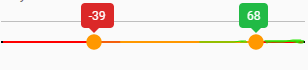
Example api
<q-range v-model="value.sentiment"
      :min="-100"
      :max="100"
      :range-colors: "[
          {from: -100, to: -11, color: 'negative},
          {from: -10, to:  10, color: 'warning},
          {from: 11, to: 100, color: 'positive}
      ]
      :label-use-color  // uses color of range, left/right-label-color, or color
      :markers-use-color
/>
 stevebor1
All 10 comments
You mean something like this? :)
https://codepen.io/pdanpdan/pen/qBdWGXy
 pdanpdan
on 5 Feb 2020
pdanpdan
on 5 Feb 2020
Not at all. We are already able to change the label colors, I'm specifically talking about the line under the selected range.
stevebor1
on 5 Feb 2020
Just set the background color of .q-slider__track to transparent.
pdanpdan
on 5 Feb 2020
Did your codepen example just change, because I see the colored bar now? 🤔
stevebor1
on 5 Feb 2020
I was playing with it, maybe you caught it during a wrong save, sorry.
pdanpdan
on 5 Feb 2020
Thanks for the updates. That is basically what I'm looking to accomplish. 🍻
stevebor1
on 5 Feb 2020
And a more interesting example: https://codepen.io/pdanpdan/pen/OJVLKar
pdanpdan
on 5 Feb 2020
very nice work @pdanpdan . I understand the complexity of trying to keep the components simple, yet customizable. I think for this component, it gives the user context of the underlying data and range information.
stevebor1
on 5 Feb 2020
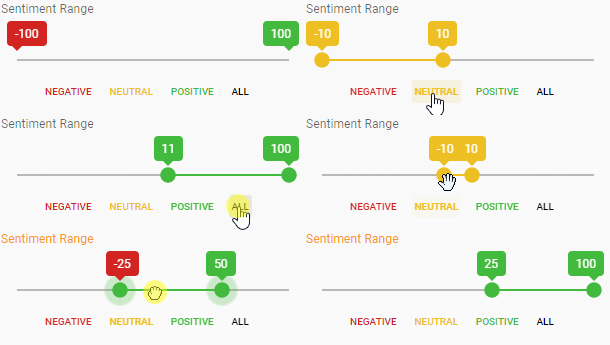
Before you replied, this was my original solution using the available API (no css changes to bar). I colored the component based on range values and also gave the user predefined ranges that were colored the same.
stevebor1
on 5 Feb 2020
Here is closer to what I wanted, utilizing your original codepen.
https://codepen.io/stevebor1/pen/OJVJPQo
I guess the downside is that 'zones' must be equal distances. Luckily, my is by 10s, so it worked out by adding more zone colors.
stevebor1
on 5 Feb 2020
Related issues
 victorborgaco
·
3Comments
victorborgaco
·
3Comments
 slowaways
·
3Comments
slowaways
·
3Comments
 alexeigs
·
3Comments
alexeigs
·
3Comments
 xereda
·
3Comments
xereda
·
3Comments
 lukadriel7
·
3Comments
lukadriel7
·
3Comments