Quasar: Scrolling in q-table with virtual-scroll is buggy when expansion row is added
Describe the bug
Scrolling down the items in a q-table with virtual-scroll is buggy whenever I add the line <q-tr v-show="props.expand" :props="props"></q-tr> to the bottom of v-slot:body template. Without that expansion row, everything works smooth and as expected. Once I add it back (even without content), the list starts to jump back up after a while and then continues to do so. From that point on, also the virtual-scroll effect of unloaded rows while scrolling stops working.
Quasar version: 1.8.3
Mode: spa
Device: Mac book pro
OS: 10.15.2
Browser: Chrome 79.0.3945.130
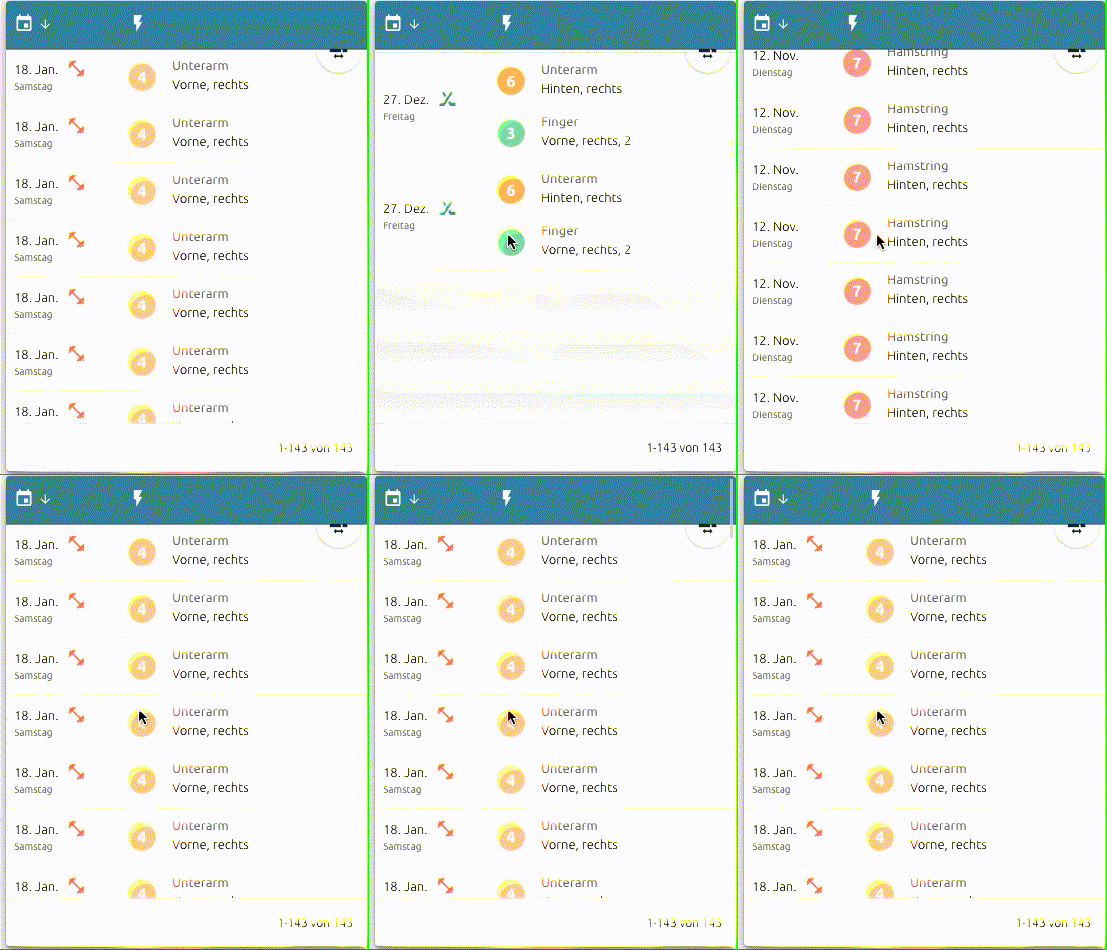
Illustration (once I reach November, it jumps back up to the start in January, and then does so each time I scroll; duplicated items are for testing purpose):
In a first simple try I couldn't reproduce it yet in a codepen but I'm on it. Meanwhile I hope someone can assist me in investigating this issue and nail down the bug.
 alexeigs
All 12 comments
Please put i a codepen the minimal code you use to reproduce it on you project (even if it's not working or cannot be reproduced in the codepen). I'll put it in a local test and inspect.
But please also fill the details required in the issue template - quasar mode/device/os/browser.
Thank you.
Also, please try to use v-if like in <q-tr v-if="props.expand" :props="props"></q-tr>
 pdanpdan
on 27 Jan 2020
pdanpdan
on 27 Jan 2020
@pdanpdan Updated the info.
I could reproduce some weird behavior in scrolling although it is not exactly what happened to me. This time you see some issues if you start scrolling slowly, so no virtual rows start appearing. Instead, once yor you stop that slow scroll, the table jumps to some rows with a higher row index: https://codepen.io/lexixon/pen/GRgLZjE
Replacing v-show with v-if seems to make the scrolling work. At first, it was still buggy when I kept one of the rows expanded while scrolling but while trying some other stuff, it seems to work by now. I'll keep a close eye on it.
alexeigs
on 27 Jan 2020
I'll check also - please leave the ticket open.
But I'm not sure I can make v-show work without problems.
pdanpdan
on 27 Jan 2020
Enhancement will be available in "quasar" v1.8.4. There will be examples in the docs on how to handle expansion rows better.
 rstoenescu
on 29 Jan 2020
rstoenescu
on 29 Jan 2020
@rstoenescu Facing similar issues combining q-virtual-scroll with q-expansion-item, the table jumps up/down when you scroll slowly over the loaded area/items and then stop. I guess you already got the point so I will not go into details again unless helpful.
alexeigs
on 6 Feb 2020
@alexeigs Please create a codepen so that I can check what is wrong
pdanpdan
on 6 Feb 2020
@pdanpdan I'll try to reproduce it in a sandbox because so far I've observed the following: everything works perfectly if I do not split the code into multiple components:
<q-virtual-scroll :items="items" style="height: 300px">
  <template v-slot="{ item, index }">
    <q-expansion-item :key="index>
But as soon as I split it, the table jumps back up to index 0 when I scroll down and stop.
_Parent_
<MyVirtualScrollList :items="items"  v-slot="{ item, index }">
  <q-expansion-item :key="index">
_MyVirtualScrollList_
<q-virtual-scroll :items="items" style="height: 300px">
  <template v-slot="{ item, index }">
    <slot :item="item" :index="index" />
  </template>
</q-virtual-scroll>
So while some internal template state of the current index shown could be broken by the splitting, I guess there might be the chance I just got something fundamentally wrong in how I'm splitting code here. But also I've experienced some slightly unusual behavior with some others of the q-components when you split them up. Let's see if I can nail it...
alexeigs
on 7 Feb 2020
If you use size changing elements in the list (like QExpansionItem) take a ref on the QVirtualScroll and call ..$refs.virtualScrollRefName.refresh(-1) when the expansion item is expanded or collapsed - maybe it helps.
But a codepen with the problem would help pinpoint the problem.
pdanpdan
on 7 Feb 2020
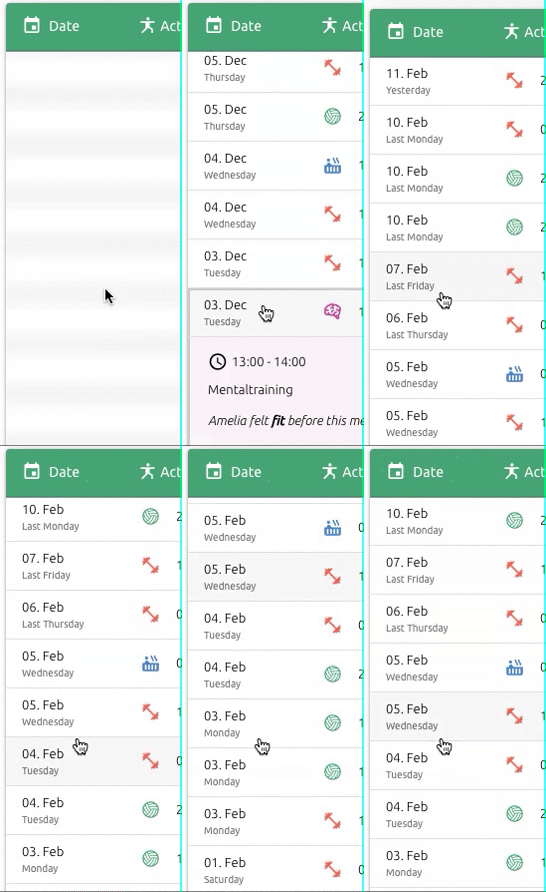
@pdanpdan I fixed the above issue but unfortunately I face the same bug again even in v1.8.5 as I did before: as soon as there are expanded rows, even one, and you keep scrolling up and down, it suddenly starts to jump back up to the first row whenever you scroll down. What is concerning: it only happens every second or third time and is not a behavior I can reproduce exactly the same way. But as soon as I have rows expanded and keep scrolling it happens to start - and if, doesn't stop anymore.
Check how it disrupts scrolling and how it keeps jumping back up to 10./11. of February:
alexeigs
on 12 Feb 2020
Hello. If you are using expanding rows I think the procedure should be something like this:
- add a
q-virtual-scroll--with-prevclass on the expanded row (the one that shows/hides) - if this alone does not fix the problem try to call put a ref on the QTable and then call
this.$refs.<tableRefName>.$refs.virtScroll.refresh(-1)when you expand or collapse a row
But in theory if you apply 1. it should be ok.
But just to be clear - are you using QTable with expanded rows or QExpansionItem?
If you are using QExpansionItem upgrade to v1.9.0+ and you'll have @after-show and @after-hide events on QExpansionItem - call the this.$refs.<virtualScrollRefName>.refresh(-1) when these events get triggered.
pdanpdan
on 12 Feb 2020
@pdanpdan Adding q-virtual-scroll--with-prev works, at least it seems so in the first tests.
In this example I'm using q-tablewith expanded rows - but in another place I have the same thing with q-expansion-itemand I will give your other proposal a try too. Many thanks!
alexeigs
on 12 Feb 2020
q-virtual-scroll--with-prev class is only for and should always be used when there are new elements that are not one-to-one with the data - like in QTable where you have extra rows.
pdanpdan
on 12 Feb 2020
Related issues
 sskwrl
·
3Comments
sskwrl
·
3Comments
 tombarfoot
·
3Comments
tombarfoot
·
3Comments
 hctpbl
·
3Comments
hctpbl
·
3Comments
 danikane
·
3Comments
danikane
·
3Comments
 wc-matteo
·
3Comments
wc-matteo
·
3Comments