Quasar: Android Cordova Mode Doesn't Build APK Properly
Describe the bug
I have an existing v1 app that builds alright by running quasar build -m cordova -T android but suddenly, the build doesn't seem to work at all. It's just displaying the default placeholder.
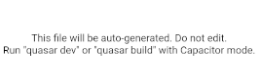
This file will be auto-generated. Do not edit. Run "quasar dev" or "quasar build" with Cordova mode.
quasar dev -m cordova -T android works. It's just in the actual building of the production app. It was working alright before, it must've broke by recent updates. But I have a habit of running quasar upgrade, I can't pinpoint yet where it has gone haywire.
Codepen/jsFiddle/Codesandbox (required)
https://codepen.quasar.dev. Issue persists on fresh install. quasar create test
To Reproduce
Steps to reproduce the behavior:
quasar create test- Proceed with defaults
quasar mode add cordovacd src-cordovacordova platform add androidquasar build -m cordova -T android- generate a keystore
- sign keystore
- install resulting apk to an android device
- See unwanted behavior
Expected behavior
It should display default quasar template in mobile app form.
Screenshots

Platform (please complete the following information):
OS: Pop!_OS
Node: 12.4.0
NPM: 6.9.0
Yarn: 1.21.1
Browsers:
iOS:
Android: 8.0.0
Electron:
 vycoder
All 10 comments
Confirmed. Will get it fixed asap.
 rstoenescu
on 20 Dec 2019
rstoenescu
on 20 Dec 2019
@rstoenescu also happening for capacitor builds. thx.
 metalsadman
on 20 Dec 2019
metalsadman
on 20 Dec 2019
Fixed in "@quasar/app" v1.4.3.
rstoenescu
on 20 Dec 2019
Well, that's fast. Thanks razvan!
vycoder
on 20 Dec 2019
Fixed in "@quasar/app" v1.4.3.
Hello. I still have this problem.
The version is now 1.9.6, but the problem remains.
This file will be auto-generated. Do not edit. Run "quasar dev" or "quasar build" with Cordova mode.
I also have the following errors when executing the quasar dev command:
Dev mode.......... spa
Pkg quasar........ v1.12.4
Pkg @quasar/app... v1.9.6
Debugging......... enabled(node:38756) UnhandledPromiseRejectionWarning: SyntaxError: /home/amin/amin/package.json: Unexpected token : in JSON at posit ion 9
JSON.parse
loader.js:799 Object.Module._extensions..json
internal/modules/cjs/loader.js:799:27loader.js:641 Module.load
internal/modules/cjs/loader.js:641:32loader.js:556 Function.Module._load
internal/modules/cjs/loader.js:556:12loader.js:681 Module.require
internal/modules/cjs/loader.js:681:19helpers.js:16 require
internal/modules/cjs/helpers.js:16:16quasar-config.js:109 new QuasarConfig
[global]/[@quasar]/app/lib/quasar-config.js:109:16quasar-dev:201 goLive
[global]/[@quasar]/app/bin/quasar-dev:201:24(node:38756) UnhandledPromiseRejectionWarning: Unhandled promise rejection. This error originated either by throwing inside of an async function without a catch block, or by rejecting a promise which was not handled with .catch(). (rejection id: 1)
(node:38756) [DEP0018] DeprecationWarning: Unhandled promise rejections are deprecated. In the future, promise rejections that are not handled will terminate the Node.js process with a non-zero exit code.
 AminZare
on 10 Jun 2020
AminZare
on 10 Jun 2020
@AminZare judging by the line in quasar-config.js, your package.json is malformed...
rstoenescu
on 10 Jun 2020
Hello,
I am getting this error aswell on a newly installed rig.
I tried to launch on my old one and the whole process is working, meaning the application loads correctly.
I also precise that the version of my app are the same on both setups.
I'm not using an emulator but my own smartphone that is under Android 8.0.
About my two rigs here are the configuration:
- Both have the same @quasar/app and quasar versions, resp. 1.5.5 and 1.9.1
[EDIT : After running an audit fix of npm's modules @quasar/app has been updated to 1.9.6] - Both have the same JDK (8) installed, the one that's linked in the "Preparation" page of the "Developing Cordova Apps" part
- My old rig's Gradle version is 5.6, and I tried on my new with 4.3 (the one linked in Quasar's doc) and the latest (6.5) [EDIT : I also tried 5.6 on my new setup]
- Just to make sure it wasn't related to this I installed the same versions of the Android SDKs that I had on my previous setup on my new one :
- Starting from Android 5.0 up to 9.0 for my old rig, and since new versions have come since then I also added them to my new setup.
- My old computer is using an Intel CPU whereas my new one is with AMD.
I had a problem with Android Studio about something needing to be done for emulation (Android Emulator Hypervisor Driver for AMD Processors) but since I'm not using emulation I ignored this step.
The software launches normally and the installations of the SDKs are successful. - Regarding PATH variables, here is a screenshot of my new setup which has the same things as the old one except for :
- Gradle version
- tools and toolds\bin (absent on my old setup)
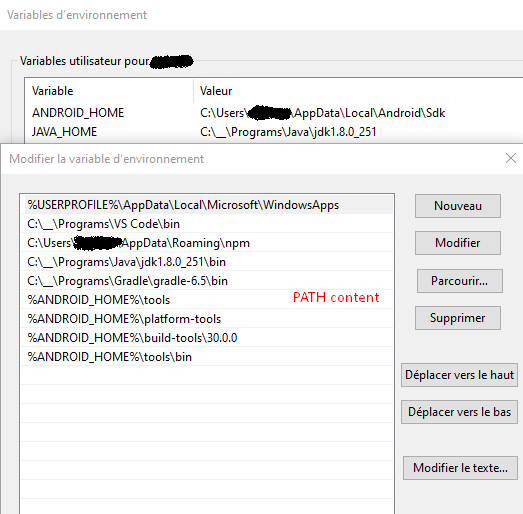
The logs displayed in the console from "BUILD SUCCESSFUL in Xs" are also the same, the only difference is that while connected to my new computer my smartphone displays the blank page with the content OP described.
Not having deep knowledge about everything revolving around this I'm kind of at a loss of ideas to solve this..
Thanks in advance for reading and any clue of the origin of this issue.
 resu511
on 18 Jun 2020
resu511
on 18 Jun 2020
Hi,
I have same problem
This file will be auto-generated. Do not edit. Run "quasar dev" or "quasar build" with Cordova mode.
when I try to run:
quasar dev -m cordova -T android
but if I run the build command and then dev then it generates the application but it is not live I need to rerun build everytime I want to see the change
 MilGard91
on 5 Nov 2020
MilGard91
on 5 Nov 2020
Just checked.. quasar dev -m cordova -T android works correctly. I think the problem that you have is in regards to HMR, or more specifically to webpack4 not supporting file watchers correctly when on Node 13 or 14. Please use Node 12.
rstoenescu
on 5 Nov 2020
I'm using node version 12.19.0, and everything is working normally if I develop on emulator or in browser. But I needed nfc so I had to use my phone and when I try to run quasar dev -m cordova -T android then this happens. Sorry for not describing it well on my first post.
MilGard91
on 9 Nov 2020
Related issues
 wc-matteo
·
3Comments
wc-matteo
·
3Comments
 jippy89
·
3Comments
jippy89
·
3Comments
 adwidianjaya
·
3Comments
adwidianjaya
·
3Comments
 tombarfoot
·
3Comments
tombarfoot
·
3Comments
 jigarzon
·
3Comments
jigarzon
·
3Comments
Most helpful comment
Fixed in "@quasar/app" v1.4.3.