Quasar: [windows] Run quasar dev -m electron with electron 7 fail
app:electron Building main Electron process... +6s
Renderer process █████████████████████████ [100%] in ~5s
Main process █████████████████████████ [100%] in ~508ms
app:electron Webpack built Electron main process +510ms
Hash: 305fc0662ccb4ecd3fcc
Version: webpack 4.41.2
Time: 510ms
Built at: 12/15/2019 11:36:07 AM
Asset Size Chunks Chunk Names
electron-main.js 220 KiB electron-main [emitted] electron-main
Entrypoint electron-main = electron-main.js
WARNING in ./node_modules/electron-debug/index.js 96:45-58
Critical dependency: the request of a dependency is an expression
@ ./src-electron/main-process/electron-main.dev.js
@ multi ./src-electron/main-process/electron-main.dev.js
WARNING in ./node_modules/electron-debug/index.js 97:61-74
Critical dependency: the request of a dependency is an expression
@ ./src-electron/main-process/electron-main.dev.js
@ multi ./src-electron/main-process/electron-main.dev.js
app:electron Booting up Electron process... +4ms
app:spawn ⚠️ Command name was not available. Please run again. +1ms
electron 6.x is ok
 sydeEvans
All 23 comments
After you first run quasar build -m electron
Do a yarn. There is something that messes up the installed packages when electron-packager is installed.
 pdanpdan
on 15 Dec 2019
pdanpdan
on 15 Dec 2019
same error
DONE Compiled successfully in 6411ms
i 「wds」: Project is running at http://0.0.0.0:8081/
i 「wds」: webpack output is served from
i 「wds」: 404s will fallback to /index.html
app:electron Building main Electron process... +7s
Renderer process █████████████████████████ [100%] in ~6s
Main process █████████████████████████ [100%] in ~2s
app:electron Webpack built Electron main process +2s
Hash: 5591fff149ed8c253a00
Version: webpack 4.41.2
Time: 1575ms
Built at: 2019-12-16 5:39:25 PM
Asset Size Chunks Chunk Names
electron-main.js 220 KiB electron-main [emitted] electron-main
Entrypoint electron-main = electron-main.js
WARNING in ./node_modules/electron-debug/index.js 96:45-58
Critical dependency: the request of a dependency is an expression
@ ./src-electron/main-process/electron-main.dev.js
@ multi ./src-electron/main-process/electron-main.dev.js
WARNING in ./node_modules/electron-debug/index.js 97:61-74
Critical dependency: the request of a dependency is an expression
@ ./src-electron/main-process/electron-main.dev.js
@ multi ./src-electron/main-process/electron-main.dev.js
app:electron Booting up Electron process... +5ms
app:spawn ⚠️ Command name was not available. Please run again. +2ms
 bastijr
on 16 Dec 2019
bastijr
on 16 Dec 2019
Are you on Windows? And which?
Works flawlessly on Mac OS and Linux.
 rstoenescu
on 17 Dec 2019
rstoenescu
on 17 Dec 2019
same problem, on Windows 10 1909
 TobiasTao
on 17 Dec 2019
TobiasTao
on 17 Dec 2019
same problem, on Windows 10 1903
the problem is
app:spawn ⚠️ Command name was not available. Please run again. +2ms
which is different form #5911
electron-packager is installed
 hugetiny
on 19 Dec 2019
hugetiny
on 19 Dec 2019
hello,i have same problem
i find error is 'requer electron filed'
i change node_modules\@quasar\app\lib\helpers\get-package.js to add log
`
const appPaths = require('../app-paths')
const logger = require('../helpers/logger')
const log = logger('app:getPackage')
module.exports = function (pkgName) {
try {
log(
require.resolve(pkgName, {
paths: [ appPaths.appDir ]
}))
return require(
require.resolve(pkgName, {
paths: [ appPaths.appDir ]
})
)
}
catch (e) {
log(e)
}
}
`
the log is
app:electron Booting up Electron process... +3ms
app:getPackage E:\demoSpace\quasar-dev\zhouyk-pc\node_modules\electron\index.js +1ms
app:getPackage Error: Electron failed to install correctly, please delete node_modules/electron and try installing again +1ms
app:spawn ⚠️ Command name was not available. Please run again.
 JustSySy
on 19 Dec 2019
JustSySy
on 19 Dec 2019
log :
`
app:electron Booting up Electron process... +3ms
app:getPackage E:\demoSpace\quasar-dev\zhouyk-pc\node_modules\electron\index.js +1ms
app:getPackage Error: Electron failed to install correctly, please delete node_modules/electron and try installing again +1ms
app:spawn ⚠️ Command name was not available. Please run again.
`
JustSySy
on 19 Dec 2019
I know my mistake, I am from China, I can't download to electron (https://github.com/electron/electron/releases/download/v7.1.6/electron-v7.1.6-win32-x64.zip).So the installation code of electron cannot generate path.txt. I manually downloaded the installation package of electron and modified the installation code of electron, and I successfully installed the electron...So I solved the problem
`
// downloads if not cached
downloadArtifact({
version,
artifactName: 'electron',
force: process.env.force_no_cache === 'true',
cacheRoot: process.env.electron_config_cache,
platform: process.env.npm_config_platform || process.platform,
arch: process.env.npm_config_arch || process.arch
}).then((zipPath) => {
extractFile(zipPath)
}).catch((err) => {
onerror(err)
})
extractFile('E:\demoSpace\quasar-dev\zhouyk-pc\node_modules\electron\electron-v7.1.6-win32-x64.zip') // 下载路径直接解压
// unzips and makes path.txt point at the correct executable
function extractFile (zipPath) {
extract(zipPath, { dir: path.join(__dirname, 'dist') }, function (err) {
if (err) return onerror(err)
fs.writeFile(path.join(__dirname, 'path.txt'), platformPath, function (err) {
if (err) return onerror(err)
})
})
}
node_modules\electron>node install.js
`
JustSySy
on 19 Dec 2019
Investigating why Windows fails.
rstoenescu
on 19 Dec 2019
I need more details from the Windows devs pls (except for the download issue on China):
- The exact sequence of terminal commands that lead to the issue.
- Are you using yarn or npm?
- What terminal are you using?
- Are you on Windows Subsystem for Linux (WSL)?
Thanks in advance.
rstoenescu
on 19 Dec 2019
- quasar create name & quasar dev -m electron
- npm
- Cmder
- no
more info #5911
 heartbeatLV
on 19 Dec 2019
heartbeatLV
on 19 Dec 2019
Using the regular terminal (cmd.exe) I cannot reproduce the issue. Sequence:
$ quasar create testapp
$ cd testapp
$ quasar mode add electron
$ quasar dev -m electron
More info on my part: tested with both npm and yarn, Nodejs v12. No issues.
rstoenescu
on 19 Dec 2019
1.quasar create name & quasar dev -m electron
2.yarn
3.conEmu
4.no
5.electron-packager is installed
bastijr
on 19 Dec 2019
This problem is due to China Networks
I tried to download the file and extract to dist folder directly like @JustSySy do and solved this problem.
hugetiny
on 19 Dec 2019
This problem is due to China Networks
I tried to download the file and extract to dist folder directly like @JustSySy do and solved this problem.
not a same problem,i can download electron from net
bastijr
on 20 Dec 2019
environment:
windows 10 1909
node 12.14.0
yarn 1.21.0
steps:
accord to https://github.com/electron/electron/issues/20739#issuecomment-561211482
change .yarnrc: electron_mirror=https "//cdn.npm.taobao.org/dist/electron/"
then run quasar mode add electron
it seens that I installed electron7 successful now:
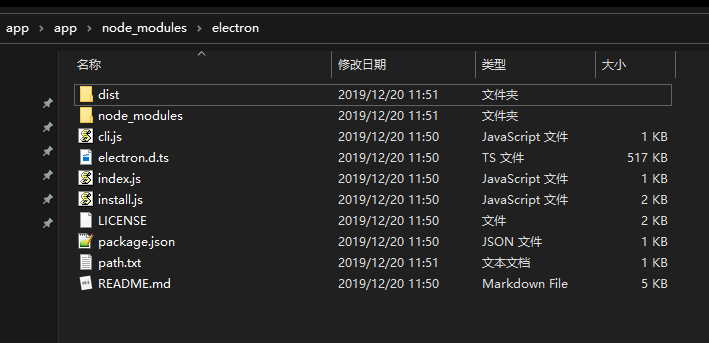
however , run quasar dev -m electron ,electron window is not open:
DONE Compiled successfully in 15032ms 12:53:49
i 「wds」: Project is running at http://0.0.0.0:8080/
i 「wds」: webpack output is served from
i 「wds」: 404s will fallback to /index.html
app:electron Building main Electron process... +16s
Renderer process █████████████████████████ [100%] in ~15s
Main process █████████████████████████ [100%] in ~1s
app:electron Webpack built Electron main process +1s
Hash: ed5f6477bc8c0a9d34d3
Version: webpack 4.41.3
Time: 1396ms
Built at: 2019-12-20 12:53:51
Asset Size Chunks Chunk Names
electron-main.js 220 KiB electron-main [emitted] electron-main
Entrypoint electron-main = electron-main.js
WARNING in ./node_modules/electron-debug/index.js 96:45-58
Critical dependency: the request of a dependency is an expression
@ ./src-electron/main-process/electron-main.dev.js
@ multi ./src-electron/main-process/electron-main.dev.js
WARNING in ./node_modules/electron-debug/index.js 97:61-74
Critical dependency: the request of a dependency is an expression
@ ./src-electron/main-process/electron-main.dev.js
@ multi ./src-electron/main-process/electron-main.dev.js
app:electron Booting up Electron process... +4ms
app:spawn Running "D:\app\app\node_modules\electron\dist\electron.exe --inspect=5858 D:\app\app\.quasar\electron\electron-main.js" +6ms
Debugger listening on ws://127.0.0.1:5858/83d40b24-e989-4e65-9a24-496327e51cd2
For help, see: https://nodejs.org/en/docs/inspector
libpng warning: iCCP: cHRM chunk does not match sRGB
electron is running in the background:

TobiasTao
on 20 Dec 2019
If it’s running in the background then it’s an Electron issue, not a Quasar one. We can’t do anything about it if the Electron executable misbehaves. Please report this to their team. Thanks.
rstoenescu
on 20 Dec 2019
but I can run electron-quick-start without problem:

TobiasTao
on 20 Dec 2019
I seem to have the same problem.
I'm from China, and I solved the problem by reading this article:
https://segmentfault.com/a/1190000020890483?utm_source=tag-newest
When downloading electron@7.* through Taobao mirror, the download URL has the wrong "v".
like:https://npm.taobao.org/mirrors/electron/v7.1.7/electron-v7.1.7-darwin-x64.zip
The right url is:https://npm.taobao.org/mirrors/electron/7.1.7/electron-v7.1.7-darwin-x64.zip
The solution was to set a custom dir using cross-env:
npm install -g cross-env
cross-env npm_config_electron_mirror="https://npm.taobao.org/mirrors/electron/" npm_config_electron_custom_dir="7.1.7" npm install [email protected]
Sorry for machine translation, and hope that helps
 zry2020
on 3 Jan 2020
zry2020
on 3 Jan 2020
@exchump Thank you very much.This solution solved my problem
hugetiny
on 3 Jan 2020
I am in China.
pc : windows10 1607
1、set c:/users/administrator/.npmrc
`
registry=https://registry.npm.taobao.org
sass_binary_site=https://npm.taobao.org/mirrors/node-sass/
phantomjs_cdnurl=http://npm.taobao.org/mirrors/phantomjs
electron_mirror=http://npm.taobao.org/mirrors/electron/
electron_custom_dir=7.1.14
`
2、delete node_modules/electron/ directory.
3、run 'npm install' at the command line of project's directory.
if 'electron' installed successfully,you can find the electron zip file downloaded at :
C:\Users\Administrator\AppData\Local\electron\Cache\httpnpm.taobao.orgmirrorselectron7.1.14electron-v7.1.14-win32-x64.zip\
hope it works.
 yangfei2013
on 10 Jun 2020
yangfei2013
on 10 Jun 2020
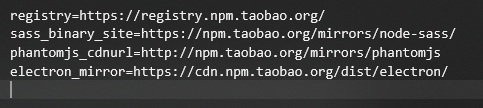
@yangfei2013 maybe you should modify electron_mirror, it works for v8 and v9 of electron
TobiasTao
on 11 Jun 2020
Related issues
 mesqueeb
·
3Comments
mesqueeb
·
3Comments
 victorborgaco
·
3Comments
victorborgaco
·
3Comments
 alexeigs
·
3Comments
alexeigs
·
3Comments
 xereda
·
3Comments
xereda
·
3Comments
 Bangood
·
3Comments
Bangood
·
3Comments
Most helpful comment
I seem to have the same problem.
I'm from China, and I solved the problem by reading this article:
https://segmentfault.com/a/1190000020890483?utm_source=tag-newest
When downloading electron@7.* through Taobao mirror, the download URL has the wrong "v".
like:https://npm.taobao.org/mirrors/electron/v7.1.7/electron-v7.1.7-darwin-x64.zip
The right url is:https://npm.taobao.org/mirrors/electron/7.1.7/electron-v7.1.7-darwin-x64.zip
The solution was to set a custom dir using cross-env:
Sorry for machine translation, and hope that helps