Quasar: Screen Plugin in SSR mode is defaulting mobile sizes
Describe the bug
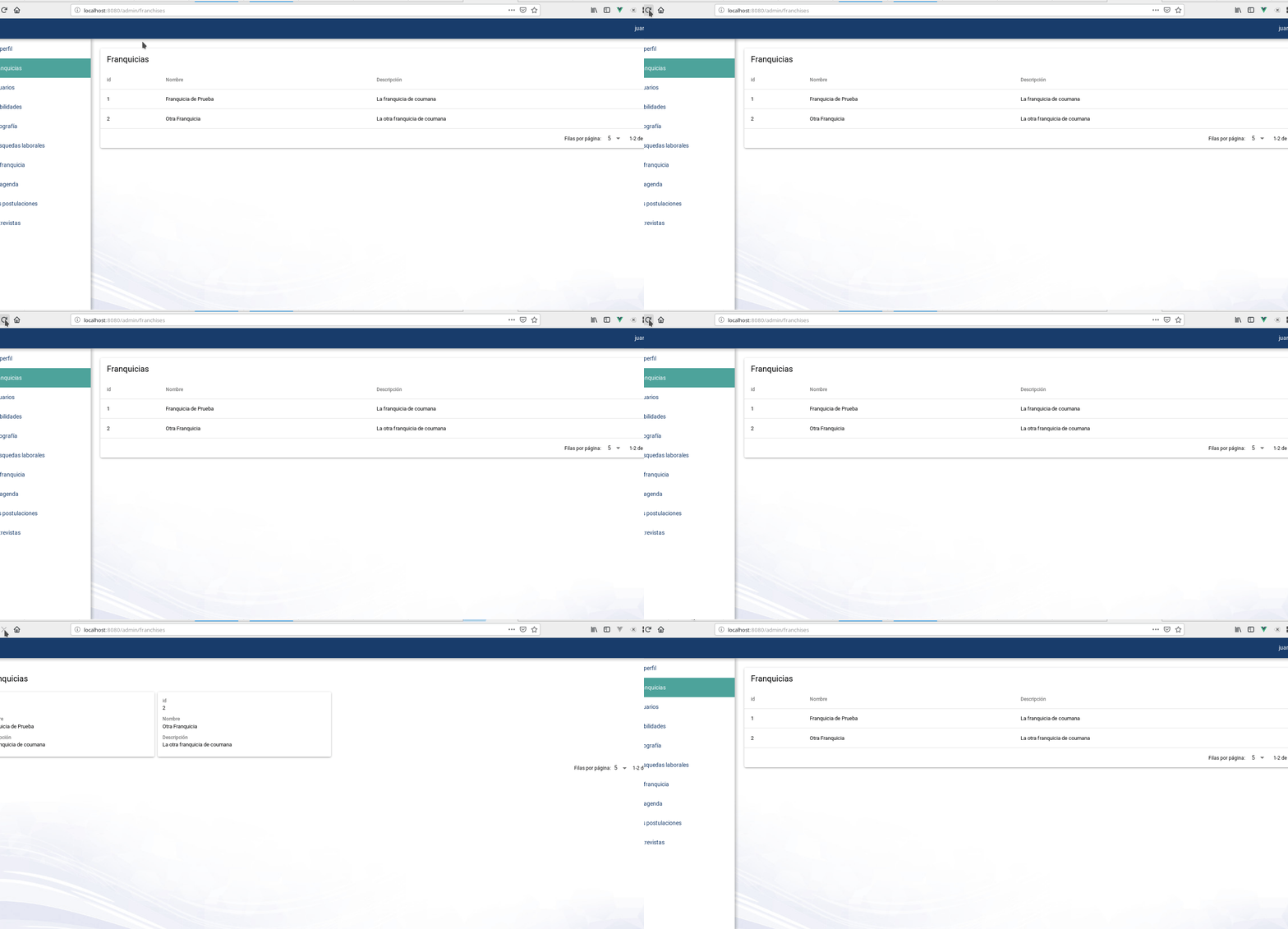
When SSR prerendering a view on desktop,a mobile screen is assumed causing a blink that can be very confusing when developing a responsive site (for example, using the grid view for mobile and normal view in desktop for a QTable, as shown in screenshot)
Expected behavior
The Screen plugin should detect the platform (it can do that via request headers analyzing) and use a better heuristic to determine which size we have. I'v checked out the code and its doing this:
    if (isSSR === true) {
      $q.screen = this
      return
    }
(Making $q.screen = this defaults to mobile sizes)
Screenshots
Responsive table rendered as mobile on server and rendering as desktop on client side. Also the left drawer disappears server side and appears back on client
Platform (please complete the following information):
Operating System - Linux(4.19.69-1-MANJARO) - linux/x64
NodeJs - 12.9.1
Global packages
NPM - 6.11.2
yarn - 1.17.3
@quasar/cli - 1.0.0
cordova - Not installed
Important local packages
quasar - 1.1.0 -- Build high-performance VueJS user interfaces (SPA, PWA, SSR, Mobile and Desktop) in record time
@quasar/app - 1.0.6 -- Quasar Framework local CLI
@quasar/extras - 1.3.1 -- Quasar Framework fonts, icons and animations
vue - 2.6.10 -- Reactive, component-oriented view layer for modern web interfaces.
vue-router - 3.1.2 -- Official router for Vue.js 2
vuex - 3.1.1 -- state management for Vue.js
electron - Not installed
electron-packager - Not installed
electron-builder - Not installed
@babel/core - 7.5.5 -- Babel compiler core.
webpack - 4.39.3 -- Packs CommonJs/AMD modules for the browser. Allows to split your codebase into multiple bundles, which can be loaded on demand. Support loaders to preprocess files, i.e. json, jsx, es7, css, less, ... and your custom stuff.
webpack-dev-server - 3.8.0 -- Serves a webpack app. Updates the browser on changes.
workbox-webpack-plugin - 4.3.1 -- A plugin for your Webpack build process, helping you generate a manifest of local files that workbox-sw should precache.
register-service-worker - 1.6.2 -- Script for registering service worker, with hooks
Quasar App Extensions
None installed
 jigarzon
All 10 comments
Hi,
This is a nasty scenario, but there's no possible way to fix it. When rendering on the server-side, the width of the client's window is unknown (no way to know it; no HTTP header for this, nothing). So we must assume it's the lowest possible (otherwise hydration errors!), then on the client side, when it takes over, it can correct it...
 rstoenescu
on 18 Sep 2019
rstoenescu
on 18 Sep 2019
@rstoenescu can't we know the agent string of the header and make a better assumption, at least knowing if mobile or desktop browser?
jigarzon
on 18 Sep 2019
Unfortunately, such an assumption cannot be accurate. And there's tons of screen sizes for mobiles. Then you also have tablets. And you can use custom breakpoints. And on desktop, the browser window width can be anything. If the assumption goes wrong, there's gonna be hydrating errors and the page left blank for those users, rendering the website useless.
rstoenescu
on 18 Sep 2019
@rstoenescu Right now the assumption is also very inaccurate, as it is assuming always a mobile. This ticket is about making a better assumption, knowing that it might be inaccurate, but at least better than now. We can assume that a desktop browser is always greater than MD. That would allow developers to at least show the right or left drawer on the SSR mode... avoiding a bunch of nasty issues.
Right now, writing this code:
 async preFetch ({ store, currentRoute, ssrContext }) {
    if (ssrContext) {
      console.log(ssrContext.req.headers['user-agent'])
    }
Outputs this in server when requesting from a desktop:
Mozilla/5.0 (X11; Linux x86_64; rv:69.0) Gecko/20100101 Firefox/69.0
And outputs this when requesting from mobile (well, I made the request with browser's web development in responsive mode, but its just to show):
Mozilla/5.0 (iPhone; CPU iPhone OS 11_0 like Mac OS X) AppleWebKit/604.1.38 (KHTML, like Gecko) Version/11.0 Mobile/15A372 Safari/604.1
@rstoenescu if you want, I can change this ticket to "allow developers to inject behavior on the screen sizes assumption", letting developers to choose what the best scenario is.
But I believe that all developers want a better experience with the right and left drawers on SSR mode
jigarzon
on 18 Sep 2019
I explained why. But you're missing the point. If the assumption is not 100% accurate (it can never be) it will result in hydration errors. Which means loss of traffic. As a framework, this is unnaceptable.
rstoenescu
on 18 Sep 2019
Sorry Razvan, and thanks for your explanations, but you didn't explain this: If right now the default screen size assumption is very inaccurate, why trying to make it better can result in hydration errors? We are dealing with inaccuracy in the screen sizes from the very beginning of SSR. I feel that you are banning this and I don't understand why, because you say that hydration errors can happen, but right now they do not happen, and we are far away of having an accurate situation right now.
I can make a PR for this, but I need your approval of course because its a new feature. If you want I can make a fork and test this feature and give you screen captures and everything, but please do not ban without a clear engineering and technical explanation of why making a better heuristic would cause hydration errors.
jigarzon
on 18 Sep 2019
Technical explanation
Assume size 0 on SSR because width cannot be detected. Render server-side, send to client. Client takes over with size 0. NO hydration errors in any scenario ever. Width gets updated (cause we are on client-side). Everything working great. :)
PR your solution
I'd be interested in your heuristics. If you think things can be improved, please go ahead and make a PR.
Problems I see with heuristics based on User Agent:
- User Agents are hell. If you've worked with them, you know what I'm talking about. A solution might require constant update. Depends on how good the heuristic approach is.
- Incorrect initial size making the layout flip in the other way (showing initially then hiding) when size gets corrected. Potentially breaking QDrawer.
- Size is tightly connected with the Quasar Screen plugin ---> has effects throughout lots of components.
- Mobiles and Tablets have a large variety of screen sizes, sometimes even overlapping.
Not shutting down possible better solutions. Actually looking forward to a PR if you think that the current status can be improved. 👍
rstoenescu
on 18 Sep 2019
@jigarzon
Coming back to this. This would be a start, however there's a major issue which I will detail at the end of the post.
// ui/src/install.js

// from
Screen.install($q, queues)
// to
Screen.install($q, queues, cfg)
// ui/src/plugins/Platform.js
import Platform, { isSSR, fromSSR } from './Platform.js'

export default {
  width: 0,
  height: 0,

  // ...

  install ($q, queues, { screen: { desktop = {} } = {} }) {
    if (desktop.width === void 0) {
      desktop.width = 1920
    }
    if (desktop.height === void 0) {
      desktop.height = 1080
    }

    let update = (force, w = window.innerWidth, h = window.innerHeight) => {
      if (h !== this.height) {
        this.height = h
      }

      if (w !== this.width) {
        this.width = w
      }
      else if (force !== true) {
        return
      }

      // ...
    }

    if (isSSR === true) {
      $q.screen = this
      queues.server.push(q => {
        if (q.platform.is.desktop === true) {
          // assume a default size;
          // on server-side, we have no idea on the client's window width
          update(true, desktop.width, desktop.height)
        }
      })
      return
    }

    // ...

    if (fromSSR === true) {
      if (Platform.is.desktop === true) {
        // avoid hydration errors
        update(true, desktop.width, desktop.height)
      }
      queues.takeover.push(start)
    }

    // ...
  }
}
The issue is that Screen is a singleton. Meaning you can't just change its properties. Serving multiple SSR clients at the same time will render a non deterministic output, since there's lots of async "gateways" in the code. One client might start being served while another changes the Screen singleton and it will end with rendered output with some content with the old values from Screen and the rest with the new changed values.
Furthermore, even if we go over this problem, then comes another one. Better Screen assumptions won't mean that Layout components (header/footer/drawer/page/page-sticky/...) can be rendered on SSR as on a SPA, because they need to communicate with each other (for sizes, offsets, etc). So for SSR, it would matter a lot the order in which template declares those components. If a QHeader is before the QPage, then QPage would have the correct size, but not if QPage is declared before QHeader. On server-side we have: render QLayout --> hey, we have a QPage here, so render QPage --> ok, here is QPage, going back to QLayout render --> hey, we have a QDrawer, so render QDrawer --> ....and so on. So rendering a subcomponent is "final" and if a subsequent component communicates with the layout, the first subcomponent is NOT getting these updates.
But let's assume we get over this problem too. QDrawer does not uses a Vue state to render the left/right position because this would mean opening/closing by touch/mouse dragging requires a Vue rerender. And you need LOTS of re-renders while you swipe -- this would make QDrawer act far far away from smooth (it would be ridiculously slow!). So to avoid this, QDrawer acts upon the DOM node directly (only for updating this part of the position). On SSR, again, you cannot do this (access DOM, cause there's no DOM), so the initial state (even if it was decided that "hey, we'll have it on layout") cannot be applied (it will still be hidden until we takeover from client-side).
I'd continue, but it's already a very long post (sorry) :)
rstoenescu
on 21 Sep 2019
Thanks Razvan for such a big explanation. This is exactly what I wanted.
I don't understand reason #2, maybe I'm missing something, but what would
be the problem if everyone ask size and it's 1920x1080? Despite of
declaration order? I understand that Layout components need to communicate
and are dependant, but right now they can perfectly overcome the situation
of a changing size viewport (when I manually resize screen size on
browser). Sorry but maybe I'm losing the architecture of those. But I don't
understand why assuming an initial size would cause problems.
The #3 situation regarding DOM can be the most challenging, but let me ask
you: isn't the biggest work for making it work on ssr already done? I mean:
right now it comes correctly rendered on ssr on the correct side, and it
disappears on the client side. So , have you tested that code and it's
breaking?
Thanks a lot for going so deep in this, I really appreciate it. I think
this is limiting a true implementation of the "code once use everywhere". A
ui designer reported that on a normal connection he had to wait almost 7
seconds with the screen broken because of this reason, and I could
reproduce.
Let me start working further with this next week, sorry last week I had no
time.
El sáb., 21 sept. 2019 6:30, Razvan Stoenescu notifications@github.com
escribió:
@jigarzon https://github.com/jigarzon
Coming back to this. This would be a start, however there's a major
issue which I will detail at the end of the post.// ui/src/install.js
// fromScreen.install($q, queues)// toScreen.install($q, queues, cfg)// ui/src/plugins/Platform.jsimport Platform, { isSSR, fromSSR } from './Platform.js'
export default {
width: 0,
height: 0,// ...
install ($q, queues, { screen: { desktop = {} } = {} }) {
if (desktop.width === void 0) {
desktop.width = 1920
}
if (desktop.height === void 0) {
desktop.height = 1080
}let update = (force, w = window.innerWidth, h = window.innerHeight) => { if (h !== this.height) { this.height = h } if (w !== this.width) { this.width = w } else if (force !== true) { return } // ... } if (isSSR === true) { $q.screen = this queues.server.push(q => { if (q.platform.is.desktop === true) { // assume a default size; // on server-side, we have no idea on the client's window width update(true, desktop.width, desktop.height) } }) return } // ... if (fromSSR === true) { if (Platform.is.desktop === true) { // avoid hydration errors update(true, desktop.width, desktop.height) } queues.takeover.push(start) } // ...}
}The issue is that Screen is a singleton. Meaning you can't just change its
properties. Serving multiple SSR clients at the same time will render a non
deterministic output, since there's lots of async "gateways" in the code.
One client might start being served while another changes the Screen
singleton and it will end with rendered output with some content with the
old values from Screen and the rest with the new changed values.Furthermore, even if we go over this problem, then comes another one.
Better Screen assumptions won't mean that Layout components
(header/footer/drawer/page/page-sticky/...) can be rendered on SSR as on a
SPA, because they need to communicate with each other (for sizes, offsets,
etc). So for SSR, it would matter a lot the order in which template
declares those components. If a QHeader is before the QPage, then QPage
would have the correct size, but not if QPage is declared before QHeader.
On server-side we have: render QLayout --> hey, we have a QPage here, so
render QPage --> ok, here is QPage, going back to QLayout render --> hey,
we have a QDrawer, so render QDrawer --> ....and so on. So rendering a
subcomponent is "final" and if a subsequent component communicates with the
layout, the first subcomponent is NOT getting these updates.But let's assume we get over this problem too. QDrawer does not uses a Vue
state to render the left/right position because this would mean
opening/closing by touch/mouse dragging requires a Vue rerender. And you
need LOTS of re-renders while you swipe -- this would make QDrawer act far
far away from smooth (it would be ridiculously slow!). So to avoid this,
QDrawer acts upon the DOM node directly (only for updating this part of the
position). On SSR, again, you cannot do this (access DOM, cause there's no
DOM), so the initial state (even if it was decided that "hey, we'll have it
on layout") cannot be applied (it will still be hidden until we takeover
from client-side).I'd continue, but it's already a very long post (sorry) :)
—
You are receiving this because you were mentioned.
Reply to this email directly, view it on GitHub
https://github.com/quasarframework/quasar/issues/5079?email_source=notifications&email_token=ACIHOSWWSN6VCG73TQT3IC3QKXSSDA5CNFSM4IWVBANKYY3PNVWWK3TUL52HS4DFVREXG43VMVBW63LNMVXHJKTDN5WW2ZLOORPWSZGOD7IOGVQ#issuecomment-533783382,
or mute the thread
https://github.com/notifications/unsubscribe-auth/ACIHOSWLUZGFO437NNKABXTQKXSSDANCNFSM4IWVBANA
.
jigarzon
on 21 Sep 2019
Related issues
 florensiuslaylim
·
3Comments
florensiuslaylim
·
3Comments
 adwidianjaya
·
3Comments
adwidianjaya
·
3Comments
 hctpbl
·
3Comments
hctpbl
·
3Comments
 jean-moldovan
·
3Comments
jean-moldovan
·
3Comments
 wc-matteo
·
3Comments
wc-matteo
·
3Comments