Quasar: QDate multiple selection
Grouping #4815, #4727, #640, #4304, #1132, #1900 .
- add a way to select multiple dates in QDate
 pdanpdan
All 54 comments
Hi, pdanpdan,
The following issue might also belong to the group:
https://github.com/quasarframework/quasar/issues/1132
 MartinManev
on 9 Sep 2019
MartinManev
on 9 Sep 2019
@MartinManev Yes, thank you very much for finding it.
pdanpdan
on 9 Sep 2019
take a look at this
https://quasarframework.github.io/app-extension-qscroller/demo
 bebekar
on 10 Oct 2019
bebekar
on 10 Oct 2019
One problem with the QDateRangeScroller is that there is no option to restrict that the start date is less than the end date.
 apple314159
on 17 Oct 2019
apple314159
on 17 Oct 2019
take a look at this
https://quasarframework.github.io/app-extension-qscroller/demo
This page is 404 now.
can check on this page . https://quasarframework.github.io/quasar-ui-qscroller/examples/date-range
But still want date-range-picker and datetime-range-picker like https://github.com/quasarframework/quasar/issues/4815#issue-476910393
 Tangkysin
on 18 Nov 2019
Tangkysin
on 18 Nov 2019
I had a look at QDate but it seems like it heavily depends on the model being a single date. I thought I'd give it a try to implement, but I'm not sure it will be possible without a complete overhaul of QDate?
 stefanvanherwijnen
on 24 Jan 2020
stefanvanherwijnen
on 24 Jan 2020
Does this work? https://quasarframework.github.io/quasar-ui-qcalendar/examples/month-view#example-Mini-Mode---Multi-Month-Selection
 hawkeye64
on 24 Jan 2020
hawkeye64
on 24 Jan 2020
In my case I would be looking for an option to select multiple individual dates, not just a range. I don't think QCalendar provides that option?
stefanvanherwijnen
on 24 Jan 2020
No, it does not @stefanvanherwijnen
hawkeye64
on 25 Jan 2020
@stefanvanherwijnen As of release v1.3.14 (today), QCalendar now allows for toggling individual dates in both regular and mini-mode: https://quasarframework.github.io/quasar-ui-qcalendar/examples/month-view#example-Selected-Dates and https://quasarframework.github.io/quasar-ui-qcalendar/examples/month-view#example-Mini-Mode---Selected-Dates

hawkeye64
on 25 Jan 2020
@hawkeye64 And here I am still trying to figure out how to possibly implement this 😬. Thanks Jeff.
stefanvanherwijnen
on 25 Jan 2020
Hi, I've been working in this feature, to add multiple dates, and ranges of dates in the QDate input value.
Two new boolean props has been added: multiple and range.
When multiple is true, if ctrl (or shift) key is pressed on click event, the date is added/removed
When range is true, if shift key is pressed on click event, the range, from the last date added to the date clicked, is added.
The value prop (and v-model) now can hold a String date or an Array of elements.
When the value holds an array of elements, each of those, can be:
- a
Stringdate - an
Arrayof 2Stringdates (range start and range end)
In example:
<q-date :value="'2020/05/25'" />
<q-date multiple :value="['2020/05/25', '2020/05/27']" />
<q-date range :value="[['2020/05/25', '2020/05/27']]" />
<q-date multiple range :value="[['2020/05/25', '2020/05/27'], '2020/05/29', ['2020/05/31', '2020/06/01']]" />
I'm working in the mobile interface (no shift and no ctrl keys), I'm thinking to do it with a context menu on the day, that will let you choose between _add day to selection_ or _set range end_.
I'll appreciate any comments
 leoelz
on 25 May 2020
leoelz
on 25 May 2020
Hi @leoelz,
In my opinion, having to hold the "Shift" or "Ctrl" key to select is not very user-friendly. I would suggest that for the multiple case, we have the behaviour of one click to select and one click to deselect; and for the range case, one click to select the start date and one click to select the end date. This behaviour can be the same for both desktop and mobile. The AirBnb date range selector is a great example. Also, check out this Codepen from Vuetify date picker https://codepen.io/pen/?editors=1010.
I don't think we need the case of both multiple and range options since this would be confusing from the UX point of view. Also, I haven't come across a use case for this. Using multiple is enough to allow max-flexibility in date selection.
Thank you for taking your time to contribute to Quasar!
 aprln
on 27 May 2020
aprln
on 27 May 2020
Thank you @aprln, You are right, I'm working to implement it as you say, the shift and ctrl will be used only when both multiple and range are true.
leoelz
on 27 May 2020
I've updated the component in my fork to behave as @aprln's suggestion.
Now I'm working in the styles to match https://material.io/components/pickers#anatomy
leoelz
on 2 Jun 2020
In https://leoelz.github.io/quasar/?#/form/date is the demo for multiple and range features.
Please I need comments about behaviors when both multiple and range are true.
- When range-start click is inside of a selected range (the actual behavior is ignore the click)
- When range-end click is inside of a selected range (the actual behavior is to union both ranges)
I'll appreciate if you go to the demo link and provide feedback.
Thanks
leoelz
on 4 Jun 2020
It does not seem possible to deselect a range (e.g. by clicking on the end date)
Also with both range and multiple selected there should be an intuitive way of selecting either two separate dates or the whole range.
Good work 😄
stefanvanherwijnen
on 4 Jun 2020
Thank you @stefanvanherwijnen!
So what about this:
- click on one end of a range convert it as editable, the other end remains as range start.
- if a range, is being created or being edited with both ends in the same day, then is an individual date.
In this way, with 3 clicks you can remove a range. One end, the other end and again in that end.
leoelz
on 4 Jun 2020
I just wanted to chime in since we've been waiting for range selection in QDate for quite some time. The demo looks just like what we need (though we don't really have a need for multiple selections), I hope it can get merged soon! :tada:
 MartinodF
on 4 Jun 2020
MartinodF
on 4 Jun 2020
Maybe a click should toggle the date between selected as individual date, selected as range date, or not selected. Maybe this is what you meant.
So for example, I select June 1st, then June 10th. I have two dates selected. I click June 10th again and it selects the range from 1 to 10. Then click 10 again and just June 1st is selected.
Just an idea. Feedback from others is desired.
stefanvanherwijnen
on 4 Jun 2020
I feel more intuitive (always talking when both multiple and range are true)
First click, Range start
Second click, Range end
If both are the same, it is a single date.
But @stefanvanherwijnen is right too, so maybe a prop to let chose the behavior?
leoelz
on 4 Jun 2020
Sorry for asking for too much, current demo @leoelz works great
(there are some strange things going on with "negative years" and range selection, but that's irrelevant)
although in #1132 it mentions 2 calendars side-by-side because people are really concerned about those month borders.
Current implementation covers it (you just go next/previous a month with date selected), and I understand that implementing side-by-side option may just scrap current concept, but at least put it as "feature request of feature request"?
 DelaneDiamon
on 5 Jun 2020
DelaneDiamon
on 5 Jun 2020
Hi @DelaneDiamon, I think that it can be accomplished with this component using two and the same v-model, I'll try to include in the demo how to do it.
I've just updated the demo with the next behavior when both range and multiple are true:
- first click on any date not in selection: range selection start
- second click on the same date from range start: individual date selected
- click on a individual date selected: date removed from selection
- click inside of a range selected: date removed from range and range divided
- click on a range selected end: range modification start
- when range selection has started and the end range is inside another range: ranges union
Excuse me if I haven't being clear, please go to the demo page and test it to a better understanding of what I meant. :-)
leoelz
on 5 Jun 2020
You can check how it is implemented here: https://github.com/quasarframework/quasar/pull/6445
pdanpdan
on 6 Jun 2020
Btw, I implemented a PR long ago: https://github.com/quasarframework/quasar/pull/6418
Never accepted and no feedback. Then @pdanpdan took a try at it. Still not accepted.
I don't know what @rstoenescu is looking for, but I get the feeling he's not going to accept PRs. Eventually, one will be close to what he wants and he'll use it as a template to implement his own.
With all the time and endeavors being put into this, it'd be nice to know if this is something that should actually be pursued.
hawkeye64
on 6 Jun 2020
I haven't seen the PR when I've started coding, it would have been so much easier to fork it! :-(
I like so much the events that it throws.
With all due respect, it can be discussed 2 things?
The main difference I'm seeing is that on my implementation the ranges/multiple dates are bind to value and v-model, and the #6445 keeps binding the last clicked date to value and v-model and binds the ranges/multiple dates to ranges prop.
The other differences are how we manage the behaviors when clicking on an already existent range, on my implementation
- If the first click is on an end (edits that end) or inside (removes the date from the range and split it).
- If the second click (when a range selection has started) is touching other range (union both).
I've uploaded the demo of @pdanpdan's implementation at https://leoelz.github.io/quasar/pdanpdan/index.html#/form/date-selection-ranges
The demo of my implementation is at https://leoelz.github.io/quasar/#/form/date
Thank you @pdanpdan! and please excuse me for not forking yours
leoelz
on 6 Jun 2020
I think the idea with range management is very good, I'll add some examples on how to do it.
About the v-model vs another property: for the way I implemented it was much easier to have a decoupled prop - you can use the model as a last clicked to transform the ranges.
And about not forking - maybe it's better if we have multiple clean room implementations, this way in the end we can get the best elements from each and make one that is better than any of the parts.
By the way, can you put a link to your branch?
pdanpdan
on 6 Jun 2020
@leoelz took a look at your demo links. Love it. There’s some small stuff that need some “tuning”, but can you PR your work pls?
 rstoenescu
on 6 Jun 2020
rstoenescu
on 6 Jun 2020
@pdanpdan: I think that to have v-model is more coherent with QOptionGroup. Here si the branch link
@rstoenescu: thanks! I've made the PR #7117
I'm working to implement the events and the styles tuning.
leoelz
on 6 Jun 2020
And I added your method of editing range ends :)
Examples:
https://codepen.io/pdanpdan/pen/YzwXVMx
https://codepen.io/pdanpdan/pen/ZEQGKZz
https://codepen.io/pdanpdan/pen/ExPjmJP
https://codepen.io/pdanpdan/pen/RwrPVOj
https://codepen.io/pdanpdan/pen/GRoJmLQ
https://codepen.io/pdanpdan/pen/OJMVmGE
pdanpdan
on 6 Jun 2020
I've updated the branch with the header that works in the next way:
If multiple is true:
- the subtitle shows _month(s) and year(s)_ of the min and max of selected dates
- the title shows the _total of days_ selected
If range is true (and multiple is false):
- the subtitle shows _year(s)_ of the selected range
- the title shows _month and day_ of the selected range
Please go to the demo and let me know any comments
leoelz
on 7 Jun 2020
About @DelaneDiamon comment:
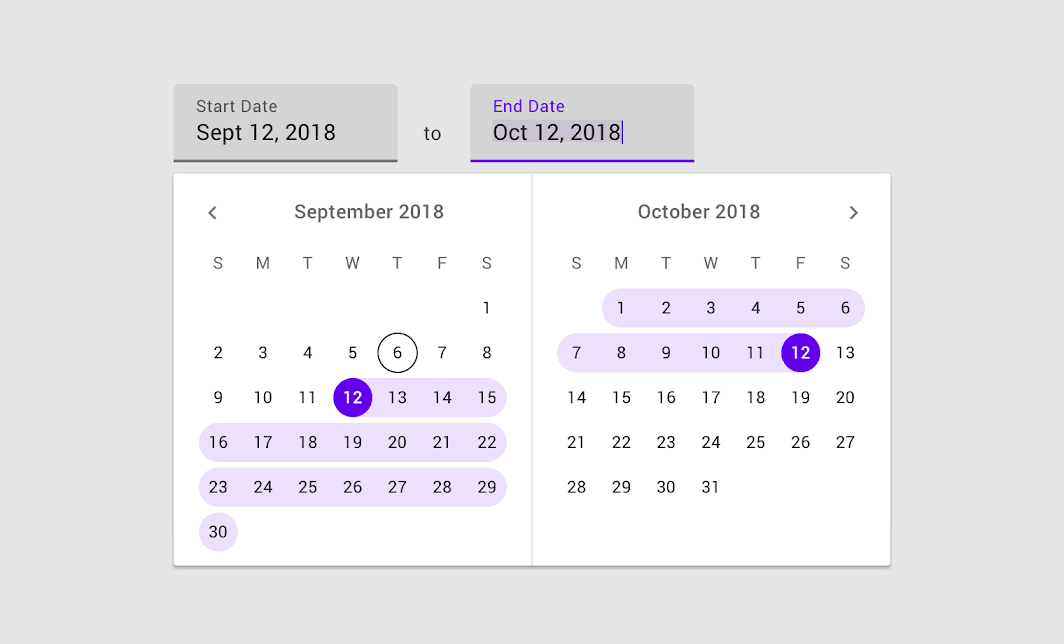 leoelz
on 7 Jun 2020
leoelz
on 7 Jun 2020
@leoelz
This last screenshot looks very promising!
I wonder if that should be one "input-like" control as a result of date range selection or two controls (like on a screenshot).
DelaneDiamon
on 7 Jun 2020
Sorry about the confusion, the image is from material design
leoelz
on 7 Jun 2020
Implementation update: New Prop edit-range
- allow 2 values:
startorend - works when
rangeis true andmultipleis false
When it is defined and there is a range, it can be resized
When the click is outside the range, the nearest range-end will be updated
When the click is inside the range, the range-end to update will depend on the edit-range value
Please test it at the demo and provide some comments.
At the end of the demo there is an attempt of implementation of 2 calendars side by side (it is necessary the calendar Min - Max option to get it complete)
leoelz
on 8 Jun 2020
Implementation update: New Prop
edit-range
- allow 2 values:
startorend- works when
rangeis true andmultipleis falseWhen it is defined and there is a range, it can be resized
When the click is outside the range, the nearest range-end will be updated
When the click is inside the range, the range-end to update will depend on the edit-range valuePlease test it at the demo and provide some comments.
At the end of the demo there is a implementation of 2 calendars side by side
I liked the examples that @leoelz put, is there any forecast for implementation in the quasar?
 mano290
on 8 Jun 2020
mano290
on 8 Jun 2020
Implementation update: New Prop default-range-view
It allows 2 values: start or end
The value defines what range-end use as the default year/month view of the QDate.
@DelaneDiamon: with this change I think that we are closer to the "2 calendars side by side" (check the demo)
leoelz
on 9 Jun 2020
With the 3 PRs #7177, #7201 and #7203 I've made a new demo to implement "2 calendars side by side" as requested at #1132
Please go to https://leoelz.github.io/quasar/date-range/#/form/date test it and provide some comments.
(it is at the very bottom of the page)
leoelz
on 11 Jun 2020
@leoelz
Those 2 side-by-side calendars look really good, in the end I assume they will be wrapped into a input with a calendar button (like inputs above the demo - PopUp Proxy I guess)?
Those 2 calendars - are they separated entities?
Sorry I am making things more complicated - current implementation is already great, although I wonder if some of the dates will be disabled with "options" prop.
DelaneDiamon
on 11 Jun 2020
Those 2 side-by-side calendars look really good, in the end I assume they will be wrapped into a input with a calendar button (like inputs above the demo - PopUp Proxy I guess)?
Sure, you can bind the model to other inputs. The model actually holds a 2 dimensional Array [[start, end]]
Those 2 calendars - are they separated entities?
Yes, 2 QDates
Sorry I am making things more complicated - current implementation is already great, although I wonder if some of the dates will be disabled with "options" prop.
Of course, it keeps all the features
leoelz
on 11 Jun 2020
Sure, you can bind the model to other inputs. The model actually holds a 2 dimensional Array
[[start, end]]
Is it already possible to bind the start and end to one input and manually edit the dates?
Like typing in „24.6.2020-5.8.2020“ and when the user opens the date picker, the dates are also correctly set?
Edit: Tried it with your side-by-side example, but manually editing the input value does not changes the selected date in the date picker (it goes only in one way). Maybe it’s just the example setup:
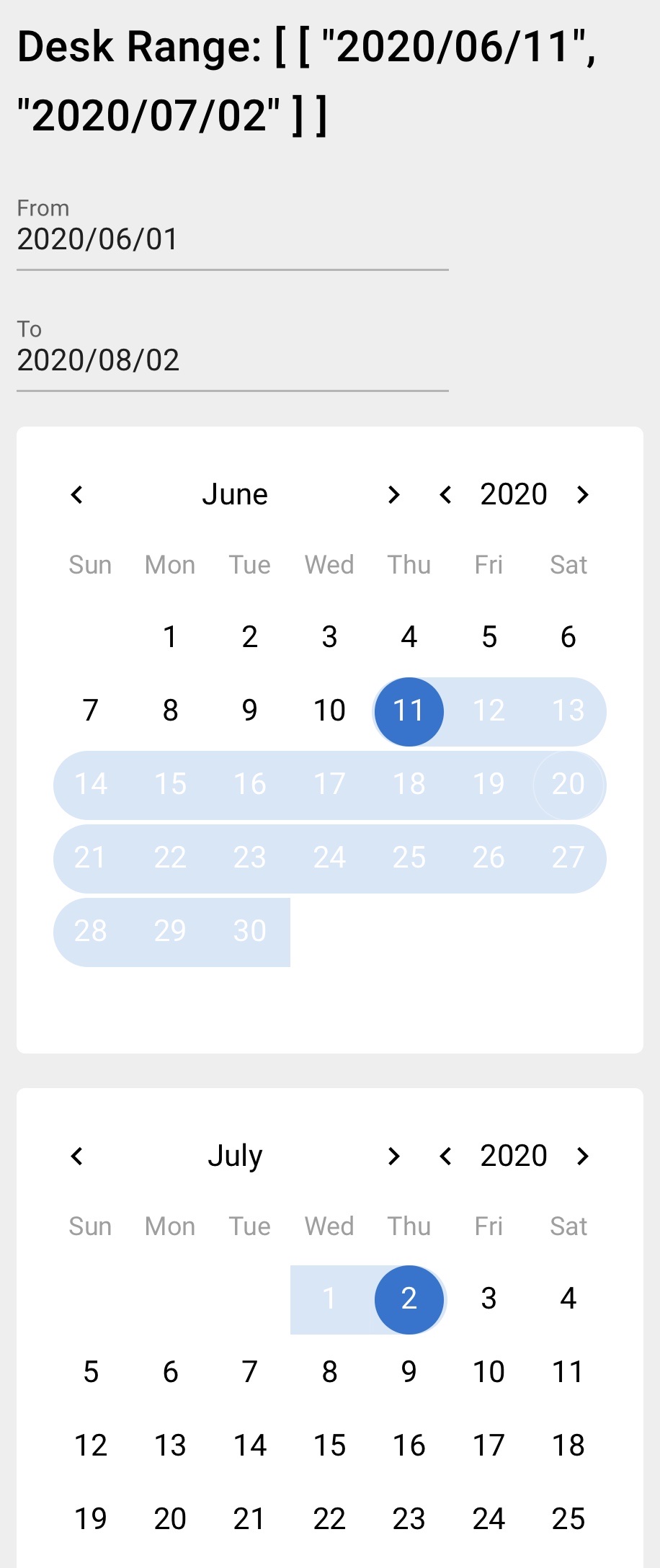
Either way it seems to be a little bit more complex having start and end inside one input. A possible solution could be a logic interpreting the user input, mapping the dates to the selected start and end date when the user opens the date picker (or after blur when the date picker is already opened like in your example). Maybe there is also a need for validation when the user for example type in a later start date then end date. Or for that it also could be possible to automatically fix the range by swapping the dates (or just interpreting the range and setting the later date as end).
 mkarras
on 20 Jun 2020
mkarras
on 20 Jun 2020
Is it already possible to bind the start and end to one input and manually edit the dates?
Like typing in „24.6.2020-5.8.2020“ and when the user opens the date picker, the dates are also correctly set?
Edit: Tried it with your side-by-side example, but manually editing the input value does not changes the selected date in the date picker (it goes only in one way). Maybe it’s just the example setup:
@mkarras: You are right, it was the example setup, now I've updated the demo and it works in both ways.
Maybe there is also a need for validation when the user for example type in a later start date then end date. Or for that it also could be possible to automatically fix the range by swapping the dates (or just interpreting the range and setting the later date as end).
Actually it accepts to put ranges backwards and it displays it. I think that any validation must be done in the implementation.
I've uploaded the demo code at https://github.com/leoelz/quasar/blob/demo/multiple/docs/src/examples/QDate/Range.vue
You will see that q-date value is bind to dateRange that it is a computed prop linked to dateFrom and dateTo data values bind to the respective inputs.
Very simplified example:
<q-input label="From" v-model="dateFrom" />
<q-input label="To" v-model="dateTo" />
<q-date range v-model="dateRange" />
data () {
  return {
    dateFrom: '2020/05/14',
    dateTo: '2020/07/10'
  }
},
computed: {
  dateRange: {
    get: function () {
      // here should be any validations
      return [[this.dateFrom, this.dateTo]]
    },
    set: function (newValue) {
      this.dateFrom = newValue[0][0]
      this.dateTo = newValue[0][1]
    }
  }
}
Brand new date range picker in the Angular Material world: https://material.angular.io/components/datepicker/overview#date-range-selection
Pick a date range inside one input. This brings me to the idea to use a input mask (for the two dates) Quasar offers.
mkarras
on 27 Jun 2020
Small input on side-by-side vs single element.
I believe the reason for airbnb to implement calendars side-by-side was for people to visualize their journey date range more easily and also to save 1 click from turning the calendar on the next month, because date range overlaps month borders quite often.
Another use case (in my project) - reporting feature, which usually spans across more than 1 month, and that way it's more convenient to mark those 2 dates in 2 separate elements.
That being said - will it over-complicate the control if there will be an option for 1 or 2 calendars to select a range?
DelaneDiamon
on 27 Jun 2020
@mkarras: I've updated the demo, now you can see both implementations with one single input and with two inputs.
Please check at https://leoelz.github.io/quasar/#/form/date and let me know if I've understood what you wanted
@DelaneDiamon: I understand what you meant, but I think that is needed a bigger refactor of QDate, because the Material Design Guidelines shows side by side calendars on desktop and also calendars scroller on mobile. By the moment it could be solved with the implementation of 2 QDates when the v1.13 be released, please check out the demo source code at https://github.com/leoelz/quasar/blob/demo/multiple/docs/src/examples/QDate/Range.vue
leoelz
on 28 Jun 2020
@mkarras: I've updated the demo, now you can see both implementations with one single input and with two inputs.
Please check at https://leoelz.github.io/quasar/#/form/date and let me know if I've understood what you wanted
Thank you, this is great! Do you use a mask? Can I have a look on the source code please?
mkarras
on 28 Jun 2020
@mkarras: Yes it uses mask, you can check the source code at /docs/src/examples/QDate/Range.vue
leoelz
on 28 Jun 2020
Just to add my 2 cents
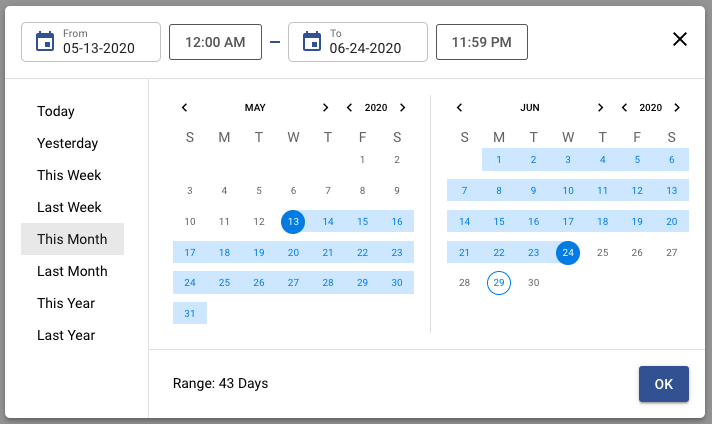
Here is a picker i made using @hawkeye64's awesome calendar library
the UI is based on a dribbble shot
https://gist.github.com/codenamezjames/fea38f8b6bf68d69a7d2484a88e8c086
https://gist.github.com/codenamezjames/73acd486930fe56aa42e60f04d96c641
It uses dayjs but could probably be changed to use quasars internal date lib.
License MIT or whatever XD
 codenamezjames
on 29 Jun 2020
codenamezjames
on 29 Jun 2020
While wait, I recommend vcalendar.io
 insign
on 8 Jul 2020
insign
on 8 Jul 2020
Hi @insign, also if you are hurry you can checkout the v1.13 branch, it's a matter of time to merge it to base branch. Please have patience.
leoelz
on 8 Jul 2020
@leoelz can you please provide code for this new feature I have check the v1.13 branch, but it is not existing branch
 DishantOpenxcell
on 20 Aug 2020
DishantOpenxcell
on 20 Aug 2020
Hi @DishantOpenxcell, is being implemented by @rstoenescu in these days and is now in the dev branch, the api has changed and is not like I've commented before.
Cheers!
leoelz
on 20 Aug 2020
@leoelz Thanks for this example, but I need to fix the newValue
this.dateFrom = newValue.from
this.dateTo = newValue.to
 danilowm
on 4 Nov 2020
danilowm
on 4 Nov 2020
Hi @danilowm, the example is deprecated, because the dateRange model is { from: 'Y/m/d', to: 'Y/m/d' }
Now it should work as next:
<div id="q-app">
  <div class="q-pa-md">
    <div class="q-pb-sm">
      <q-input label="From" v-model="dateFrom" />
    </div>
    <div class="q-pb-sm">
      <q-input label="To" v-model="dateTo" />
    </div>
    <q-date v-model="dateRange" range></q-date>
  </div>
</div>
new Vue({
  el: '#q-app',
  data () {
    return {
      dateFrom: '2020/05/14',
      dateTo: '2020/07/10'
    }
  },
  computed: {
    dateRange: {
      get: function () {
        // here should be any validations
        return {
          from: this.dateFrom,
          to: this.dateTo
        }
      },
      set: function (newValue) {
        this.dateFrom = newValue.from
        this.dateTo = newValue.to
      }
    }
  }
})
Related issues
 florensiuslaylim
·
3Comments
florensiuslaylim
·
3Comments
 wc-matteo
·
3Comments
wc-matteo
·
3Comments
 fnicollier
·
3Comments
fnicollier
·
3Comments
 mesqueeb
·
3Comments
mesqueeb
·
3Comments
 tombarfoot
·
3Comments
tombarfoot
·
3Comments
Most helpful comment
Implementation update: New Prop
edit-rangestartorendrangeis true andmultipleis falseWhen it is defined and there is a range, it can be resized
When the click is outside the range, the nearest range-end will be updated
When the click is inside the range, the range-end to update will depend on the edit-range value
Please test it at the demo and provide some comments.
At the end of the demo there is an attempt of implementation of 2 calendars side by side (it is necessary the calendar Min - Max option to get it complete)