Quasar: [docs] Availability of process environment variables
When using the Quasar CLI, if I have:
data () {
    return {
        process: process,
        env: process.env
    }
},
and in the template:
{{ process.env.DEV }} / {{ env.DEV }}
it ouputs : / true (seen in the browser and in cordova)
So AFAIK it means that process or env itself is reassigned at some point, and only keeping a direct reference to the process.env object at the creation of the component works.
This is the console log of process later on when the env object is empty:
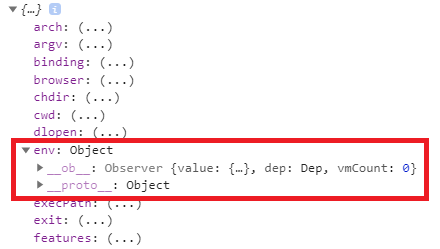
If it's not a bug I believe it should be documented on this page: https://quasar.dev/quasar-cli/cli-documentation/handling-process-env.
Thank you
 louisameline
All 6 comments
The process object is only available in the context of a node.js application. Webpack automatically removes it for you.
For Vue CLI there is some documentation here: https://cli.vuejs.org/guide/mode-and-env.html#modes
Note that only variables that start with VUE_APP_ will be statically embedded into the client bundle with webpack.DefinePlugin.
How WebPack's DefinePlugin works is explained here: https://webpack.js.org/plugins/define-plugin/
The Quasar CLI works a bit differently than the Vue CLI, but I believe the idea is the same. There is even a section that explains how it (Webpack) strips out code when running in different modes: https://quasar.dev/quasar-cli/cli-documentation/handling-process-env#Stripping-out-code
Edit: The above Quasar CLI documentation page does not mention Webpack at all. I think it should be updated to be more descriptive.
 MartinManev
on 22 Aug 2019
MartinManev
on 22 Aug 2019
Thank you for the response. It does work when I reach it the way I explained above with env: process.env though. Should I stop doing that and reproduce the same functionality another way? It's handy to have these predefined.
Edit: I'm confused, the docs say it can be used at runtime in all modes:
can help you differentiate runtime procedure depending on Quasar Mode (SPA/PWA/Cordova/Electron)
louisameline
on 22 Aug 2019
I don't know about using process.env itself. It might not be safe but I can't be sure until I do some more research.
The intended idea is that Webpack will detect and swap any members of process.env with their compile-time value. And maybe do some optimization on top, like the code stripping idea. For Vue CLI, only variables starting with VUE_APP_ will be made available, so process.env.VUE_APP_MY_VARIABLE is good, but Quasar CLI doesn't seem to have this limitation.
So if you write process.env.MODE, then after compiling, it will become either spa, pwa, electron or whatever else it can be. If you write process.env.MODE === 'electron' the whole expression will be swapped with either true or false.
One possible use for this feature is, as stated, to change the functionality and behavior of your app when running in different modes. So you could add a lot of debug messages and extra pages when compiling for development mode, but strip them entirely in production. And of course, you can define any variable you want in your quasar.conf.js file and use it in your compiled application.
As to wether to use process.env itself directly, again, I'm not sure.
MartinManev
on 22 Aug 2019
I did a test in Vue CLI. process.env can be used directly, but I think Webpack swaps it with an inlined object literal.
Take a look at this:
let obj = process.env;
console.log(obj);// Prints the object contents...
console.log(process.env);// Exactly the same as above, no difference
console.log(obj === process.env);// false
console.log(process.env === process.env);// false
console.log(obj === obj);// true
Edit: Also
let obj2 = process.env;
console.log(obj.NODE_ENV);// development
console.log(obj.NODE_ENV === obj2.NODE_ENV);// true
obj.NODE_ENV = 'foo';
console.log(obj.NODE_ENV);// foo
console.log(obj.NODE_ENV === obj2.NODE_ENV);// false
I get it thank you, it makes sense. Maybe a note in the docs for people like me who naively think they can manipulate this object like any other would be helpful.
louisameline
on 22 Aug 2019
Be careful, especially if you are using either of the @quasar/qenv or @quasar/dotenv app extensions in the Quasar CLI (which is what we recommend).
While @MartinManev makes a good point, he is comparing Vue CLI to Quasar CLI. They are very different things.
 nothingismagick
on 22 Aug 2019
nothingismagick
on 22 Aug 2019
Related issues
 sskwrl
·
3Comments
sskwrl
·
3Comments
 victorborgaco
·
3Comments
victorborgaco
·
3Comments
 Bangood
·
3Comments
Bangood
·
3Comments
 hctpbl
·
3Comments
hctpbl
·
3Comments
 xereda
·
3Comments
xereda
·
3Comments
Most helpful comment
The
processobject is only available in the context of a node.js application. Webpack automatically removes it for you.For Vue CLI there is some documentation here: https://cli.vuejs.org/guide/mode-and-env.html#modes
How WebPack's DefinePlugin works is explained here: https://webpack.js.org/plugins/define-plugin/
The Quasar CLI works a bit differently than the Vue CLI, but I believe the idea is the same. There is even a section that explains how it (Webpack) strips out code when running in different modes: https://quasar.dev/quasar-cli/cli-documentation/handling-process-env#Stripping-out-code
Edit: The above Quasar CLI documentation page does not mention Webpack at all. I think it should be updated to be more descriptive.