Quasar: Error in callback for watcher "value": "TypeError: Cannot read property 'desktop' of undefined" found in <QMenu>
I have this problem when import a new QSelect component,
app.js:67460 [Vue warn]: Error in callback for watcher "value": "TypeError: Cannot read property 'desktop' of undefined" found in
---> <QMenu>
       <QSelect>
         <SearchForm> at resources/assets/js/forms/SearchForm.vue
           <Table> at resources/assets/js/components/Table.vue
             <Listar> at resources/assets/js/components/ListAdmin.vue
               <Admin> at resources/assets/js/pages/Admin.vue
                 <QPageContainer>
                   <QLayout>
                     <Default> at resources/assets/js/layout/Default.vue
                       <Main> at resources/assets/js/layout/Main.vue
                         <Root>
I use quasar without quasar CLI in standalone way, my app file look that way
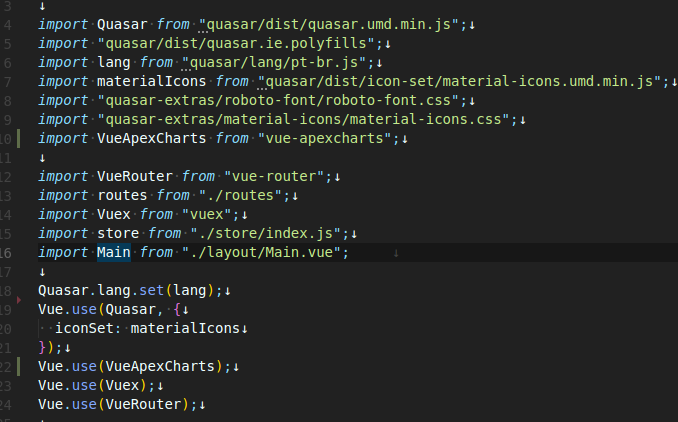
And when debug in the transpiled file app.js

Thanks
 nikoz84
All 11 comments
@nikoz84 you need to provide more information. Also as you are using the UMD version, you don't need to use Vue.use(Quasar, //..., Quasar UMD already calls that for you. If you need to change the iconSet, you need to do Quasar.iconSet.set(Quasar.iconSet.fontawesomeV5/* or something else */), MaterialIcons is already the default so you can remove the Vue.use(Quasar, //..., part completely. You can check the docs for icon sets.
@smolinari I think you will take care of this issue. The problem is about the Platform plugin. One call for that plugin that produced an error is in here. The place where the Platform plugin is installed is here, definition of the called install method is here.
 yusufkandemir
on 2 Sep 2019
yusufkandemir
on 2 Sep 2019
Thanks @yusufkandemir.
@nikoz84 - Are you using Vue CLI and attempting to "plug-in" Quasar?
Scott
 smolinari
on 2 Sep 2019
smolinari
on 2 Sep 2019
Also, looking at a plugged-in Quasar, the code to get it plugged-in looks like this.
Vue.use(Quasar, {
  config: {},
  components: {
    QLayout,
    QHeader,
    QDrawer,
    QPageContainer,
    QPage,
    QToolbar,
    QToolbarTitle,
    QBtn,
    QIcon,
    QList,
    QItem,
    QItemSection,
    QItemLabel
  },
  directives: {
  },
  plugins: {
  }
})
So, bottom line, you need to explain better how you've gotten Quasar set up. UMD or Vue CLI plug-in or some other fashion. The first two are the supported ways. Anything else is not supported.
Scott
smolinari
on 2 Sep 2019
@nikoz84
Please clarify your setup. Are you using Quasar CLI / Vue CLI / UMD?
 rstoenescu
on 3 Sep 2019
rstoenescu
on 3 Sep 2019
Any barebones repo with your setup would be immensely helpful for us in order to help you.
rstoenescu
on 3 Sep 2019
i'm not use quasar cli / vue cli or UDM. I use Laravel Mix and i install like a NPM packege.

Only this component fail when i import in a vue file.

nikoz84
on 3 Sep 2019
The error occurs when I click on the component and not when it is imported


nikoz84
on 3 Sep 2019
Ok, I see now.
The part with Vue.use(Quasar, ...) is extremely important. That, along many other things, installs the "Platform" Quasar plugin. Without it, "this.$q.platform" (and many others) will NOT be available and will break your app.
So make sure that on the client-side, Vue.use(Quasar, ...) is run before your app is kicked off (new Vue(app)).
I also notice inconsistencies into your app:
- you have the old "quasar-extras" package (which is meant to work with <= v0.17) instead of "@quasar/extras"
- you're loading material-design-icons and roboto-fontface instead of relying on "@quasar/extras"
rstoenescu
on 3 Sep 2019
Thanks
nikoz84
on 3 Sep 2019
If someone want the solution, i update de quasar extras, and in the app.js pass the Quasar object with the options. Thanks and sorry for my terrible english @rstoenescu @smolinari smolinari
import Vue from "vue";

import Quasar from "quasar";
import "quasar/dist/quasar.ie.polyfills.umd.min.js";
import lang from "quasar/lang/pt-br.js";
import materialIcons from "quasar/dist/icon-set/material-icons.umd.min.js";
import "@quasar/extras/roboto-font/roboto-font.css";
import "@quasar/extras/material-icons/material-icons.css";

Vue.use(Quasar, {
  lang,
  iconSet: materialIcons
});


nikoz84
on 4 Sep 2019
I'm getting the same error as above, except it only occurs when I compile my own component-library (that builds on top of quasar), and then import that into a different project.
My project is also a Vue app that plugs in Quasar.
However, I do correctly (to my knowledge) do Vue.use (quasar, {


The issue seems to originate from utils/escape-key.js that tries to make use of the Platform plugin.
After editing the (minified) file directly in my browser (console>sources tab in chrome) with some console.logs, I get the following.


If I change the if-statement as seen in the screenshot in my node-modules directly in both my component library and my web-app into the following, I can use the dropdowns (components that use q-menu) just fine!
if (Platform.is === undefined || Platform.is.desktop === true) {
Obviously this would likely bug out the mobile view, so that's not much of a permanent solution.
::edit::
On second thought, it makes much more sense to turn
if (Platform.is === undefined || Platform.is.desktop === true) {
into
if (Platform.is !== undefined && Platform.is.desktop === true) {
 shandrolis
on 22 Oct 2019
shandrolis
on 22 Oct 2019
Related issues
 mesqueeb
·
3Comments
mesqueeb
·
3Comments
 jigarzon
·
3Comments
jigarzon
·
3Comments
 green-mike
·
3Comments
green-mike
·
3Comments
 slowaways
·
3Comments
slowaways
·
3Comments
 Bangood
·
3Comments
Bangood
·
3Comments
Most helpful comment
I'm getting the same error as above, except it only occurs when I compile my own component-library (that builds on top of quasar), and then import that into a different project.
My project is also a Vue app that plugs in Quasar.
However, I do correctly (to my knowledge) do Vue.use (quasar, {}) in my main.ts, and all my packages are up-to-date with the latest versions of quasar.

The issue seems to originate from utils/escape-key.js that tries to make use of the Platform plugin.
After editing the (minified) file directly in my browser (console>sources tab in chrome) with some console.logs, I get the following.
If I change the if-statement as seen in the screenshot in my node-modules directly in both my component library and my web-app into the following, I can use the dropdowns (components that use q-menu) just fine!
if (Platform.is === undefined || Platform.is.desktop === true) {Obviously this would likely bug out the mobile view, so that's not much of a permanent solution.
::edit::
On second thought, it makes much more sense to turn
if (Platform.is === undefined || Platform.is.desktop === true) {into
if (Platform.is !== undefined && Platform.is.desktop === true) {