Summary of Bug
I pulled my quasar project from git, ran npm install, and then npm run-script (which is the same as quasar dev). However, compiling was stuck at 0%. I ran dev command multiple times but would always get stuck on 0%.
I then tried running quasar build (which actually compiled correctly) and then ran quasar dev again, and it worked this time. I'm wondering if anyone has had this issue as well.
To Reproduce
Steps to reproduce the behavior: (this worked for me)
- delete quasar app and then pull from github
- run
quasar dev - compile should get stuck on 0%
Expected Behavior
I think what should happen is being able to run dev without having to build the quasar project
 luna215
All 23 comments
This is not happening to me. I just tried with the demo app of one of my app extnsions.
I think we need more info to go on.
Can you post the output of your quasar info?
thanks
 hawkeye64
on 8 Aug 2019
hawkeye64
on 8 Aug 2019
@hawkeye64 Sure thing. Here it is:
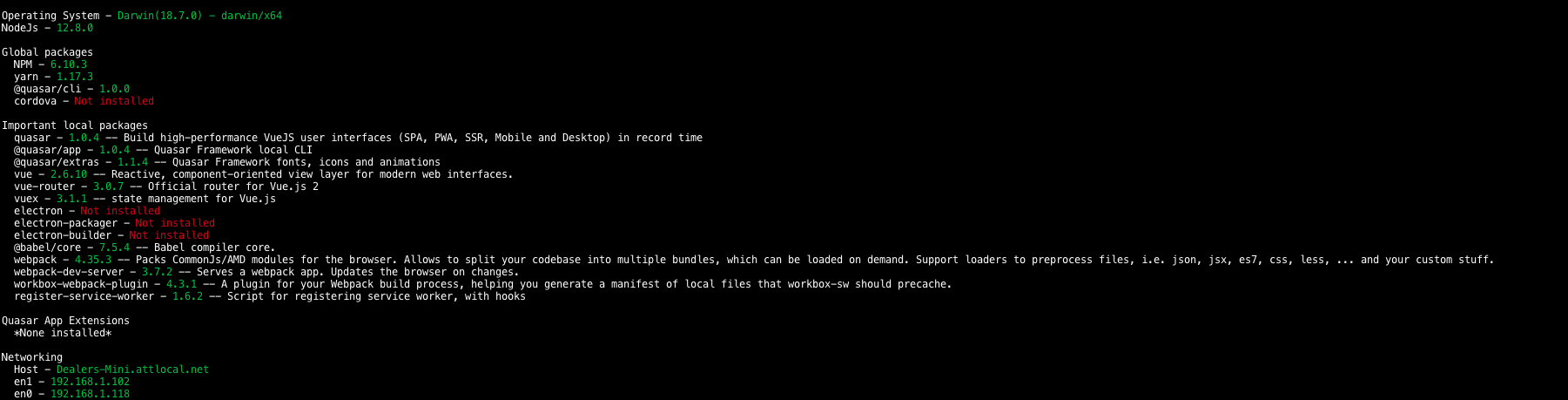
Also, I had to do quasar build again. However, after that, it seems to work perfectly.
luna215
on 9 Aug 2019
Hi,
Thank you for the report. However, there can be a LOT of reasons why this happened to you (most outside of the control of Quasar). This information is simply not enough :(
Can you consistently reproduce this? Haven't heard from anyone (except this case) of having to build first in order for quasar dev to work. This would have been a massive problem for a lot of people. If the error is consistent, would you be so kind to share the repo (or create a barebone repo with which I can reproduce) pls? I really want to rule out any eventual bugs in Quasar for this specific scenario (which I am yet to find out which it is)... maybe there's something to be gained from this, but need your help in reproducing the error.
Thanks!
 rstoenescu
on 9 Aug 2019
rstoenescu
on 9 Aug 2019
I would like to add that I have (and some others) stumbled upon this from several users, usually using stable node version (lts) and updating of yarn, plus with the usual trouble shooting of deleting node_modules folder and lock files solves it. But yeah need to get down with this, as far as i recall npm started messing up for local starting v1 beta hence that's the time i used yarn because of it, if it's out of scope for quasar, then imo we really need a trouble shooting section about this in the docs.
 metalsadman
on 12 Aug 2019
metalsadman
on 12 Aug 2019
Hi,
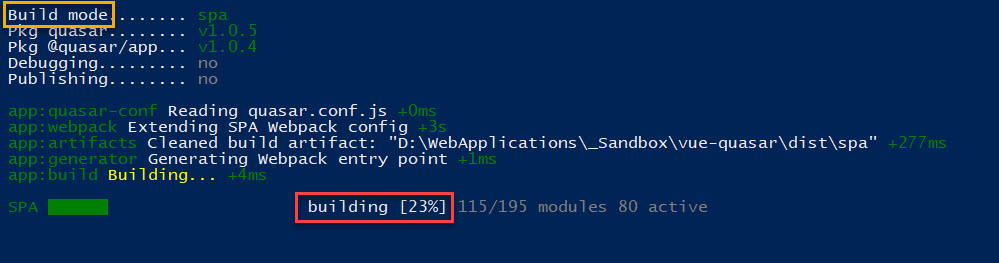
I encountered a similar problem. I wanted to test Quasar framework (windows 10) and yesterday I created an app with the Quasar CLI, everything worked well until today. When I ran 'quasar dev' the CLI always freezes at 40% of the build, when I run 'quasar build' the same problem but it then freezes at 23% . (no browser gets opended, no error messages, nothing, just freezing).
I ran 'quasar clean' and then again 'quasar build', I deleted the .quasar folder try to rebuild in dev mode but nothing worked. So I deleted and recreated the 'test app' and the the build process worked again.

 artnova-david
on 16 Aug 2019
artnova-david
on 16 Aug 2019
@rstoenescu Sorry for getting back to you so late, but I can't consistently produce it but it does occur at random times. Similar to @artnova-david, mine also freezes at random percentages. Could it be that I have a custom boot file and the .quasar folder? I'll get you that barebone repo as soon as I can!
luna215
on 16 Aug 2019
I'm having the same problem on a mac
OS: Mojave 10.14.6
Homebrew 2.1.11
quasar info
Operating System    Darwin(18.7.0) - darwin/x64
NodeJs              12.9.1

Global packages
  NPM               6.10.2
  yarn              Not installed
  @quasar/cli       1.0.0
  cordova           Not installed
If i run ctrl+c and then try again, (with some web searching in between) it finally started working.
So then i tried it in another project where i checked out a new branch and created a quasar project in that apps directory (quasar create <existing directory for non quasar project where i moved all files and folders in a sub folder but missed a hidden file>) and noticed the following the second time i tried to quasar dev:
SPA █████████████████████████ [100%] in ~1s


 ERROR  Failed to compile with 1 errors                                                                                              8:35:54 AM

 error  in ./.quasar/client-entry.js

Module build failed (from ./node_modules/babel-loader/lib/index.js):
  BrowserslistError: [BABEL] /Users/travis/Documents/app1/.quasar/client-entry.js: /Users/travis/Documents/app1 contains both .browserslistrc and package.json with browsers (While processing: "/Users/travis/Documents/app1/node_modules/@quasar/babel-preset-app/index.js$0")

@ multi (webpack)-dev-server/client?http://0.0.0.0:8080 (webpack)/hot/dev-server.js ./.quasar/client-entry.js
I removed that left over .browserslistrc from the old project and ran quasar clean and quasar dev and it started working normally.
While that resolved that instance, i still had the problem multiple times on my system in other projects.
 jtlindsey
on 6 Sep 2019
jtlindsey
on 6 Sep 2019
Also on Mac:
Mojave 10.14.6
Homebrew 2.1.6
I was just looking to see if this issue was pre-existing before making a new Issue, and glad to see others seeing it.
Yes, I am running quasar dev. It is more than 50/50 that it doesn't even seem to start but just hangs at 0%:
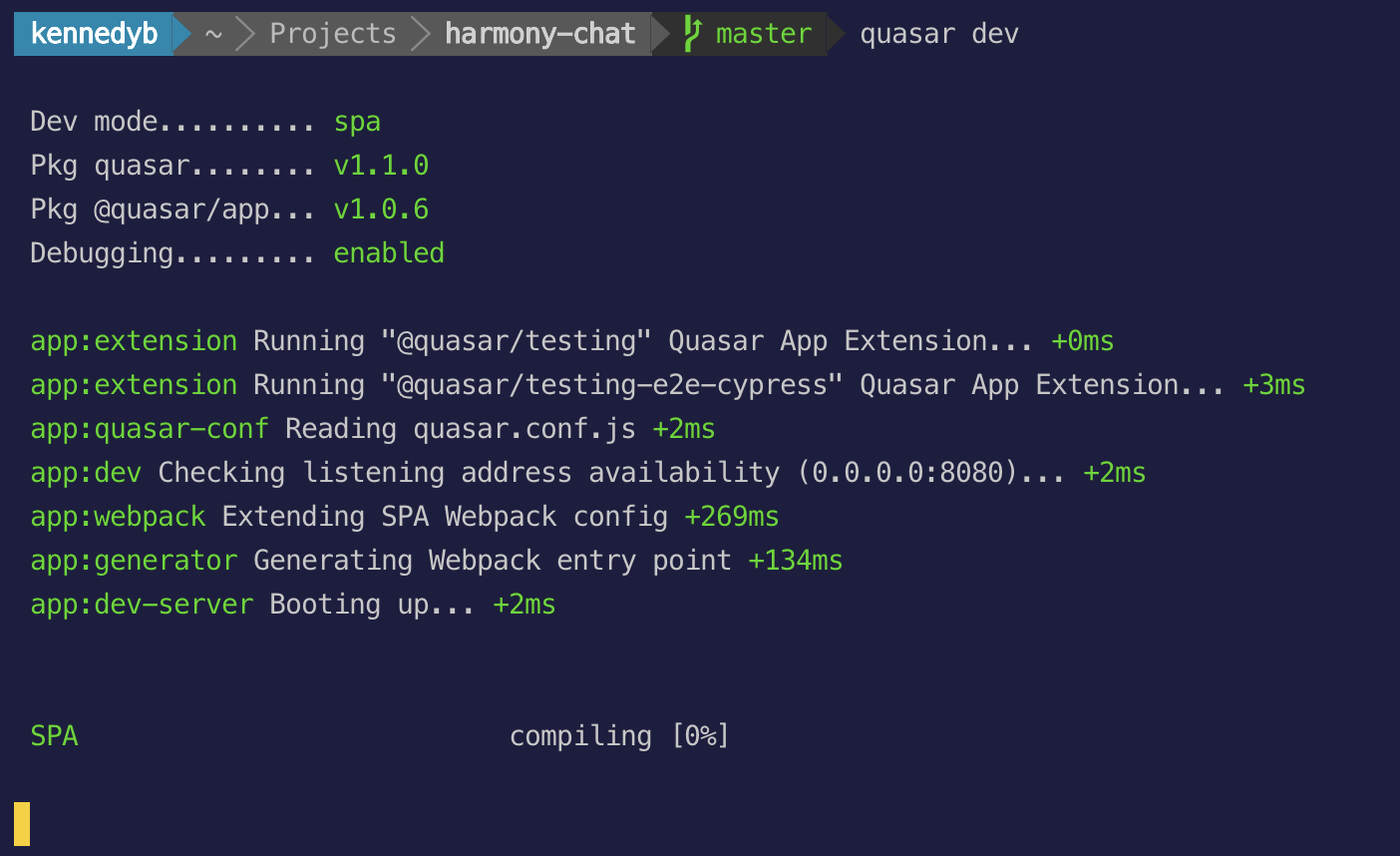
But within three to four consecutive attempts it eventually compiles and runs. And it when it does, it runs with no console errors, lint errors or anything of that nature. It also builds to spa, pwa, and electron without issue.
The fact that the compile itself is not consistent is concerning, and I'm thinking that it isn't my code as if that were the case it should fail to compile all the time?
I don't know how to reproduce, but you can see the github repo where I'm working here: https://github.com/bpkennedy/harmony-church-chat. Feel free to pull down and build and see if you see the same things.
EDIT: Here is my quasar info:
kennedyb ~ Projects harmony-chat master quasar info
Operating System - Darwin(18.7.0) - darwin/x64
NodeJs - 12.9.1
Global packages
NPM - 6.10.2
yarn - 1.13.0
@quasar/cli - 1.0.0
cordova - 9.0.0 ([email protected])
Important local packages
quasar - 1.1.0 -- Build high-performance VueJS user interfaces (SPA, PWA, SSR, Mobi
le and Desktop) in record time
@quasar/app - 1.0.6 -- Quasar Framework local CLI
@quasar/extras - 1.3.1 -- Quasar Framework fonts, icons and animations
vue - 2.6.10 -- Reactive, component-oriented view layer for modern web interfaces.
vue-router - 3.0.7 -- Official router for Vue.js 2
vuex - 3.1.1 -- state management for Vue.js
electron - 5.0.10 -- Build cross platform desktop apps with JavaScript, HTML, and C
SS
electron-packager - 13.1.1 -- Customize and package your Electron app with OS-specific bundles (.app, .exe, etc.) via JS or CLI
electron-builder - Not installed
@babel/core - 7.5.5 -- Babel compiler core.
webpack - 4.39.3 -- Packs CommonJs/AMD modules for the browser. Allows to split your codebase into multiple bundles, which can be loaded on demand. Support loaders to preprocess files, i.e. json, jsx, es7, css, less, ... and your custom stuff.
webpack-dev-server - 3.8.0 -- Serves a webpack app. Updates the browser on changes.
workbox-webpack-plugin - 4.3.1 -- A plugin for your Webpack build process, helping you generate a manifest of local files that workbox-sw should precache.
register-service-worker - 1.6.2 -- Script for registering service worker, with hooks
Quasar App Extensions
@quasar/quasar-app-extension-testing - 1.0.0 -- A Quasar App Extension for managing Test Harnesses
@quasar/quasar-app-extension-testing-e2e-cypress - 1.0.0-beta.10 -- A Quasar App Extension for Cypress e2e
Networking
Host - MacBook-Pro-2.local
en0 - 192.168.1.6
EDIT: I've tried wiping node_modules + package-lock.json and reinstalling, and I've also tried quasar clean && quasar dev. No change in the inconsistent compile.
 bpkennedy
on 8 Sep 2019
bpkennedy
on 8 Sep 2019
try this guys, do the usual cleanup (delete node_modules, lock files etc..), use LTS version of node js 10.16 something also update your yarn versions to latest. as looking at peeps' quasar info, guys are either on current node js or using outdated yarn versions.
metalsadman
on 10 Sep 2019
Tried the suggestions above (on Ubuntu Server 18.04.2 LTS) , but nothing seemed to work when I ran quasar dev. Was originally on node 12.6 so tried removing it, installing 10.x and cleaning the node_modules folder to see if that worked. Still no luck.
Installing [email protected] seemed to do the trick though:
npm i -S [email protected]
Kudos to these folks on stackoverflow who were discussing a similar issue!
 deplorable
on 7 Oct 2019
deplorable
on 7 Oct 2019
I also have this issue in a lot of my quasar projects.
Sometimes I ctrl+c to stop and try again 10 times, then it will suddenly start compiling.
Building once also seems to fix this for the dev server.
I too cannot reproduce this consistently, it seems random.
 mesqueeb
on 10 Oct 2019
mesqueeb
on 10 Oct 2019
I also have this issue in a lot of my quasar projects.
Sometimes Ictrl+cto stop and try again 10 times, then it will suddenly start compiling.
So weird, but this works for me.
Thanks
 asiz15
on 17 Oct 2019
asiz15
on 17 Oct 2019
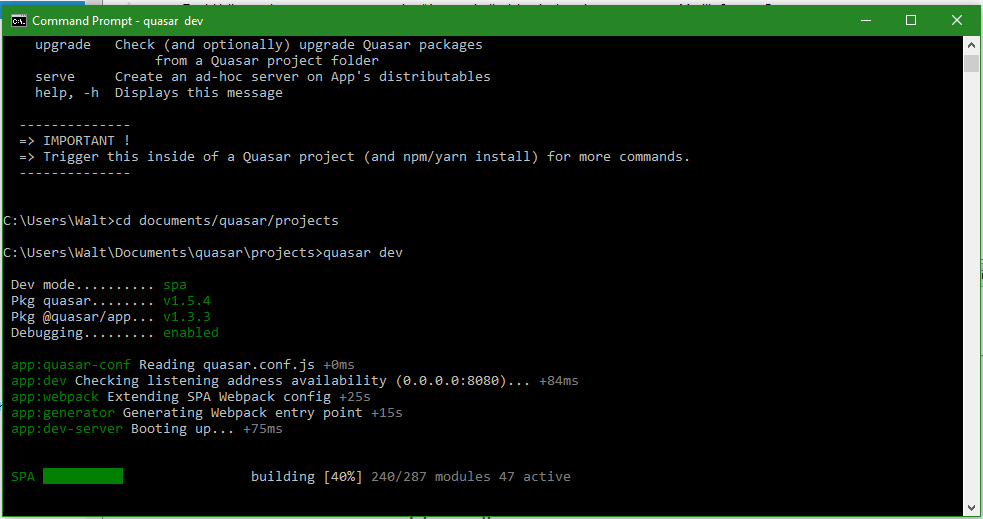
Similar issue here.
Operating System - Windows_NT(10.0.18363) - win32/x64
NodeJs - 12.13.1
Global packages
NPM - 6.12.1
yarn - Not installed
@quasar/cli - 1.0.3
cordova - Not installed
Important local packages
quasar - 1.5.4 -- Build high-performance VueJS user interfaces (SPA, PWA, SSR, Mobile and Desktop) in record time
@quasar/app - 1.3.3 -- Quasar Framework local CLI
@quasar/extras - 1.3.3 -- Quasar Framework fonts, icons and animations
vue - 2.6.10 -- Reactive, component-oriented view layer for modern web interfaces.
vue-router - 3.1.3 -- Official router for Vue.js 2
vuex - 3.1.2 -- state management for Vue.js
electron - Not installed
electron-packager - Not installed
electron-builder - Not installed
@capacitor/core - Not installed
@capacitor/cli - Not installed
@capacitor/android - Not installed
@capacitor/ios - Not installed
@babel/core - 7.7.4 -- Babel compiler core.
webpack - 4.41.2 -- Packs CommonJs/AMD modules for the browser. Allows to split your codebase into multiple bundles, which can be loaded on demand. Support loaders to preprocess files, i.e. json, jsx, es7, css, less, ... and your custom stuff.
webpack-dev-server - 3.9.0 -- Serves a webpack app. Updates the browser on changes.
workbox-webpack-plugin - 4.3.1 -- A plugin for your Webpack build process, helping you generate a manifest of local files that workbox-sw should precache.
register-service-worker - 1.6.2 -- Script for registering service worker, with hooks
Quasar App Extensions
None installed
Networking
Host - Abraham
Ethernet 2 - 10.0.0.199
Wi-Fi - 10.0.0.125
Here's a screen shot of the hanged process:
 vahost
on 8 Dec 2019
vahost
on 8 Dec 2019
Just throwing my 2 cents. Are you by chance in "copy-paste" mode? That halts any progress. Can get out of it if right-clicking on the command prompt window.
rstoenescu
on 19 Dec 2019
I've spent 20 mins testing this in various ways.
Not sure if this is the same issue as "copy-paste" mode but simply left clicking once in the cmd window halts the process. It would seem this is very easy to do by accident.
For me, 40% is where the main bulk of processing is done, after that is skips up to 100 really quickly which would also explain why 40% is this magic line people are seeing.
 webnoob
on 19 Dec 2019
webnoob
on 19 Dec 2019
That's a feature of the windows terminal itself. It halts execution until you're out of the "copy-paste" mode. Out of anyone's control, including Quasar's.
rstoenescu
on 19 Dec 2019
Can everybody else confirm that the right above is not the issue reported pls?
rstoenescu
on 19 Dec 2019
I can confirm the left-click, right-click behavior after some experimentation. I don't know if that's what I was experiencing. All I can say about that is that I restored from backup and tried again, and I haven't had the issue since. On the other hand, maybe I just stopped inadvertently left-clicking. Sorry ... I can't be more helpful.
vahost
on 20 Dec 2019
Please reopen if the copy-paste is not your issue.
rstoenescu
on 20 Dec 2019
I had this same problem, and it was not related to the copy-paste. It was my own dumb fault, but it took me "a little" time to figure out what I screwed up. I figured I would post what I did wrong in the hopes that it might help some other developer having the same problem.
I made a few changes, but wasn't really watching the console to see that it was stuck. A few minutes later, as I was clicking around in the app, I noticed it was not working and things were not loading. When I looked at the console, it had the blue "WAIT Compiling...". I just figured I needed to ctrl+c and rerun quasar dev. After that, I was dead with no real message as to why I was dead. I would usually die at the 40%, but sometimes I made it to 44% (as shown below)
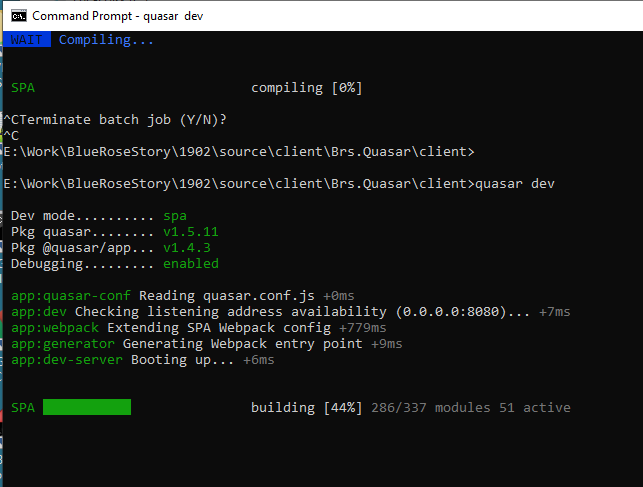
I backed up my repo, undid my changes and compiled and ran fine. As I started adding them back, I found this "dumb" mistake of putting more than one element at the root of the template. I have made that same mistake in the past, but I would get a message telling me my mistake. Here was my offending line. Once I removed that, did ctrl+c again, and then I ran quasar dev and it all worked again.
So, to recap, here was my mistake.

If more people are seeing this same issue, is it possible something changed where this mistake displayed an error in the past, but is no longer displaying it? If there had been a message, I would have just made the fix, and never googled the problem. Just a thought...
 BlueRoseStory
on 28 Dec 2019
BlueRoseStory
on 28 Dec 2019
I faced the same issue. It was because of an error inside a "v-bind".
I wrote
<q-popup-edit :value="edit.salutation,edit.firstname,edit.lastname"...
Instead of
<q-popup-edit :value="edit.salutation + edit.firstname + edit.lastname"
The problem is: how to find the error origin in this case?
 mmehira
on 4 Apr 2020
mmehira
on 4 Apr 2020
@BlueRoseStory IDE's linting should have sorted that out and shown you that's not allowed.
@mmehira Unfortunately, you just need to compare your changes between versions for that kind of issue...
webnoob
on 4 Apr 2020
@webnoob That's what I've done
Thanks
mmehira
on 4 Apr 2020
Related issues
 wc-matteo
·
3Comments
wc-matteo
·
3Comments
 victorborgaco
·
3Comments
victorborgaco
·
3Comments
 xereda
·
3Comments
xereda
·
3Comments
 danikane
·
3Comments
danikane
·
3Comments
 nueko
·
3Comments
nueko
·
3Comments
Most helpful comment
I would like to add that I have (and some others) stumbled upon this from several users, usually using stable node version (lts) and updating of yarn, plus with the usual trouble shooting of deleting node_modules folder and lock files solves it. But yeah need to get down with this, as far as i recall npm started messing up for local starting v1 beta hence that's the time i used yarn because of it, if it's out of scope for quasar, then imo we really need a trouble shooting section about this in the docs.