Quasar: Bring back Min and Max options for QDate
The new Date picker is nice, including the possibility to pass a function as options to disable certains dates.
However the min and max options were useful. I don't need to let users browse through the months of 2020 and beyond, when I know that my max date is 2019 December 31st.
I wish min and max were brought back to the component to prevent going too far or too early in the calendar.
Thank you
 louisameline
All 12 comments
You can just use something like :options="(date) => date <= 'my-max-date'" instead of the min/max
 lucasfernog
on 5 Jul 2019
lucasfernog
on 5 Jul 2019
I already do, that's not the point. This is about blocking the calendar view beyond certain dates, not just preventing a date from being selected.
louisameline
on 5 Jul 2019
Yes! I agree. Restricting this via the calendar is an essential feature for many business apps that I work on.
 tohagan
on 6 Jul 2019
tohagan
on 6 Jul 2019
I concur. The UI needs to respect date restrictions and disallow users from navigating into months/years that are not allowed. Instead of min and max, though, I'd rather have the UI follow the current, more dynamic options setting. Such would make it possible to build something like a date range picker.
 brianwhu
on 30 Jul 2019
brianwhu
on 30 Jul 2019
Closing this as it's really not necessary. Just pass the options function and it's all done.
 pdanpdan
on 8 Feb 2020
pdanpdan
on 8 Feb 2020
Please read this discussion as this has been discussed, and reopen. Thank you
louisameline
on 8 Feb 2020
You want the user not to be able to navigate to some months?
I'll reopen it, but I don't see it as a good ideea.
pdanpdan
on 8 Feb 2020
@pdanpdan From business cases I would disagree. we often wish to restrict a date to a limited period of time and thus disable dates outside that range (eg. within 14 days). Another example ... disallow a set of dates ... like weekends, bank holidays, public holidays, days that are already booked. This may therefore require a lazy async lookup per month.
Also giving immediate visual cues on which days are available/unavailable, prior to the user selecting a date is also valuable. For example they may be on the phone negotiating the date with a customer. Being able to see the available dates is very helpful.
These are the go/nogo features that I go hunting for when evaluating a widget library for business apps. Often its the date and time widgets that send me off hunting for a commercial replacement.
tohagan
on 13 Feb 2020
@tohagan disabling certain days is already possible, they get greyed and non-clickable.
@pdanpdan it's UX 101 to prevent browsing through useless interfaces. If the user can only book 3 months in advance for example, there is no point in letting him browse after that, it's just a waste of time to him, while it's obvious he can't when the calendar is blocked.
louisameline
on 13 Feb 2020
This feature would help to reach this component if range feature #5052 is approved
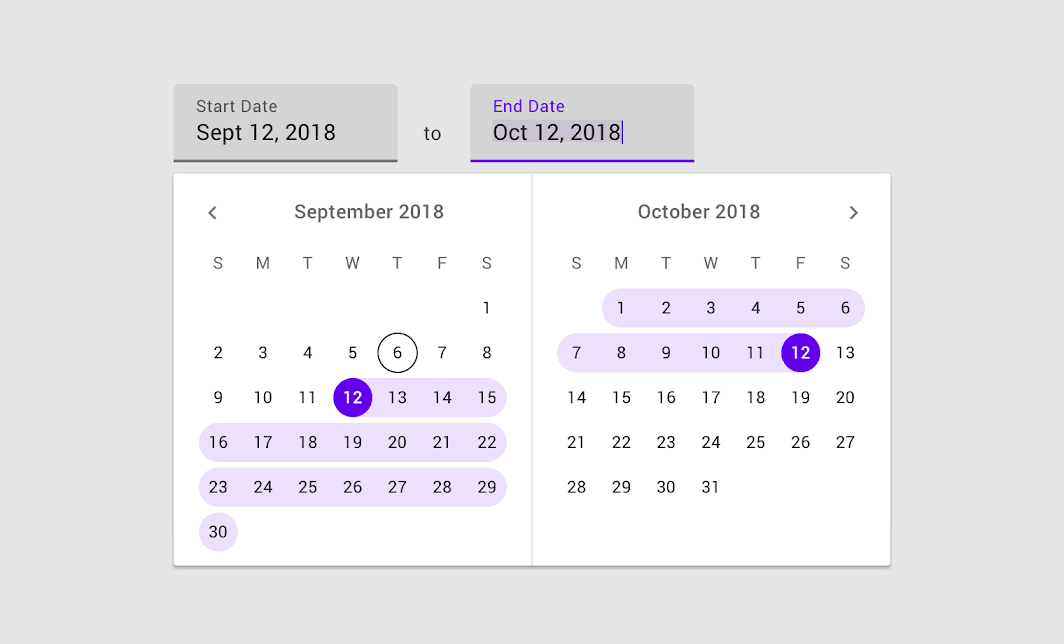
I've made a demo with a date range picker at bottom that would be improved with the max min options.
 leoelz
on 9 Jun 2020
leoelz
on 9 Jun 2020
I've implemented the navigation boundaries using 2 props:
minYearMonth and maxYearMonth: accepts YYYY/MM format
You can test it at https://leoelz.github.io/quasar/qdate-navigation-boundaries/#/form/date
(exists a PR #6407 that also can be solved with this implementation)
Please test the demo and comment (there are 2 inputs for the new props to be filled with YYYY/MM)
leoelz
on 10 Jun 2020
New props (navigation-min-year-month and navigation-max-year-month) will be available in Quasar v1.13.0
 rstoenescu
on 7 Aug 2020
rstoenescu
on 7 Aug 2020
Related issues
 mesqueeb
·
3Comments
mesqueeb
·
3Comments
 nueko
·
3Comments
nueko
·
3Comments
 jippy89
·
3Comments
jippy89
·
3Comments
 xereda
·
3Comments
xereda
·
3Comments
 wc-matteo
·
3Comments
wc-matteo
·
3Comments
Most helpful comment
I already do, that's not the point. This is about blocking the calendar view beyond certain dates, not just preventing a date from being selected.