Quasar: Full-height is not working properly
Hi guys...
I'm setting the class "full-height" (and "fit") to a q-card contained in a q-page, but I can't to do the card have the full height of the q-page.... Am I missing something?
Thanks in advance!

 jarlos3
All 8 comments
https://codepen.io/rstoenescu/pen/vqLmRd
Emphasis on:
<q-page-container>
<q-page class="column">
<q-card class="col my-card text-white"
The CSS helper class full-height simply applies height: 100%.. but CSS does not work like you'd expect in all scenarios... Best approach in this case is to use the Quasar Flex Grid like highlighted above.
 rstoenescu
on 15 Jun 2019
rstoenescu
on 15 Jun 2019
I'm facing the same problemes here. Code working fine in Quasar v0.17 stopped working in Quasar
Quasar v1.0.0-rc.4.
I tried what you say @rstoenescu but with no luck. Elements doesn't take fit & full-height into account.
I tried different code and different conditions and I can ensure that it its working fine in Quasar v0.17 but when moving code to Quasar v1.0 it does not work, no matter what you try. In most of the cases functionality is broken.
Here a clear example:

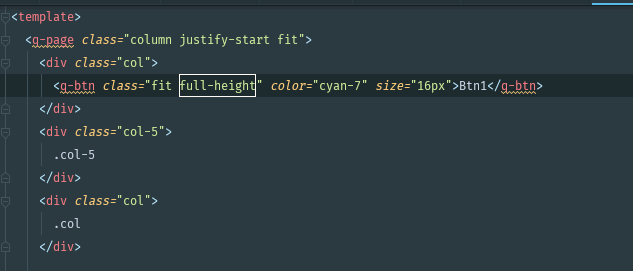
 kidox
on 17 Jun 2019
kidox
on 17 Jun 2019
@kidox Create a codepen and I'll show you how to do it.
rstoenescu
on 17 Jun 2019
@rstoenescu here you are: https://codepen.io/kidox/pen/MMyLXd
kidox
on 17 Jun 2019
@kidox https://codepen.io/rstoenescu/pen/XLdGMN
Notice:
<q-page class="column justify-start">
    <div class="col column">
      <q-btn class="col" ...
Thank you @rstoenescu.
Thus, I understand that since fit/full-height are responding different in Quasar v1.0 and in 0.17 it's better to play around with "col" and "column" classes, right?
And what if I want to specify a "col-5" class?
With your example it is not working: https://codepen.io/kidox/pen/YoqgjJ
kidox
on 17 Jun 2019
@rstoenescu thank you for your suggestion!
@kidox try this:
`
<q-page class="column justify-start">
    <div class="column col absolute-full">
        <div class="col-5 column">
            <q-btn class="col" color="cyan-7" size="16px">Btn1</q-btn>
        </div>
        <div class="col-5">
            .col-5
        </div>
        <div class="col">
            .col
        </div>
    </div>
</q-page>
`
jarlos3
on 19 Jun 2019
@jarlos3 thanks! It works flawlessly.
kidox
on 20 Jun 2019
Related issues
 hctpbl
·
3Comments
hctpbl
·
3Comments
 florensiuslaylim
·
3Comments
florensiuslaylim
·
3Comments
 alexeigs
·
3Comments
alexeigs
·
3Comments
 slowaways
·
3Comments
slowaways
·
3Comments
 jean-moldovan
·
3Comments
jean-moldovan
·
3Comments
Most helpful comment
@kidox https://codepen.io/rstoenescu/pen/XLdGMN
Notice: