Quasar: QInput on iOS native requires two taps
Software version
Operating System - Darwin(18.6.0) - darwin/x64
NodeJs - 8.11.3
Global packages
NPM - 6.7.0
yarn - Not installed
@quasar/cli - 1.0.0-rc.2
cordova - 9.0.0 ([email protected])
Important local packages
quasar - 1.0.0-rc.4
@quasar/app - 1.0.0-rc.6
@quasar/extras - 1.1.2
What did you get as the error?
No error information. Strictly UX related.
What were you expecting?
_QInput_ elements on an iOS build seem to require two distinct taps to pull up the keyboard. The first tap gives it focus. The second tap then allows editing the text.
Expecting a single tap to both bring focus to the input _and_ pull up the keyboard.
What steps did you take, to get the error?
Any _QInput_ used in a native iOS build. Mobile web is not an issue. Android is not an issue.
Also: not an issue with our 0.17 iOS build.
 wooliet
All 40 comments
Hi,
Cannot reproduce. Tested both on the emulator and on a real device. Keyboard comes up on first tap.
You haven't specified your Quasar version (only @quasar/app version, but that's the App CLI). Please confirm quasar package is 1.0.0-rc.4.
 rstoenescu
on 15 Jun 2019
rstoenescu
on 15 Jun 2019
@wooliet I also experienced this issue, however, I can no longer reproduce it.
In addition to the information @rstoenescu has asked for, could you please also post the dependencies section of your src-cordova/package.json file.
I have a feeling that the following sorted it for me:
- npm install -g cordova
- cd src-cordova
- cordova platform remove ios
- cordova platform add ios
I can't be sure and please post your package.json data before trying this so we can see if it's an issue with cordova / cordova-ios version or not.
 webnoob
on 15 Jun 2019
webnoob
on 15 Jun 2019
Sounds like a good idea @webnoob. I will report back when we've worked through your steps and tested again.
Copied below are the dependencies as they stand now.
_src-cordova/package.json_
  "dependencies": {
    "cordova-android": "^8.0.0",
    "cordova-ios": "^5.0.1",
    "cordova-plugin-camera": "^4.0.3",
    "cordova-plugin-compat": "^1.2.0",
    "cordova-plugin-file": "^6.0.1",
    "cordova-plugin-geolocation": "^4.0.1",
    "cordova-plugin-ios-camera-permissions": "^1.2.0",
    "cordova-plugin-network-information": "^2.0.1",
    "cordova-plugin-splashscreen": "^5.0.2",
    "cordova-plugin-statusbar": "^2.4.2",
    "cordova-plugin-whitelist": "^1.3.3",
    "phonegap-plugin-barcodescanner": "^7.1.2"
  },
Maybe try with cordova 9
 nothingismagick
on 17 Jun 2019
nothingismagick
on 17 Jun 2019
@nothingismagick I double-checked and that is the version installed:
npm ls -g --depth=0 | grep cordova
├── [email protected]
Also post the results of
quasar info
>
nothingismagick
on 17 Jun 2019
I've updated the info above with output of quasar info.
This is a tricky issue. The current behavior, on iOS native build, is definitely different from the 0.17 builds.
_(And sorry for size of the gifs, could not find out how to get markdown to reduce displayed image dimensions)._
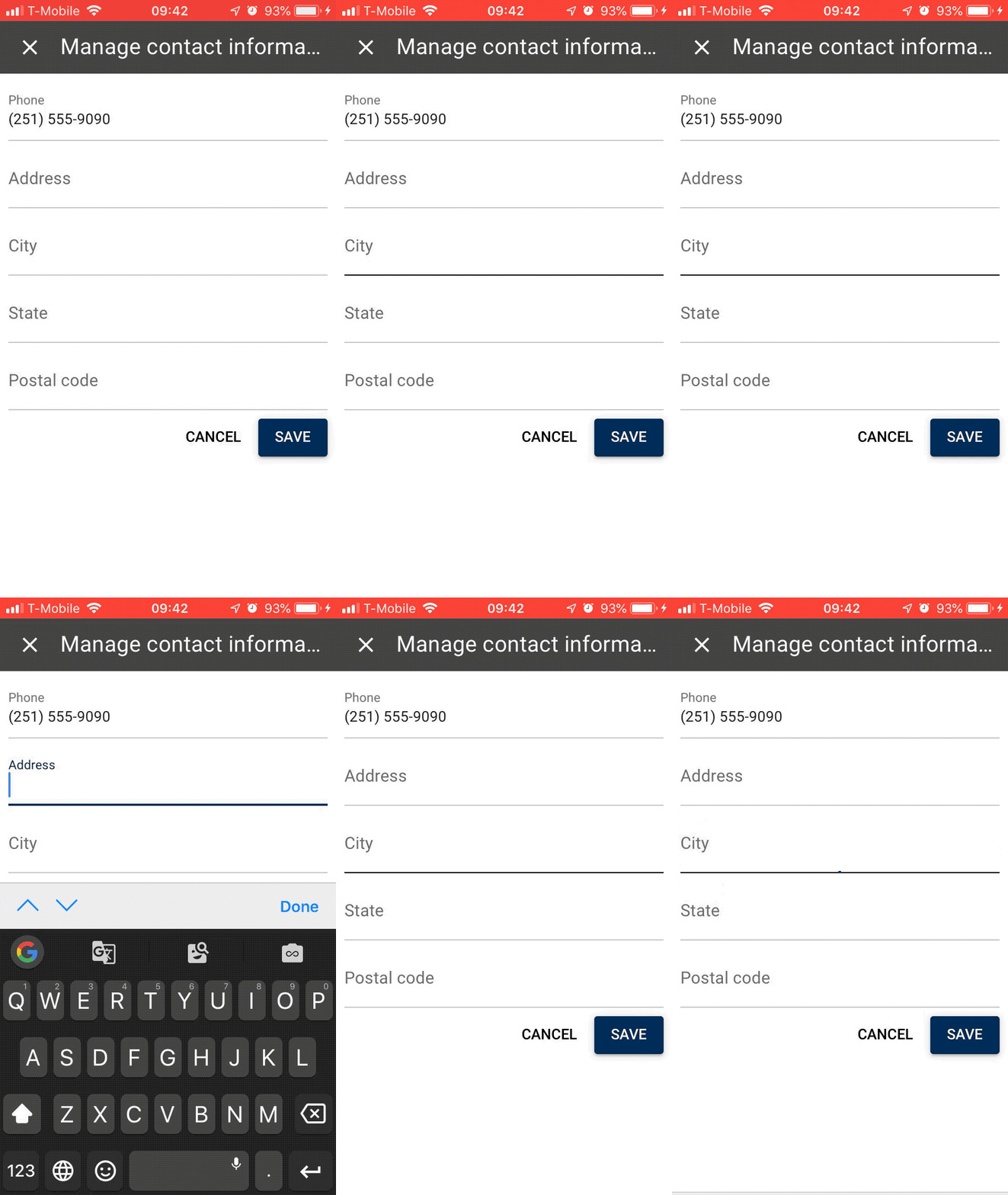
Current
A quick tap of the input gives it focus only. A _slightly_ longer tap gives it focus and keyboard.
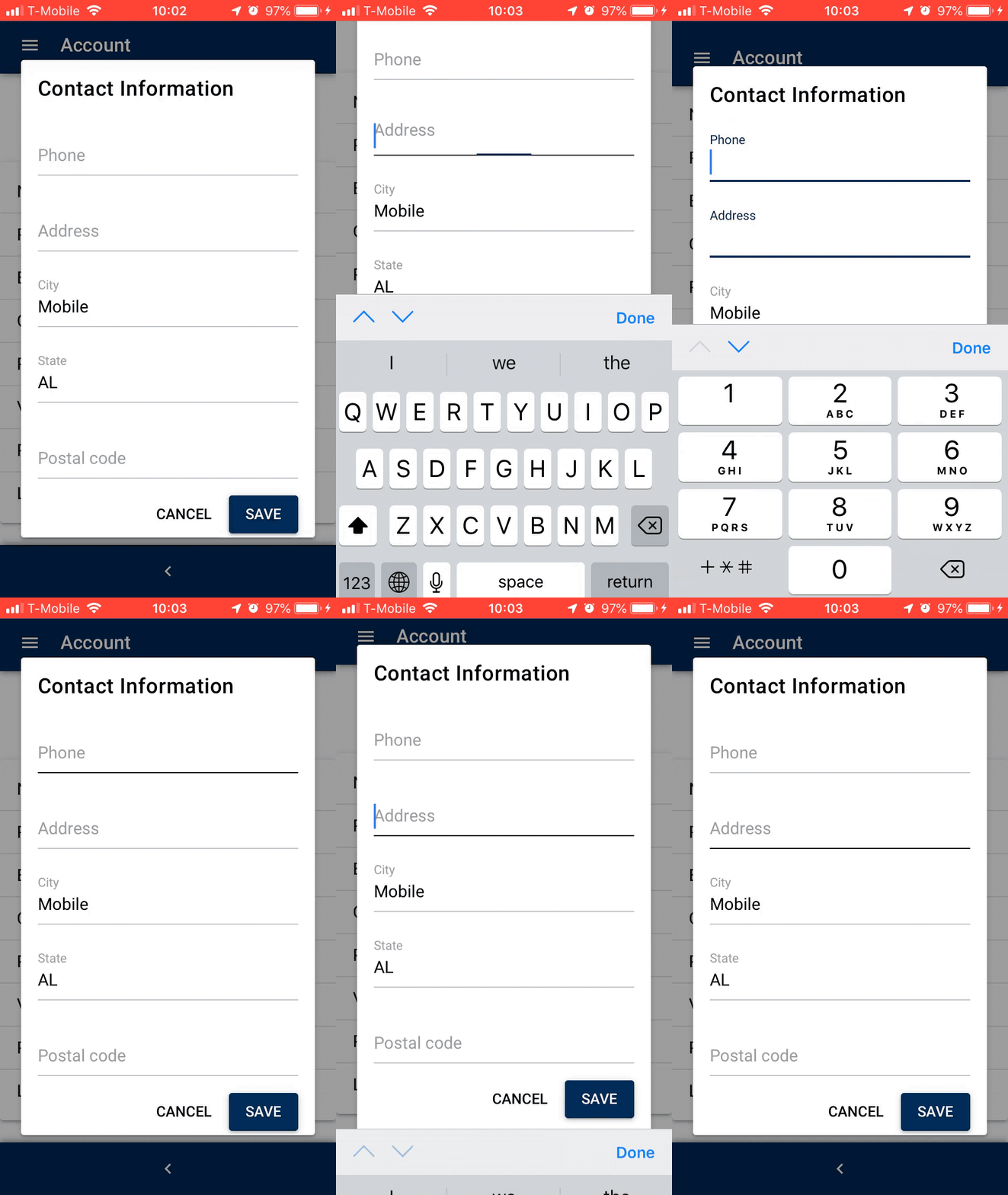
0.17
A quick tap of the input gives it focus and keyboard.
wooliet
on 17 Jun 2019
Also exactly what devices and what iOS are you using?
nothingismagick
on 17 Jun 2019
vids above on iPhone SE running iOS 12.3.1. It was reproducible on iPhone X (same version).
wooliet
on 17 Jun 2019
@wooliet Stab in the dark here - Is this an upgraded project from .17 to v1?
If so, does it happen with a brand new project creation using quasar create <your_proj> ?
webnoob
on 17 Jun 2019
It is an upgrade from 0.17.
Yes, this happens with a straight out of the box quasar create.
_src/pages/Index.vue_
<template>
  <q-page padding>
    <q-list no-border>
      <q-item>
        <q-input
          filled
          v-model.trim="nameFirst"
          label="First name"
          stack-label
          class="fit"
        />
      </q-item>
      <q-item>
        <q-input
          filled
          v-model.trim="nameLast"
          label="Last name"
          stack-label
          class="fit"
        />
      </q-item>
    </q-list>
  </q-page>
</template>

<script>
export default {
  name: 'PageIndex',
  data() {
    return {
      nameFirst: null,
      nameLast: null
    };
  }
}
</script>

wooliet
on 17 Jun 2019
Possible related: https://github.com/ionic-team/ionic-v3/issues/1012
nothingismagick
on 17 Jun 2019
More likely related: https://github.com/apache/cordova-plugin-wkwebview-engine/issues/86
And a potential fix:
https://www.npmjs.com/package/cordova-plugin-wkwebview-inputfocusfix
nothingismagick
on 17 Jun 2019
Good catch - @wooliet Can you try this and see if it fixes your issue?
webnoob
on 17 Jun 2019
This might be the issue - we aren't focussing on the same tick...
you can call .focus() so long as its in the same tick as a user action. For example, you can call .focus() on an element synchronously in click event handler.
you can call event.preventDefault() on the mousedown event to prevent the input from being blurred
From this PR: https://github.com/apache/cordova-plugin-wkwebview-engine/pull/37/
Also see this:
https://github.com/ionic-team/ionic-plugin-keyboard/issues/274
nothingismagick
on 17 Jun 2019
Any additional guidance?
Are you (@nothingismagick) saying there are things that can be done within Quasar?
Does the _inputfocus fix_ plugin also rely on installing the _wkwebview engine_ plugin? That seems like a large dependency, and hasn't had a new release in 1.5 years.
wooliet
on 18 Jun 2019
Try adding this plugin:
https://www.npmjs.com/package/cordova-plugin-wkwebview-inputfocusfix
And potentially this is something that could be fixed, but we need your help to know exactly what the problem is because we can't replicate.
nothingismagick
on 19 Jun 2019
@nothingismagick We had never switched from UIWebView. So, we added WKWebView, and then the inputfocusfix plugin, but the double tap issue persists.
Not sure if this is related, but we're watching this issue now: https://github.com/onderceylan/cordova-plugin-wkwebview-inputfocusfix/issues/10
We've also tried the ionic webview, but the issue is still there, along with other problems. https://github.com/ionic-team/cordova-plugin-ionic-webview
Our next attempt is to see if we can prove that it is an issue with iOS 12.2 and 12.3.1
 dlbass
on 24 Jun 2019
dlbass
on 24 Jun 2019
We were able to confirm the issue only appears since iOS. Inputs focus as expected in 11.4 :|
dlbass
on 25 Jun 2019
Can anybody check if this helps?
https://www.outsystems.com/forums/discussion/46409/focus-within-ios-mobile-is-not-opening-keyboard/#Post170328
 pdanpdan
on 12 Jul 2019
pdanpdan
on 12 Jul 2019
@pdanpdan We finally had a chance to try the KeyboardDisplayRequiresUserAction config mentioned in the Outsystems issue. It did not solve the double-tap issue for us.
dlbass
on 15 Jul 2019
Thank you for checking.
I think we have a way to solve it.
If you can do it please try to apply this PR (https://github.com/quasarframework/quasar/pull/4659) - it should fix the problem.
But the fix will land in production after Razvan returns from vacation (estimated 3 weeks).
pdanpdan
on 15 Jul 2019
That's excellent news! We'll test it out as soon as we can and report back.
dlbass
on 15 Jul 2019
Hi guys, any progress on this one? It's holding me back from launching my app. If I can help in any way let me know - I have an iPad and have my app deployed natively onto it. Thanks
 JamieMcDonnell
on 24 Jul 2019
JamieMcDonnell
on 24 Jul 2019
@JamieMcDonnell @dlbass
Please make a short test for me - add "quasar": "pdanpdan/quasar#quasar-v1.0.5-test.9-gitpkg", in your application's package.json under "dependencies".
Do a yarn && quasar dev and tell me if you can still reproduce the problems.
pdanpdan
on 26 Jul 2019
Hay Dan,
Thanks for getting that up - I'll do my best to take a look over the
weekend. Have a good one.
J
On Fri, 26 Jul 2019, 16:27 Popescu Dan, notifications@github.com wrote:
@JamieMcDonnell https://github.com/JamieMcDonnell @dlbass
https://github.com/dlbassPlease make a short test for me - add "quasar":
"pdanpdan/quasar#quasar-v1.0.5-test.9-gitpkg", in your application's
package.json under "dependencies".Do a yarn && quasar dev and tell me if you can still reproduce the
problems.—
You are receiving this because you were mentioned.
Reply to this email directly, view it on GitHub
https://github.com/quasarframework/quasar/issues/4337?email_source=notifications&email_token=AAE6END7ZPRSXUBY6KXV2E3QBMCWPA5CNFSM4HV33AEKYY3PNVWWK3TUL52HS4DFVREXG43VMVBW63LNMVXHJKTDN5WW2ZLOORPWSZGOD24YSHA#issuecomment-515475740,
or mute the thread
https://github.com/notifications/unsubscribe-auth/AAE6ENCMSYFFPWISPMMWW2TQBMCWPANCNFSM4HV33AEA
.
JamieMcDonnell
on 26 Jul 2019
Thought I'd have my say here too. I'm having a very similar issue on Cordova iOS, however I don't have to tap twice, but rather long tap on the input.
So if I quickly tap on an input. it will produce the same bug ^, but if I hold down on an input field for half a second, then it will trigger the keyboard / input.
Tried on both iPhone and iPad and both produce the same error.
 nicholaszuccarelli
on 29 Jul 2019
nicholaszuccarelli
on 29 Jul 2019
Hi Dan,
I got the chance to test this just now.
I need to build as apposed to dev as the BE api is limited to what referrer it will accept (doesn't like my current external IP) - this won't invalidate the test though right?
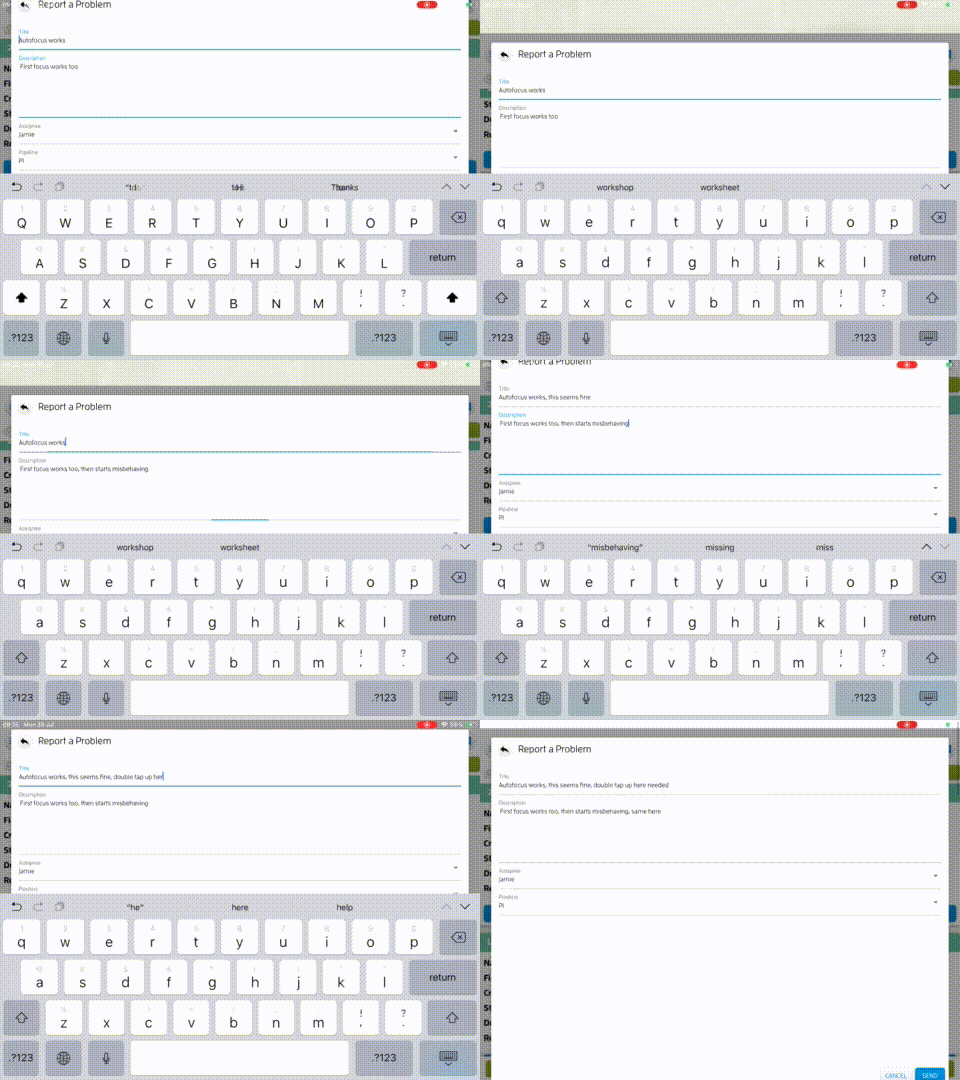
It does seem solved on fields that are placed directly into the page, but for any that are in a qDialog, I see the same issues, I have to tap multiple times in different areas of the field to get focus. Some times focus is given from a double tab, and it seems that sometimes by single tap in a very specific area around the label. Tapping in the area of a textArea for example does not focus the field - only double tapping seems to give it focus.
I created the following video to demonstrate the issue. Hope this helps?
JamieMcDonnell
on 29 Jul 2019
Hi PDan, any progress, questions or assistance I can offer to help get this bug sorted? It is a pretty big show-stopper.
JamieMcDonnell
on 30 Jul 2019
I'll do some more tests tomorrow and I'll try to provide another test build.
pdanpdan
on 31 Jul 2019
Thanks, let me know if and how I can help get to the bottom of this one.
JamieMcDonnell
on 1 Aug 2019
Please make a short test for me - add "quasar": "pdanpdan/quasar#quasar-v1.0.5-test.11-gitpkg", in your application's package.json under "dependencies".
Do a yarn && quasar dev and tell me if you can still reproduce the problems.
edit: use test.11 :)
pdanpdan
on 1 Aug 2019
Hay Dan, I just followed your instructions and have it up and running on the iPad, but I still need to double tap into both q-Input (text and textarea) in order to focus them ;( Is there any way we can collaborate to help you get this resolved?
JamieMcDonnell
on 2 Aug 2019
Ok, something is strange, because I tested on iPad and it was ok.
Are you using:
- web
- cordova
If web then what iOS, what browser.
Also I'll need a codepen with the structure you have - if you can do a minimal one that reproduces the problem it would be best.
pdanpdan
on 2 Aug 2019
Hay,
I'm using iOS 12.1.4
I see the issue only in the Cordova build
The following fields are in a qDialog
1x qInput (text)
1x qInput (textArea)
2x qSelect.
On the same iPad, Chrome / Safari both are fine, so only Cordova displays the issue.
I will try again to create a codepen that reproduces the bug, but I have done so before and was unable to. Perhaps I can put my project on dropbox and you can test it directly?
JamieMcDonnell
on 2 Aug 2019
No, in that case I think it's no need for codepen. But if it's just about Cordova we'll have to wait for @razvan
pdanpdan
on 2 Aug 2019
OK, thanks for saving me that bit of time - do please keep me updated so I can keep my client updated ;)
JamieMcDonnell
on 5 Aug 2019
I also have same issue with this. no need to double tap, but single tap (< 0.1s I think) seems like it only doing hover action, then little hold tap trigger focus action to the field.
I am using iOS 12.0
Thought I'd have my say here too. I'm having a very similar issue on Cordova iOS, however I don't have to tap twice, but rather long tap on the input.
So if I quickly tap on an input. it will produce the same bug ^, but if I hold down on an input field for half a second, then it will trigger the keyboard / input.
Tried on both iPhone and iPad and both produce the same error.
 ypxio
on 6 Aug 2019
ypxio
on 6 Aug 2019
Fix will be available in 1.0.6.
rstoenescu
on 8 Aug 2019
It was due to a bug in fastclick. We had to fork it. Be sure to update both @quasar/app and quasar packages (when v1.1.0 is released). Thank you.
rstoenescu
on 15 Aug 2019
Related issues
 fnicollier
·
3Comments
fnicollier
·
3Comments
 danikane
·
3Comments
danikane
·
3Comments
 nueko
·
3Comments
nueko
·
3Comments
 lukadriel7
·
3Comments
lukadriel7
·
3Comments
 jean-moldovan
·
3Comments
jean-moldovan
·
3Comments
Most helpful comment
Thank you for checking.
I think we have a way to solve it.
If you can do it please try to apply this PR (https://github.com/quasarframework/quasar/pull/4659) - it should fix the problem.
But the fix will land in production after Razvan returns from vacation (estimated 3 weeks).