Quasar: Auto focus on filter fields causing erratic q-select behaviour
Software Version _(of the machine that built the app)_
Operating System Windows_NT(10.0.14393) - win32/x64
NodeJs 8.11.3
Global packages
NPM 6.1.0
yarn 1.7.0
quasar-cli 0.17.0
vue-cli 3.0.1
cordova Not installed
Important local packages
quasar-cli 0.17.0 (Quasar Framework CLI)
quasar-framework 0.17.0 (Build responsive websites, PWAs, hybrid mobile apps and Electron apps, all simultaneously using same codebase)
quasar-extras 2.0.4 (Quasar Framework fonts, icons and animations)
vue 2.5.16 (Reactive, component-oriented view layer for modern web interfaces.)
vue-router 3.0.1 (Official router for Vue.js 2)
vuex 3.0.1 (state management for Vue.js)
electron Not installed
electron-packager Not installed
electron-builder Not installed
@babel/core 7.0.0-beta.54 (Babel compiler core.)
webpack 4.17.1 (Packs CommonJs/AMD modules for the browser. Allows to split your codebase into multiple bundles, which can be loaded on demand. Support loaders to preprocess files, i.e. json, jsx, e
s7, css, less, ... and your custom stuff.)
webpack-dev-server 3.1.5 (Serves a webpack app. Updates the browser on changes.)
workbox-webpack-plugin 3.4.1 (A plugin for your Webpack build process, helping you generate a manifest of local files that workbox-sw should precache.)
register-service-worker 1.4.1 (Script for registering service worker, with hooks)
What did you get as the error?
There is no error output, but the behaviour of the q-select component seems to auto focus on a filter box we are using while on a mobile device.
What were you expecting?
I would expect the behaviour would be the same as when on a desktop browser, where the items from the select list appear, and the component remains static on the page.
What steps did you take, to get the error?
I opened a q-select component while on a mobile device
- Please see video attached
20180830_094515.zip
More Description
The auto-focus of the filter text field causes the mobile keyboard to pop up, moving the component to the top of the page to make space for the keyboard.
This causes the filter box and the, now expanded, list of selectable items to be forced to the top of the screen, and causes the page to scroll.
If the component is at the very bottom of the page, the list auto closes itself also (as shown in video).
 reecebrend
All 5 comments
Can you please try with the latest version of the framework, and also provide a fiddle that can reproduce the problem?
 pdanpdan
on 30 Aug 2018
pdanpdan
on 30 Aug 2018
Hi thanks for the quick reply,
The quasar version has been updated to 0.17.13 as per https://github.com/wmfs/viewscript/commit/7d78b249bcd8f15a302a589e06816faae0218de5 but the behaviour still persists.
Instead of a fiddle, you can experience the behaviour live on the site in the video:
https://wmfs.github.io/viewscript/
From here if you select the complex example from the examples list, then select either answer for this question:
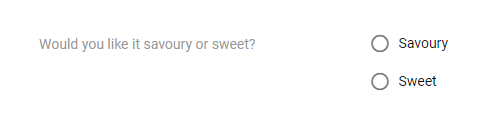
Then open the next question you can see the same effect.
reecebrend
on 30 Aug 2018
I can reproduce it, thank you. We'll try to fix it, but I cannot promise a time frame.
pdanpdan
on 30 Aug 2018
Thanks Dan,
No worries
reecebrend
on 30 Aug 2018
@reecebrend cool app btw ;)
 panstromek
on 30 Aug 2018
panstromek
on 30 Aug 2018
Related issues
 jigarzon
·
3Comments
jigarzon
·
3Comments
 xereda
·
3Comments
xereda
·
3Comments
 florensiuslaylim
·
3Comments
florensiuslaylim
·
3Comments
 mesqueeb
·
3Comments
mesqueeb
·
3Comments
 danikane
·
3Comments
danikane
·
3Comments
Most helpful comment
@reecebrend cool app btw ;)