Quasar: [Request] Data Table Inline Editing
I work with Data Table Component a lot. I would like to have these features:
- inline editing
https://vuetifyjs.com/en/components/data-tables#example-editdialog - custom filters for desired columns
https://react-table.js.org/#/story/custom-filtering
 krugerpl
All 19 comments
inline editing: +1
 olegvakulenko
on 10 May 2018
olegvakulenko
on 10 May 2018
Specific column inline editing can already be achieved using the Q-TD slot component. It even works with vuelidate if coded properly.
While having it already in data table component would be convenient, I'd hate to see it bulk up the control for basic table layouts.
I use something like:
<q-td slot="body-cell-fieldName" slot-scope="props" :props="props">
       <q-field :error="$v.form.$each[props.row.__index].fieldName.$error"
                    :error-label="errorMsg($v.form.$each[props.row.__index].fieldName)">
                    <q-input type="text" v-model="props.row.fieldName" maxLength=9
                      @blur="$v.form.$each[props.row.__index].fieldName.$touch()"
                      @change.native="changedField(props)" />
      </q-field>
</q-td>
 Lou-Der
on 10 May 2018
Lou-Der
on 10 May 2018
I tried to use q-input inside q-td slot but I experienced performance issues on rows number > 50. This is another issue with quasar data table. When I use a few components like q-input or q-toggle inside q-td slot data table is very sluggish. It seems like overall performance of Q-DataTable 0.15 is much slower than in 0.14. I am wondering why?
krugerpl
on 10 May 2018
Editable cells should be activated dynamically. Yes, you can create an editable table by inserting many q-input components but this is inefficient. The table should display an editable cell when the user clicks (or double clicks) on the cell or tabs into the cell.
Of course, since table columns can have different data types, you'd need to activate the correct editable component for the data type. Select components should also be supported.
 kerbo
on 12 May 2018
kerbo
on 12 May 2018
@krugerpl Have you tried using a a popover with a input inside?
The column filter is a nice proposal, much better than actual filtering... today you can do something using body slot...
 hurrycaner
on 12 May 2018
hurrycaner
on 12 May 2018
Very easy to achieve this using slots. IMHO should stay as is, else linking it up with things like validation will become a pain
 BenoitRanque
on 15 May 2018
BenoitRanque
on 15 May 2018
+1 for some form of inline editing support.
Vuetify, for instance, includes it in their data table implementation.
 sustained
on 18 Aug 2018
sustained
on 18 Aug 2018
It will get in. Thanks for your patience.
 rstoenescu
on 18 Aug 2018
rstoenescu
on 18 Aug 2018
Added QInlineEdit new component. Will be available in Quasar v0.17.10.


The custom filters can be done using QTable scoped slots.
rstoenescu
on 19 Aug 2018
This component is not really an "inline" editor. Its is a popup modal with an edit component. Not very user friendly in my option.
A better implementation is one that mimics an excel spreadsheet with editable table cells.
I've done this using slots and q-input components however this solution is not scalable as a q-input component gets created for every table cell.
A more efficient solution is creating one edit component for each column type and moving the component into the cell when the user clicks into or tabs into the cell. When the use clicks or tabs out of the cell, the data is saved back into the table. The column edit type determines what kind of input component is activated in the cell. It could be q-input or q-select, etc.
kerbo
on 19 Aug 2018
@kerbo It's actually very user friendly and non-intrusive. Regardless, are you forgetting we're following Material Guidelines? https://material.io/design/components/data-tables.html
rstoenescu
on 19 Aug 2018
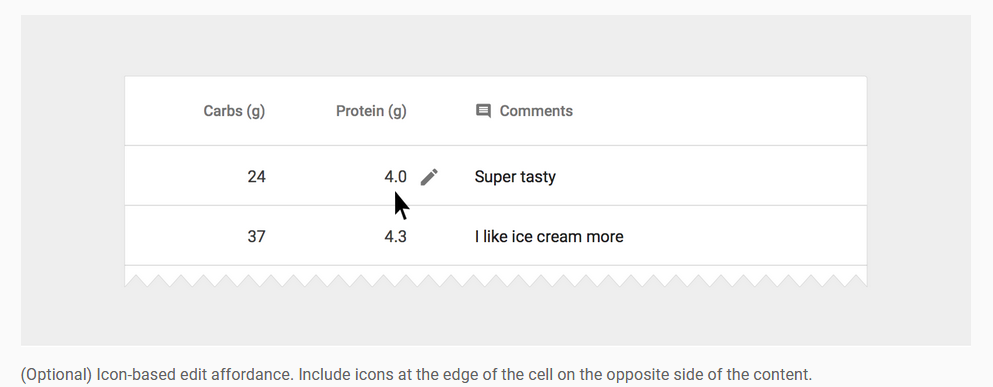
The spec does allow for "inline menus" which is basically what I'm asking for. I think the popover editor design spec is there because it better supports mobile devices. With larger screens/mouse, I think the approach is terrible for data entry. And data entry is the primary use case for editable tables. I guess I have to complain to Google...
kerbo
on 19 Aug 2018
First, let me thank you for taking the time to implement the feature.
I too was hoping for a true inline solution, personally but ideally wouldn't it be best if both methods were supported?
Especially if the Material design spec does in fact allow actual inline editing as well, as @kerbo says it does.
I'm going to take a stab at implementing true inline editing myself because I personally really need it and don't particularly care if I'd be breaking away from the Material design spec (but I understand if you want Quasar to follow the spec to the letter).
I'm not sure if I'll even be able to figure it out myself (pretty new to Vue and Quasar) but I'll try anyway. If a PR wouldn't be accepted, I'll still post here if I get a solid implementation working in case anyone finds this and wants to use it.
sustained
on 19 Aug 2018
The way I see it, the options for true inline editing are as follows:
Option 1: Show the inputs for the entire row, on row hover:

Option 2: Show the inputs for the entire row, after clicking an edit button:

Option 2b: Show the input for a single cell, after clicking an edit button:
Option 3: Show the input for a single cell, upon clicking on the text within the cell:

I'm going to explore these methods (which were mostly taken from here) as I don't personally care about adhering strictly to the guidelines, for my project.
I am making an app similar in some ways to Memrise (see option 3) and I want this feature more than I want to be classed as 100% Material design.
But perhaps one of more of these would fall within the guidelines?
EDIT: I have taken a look at the Material design specification and as far as I can tell option 2, at a minimum, would be perfectly acceptable?
sustained
on 19 Aug 2018
Option 1 - my opinion is only show the editor on the active cell. For example, if you are editing a currency cell, its nice to see the content (which is formatted with the currency symbol) to change to a number for editing. After leaving the cell, the edited value formats with the currency symbol. Same with dates. You can show a mask for input.
Option 2 is a good choice for use cases where the table represents a table of records and you want to do a CRUD operation on a row.
Option 2b doesn't make any sense to me.
Option 3 is good. For a common use case where you have a parent record with child records (e.g., Invoice/Invoice Line Items), the table would represent the child records for the parent. A save on the form would save everything (parent and all child records) n one transaction.
I find for the use case where you are displaying a list of records and an edit is complex (child records or rule validations), in line editing of records is impractical. Instead you would click on an edit icon (or double click the row) to open the record and display a form for editing.
kerbo
on 19 Aug 2018
@sustained @kerbo
- As you can see there are many options of editing. There's no golden solution as each developer has custom needs. It's one of the reasons of why QTable allows for scoped slots, so use them.
- An inline editing custom component is easy to create. So easy that it just doesn't make sense to add it to the framework. Just use two divs (one with content as text, the other with an input) and a v-if + v-else combination on them; a state variable that gets changed based on mouseover/mouseout or click (for entering editing mode) + capture ENTER/ESC keys on the input (for returning to non-edit mode).
rstoenescu
on 20 Aug 2018
True, fair points!
Well, I'm going to attempt to create components for the various use cases above and I'll add them to quasar-awesome (and link them there) if and when I figure it out. I think there needs to be more sharing of custom components in the Quasar ecosystem, even if it's easy to create for some!
sustained
on 20 Aug 2018
@sustained Have you figured it out? Can you share some results?
 vinidiktov
on 10 Sep 2018
vinidiktov
on 10 Sep 2018
Hi,
When will real inline editing be available? The popup modal is intrusive to the UI margins.
 radiantone
on 15 Mar 2020
radiantone
on 15 Mar 2020
Related issues
 jippy89
·
3Comments
jippy89
·
3Comments
 florensiuslaylim
·
3Comments
florensiuslaylim
·
3Comments
 fnicollier
·
3Comments
fnicollier
·
3Comments
 wc-matteo
·
3Comments
wc-matteo
·
3Comments
 jigarzon
·
3Comments
jigarzon
·
3Comments
Most helpful comment
This component is not really an "inline" editor. Its is a popup modal with an edit component. Not very user friendly in my option.
A better implementation is one that mimics an excel spreadsheet with editable table cells.
I've done this using slots and q-input components however this solution is not scalable as a q-input component gets created for every table cell.
A more efficient solution is creating one edit component for each column type and moving the component into the cell when the user clicks into or tabs into the cell. When the use clicks or tabs out of the cell, the data is saved back into the table. The column edit type determines what kind of input component is activated in the cell. It could be q-input or q-select, etc.