Software version
Quasar:
Quasar CLI v0.6.2
App running on Quasar v0.14.0 (edge version)
OS:
Windows , Chrome
Android
Node:
NPM: '4.1.2'
Browsers: Chrome
iOS:
Android: 7
Any other software related to your bug:
What did you get as the error?
Display of the CSS is wrong on the Android version
https://i.imgur.com/1upYQ7E.png
 Sndan
Sndan
All 17 comments
Check with Chrome Devtools if it doesn't inherit something from your own classes.
I have fab buttons and they are ok on mobile too.
 murbanowicz
on 18 Jul 2017
murbanowicz
on 18 Jul 2017
did not add any code or any CSS
vanilla quasar install ...
Sndan
on 18 Jul 2017
Your FAB seems ok to me. It is in the bottom right corner in both cases, and distance from both borders seems consistent (as far as I can tell from your screenshot, since both window sizes differ a little).
If you did not intend for it to have a fixed position, but move with the card instead, your alignment problem may have its source in your usage of the q-card component and affiliates, and we can't help without seeing some of the underlying code. Feel free to join us on the forum or gitter for help.
 spectrolite
on 20 Jul 2017
spectrolite
on 20 Jul 2017
it is not the FAB itself but the icon inside it ....
see in the desktop view where is was centralized then in the mobile in ANDROID/Cordova build the icon is aligned upward
Sndan
on 21 Jul 2017
Are you using Crosswalk Cordova plugin? If so, remove it and report back. Thanks.
 rstoenescu
on 21 Jul 2017
rstoenescu
on 21 Jul 2017
I’ve seen that issue before on gitter. Tiago had the same problem with a FAB icon misbehaving. Have you defined your q-fab at the root of your page? I’m guessing q-layout or some other wrapping tag might affect its text-alignment, and since it’s absolutely positioned it should be fine living at/near the page’s root.
spectrolite
on 21 Jul 2017
@rstoenescu nevertheless, this points to the FAB component missing an explicit css rule for text-alignment, with unexpected consequences. My suggestion may be a temporary fix, but FAB needs some love.
spectrolite
on 21 Jul 2017
It just occurred to me that it may be a padding issue instead of text-alignment, but that changes little to what’s been said above.
spectrolite
on 21 Jul 2017
Are you using Crosswalk Cordova plugin? If so, remove it and report back. Thanks.
it crossed my mind .... I removed it and even built a new project but with no help
and yes the QFAB is inside a qLayout
Sndan
on 24 Jul 2017
I guess if you take it out of q-layout’s wrapping it will behave correctly. But I understand that may not be trivial.
spectrolite
on 24 Jul 2017
Actually, I just had a quick search through the source, and it seems vertical-alignment is explicitly set to middle in the FAB component, and the only component with vertical-alignment: top is q-card. There may be some unwanted interaction hidden in your code.
Since the vertical-middle helper includes !important, you should be able to apply that class to your fab and fix your problem in the meantime.
If this still does not fix it, please inspect your FAB in the browser and report on its text alignment and internal padding css values (and their origin).
@rstoenescu please take a look at this and fix it or show us what we’re doing wrong.
spectrolite
on 24 Jul 2017
Browser quirks. Will try to fix it with a workaround.
rstoenescu
on 3 Aug 2017
i'm running into the same issue when I build for android (not on chrome for windows or when using quasar play). Is there any information I could provide that would help with a solution?
 jonOsm
on 7 Sep 2017
jonOsm
on 7 Sep 2017
Not sure if this is related, but I've run into a similar issue on 0.14.2 with QFab inside QLayout: The icon displays fine (all browsers) during 'quasar dev'; but after 'quasar build' the icon in the QFab displays toward the top of the button (and slightly smaller I think) in all browsers (including desktop) -- just like in Sndan's screenshot.
In my instance the application is built to be served to desktop & mobile browsers (i.e. not to app deployed to phone)
So far, I've been able to determine that the icon in the QFab will display properly again if I change webback.prod.conf.js to set extract: false in the cssUtils.styleRules.
 pcharlc
on 10 Sep 2017
pcharlc
on 10 Sep 2017
just tried your fix @pcharlc and it's working on android now
jonOsm
on 15 Sep 2017
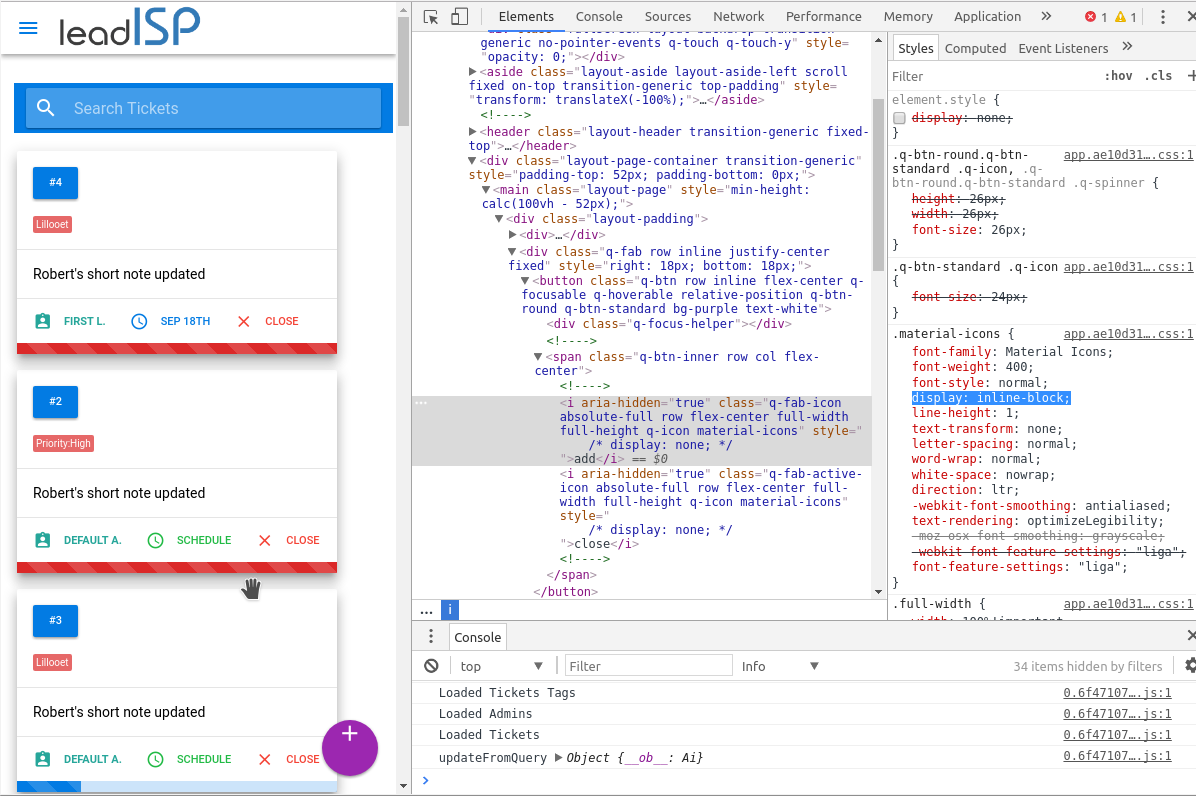
Getting the same issue both on iOS and on Desktop Chrome, fine during dev but build some how screws something up. The css attribute .material-icons "display: inline-block" is not overridden as they are in the dev build.
 danielcomcom
on 2 Oct 2017
danielcomcom
on 2 Oct 2017
Can you confirm this happens with latest default starter kit and with purifyCSS option set to false? If so, please reopen. Thanks!
rstoenescu
on 20 Oct 2017
Related issues
 slowaways
·
3Comments
slowaways
·
3Comments
 Bangood
·
3Comments
Bangood
·
3Comments
 nueko
·
3Comments
nueko
·
3Comments
 jean-moldovan
·
3Comments
jean-moldovan
·
3Comments
 mesqueeb
·
3Comments
mesqueeb
·
3Comments
Most helpful comment
Not sure if this is related, but I've run into a similar issue on 0.14.2 with QFab inside QLayout: The icon displays fine (all browsers) during 'quasar dev'; but after 'quasar build' the icon in the QFab displays toward the top of the button (and slightly smaller I think) in all browsers (including desktop) -- just like in Sndan's screenshot.
In my instance the application is built to be served to desktop & mobile browsers (i.e. not to app deployed to phone)
So far, I've been able to determine that the icon in the QFab will display properly again if I change webback.prod.conf.js to set extract: false in the cssUtils.styleRules.