Quarkus: Command Line Application fails to start from Intellij
Describe the bug
Command Line Application fails to start from Intellij
Expected behavior
The application should start
Actual behavior
The application fails to start with the following exception:
Exception in thread "main" java.lang.RuntimeException: java.lang.reflect.InvocationTargetException
    at io.quarkus.launcher.QuarkusLauncher.launch(QuarkusLauncher.java:50)
    at io.quarkus.runtime.Quarkus.launchFromIDE(Quarkus.java:93)
    at io.quarkus.runtime.Quarkus.run(Quarkus.java:79)
    at io.quarkus.runtime.Quarkus.run(Quarkus.java:38)
    at org.acme.timer.Main.main(Main.java:26)
Caused by: java.lang.reflect.InvocationTargetException
    at java.base/jdk.internal.reflect.NativeMethodAccessorImpl.invoke0(Native Method)
    at java.base/jdk.internal.reflect.NativeMethodAccessorImpl.invoke(NativeMethodAccessorImpl.java:62)
    at java.base/jdk.internal.reflect.DelegatingMethodAccessorImpl.invoke(DelegatingMethodAccessorImpl.java:43)
    at java.base/java.lang.reflect.Method.invoke(Method.java:566)
    at io.quarkus.launcher.QuarkusLauncher.launch(QuarkusLauncher.java:47)
    ... 4 more
Caused by: java.lang.RuntimeException: java.lang.RuntimeException: java.lang.ClassNotFoundException: io.quarkus.deployment.dev.IDEDevModeMain
    at io.quarkus.bootstrap.IDELauncherImpl.launch(IDELauncherImpl.java:30)
    ... 9 more
Caused by: java.lang.RuntimeException: java.lang.ClassNotFoundException: io.quarkus.deployment.dev.IDEDevModeMain
    at io.quarkus.bootstrap.app.CuratedApplication.runInCl(CuratedApplication.java:134)
    at io.quarkus.bootstrap.app.CuratedApplication.runInAugmentClassLoader(CuratedApplication.java:84)
    at io.quarkus.bootstrap.IDELauncherImpl.launch(IDELauncherImpl.java:28)
    ... 9 more
Caused by: java.lang.ClassNotFoundException: io.quarkus.deployment.dev.IDEDevModeMain
    at io.quarkus.launcher.QuarkusLauncher$IDEClassLoader.findClass(QuarkusLauncher.java:70)
    at java.base/java.lang.ClassLoader.loadClass(ClassLoader.java:589)
    at java.base/java.lang.ClassLoader.loadClass(ClassLoader.java:522)
    at io.quarkus.bootstrap.classloading.QuarkusClassLoader.loadClass(QuarkusClassLoader.java:378)
    at io.quarkus.bootstrap.classloading.QuarkusClassLoader.loadClass(QuarkusClassLoader.java:330)
    at io.quarkus.bootstrap.app.CuratedApplication.runInCl(CuratedApplication.java:129)
    ... 11 more
To Reproduce
Steps to reproduce the behavior:
- checkout https://github.com/apache/camel-quarkus
- build the project
- run the
Mainclass fromexamples/timer-log/mainfrom Intellij
Environment (please complete the following information):
- Output of
uname -aorver:
Linux moon 5.6.19-300.fc32.x86_64 #1 SMP Wed Jun 17 16:10:48 UTC 2020 x86_64 x86_64 x86_64 GNU/Linux - Output of
java -version:
openjdk version "11.0.7" 2020-04-14 OpenJDK Runtime Environment AdoptOpenJDK (build 11.0.7+10) OpenJDK 64-Bit Server VM AdoptOpenJDK (build 11.0.7+10, mixed mode) - GraalVM version (if different from Java):
- Quarkus version or git rev:
1.5.2.Final - Build tool (ie. output of
mvnw --versionorgradlew --version):
Apache Maven 3.6.3 (cecedd343002696d0abb50b32b541b8a6ba2883f)
Maven home: /opt/data/sfw/tools/sdkman/candidates/maven/current
Java version: 11.0.7, vendor: AdoptOpenJDK, runtime: /opt/data/sfw/tools/sdkman/candidates/java/11.0.7.hs-adpt
Default locale: en_US, platform encoding: UTF-8
OS name: "linux", version: "5.6.19-300.fc32.x86_64", arch: "amd64", family: "unix"
 lburgazzoli
All 20 comments
@lburgazzoli have you by chance tested if this is still an issue with the latest master?
 geoand
on 22 Jun 2020
geoand
on 22 Jun 2020
no, just opened so I won't forget :)
will try it soon
lburgazzoli
on 22 Jun 2020
@geoand yes, same behaviour with the latest master, it can be something wrong on my side but don't know
lburgazzoli
on 22 Jun 2020
Thanks for checking
geoand
on 22 Jun 2020
Same here but i get that Exception:
./mvnw quarkus:dev
Exception in thread "main" java.lang.reflect.InvocationTargetException
        at java.base/jdk.internal.reflect.NativeMethodAccessorImpl.invoke0(Native Method)
        at java.base/jdk.internal.reflect.NativeMethodAccessorImpl.invoke(NativeMethodAccessorImpl.java:62)
        at java.base/jdk.internal.reflect.DelegatingMethodAccessorImpl.invoke(DelegatingMethodAccessorImpl.java:43)
        at java.base/java.lang.reflect.Method.invoke(Method.java:566)
        at org.apache.maven.wrapper.BootstrapMainStarter.start(BootstrapMainStarter.java:39)
        at org.apache.maven.wrapper.WrapperExecutor.execute(WrapperExecutor.java:122)
        at org.apache.maven.wrapper.MavenWrapperMain.main(MavenWrapperMain.java:61)
Caused by: java.lang.NoClassDefFoundError: org/apache/maven/exception/ExceptionHandler
        at java.base/java.lang.Class.getDeclaredMethods0(Native Method)
        at java.base/java.lang.Class.privateGetDeclaredMethods(Class.java:3166)
        at java.base/java.lang.Class.getMethodsRecursive(Class.java:3307)
        at java.base/java.lang.Class.getMethod0(Class.java:3293)
        at java.base/java.lang.Class.getMethod(Class.java:2106)
        at org.codehaus.plexus.classworlds.launcher.Launcher.getEnhancedMainMethod(Launcher.java:168)
        at org.codehaus.plexus.classworlds.launcher.Launcher.launchEnhanced(Launcher.java:261)
        at org.codehaus.plexus.classworlds.launcher.Launcher.launch(Launcher.java:225)
        at org.codehaus.plexus.classworlds.launcher.Launcher.mainWithExitCode(Launcher.java:406)
        at org.codehaus.plexus.classworlds.launcher.Launcher.main(Launcher.java:347)
        ... 7 more
Caused by: java.lang.ClassNotFoundException: org.apache.maven.exception.ExceptionHandler
        at org.codehaus.plexus.classworlds.strategy.SelfFirstStrategy.loadClass(SelfFirstStrategy.java:50)
        at org.codehaus.plexus.classworlds.realm.ClassRealm.unsynchronizedLoadClass(ClassRealm.java:271)
        at org.codehaus.plexus.classworlds.realm.ClassRealm.loadClass(ClassRealm.java:247)
        at org.codehaus.plexus.classworlds.realm.ClassRealm.loadClass(ClassRealm.java:239)
        ... 17 more
 Panagiss
on 19 Jul 2020
Panagiss
on 19 Jul 2020
Found this to be a problem for me too, but the project was able to be run with either java -jar on the -runner.jar or using mvn quarkus:dev
 ivangreene
on 23 Jul 2020
ivangreene
on 23 Jul 2020
Same here but i get that Exception:
./mvnw quarkus:dev Exception in thread "main" java.lang.reflect.InvocationTargetException at java.base/jdk.internal.reflect.NativeMethodAccessorImpl.invoke0(Native Method) at
Hello @Panagiss, your exception seems to be unrelated to launching from IDE. You are running quarkus:dev command from the command line. If you are still running into that issue (against 1.6.1.Final of Quarkus), could you open a new issue with all the relevant details and if possible a reproducible application shared as a github repo?
 jaikiran
on 24 Jul 2020
jaikiran
on 24 Jul 2020
Hello @ivangreene, would it be possible for you to share a simple application (preferably as a github repo) which reproduces this issue? I know @lburgazzoli already mentioned the quarkus-camel repo as an example, but looking at that repo, it's going to take me a long while to do a maven build, so I won't be able to get to it today. A smaller application will make it easier to check this quickly.
jaikiran
on 24 Jul 2020
@jaikiran here is a simple project generated with the Quarkus Maven plugin that I converted to multi-module, which has the Main class failing with the exception mentioned in the first comment of this issue: https://github.com/ivangreene/quarkus-starter
ivangreene
on 24 Jul 2020
@jaikiran I'm also having this issue when starting looking command-line support in Keycloak. Did you find something already? Meanwhile, I'll try to figure out what may be wrong.
Including the quarkus-core-deployment fixes the CNFE but not really a solution and I get other issues when doing so.
 pedroigor
on 31 Jul 2020
pedroigor
on 31 Jul 2020
The error can be reproduced by changing the https://github.com/quarkusio/quarkus-quickstarts/tree/master/getting-started-command-mode to use a Java Main class to run the application using Quarkus.run(GreetingMain.class, args);.
Although we have tests for this at https://github.com/quarkusio/quarkus/blob/11a529e9595f33d22bd4c77082b4d2a07509c5cd/core/test-extension/deployment/src/test/java/io/quarkus/commandmode/JavaMainTestCase.java, it only works because the IDEDevModeMain class is in the same module of the test?
pedroigor
on 31 Jul 2020
FYI, it should work fine when using Quarkus Integration plugin for InteliJ.
pedroigor
on 7 Aug 2020
Unfortunately this bug still exist in the version 1.7.1.Final
 fluoxa
on 1 Sep 2020
fluoxa
on 1 Sep 2020
Sorry @pedroigor and others, I forgot about this one. I'll take a look this week.
jaikiran
on 1 Sep 2020
Hello @jaikiran , did you find time to working on it?
fluoxa
on 10 Sep 2020
@fluoxa @jaikiran I was able to run the main class using Quarkus Integration Plugin for InteliJ and it works fine for what I need.
pedroigor
on 10 Sep 2020
@pedroigor
https://plugins.jetbrains.com/plugin/14242-quarkus-integration/versions
do you mean this plugin? it is deprecated and therefore i dont want to use it
fluoxa
on 10 Sep 2020
@fluoxa Yeah. Did not know it was deprecated. Thanks for the heads up.
So I guess we need something else then.
pedroigor
on 14 Sep 2020
Hi,
I had this error (CNFE on IDEDevModeMain) when launching a quarkus app in IntelliJ when the app is in a submodule.
Updating the "working directory" for the submodule one in the launch configuration fixes the issue.
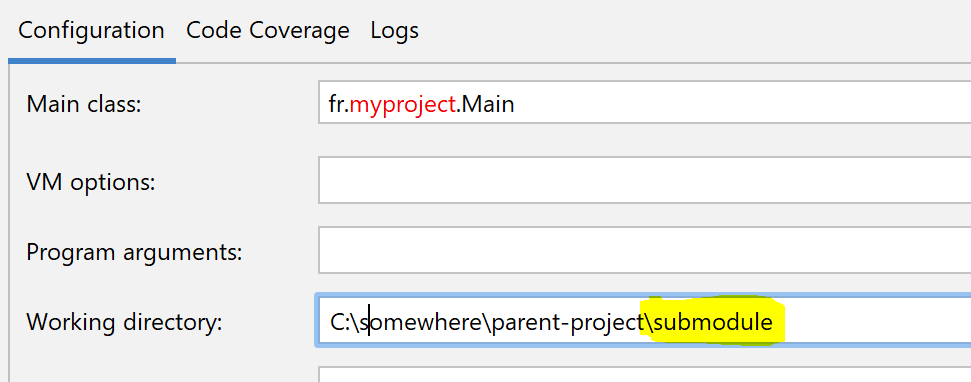
Also opening directly the submodule in intellij and launching from there works.
I am using community edition of IntelliJ with free "Quarkus Tools" plugin.
 jloupdef
on 16 Nov 2020
jloupdef
on 16 Nov 2020
The same for me. I've made changes in my current project to run application as Quarkus app. So changes were by replacing :
public class MainApp {
public static void main(String[] argv) {
// run main app code is here...
to code like
@QuarkusMain
public class MainApp {
    public static void main(String... args) {
        Quarkus.run(MyApp.class, args);
    }

   public static class MyApp implements QuarkusApplication {
        @Override
        public int run(String... argv) throws Exception {
       // run main app code is here...
and got that error inside IDEA trying to start it up
Caused by: java.lang.ClassNotFoundException: io.quarkus.deployment.dev.IDEDevModeMain
    at io.quarkus.launcher.RuntimeLaunchClassLoader.findClass(RuntimeLaunchClassLoader.java:25)
    at java.base/java.lang.ClassLoader.loadClass(ClassLoader.java:589)
    at java.base/java.lang.ClassLoader.loadClass(ClassLoader.java:522)
    at io.quarkus.bootstrap.classloading.QuarkusClassLoader.loadClass(QuarkusClassLoader.java:412)
    at io.quarkus.bootstrap.classloading.QuarkusClassLoader.loadClass(QuarkusClassLoader.java:365)
    at io.quarkus.bootstrap.app.CuratedApplication.runInCl(CuratedApplication.java:127)
Adding one more library into the project explicitly solves the problem:
< dependency >
< groupId > io.quarkus
< artifactId > quarkus-core-deployment
< version >${quarkus.platform.version}
 yuriy-larin-firstbridge
on 19 Nov 2020
yuriy-larin-firstbridge
on 19 Nov 2020
Related issues
 rodrigofujioka
·
3Comments
rodrigofujioka
·
3Comments
 rsvoboda
·
3Comments
rsvoboda
·
3Comments
 halhelal
·
3Comments
halhelal
·
3Comments
 gastaldi
·
3Comments
gastaldi
·
3Comments
 dansiviter
·
3Comments
dansiviter
·
3Comments
Most helpful comment
Hi,

I had this error (CNFE on IDEDevModeMain) when launching a quarkus app in IntelliJ when the app is in a submodule.
Updating the "working directory" for the submodule one in the launch configuration fixes the issue.
Also opening directly the submodule in intellij and launching from there works.
I am using community edition of IntelliJ with free "Quarkus Tools" plugin.