Qtox: Not Working on Macos Big Sur 11.0.1 (20B29)
It will stop responding second after i open it.
 PyTh0N22
All 12 comments
@PyTh0N22 Read Your Computer Isn't Yours.
EDIT: I suspect MacOS is explicitly closing your Application since it reports back to Apple for every Application you open.
 antony-jr
on 18 Nov 2020
antony-jr
on 18 Nov 2020
@PyTh0N22 Read Your Computer Isn't Yours.
EDIT: I suspect MacOS is explicitly closing your Application since it reports back to Apple for every Application you open.
This isn't how that works. Yes Apple's method of ensuring Apps are signed and authentic has security holes they need to address.
qtox for Mac has always been a bit unstable, but sadly Big Sur has fully broken it and it will stop responding as soon as you open it. A fix would be GREATLY appreciated by me 👍
 bwillwall
on 19 Nov 2020
bwillwall
on 19 Nov 2020
Can confirm that this is not working. What would help to resolve this?
 rudolf-ernenputsch
on 19 Nov 2020
rudolf-ernenputsch
on 19 Nov 2020
First we need either logs, a backtrace, a coredump, or something like that to get an idea of what's going wrong. I'll try upgrading my cough authentic Apple hardware cough to repro the issue and capture that info myself now, but if any of you have logs posting them here would be helpful. Log files are stored at ~/Library/Application Support/Tox/qtox.log.
 anthonybilinski
on 20 Nov 2020
anthonybilinski
on 20 Nov 2020
@anthonybilinski sorry for long respond. I'll paste you here my log file (without IDs).
[08:20:43.113 UTC] platform/install_osx.cpp:101 : Debug: OS X: Old settings directory not detected
[08:20:43.113 UTC] persistence/settings.cpp:117 : Debug: No settings file found, using defaults
[08:20:43.113 UTC] persistence/settings.cpp:121 : Debug: "Loading settings from :/conf/qtox.ini"
[08:20:43.164 UTC] ipc.cpp:61 : Debug: Our global IPC ID is XXXXXXXXXXXXXXX
[08:20:43.165 UTC] ipc.cpp:73 : Debug: Attaching to the global shared memory
[08:20:43.165 UTC] ipc.cpp:269 : Debug: Previous owner timed out, taking ownership XXXXXXXXXXXXXX -> XXXXXXXXXXXXX
PyTh0N22
on 20 Nov 2020
Thanks, checking on my side and referencing code, it looks like it's failing as soon as it tries to open the login screen. IPC seems to not be related. I'll try running under gdb and making test changes in my environment now that it's up and running with Big Sur.
anthonybilinski
on 20 Nov 2020
Alright I've got it running correctly again in my environment. The issue is that we are building against an out of date SDK that isn't present on Big Sur. https://github.com/qTox/qTox/blob/5a46d3c28ee0967adf6e26781890bf3c873cecc0/CMakeLists.txt#L69 has both a version, 10.12, that doesn't exist on Big Sur (I only see 11.0 and 10.15), and additionally SDKs are stored in a different location now. I hardcoded the CMAKE_OSX_SYSROOT to /Library/Developer/CommandLineTools/SDKs/MacOSX10.15.sdk and then qTox built and ran fine.
The actual fix will need to keep support for older versions so we can't just do this, but it should be relatively simple to fix. We'll need to cut a patch release to get the new builds out.
@sudden6 are you ok with us making a patch release with only this change? I know we want to do a release soon anyway and we have other bug fixes that could go out, but IMO none are critical and we could always release a little after this one. If we try to release off master we'd have to I think deal with the chatlog since it's regressed since v1.17.2, and trying to backport lots of bugfixes only to 1.17.3 would have lots of conflicts. If you want to chat about it I'll be on Tox.
anthonybilinski
on 20 Nov 2020
Porting only the fix to support recent Macs seems reasonable to me, since it will make qTox completely unusable for Mac users.
 sudden6
on 21 Nov 2020
sudden6
on 21 Nov 2020
ok I've been looking into the fix for a bit, my notes so far. We have a couple problems to address for macOS to release
- travis builds are failing because we're timing out while updating brew, brew is spitting out warnings that it doesn't support 10.13 anymore.
- the SDK doesn't seem to work on Big Sur at all
- the SDK path is different on Big Sur, and our cmake tries to define it by path
Resources
- https://developer.apple.com/support/xcode/
- Xcode 10.2x is the oldest supported SDK (?)
- https://discourse.brew.sh/t/we-and-apple-do-not-provide/5956
- > As mentioned here , Apple (who is careful to limit liability by announcing ANY support policy) supports the last 2 or 3 OS’s. If you’re in doubt, check for security updates on their update site below.
- > Since then Catalina has been released, making Sierra the 4th most recent version. Thus ending support.
- This means that since 10.16 was released, 10.13 has lost support by brew's usage
- This causing OSX builds in travis to fail
- https://computing.cs.cmu.edu/desktop/os-lifecycle
- says that 10.13 "High Sierra" is "Phasing Out", but this conflicts with brew that is failing, e.g. here: https://travis-ci.org/github/qTox/qTox/jobs/745000941
Warning: You are using macOS 10.13.
We (and Apple) do not provide support for this old version.
You will encounter build failures with some formulae.
https://docs.travis-ci.com/user/reference/osx
- travis default is xcode9.4 on macOS 10.13
- that macOS is EOL according to brew, and according to apple's xcode page
Todo
- that macOS is EOL according to brew, and according to apple's xcode page
- travis default is xcode9.4 on macOS 10.13
Update xcode to oldest supported version, 10.2x
- Update macOS build image to oldest supported OS (by brew), 10.14, Mojave
- Remove explicit version check in CMake, since paths differ in Big Sur
- Fix now deprecated things in Qt 5.15 that's used in this macOS build, or deprecated by newer clang
- backport 6d51971c6fe6a7ee6beb5fa864b98c3231211279 which covers updating to Qt 5.15
- Check if this binary then works on 10.16 Big Sur
I've got my env setup and am running test builds on travis. My current branch is at https://github.com/anthonybilinski/qTox/tree/fix_osx_build, but I'll PR that to the v1.17-dev branch once done and tested, and then we can cut v1.17.3 from there.
I didn't expect the new failures due to Qt 5.15 deprecations and a new version of clang, but I don't think those will delay this too much longer. Assuming that using SDK 10.2 works at runtime in Big Sur, this should be wrapped up in the next day or two, but I don't really have an authoritative source that says that it will, and says that what we were using before wouldn't, so there's no guarantee that this will resolve the runtime failure.
anthonybilinski
on 21 Nov 2020
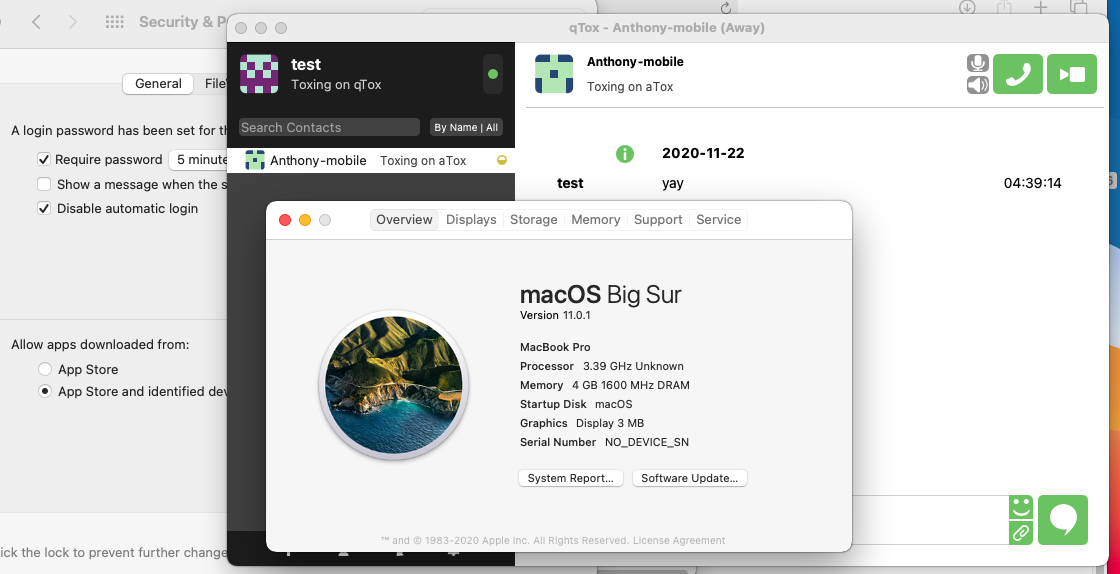
- :clap: It's working on Big Sur (10.16 / 11.0) with SDK 10.2.
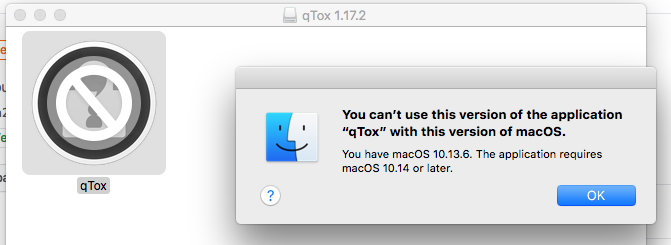
- It now fails to launch on High Sierra (10.13), which is expected but unfortunate. High Sierra is either entering or already in EOL (Apple doesn't say). We could theoretically make multiple MacOS releases with different SDKs to add more backwards compatibility, since the only thing limiting us is the SDK, but I don't think that that's what MacOS apps usually do, and I don't think we should be ones to champion extra backwards compatibility on MacOS when we're struggling to support it already.
- It works on Catalina (10.15) as expected. I don't want to spend the time to install a Mojave (10.14) environment, but it should work there too.
The build's available for test here: https://github.com/qTox/qTox-nightly-releases/releases/tag/ci-fix_osx_build-latest but note that that's just a temporary test build. The proper release should be out soon.
As part of the release, I also backported Windows dependency updates, build system fixes and changes, and macOS build script fixes. It should still be a pretty minimal diff, and this was easier than trying to refix things, plus now WIndows users will get updated deps, even if we don't backport any other bug fixes.
anthonybilinski
on 22 Nov 2020
The release with the fix for Big Sur is now out, the updated .dmg can be found here: https://github.com/qTox/qTox/releases/v1.17.3.
anthonybilinski
on 25 Nov 2020
Thank you for the express fix. Much appreciated.
rudolf-ernenputsch
on 25 Nov 2020
Related issues
 Hasshu
·
5Comments
Hasshu
·
5Comments
 iphydf
·
3Comments
iphydf
·
3Comments
 ghost
·
4Comments
ghost
·
6Comments
ghost
·
4Comments
ghost
·
6Comments
 rbmib
·
6Comments
rbmib
·
6Comments
Most helpful comment
This isn't how that works. Yes Apple's method of ensuring Apps are signed and authentic has security holes they need to address.
qtox for Mac has always been a bit unstable, but sadly Big Sur has fully broken it and it will stop responding as soon as you open it. A fix would be GREATLY appreciated by me 👍