Qtox: tox does not connect/ go online any more
Brief Description
qTox version: v1.16.3
Commit hash: https://github.com/qTox/qTox/commit/8eed684c37bd711de2ca4bd863f5f0509edcdc2d
toxcore: 0.2.3
Qt: 5.9.6
System: Windows 7
Reproducible: Always :
tox used to go online a couple of seconds after starting the program, indicating a green dot next to user name on top of screen.
For about 2 weeks now I cannot get the green dot, online status any more. Program starts but stays offline, indicated by grey circle instead of green dot. Cannot receive messages from or send messages to other users.
Everything worked fine until about 2 weeks ago. Used to run tox several times per week.
Steps to reproduce
- start tox
- wait for program to open
- wait for online status to be indicated by green dot
Observed Behavior: no green dot, remains grey circle instead (offline)
Expected Behavior: green dot, online status
Cannot find any answer in previous threads and would appreciate a guideline how to solve the issue.
Already tried to reinstall program.
Tox does work though when I use a different account when starting Windows. But then I cannot access my original profile and chat history etc.
 Itoxu
Itoxu
All 8 comments
Could you provide a debug log after 30 seconds or so of failing to connect? You can retrieve it from the advanced tab under settings.
 Kribylet
on 18 Jun 2019
Kribylet
on 18 Jun 2019
Can you also try a newer build from here: https://github.com/qTox/qTox-nightly-releases/releases but make sure to backup your profile directory!
 sudden6
on 18 Jun 2019
sudden6
on 18 Jun 2019
Proxy settings are saved per-profile which might explain why it only doesn't work on your one profile. Do you have an invalid proxy set under settings -> advanced?
 anthonybilinski
on 19 Jun 2019
anthonybilinski
on 19 Jun 2019
Proxy settings are saved per-profile which might explain why it only doesn't work on your one profile. Do you have an invalid proxy set under settings -> advanced?
I have not changed anything, ever.
My guess is that it has to do with a recent W7 update.
Itoxu
on 19 Jun 2019
Can you also try a newer build from here: https://github.com/qTox/qTox-nightly-releases/releases but make sure to backup your profile directory!
yesterday I downloaded tox again from the tox.chat website and installed it over the existing prg. Nothing changed though. Maybe I need to uninstall the old version first, but I don´t want to loose my profile. How can I save that?
Itoxu
on 19 Jun 2019
Could you provide a debug log after 30 seconds or so of failing to connect? You can retrieve it from the advanced tab under settings.
[15:59:49.032 UTC] persistence/settings.cpp:133 : Debug: "Loading settings from C:/Users/xyz/AppData/Roaming/tox/qtox.ini"
[15:59:49.042 UTC] ipc.cpp:61 : Debug: Our global IPC ID is 3169903406987816468
[15:59:49.042 UTC] main.cpp:227 : Debug: Log file over 1MB, rotating...
[15:59:49.062 UTC] main.cpp:237 : Debug: Removed old log successfully
[15:59:49.132 UTC] main.cpp:258 : Debug: commit: 8eed684c37bd711de2ca4bd863f5f0509edcdc2d
[16:00:02.206 UTC] persistence/profile.cpp:117 : Debug: Loading tox save "C:/Users/xyz/AppData/Roaming/tox\xyz.tox"
[16:00:02.325 UTC] persistence/settings.cpp:462 : Debug: "Saving global settings at C:/Users/xyz/AppData/Roaming/tox\qtox.ini"
[16:00:02.386 UTC] persistence/settings.cpp:335 : Debug: Loading personal settings from "C:/Users/xyz/AppData/Roaming/tox/xyz.ini"
[16:00:02.386 UTC] nexus.cpp:87 : Debug: Starting up
[16:00:02.760 UTC] :0 : Warning: OpenType support missing for "MS Shell Dlg 2", script 16
[16:00:02.761 UTC] :0 : Warning: OpenType support missing for "Arial", script 16
[16:00:02.761 UTC] :0 : Warning: OpenType support missing for "MS UI Gothic", script 16
[16:00:02.761 UTC] :0 : Warning: OpenType support missing for "Gulim", script 16
[16:00:02.763 UTC] :0 : Warning: OpenType support missing for "SimSun", script 16
[16:00:02.764 UTC] :0 : Warning: OpenType support missing for "PMingLiU", script 16
[16:00:02.765 UTC] :0 : Warning: OpenType support missing for "Segoe UI Symbol", script 16
[16:00:02.874 UTC] core/core.cpp:202 : Debug: Loading user profile
[16:00:02.874 UTC] core/toxoptions.cpp:60 : Warning: Core starting without LAN discovery. Peers can only be found through DHT.
[16:00:02.874 UTC] core/toxoptions.cpp:63 : Debug: Core starting with IPv6 enabled
[16:00:06.099 UTC] widget/systemtrayicon.cpp:83 : Debug: Using the Qt backend
[16:00:06.100 UTC] persistence/profile.cpp:82 : Debug: Self avatar not found, will broadcast empty avatar to friends
[16:00:07.896 UTC] core/core.cpp:357 : Debug: "Connecting to d4rk4.ru:1813 (D4rk4)"
[16:00:07.896 UTC] core/core.cpp:366 : Debug: "Error bootstrapping from D4rk4"
[16:00:07.896 UTC] core/core.cpp:370 : Debug: "Error adding TCP relay from D4rk4"
[16:00:07.896 UTC] core/core.cpp:357 : Debug: "Connecting to tmux.ru:33445 (nrn)"
[16:00:07.896 UTC] core/core.cpp:366 : Debug: "Error bootstrapping from nrn"
[16:00:07.896 UTC] core/core.cpp:370 : Debug: "Error adding TCP relay from nrn"
[16:00:13.512 UTC] core/core.cpp:357 : Debug: "Connecting to 2001:6f8:1c3c:babe::14:1:33445 (Manolis)"
[16:00:13.512 UTC] core/core.cpp:366 : Debug: "Error bootstrapping from Manolis"
[16:00:13.512 UTC] core/core.cpp:370 : Debug: "Error adding TCP relay from Manolis"
[16:00:13.513 UTC] core/core.cpp:357 : Debug: "Connecting to node.tox.biribiri.org:33445 (nurupo)"
[16:00:13.513 UTC] core/core.cpp:366 : Debug: "Error bootstrapping from nurupo"
[16:00:13.513 UTC] core/core.cpp:370 : Debug: "Error adding TCP relay from nurupo"
[16:00:19.129 UTC] core/core.cpp:357 : Debug: "Connecting to 130.133.110.14:33445 (Manolis)"
[16:00:19.129 UTC] core/core.cpp:366 : Debug: "Error bootstrapping from Manolis"
[16:00:19.129 UTC] core/core.cpp:370 : Debug: "Error adding TCP relay from Manolis"
[16:00:19.129 UTC] core/core.cpp:357 : Debug: "Connecting to 104.223.122.15:33445 (ru_maniac)"
[16:00:19.130 UTC] core/core.cpp:366 : Debug: "Error bootstrapping from ru_maniac"
[16:00:19.130 UTC] core/core.cpp:370 : Debug: "Error adding TCP relay from ru_maniac"
[16:00:24.744 UTC] core/core.cpp:357 : Debug: "Connecting to 2607:ff48:aa81:800::35eb:1:33445 (ru_maniac)"
[16:00:24.744 UTC] core/core.cpp:366 : Debug: "Error bootstrapping from ru_maniac"
[16:00:24.745 UTC] core/core.cpp:370 : Debug: "Error adding TCP relay from ru_maniac"
[16:00:24.745 UTC] core/core.cpp:357 : Debug: "Connecting to 194.249.212.109:33445 (fluke571)"
[16:00:24.745 UTC] core/core.cpp:366 : Debug: "Error bootstrapping from fluke571"
[16:00:24.745 UTC] core/core.cpp:370 : Debug: "Error adding TCP relay from fluke571"
[16:00:30.360 UTC] core/core.cpp:357 : Debug: "Connecting to 2605:6400:1:fed5:22:45af:ec10:f329:33445 (Busindre)"
[16:00:30.360 UTC] core/core.cpp:366 : Debug: "Error bootstrapping from Busindre"
[16:00:30.360 UTC] core/core.cpp:370 : Debug: "Error adding TCP relay from Busindre"
[16:00:30.361 UTC] core/core.cpp:357 : Debug: "Connecting to hibiki.eve.moe:33445 (EveNeko)"
[16:00:30.361 UTC] core/core.cpp:366 : Debug: "Error bootstrapping from EveNeko"
[16:00:30.361 UTC] core/core.cpp:370 : Debug: "Error adding TCP relay from EveNeko"
[16:00:35.978 UTC] core/core.cpp:357 : Debug: "Connecting to 37.187.122.30:33445 (dolohow)"
[16:00:35.978 UTC] core/core.cpp:366 : Debug: "Error bootstrapping from dolohow"
[16:00:35.978 UTC] core/core.cpp:370 : Debug: "Error adding TCP relay from dolohow"
[16:00:35.979 UTC] core/core.cpp:357 : Debug: "Connecting to 2a01:230:2:6::46a8:33445 (linxon)"
[16:00:35.979 UTC] core/core.cpp:366 : Debug: "Error bootstrapping from linxon"
[16:00:35.979 UTC] core/core.cpp:370 : Debug: "Error adding TCP relay from linxon"
[16:00:40.857 UTC] widget/form/settings/advancedform.cpp:151 : Debug: Debug log copied to clipboard
Itoxu
on 19 Jun 2019
I have not changed anything, ever.
There was a bug in an old version https://github.com/qTox/qTox/issues/5311 that incorrectly set an invalid proxy option. Your client is only trying to connect to TCP relays, not connect over UDP to bootstrap nodes. This would happen if a proxy is set.
Please check that "Proxy type" has "None" selected and that UDP is enabled (both are default):
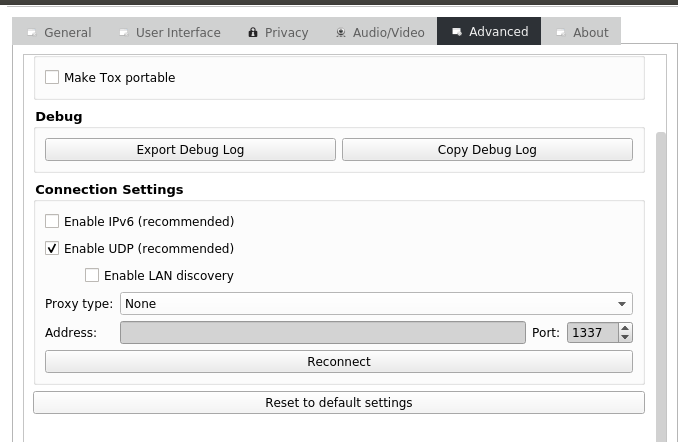
but I don´t want to loose my profile. How can I save that?
your profile (Tox ID, friends list) are stored in %APPDATA%/Roaming/tox/profile.tox, your chat history at %APPDATA%/Roaming/tox/profile.db, your profile client settings at %APPDATA%/Roaming/tox/profile.ini and your global client settings at %APPDATA%/Roaming/tox/qtox.ini. Backing those files up, or just copying the whole tox/ config dir, will make sure nothing is lost.
anthonybilinski
on 19 Jun 2019
I have not changed anything, ever.
There was a bug in an old version #5311 that incorrectly set an invalid proxy option. Your client is only trying to connect to TCP relays, not connect over UDP to bootstrap nodes. This would happen if a proxy is set.
Please check that "Proxy type" has "None" selected and that UDP is enabled (both are default):
but I don´t want to loose my profile. How can I save that?
your profile (Tox ID, friends list) are stored in
%APPDATA%/Roaming/tox/profile.tox, your chat history at%APPDATA%/Roaming/tox/profile.db, your profile client settings at%APPDATA%/Roaming/tox/profile.iniand your global client settings at%APPDATA%/Roaming/tox/qtox.ini. Backing those files up, or just copying the whole tox/ config dir, will make sure nothing is lost.
Thanks a lot! Problem solved.
Setting the proxy type to "none" was essential. Before that I could not select the UDP option, as it appeared gray and could not be clicked.
My tox is now connecting online again.
Thanks everyone for your help!
Itoxu
on 20 Jun 2019
Related issues
 Tcll
·
3Comments
Tcll
·
3Comments
 ghost
·
3Comments
ghost
·
6Comments
ghost
·
3Comments
ghost
·
6Comments
 dcapeletti
·
4Comments
dcapeletti
·
4Comments
 tox-user
·
4Comments
tox-user
·
4Comments
Most helpful comment
Thanks a lot! Problem solved.
Setting the proxy type to "none" was essential. Before that I could not select the UDP option, as it appeared gray and could not be clicked.
My tox is now connecting online again.
Thanks everyone for your help!