All 45 comments
If someone is interested in spending their time on making & maintaining it, why not.
BTW, about the packaging formats; there's also AppImage which IMO looks better than either of corpo-backed projects.
 zetok
on 14 Nov 2016
zetok
on 14 Nov 2016
Yes, there is AppImage too. However, it does not AFAIK take care of dependencies in any manner by itself, unlike Flatpak or snappy.
 ilmaisin
on 14 Nov 2016
ilmaisin
on 14 Nov 2016
AFAIK pretty much everyone except Ubuntu, even Debian, seems to be adopting it as a way to install desktop software.
Doesn't seem to be the case:
$ eix flatpak
No matches found
Then again, Gentoo has a proper way of packaging stuff, so it doesn't need workarounds.
Anyways; I've been wondering for a while if there would be any financial support for flatpak and/or appimage qTox packages.
What do you think?
zetok
on 15 Nov 2016
Yes, there is AppImage too. However, it does not AFAIK take care of dependencies in any manner by itself, unlike Flatpak or snappy.
AppImage is a self-mounting filesystem that simply executes what you put inside. It's up to you what you put inside, but if you follow the general rule to "bundle everything that cannot be reasonably expected to be part of each target system in a recent enough version", then chances are that it will run on many target systems.
 probonopd
on 15 Nov 2016
probonopd
on 15 Nov 2016
AppImage is a self-mounting filesystem that simply executes what you put inside. It's up to you what you put inside, but if you follow the general rule to "bundle everything that cannot be reasonably expected to be part of each target system in a recent enough version", then chances are that it will run on many target systems.
So it pretty much works by luck. It's perhaps a decent intermediate solution, but does not sound like good engineering.
By the way, flatpak has been in Ubuntu's universe repository beginning from 16.10. Don't know about when/if/why not Gentoo will adopt it. There AFAIK should be any major technical obstacles, since it does not require systemd anymore. I don't think flatpak impiles that the distro's built-in packaging system is "improper" in any way, but provides a framework for inter-distro compatibility.
ilmaisin
on 25 Nov 2016
So it pretty much works by luck. It's perhaps a decent intermediate solution, but does not sound like good engineering.
No; it works exactly like developing for a platform like macOS or Windows. Unless a subsequent version of the OS does something really stupid and breaks backward compatibility, it will work just fine.
probonopd
on 26 Nov 2016
No; it works exactly like developing for a platform like macOS or Windows. Unless a subsequent version of the OS does something really stupid and breaks backward compatibility, it will work just fine.
So AppImage is based on the flawed assumption that there is some kind of "Linux" operating system that has different "flavors"? In real world, we have different operating systems that have Linux kernel and happen to incidentally have some grade of binary compatibility due to the use of same libraries.
It does not matter a slightest amount if you think it is "stupid", you cannot derive is from ought. This is not just some theoretical concern, I have run into badly made appimages that won't run on my system.
ilmaisin
on 26 Nov 2016
@probonopd : When developping for Windows or MacOS, you target one or two versions of the OS, that will last for years. Not the same as developping for Linux, unless you target only one distro.
AppImage also lacks an updating system.
Still, the fact that it's a stand-alone package has practical advantages over runtime-based solution, so the best would be to provide both an AppImage and a Flatpak :).
 Letiliel
on 26 Nov 2016
Letiliel
on 26 Nov 2016
AppImage also lacks an updating system
Not really, check AppImageUpdate.
probonopd
on 26 Nov 2016
Any news for flatpak support? Could be published on https://flathub.org/ e.g.
 rugk
on 17 Jul 2017
rugk
on 17 Jul 2017
No changes so far, do you want to try making qTox into one?
 sudden6
on 17 Jul 2017
sudden6
on 17 Jul 2017
No, I'm just interested in this issue too. :smiley:
rugk
on 17 Jul 2017
+1 for Flatpak and/or AppImage support.
 Hasshu
on 22 Dec 2017
Hasshu
on 22 Dec 2017
Can we have a separate issue discussing appimage support?
 Serkan-devel
on 22 Dec 2017
Serkan-devel
on 22 Dec 2017
Can we have a separate issue discussing appimage support?
@Serkan-devel Yes, we can.
Hasshu
on 23 Dec 2017
Here is my attempt at a Flatpak for qTox:
chat.tox.qTox.json.txt
Remove .txt, this should be called chat.tox.qTox.json but I couldn't upload it with its proper name.
This targets qTox 0.15.0 and c-toxcore 0.2.2.
It builds ok on my computer with:
flatpak-builder --force-clean --repo=tox-repo qTox-flatpak chat.tox.qTox.json
It would probably be best to get it on Flathub (https://www.flathub.org/). Instructions here:
https://github.com/flathub/flathub/wiki/App-Submission
I'm sure I could do this myself but it looks like this is best done by the qTox github maintainers.
 Andrew40
on 20 Apr 2018
Andrew40
on 20 Apr 2018
@Andrew40 could you open a PR to integrate that into our Travis CI setup, similar to the open AppImage PR?
sudden6
on 20 Apr 2018
@Andrew40 : Would be nice if you could make this Pull request.
I think the PR of which sudden6 was talking about is:
https://github.com/qTox/qTox/pull/5080
 robschi
on 2 May 2018
robschi
on 2 May 2018
Here is a detailed description on how you can try it out under Debian or Ubuntu:
1. Download the “io.github.qtox.qTox.json.txt” and rename it to “io.github.qtox.qTox.json”
wget https://raw.githubusercontent.com/qTox/flathub/qtox/io.github.qtox.qTox.json
2. Install flatpak and flatpak-builder:
sudo apt install flatpak flatpak-builder
3. Add 'https://flathub.org' remote:
sudo flatpak remote-add --if-not-exists flathub https://flathub.org/repo/flathub.flatpakrepo
4. Build the qTox flatpak and install it:
flatpak-builder --install-deps-from=flathub --install --force-clean --delete-build-dirs qtox-flatpak io.github.qtox.qTox.json
5. Copy your current qtox config to the flatpak config location
cp -r -f ~/.config/tox/ ~/.var/app/io.github.qtox.qTox/config/
6. start the qTox Flatpak
flatpak run io.github.qtox.qTox
robschi
on 6 May 2018
@robschi thanks, I will try to translate these instructions into a docker based build script.
sudden6
on 6 May 2018
@Andrew40 and @robschi I have now created a CI build for Flatpak in #5123
Thanks for your help, the build seems to run through without major errors. However I'm unsure how to get the output "binary"? Or do I have to upload this chat.tox.qTox.json to some repository so everyone can build it? I think I'm missing a crucial point here :confused:
sudden6
on 6 May 2018
Hello @sudden6 thank you very much for trying to make this work.
Unfortunately my knowledge about git and flatpak are very limited.
But maybe this links can help?
http://docs.flatpak.org/en/latest/first-build.html?highlight=first
http://docs.flatpak.org/en/latest/publishing.html
http://docs.flatpak.org/en/latest/flatpak-builder-command-reference.html?highlight=flatpak-builder
And I think the "flatpak-builder" options "--install" and "--delete-build-dirs" should not be used on a build server?
robschi
on 6 May 2018
created a PR to include qTox on flathub
sudden6
on 8 May 2018
@sudden6 I have updated the .jason file and renamed it to "io.github.qtox.qTox.json", it now even installs the the icons and qtox.desktop correctly.
I have also integrated the comments form "nedrichards" and "TingPing", if I was able to.
Still open is:
- "I believe -DCMAKE_BUILD_TYPE=Release in config-opts is the better way to set optimization level?"
- "This needs an autoreconf in order to build for aarch64" (I just copy and pasted the example to the module "sqlcipher")
robschi
on 11 May 2018
@sudden6 I think that qTox meets the App-Requirements if you merge this PR https://github.com/qTox/flathub/pull/10 .
Even "appstream-util validate-relax io.github.qtox.qTox.appdata.xml" returns "OK"
robschi
on 27 May 2018
Merged
sudden6
on 28 May 2018
It's done, qTox is now available on flathub:
https://flathub.org/apps/details/io.github.qtox.qTox
robschi
on 29 May 2018
@robschi thank you very much for your help with flatpak support :)
I hope you want to continue helping with qTox and maybe join our GH organisation :)
sudden6
on 29 May 2018
@tox-user @anthonybilinski anyone want to do a blog post for this nice occasion? ;)
sudden6
on 29 May 2018
Also @robschi do you want to write a blog post in https://github.com/qTox/blog?
sudden6
on 29 May 2018
@sudden6 sorry, but my English is not good enough for such a task.
robschi
on 29 May 2018
@sudden6 I can write one later.
 tox-user
on 29 May 2018
tox-user
on 29 May 2018
What are the instructions to get qTox as flatpak?
tox-user
on 29 May 2018
@tox-user
1. Install Flatpak, for Debian/Ubuntu:
sudo apt install flatpak
2. Add the flatpak repo
sudo flatpak remote-add --if-not-exists flathub https://flathub.org/repo/flathub.flatpakrepo
3. Install the qTox flatpak
flatpak install flathub io.github.qtox.qTox
4. Start the qTox flatpak
flatpak run io.github.qtox.qTox
(But since there is the installed "io.github.qtox.qTox.desktop", it can be started like every other application in the DE)
This Information and information's for other distros also can be found here:
https://flatpak.org/setup/
https://flathub.org/apps/details/io.github.qtox.qTox
BTW: The location of the config folder for the flatpak app differs from the normal app.
In my case I have migrated the files with the following command:
cp -r -f $XDG_CONFIG_HOME/tox/ ~/.var/app/io.github.qtox.qTox/config/
robschi
on 30 May 2018
This should be added to the readme and maybe to tox.chat. Since you created a post on reddit, it won't be necessary to make a blog post.
tox-user
on 30 May 2018
@tox-user I think we should still write a blog post, even if we just copy the reddit post or link to it.
sudden6
on 30 May 2018
@sudden6 Nah, my reddit post is only a short mention of the flatpak package.
@tox-user Since it is described on the flatpak page on how to install a flatpak, I don't know if it is necessary to also add it on other places?
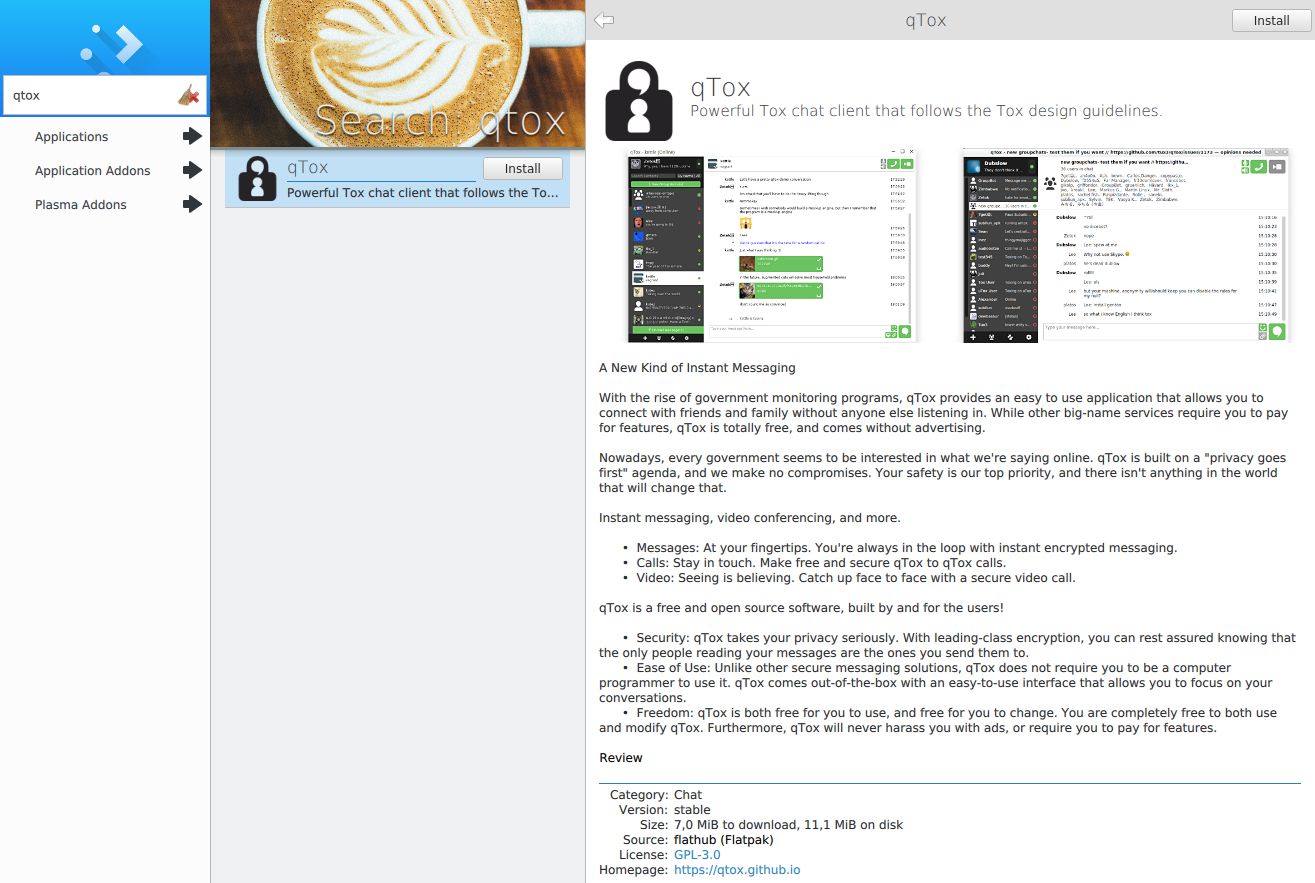
And if you have installed the plugin for GNOME Software (apt install gnome-software-plugin-flatpak) or (plasma-)Discover (sudo apt install plasma-discover-backend-flatpak), you can comfortably install it with one click.
robschi
on 31 May 2018
I want to add them for convenience. @sudden6 btw what is the state of appimages for qTox now? I could include it in the same post. Can they be downloaded?
tox-user
on 31 May 2018
@tox-user they build and are uploaded to our github releases on the next release. We just™ need to make a release :)
I think it's time for a release anyway
sudden6
on 31 May 2018
I agree, but first this needs to be fixed: https://github.com/qTox/qTox/issues/5128.
tox-user
on 31 May 2018
@tox-user What should be noted is that it it's atm not possible to activate Autostart from with in a flatpak (https://github.com/flatpak/flatpak/issues/118).
To work around this, this can be executed:
ln -s /var/lib/flatpak/app/io.github.qtox.qTox/current/active/export/share/applications/io.github.qtox.qTox.desktop $XDG_CONFIG_HOME/autostart/io.github.qtox.qTox.desktop
robschi
on 1 Jun 2018
In your other issue (https://github.com/qTox/qTox/issues/5162) you reported that video chat doesn't work either. Since it's an important feature of qTox (video, not autostart), we should fix it first before we announce a flatpak version.
tox-user
on 1 Jun 2018
@tox-user I agree, added it to the release milestone.
sudden6
on 1 Jun 2018
Reopening, since video is not yet working.
sudden6
on 25 Jun 2018
Video is working now
sudden6
on 10 Jul 2018
Related issues
 andriusign
·
4Comments
andriusign
·
4Comments
 ghost
·
4Comments
ghost
·
4Comments
 ovalseven8
·
4Comments
ghost
·
6Comments
ovalseven8
·
4Comments
ghost
·
6Comments
 anthonybilinski
·
6Comments
anthonybilinski
·
6Comments
Most helpful comment
Here is my attempt at a Flatpak for qTox:
chat.tox.qTox.json.txt
Remove .txt, this should be called chat.tox.qTox.json but I couldn't upload it with its proper name.
This targets qTox 0.15.0 and c-toxcore 0.2.2.
It builds ok on my computer with:
flatpak-builder --force-clean --repo=tox-repo qTox-flatpak chat.tox.qTox.json
It would probably be best to get it on Flathub (https://www.flathub.org/). Instructions here:
https://github.com/flathub/flathub/wiki/App-Submission
I'm sure I could do this myself but it looks like this is best done by the qTox github maintainers.