Qt: Is it possible to use Sparkle to enable auto update?
We are adding a new feature for auto update, and found this: https://sparkle-project.org
Looks like Sparkle is being used by multiple apps on my machine:
/Applications/VLC.app/Contents/Frameworks/Sparkle.framework
/Applications/TeamViewer.app/Contents/Frameworks/Sparkle.framework
/Applications/Docker.app/Contents/Frameworks/Sparkle.framework
...
I found some tutorials showing how to use it in Qt:
- https://github.com/sparkle-project/Sparkle/issues/1137#issuecomment-336667547
- http://www.discoversdk.com/knowledge-base/using-sparkle-in-qt
but it's for C++/Objective C code.
Is it possible to use with Golang?
 quantonganh
All 8 comments
Hey
Yeah, Sparkle is basically the "default" updater for apps on macOS.
And yes, its possible to use it with Go.
I created a new example that shows you how to use it: https://github.com/therecipe/qt/tree/master/internal/examples/3rdparty/sparkle
Just run the init.sh to download the Sparkle SDK into the darwin dir, and then qtdeploy.
The Sparkle SDK, will automatically be bundled with your application and you will only need to add something like this
    <key>SUFeedURL</key>
    <string>https://example.com/appcast.xml</string>
    <key>SUPublicEDKey</key>
    <string>someBase64Key</string>
to your Info.plist to make it work. (like I did here)
And of course generate the key, sign the new releases and all the other stuff ...
 therecipe
on 6 Dec 2018
therecipe
on 6 Dec 2018
@therecipe How can I move that button to the Application menu?
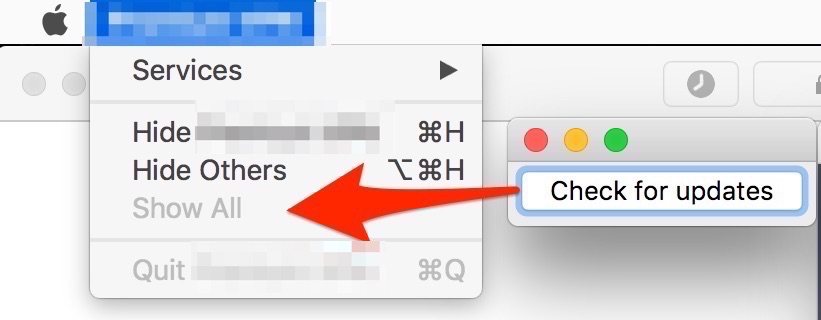
quantonganh
on 7 Dec 2018
I think we can use QMainWindow and add action to the menu bar. but the problem is main window is returned by objectCreated signal and QApplication::mainWindow as QObject and QWidget ... while we can't convert them to QMainWindow in go.
@therecipe can you confirm ? do I have the correct understanding ?
 arknable
on 7 Dec 2018
arknable
on 7 Dec 2018
I tried to add the action via QWidget but the menu didn't added, I think it was added to context menu instead of menubar.
arknable
on 7 Dec 2018
@quantonganh @arknable
If the application is an QApplication (required for quick.QQuickView or the widgets module in general), then you can use something like this on macOS (and probably Linux) to create a global MenuBar.
action := widgets.NewQMenuBar(nil).AddMenu2("").AddAction("check for updates")
action.SetMenuRole(widgets.QAction__ApplicationSpecificRole)
action.ConnectTriggered(func(bool) { println("triggered: check for updates") })
more infos here
If you however just use an QGuiApplication (with QQmlApplicationEngine or something), then you will need to either replace the QGuiApplication with QApplication first, or create the MenuBar from within Qml and then callback into Go to invoke the checkUpdates function.
Infos about MenuBar in QuickControls1 and QuickControls2
@arknable
Yeah, I also tried to cast the ApplicationWindow from the objectCreated signal into an QMainWindow but the underlying types are probably to different, so it didn't work for me as well.
therecipe
on 7 Dec 2018
@therecipe so for now the only way to do that is via cgo, perhaps ... right ?
arknable
on 7 Dec 2018
no, you can upcast with (*widgets.QWidget).QObject or (*widgets.QWidget).QObject_PTR() or downcast with something like widgets.NewQWidgetsFromPointer(someObject.Pointer()) for example
edit: so I did something like this to test if I could use the ApplicationWindow as an QMainWindow widgets.NewQMainWindowFromPointer(object.Pointer())
therecipe
on 7 Dec 2018
@therecipe ah I thought that kind of functions is using pointer from internal cgo process hehe ... nice tips.
arknable
on 7 Dec 2018
Related issues
 woodyjon
·
5Comments
woodyjon
·
5Comments
 Litarvan
·
3Comments
Litarvan
·
3Comments
 xlucas
·
7Comments
quantonganh
·
6Comments
xlucas
·
7Comments
quantonganh
·
6Comments
 tjma2001
·
3Comments
tjma2001
·
3Comments
Most helpful comment
Hey
Yeah, Sparkle is basically the "default" updater for apps on macOS.
And yes, its possible to use it with Go.
I created a new example that shows you how to use it: https://github.com/therecipe/qt/tree/master/internal/examples/3rdparty/sparkle
Just run the init.sh to download the Sparkle SDK into the darwin dir, and then qtdeploy.
The Sparkle SDK, will automatically be bundled with your application and you will only need to add something like this
to your Info.plist to make it work. (like I did here)
And of course generate the key, sign the new releases and all the other stuff ...