Qownnotes: Slow "Find" search on interactive input (searches immediately on first character instead of debouncing)
Expected behaviour
Don't begin searching immediately from interactive input. Debounce input event to delay search enough to input several characters? (500ms debounce?)
Actual behaviour
Notably slow (a few seconds at most) on a large note when bringing up the "Find" (Ctrl+F) field and typing several characters.
May be fault of the highlighting code rather than the search itself, as due to the size of the note (2k lines, many URLs and markdown syntax throughout) there is many instances of a single letter to highlight (12k).
Steps to reproduce
- Ctrl + F
- Start searching for "slab", typed input not copy/paste.
- Search begins immediately after I typed "s", despite my typing speed not being that slow, the following characters input would be delayed from search.
- "s" is highlighting through the large note, while I have already typed "slab" and wait for the UI to update and proceed with the actual search.
Output from the debug section in the settings dialog
Expand
General Info
Current Date: Mon Dec 14 16:06:17 2020
Version: 20.12.3
Build date: Dec 8 2020
Build number: 794
Platform: linux
Operating System: Manjaro Linux
Build architecture: x86_64
Current architecture: x86_64
Release: AUR
Qt Version (build): 5.15.2
Qt Version (runtime): 5.15.2
Portable mode: no
Settings path / key: /home/polarathene/.config/PBE/QOwnNotes.conf
Application database path: /home/polarathene/.local/share/PBE/QOwnNotes/QOwnNotes.sqlite
Application arguments: /usr/bin/QOwnNotes
Qt Debug: 0
Locale (system): en_US
Locale (interface): empty
Primary screen resolution: 1920x1080
Screen resolution(s): 1920x1080, 1440x900
Icon theme: breath
Notes in current note folder: 306
Calendar items: 0
Enabled scripts: 0
 polarathene
All 17 comments
Thank you for your suggestion. I never had the issue with 1000+ (not very small) notes. 😅
 pbek
on 14 Dec 2020
pbek
on 14 Dec 2020
I assume it's a CPU performance issue? My CPU is an old i5-6500 from 2016, 4/4 cores/threads at 3.2GHz.
Are you unable to reproduce with a note that has over 10k matches for a single letter?
polarathene
on 14 Dec 2020
Ah sorry, we are not talking about the note-list search (where searching starts at 2 characters), but the in-note search.
Yes, I had to wait 500ms for 2778 matches (2014 i7). Maybe we'll just also start searching at 2 characters here, that would be the most simple solution (QLineEdit doesn't support a "debounce" by default)...
pbek
on 14 Dec 2020
So far no Asian user complained about the 2-character search in the note-list.
pbek
on 14 Dec 2020
Wanting to search for a single character might be relevant sometimes.
I know I have some notes about fonts/emoji, although I've never frequented the note (which is large) that much nor have I needed to look up by an emoji (the note is about multi-byte sequences that should render as single characters but some fail depending on OS/software).
Two character would be more relevant, especially with languages like Chinese. Which happens to be something I also have notes on :smile:
A location can be two characters long for example like ChongQing (重庆).
Probably best to debounce the event call (as in, a key is pressed and doesn't call search logic immediately, delays by say 500ms, if another key is pressed before then, the delay starts again, thus only calling when key input is idle for 500ms).
If you set a minimum length, the problem is worked around I guess, provided matches are low enough. Some users might think search is broken, but I guess that's the point of feedback from users reporting bugs if implementing debouncing would be more effort or a fixed delay was considered too slow?
polarathene
on 14 Dec 2020
I am not sure but I think the delay is probably because of lots of viewUpdates. Will need to profile this to be certain.
 Waqar144
on 21 Dec 2020
Waqar144
on 21 Dec 2020
20.12.9
- the in-note search performance was improved
(for #1985, thank you @Waqar144)
There now is a new release, could you please test it and report if it works for you?
pbek
on 22 Dec 2020
Also, it wouldn't be too bad if we give an option where "search as you type" is not done.
Waqar144
on 22 Dec 2020
@Waqar144, @pbek , it looks there's some regression on search text highlight (I have this issue in v. 20.12.9 and haven't seen it before).
How to reproduce,
- Create a new Note with
And more supertest notes, and more supertest notestext. - Type for
"supertest notes"in Notes search box, observe search hit highlighting works in the Note found. - Click on any text in the Note itself.
- Observe search hit highlighting is not working anymore, zero search hit results highlighted.
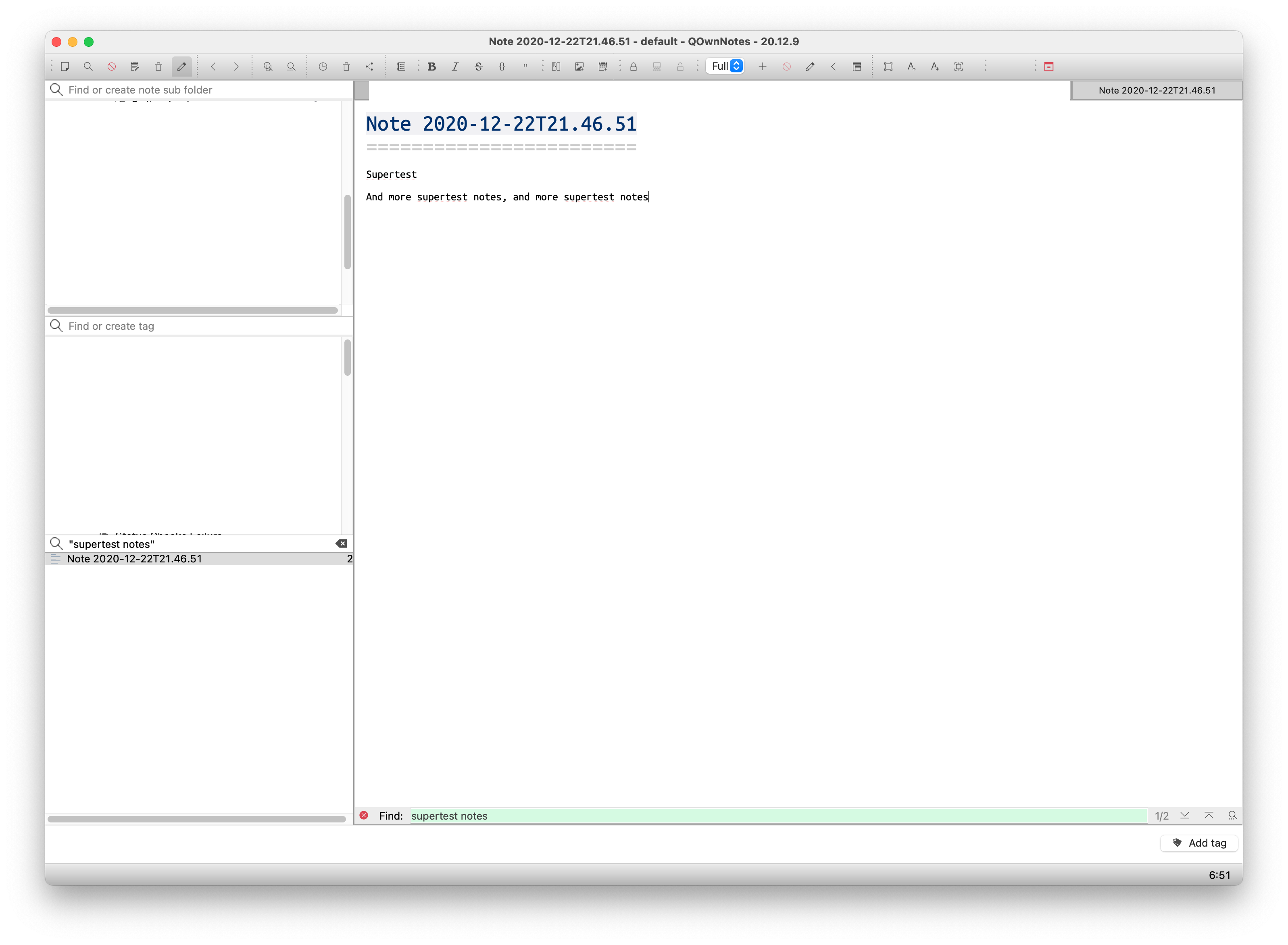
 Airgunster
on 22 Dec 2020
Airgunster
on 22 Dec 2020
Click on any text in the Note itself.
If you click on the note text the highlighting should vanish. Didn't it do that already before?
Only if you use the search buttons on the bottom right in your screenshot you should see the highlighting again.
Or am I missing something?
pbek
on 23 Dec 2020
Didn't it do that already before?
It's behaved that way for me (losing highlight when interacting with the note, resuming highlight if clicking next/prev result again) for as long as I can remember. I'm currently on 20.12.3.
polarathene
on 23 Dec 2020
It doesn't on 20.12.8 (not updated yet on another machine). The question is, should it and why? 😁
pbek
on 23 Dec 2020
@pbek, @polarathene,
Only if you use the search buttons on the bottom right in your screenshot you should see the highlighting again.
That's the part that is actually not working, however I just realised that I provided not entirely correct repro instructions (the issue is reproducible only with a single word (word), and not with >= 2 words in search (wordA wordB)), correct repro instructions,
How to reproduce,
- Create a new Note with
And more supertest notes, and more supertest notestext. - Type for
"supertest"in Notes search box, observe search hit highlighting works in the Note found. - Click on any text in the Note itself.
- Observe search hit highlighting is not working anymore, zero search hit results highlighted.
- Click on search button inside the Note itself.
- Observe search hit highlighting is not working anymore, zero search hit results highlighted.
Airgunster
on 23 Dec 2020
Probably best that it doesn't retain the highlight if you modify the note, I recall a few times where I'd have liked the highlighting to remained, but triggering the next/prev find result would bring highlights back up again, so not a big issue tbh.
Either way, it's not related to this issue is it. @Airgunster should raise that as a separate issue.
Observe search hit highlighting is not working anymore, zero search hit results highlighted.
I cannot reproduce that on 20.12.3. The two results highlight again when I click next/prev find buttons.
polarathene
on 23 Dec 2020
@Airgunster, let's please discuss that in a separate issue.
@polarathene, is the in-note search now faster for you? 😁
pbek
on 23 Dec 2020
Just updated to 20.12.9, so much better now, thank you! :grinning:
polarathene
on 23 Dec 2020
Great, thank you for testing! And thank you, @Waqar144, for your Kate-fix! 😉
pbek
on 23 Dec 2020
Related issues
 OlivierHobbes
·
5Comments
OlivierHobbes
·
5Comments
 smac89
·
7Comments
smac89
·
7Comments
 sanderboom
·
5Comments
sanderboom
·
5Comments
 BlackCanopus
·
6Comments
BlackCanopus
·
6Comments
 schiessle
·
5Comments
schiessle
·
5Comments