Qmk_firmware: [Bug] MSYS2 QMK Setup for Windows is broken if the Shell variable is not explicitly set correctly
Edit: Update:
The issue appears to be that msys2 doesn't set a SHELL variable during install or setup. If the shell read by commands.py isn't correct because the shell isn't valid (presumably from a windows environment variable), the below error will occur.
Explicitly setting the SHELL to a correct value (i.e. add "export SHELL="/usr/bin/bash" to the .bashrc) corrects the issue for a fresh msys2 install.
My guess is that there should be a check if the returned shell is correct and if not, it should default to bash, which is what msys2 does.
There are a couple issues:
Issues:
- msys2_install.sh is never run by anything and the instructions don't indicate it should be run.
Without running this, dfu-programmer, dfu-util, and the avr-toolchain are not installed and therefore produce an error.
- After running msys2_install.sh and restarting the terminal, running "qmk setup" produces the error copied below.
This occurs with the latest updated build as of 08/06/2020
Following the instructions here for windows: https://docs.qmk.fm/#
Steps to reproduce:
Install QMK Toolbox
0. Download and install qmk_toolbox_install.exe
Install MSYS2
1. Download and Install msys2-x86_64-20200720.exe from msys2.org
2. Run msys2 minGW 64-bit terminal
3. Run 'pacman -Syu' from terminal
4. close msys2 terminal
5. Run msys2 minGW 64-bit terminal
6. Run 'pacman -Su' from terminal
7. close msys2 terminal
8. Run msys2 minGW 64-bit terminal
ToolChains
9. run "pacman --needed --noconfirm --disable-download-timeout -S git mingw-w64-x86_64-toolchain mingw-w64-x86_64-python3-pip" from terminal
10. run "python3 -m pip install qmk" from terminal
11. close msys2 terminal
QMK Setup
12. Run msys2 minGW 64-bit terminal
13. run "qmk setup" from terminal
Issues:
- msys2_install.sh is never run by anything and the instructions don't indicate it should be run.
Without running this, dfu-programmer, dfu-util, and the avr-toolchain are not installed and therefore produce an error.
- After running msys2_install.sh and restarting the terminal, running "qmk setup" produces the following error:
This occurs with the latest updated build as of 08/06/2020
INFO Wrote configuration to E:/msys64/mingw64/bin/qmk.exe.ini
INFO QMK Doctor is checking your environment.
INFO Detected Windows.
<class 'FileNotFoundError'>
ERROR [WinError 2] The system cannot find the file specified
Traceback (most recent call last):
  File "E:/msys64/mingw64/lib/python3.8/site-packages/milc.py", line 635, in __call__
    return self.__call__()
  File "E:/msys64/mingw64/lib/python3.8/site-packages/milc.py", line 640, in __call__
    return self._entrypoint(self)
  File "E:/msys64/home/username/qmk_firmware/lib/python/qmk/cli/doctor.py", line 295, in doctor
    bin_ok = check_binaries()
  File "E:/msys64/home/username/qmk_firmware/lib/python/qmk/cli/doctor.py", line 124, in check_binaries
    if not is_executable(binary):
  File "E:/msys64/home/username/qmk_firmware/lib/python/qmk/cli/doctor.py", line 224, in is_executable
    check = run([command, version_arg], stdout=subprocess.PIPE, stderr=subprocess.STDOUT, timeout=5, universal_newlines=True)
  File "E:/msys64/home/username/qmk_firmware/lib/python/qmk/commands.py", line 86, in run
    return subprocess.run(command, *args, **kwargs)
  File "E:/msys64/mingw64/lib/python3.8/subprocess.py", line 489, in run
    with Popen(*popenargs, **kwargs) as process:
  File "E:/msys64/mingw64/lib/python3.8/subprocess.py", line 854, in __init__
    self._execute_child(args, executable, preexec_fn, close_fds,
  File "E:/msys64/mingw64/lib/python3.8/subprocess.py", line 1307, in _execute_child
    hp, ht, pid, tid = _winapi.CreateProcess(executable, args,
FileNotFoundError: [WinError 2] The system cannot find the file specified
 GNO21
GNO21
All 19 comments
qmk setup will run qmk doctor, which checks for the necessary dependencies and asks to install them if they are missing, by running qmk_install.sh.
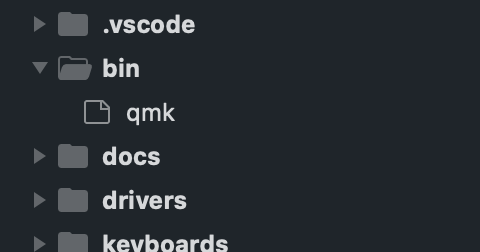
Can you make sure that there is a bin/qmk in the qmk_firmware directory?
 fauxpark
on 6 Aug 2020
fauxpark
on 6 Aug 2020
There is a bin/qmk in the firmware directory.
Looking at it more, it looks like there may be an issue with the doctor.py in the "is_executable(command)" function.
It appears
check = run([command, version_arg], stdout=subprocess.PIPE, stderr=subprocess.STDOUT, timeout=5, universal_newlines=True)
is causing the issue in that function.
Result from
res = shutil.which(command)
is
E:\msys64\home\username\qmk_utils\gcc-arm-none-eabi\bin/arm-none-eabi-gcc.EXE
"command = arm-none-eabi-gcc" being passed into the run function above at this point.
That is indeed in the path and works on the command line.
GNO21
on 6 Aug 2020
What is command just before the actual subprocess.run() then?
https://github.com/qmk/qmk_firmware/blob/master/lib/python/qmk/commands.py#L84
fauxpark
on 6 Aug 2020
What is
commandjust before the actualsubprocess.run()then?
https://github.com/qmk/qmk_firmware/blob/master/lib/python/qmk/commands.py#L84
command is "arm-none-eabi-gcc" in doctor.py
version_arg is "-dumpversion" in doctor.py
So it tries to run "arm-none-eabi-gcc -dumpversion", which works just fine on the command line.
give me a sec and I'll get the command.py
GNO21
on 6 Aug 2020
On MSYS2, it should be prepending $SHELL -c, because of this exact problem, I believe.
fauxpark
on 6 Aug 2020
On MSYS2, it should be prepending
$SHELL -c, because of this exact problem, I believe.
command is "['E:/msys64/usr/bin/tcsh', '-c', 'arm-none-eabi-gcc -dumpversion'] right before the subprocess.run
That's a little interesting because my shell isn't tcsh. It's the default bash.
GNO21
on 6 Aug 2020
On MSYS2, it should be prepending
$SHELL -c, because of this exact problem, I believe.command is "['E:/msys64/usr/bin/tcsh', '-c', 'arm-none-eabi-gcc -dumpversion'] right before the subprocess.run
That's a little interesting because my shell isn't tcsh. It's the default bash.
That's the issue. Msys2 doesn't set or overwrite a SHELL variable on setup.
So when the commands.py tries to read it, it can be an entirely different value than the bash shell (actual shell being used).
if I hardcode my shell to be "/usr/bin/bash", it works.
Perhaps it should check to see if a shell exists prior to choosing it? I don't know if Msys2 not writing the shell variable is a bug or not. This has to be some sort of windows quirk.
GNO21
on 6 Aug 2020
On MSYS2, it should be prepending
$SHELL -c, because of this exact problem, I believe.command is "['E:/msys64/usr/bin/tcsh', '-c', 'arm-none-eabi-gcc -dumpversion'] right before the subprocess.run
That's a little interesting because my shell isn't tcsh. It's the default bash.That's the issue. Msys2 doesn't set or overwrite a SHELL variable on setup.
So when the commands.py tries to read it, it can be an entirely different value than the bash shell (actual shell being used).
if I hardcode my shell to be "/usr/bin/bash", it works.Perhaps it should check to see if a shell exists prior to choosing it? I don't know if Msys2 not writing the shell variable is a bug or not. This has to be some sort of windows quirk.
There may still be an issue with msys2_install.sh not running. I had to manually run it prior to getting this far.
GNO21
on 6 Aug 2020
On a fresh Windows 10 VM, right after installing MSYS2 I get:
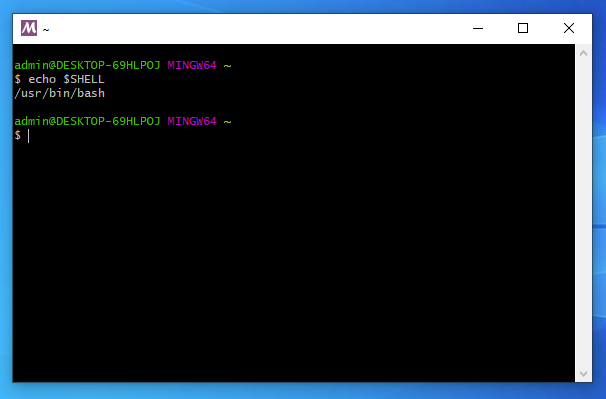
At the qmk setup step, after cloning qmk_firmware:
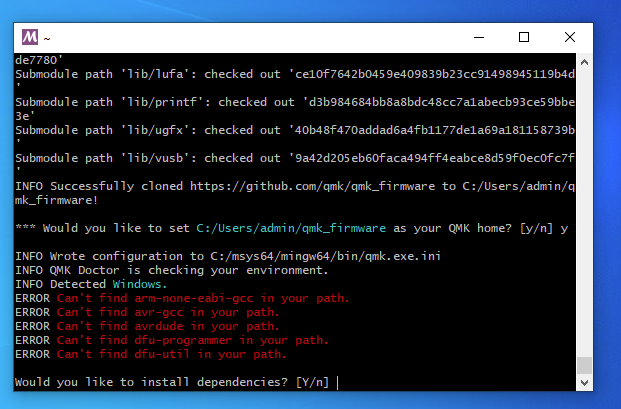
And finally, after installing the rest of the dependencies and restarting MinGW64, qmk doctor produces:

I have no idea where or how $SHELL is being set, but it definitely is.
fauxpark
on 7 Aug 2020
On a fresh Windows 10 VM, right after installing MSYS2 I get:
At the
qmk setupstep, after cloningqmk_firmware:And finally, after installing the rest of the dependencies and restarting MinGW64,
qmk doctorproduces:I have no idea where or how
$SHELLis being set, but it definitely is.
Right. It looks like WSL, Cygwin, or some other tool set the windows environment variable for SHELL.
By default, msys2 uses that value, regardless of the shell being used. If the shell is overridden in the .bashrc, it works. (unfortunately msys2 doesn't re-set the shell correctly anywhere by default)
This may be a bug in msys2, but the net effect is the same, which is if someone trys to run the QMK instructions after having previouisly installed a program that sets a windows environment SHELL variable to something other than bash, it won't work.
GNO21
on 7 Aug 2020
What I don't understand is why tcsh specifically? It doesn't appear to be installed in MSYS2 by default.
I don't think that this is a bug in MSYS2, because it sounds like normal behaviour - Windows environment variables are carried over into the MSYS environment, including SHELL.
fauxpark
on 7 Aug 2020
What I don't understand is why tcsh specifically? It doesn't appear to be installed in MSYS2 by default.
I don't think that this is a bug in MSYS2, because it sounds like normal behaviour - Windows environment variables are carried over into the MSYS environment, including
SHELL.
Right, it uses tcsh because /usr/bin/tcsh is set as the windows environment variable "SHELL" on my machine, likely from an old WSL installation (though it could be from any open source tool that I use).
But msys2 doesn't install anything but bash by default. So it imports the variable without checking whether it works either and blindly sets the SHELL variable to the windows environment variable even though it loads bash by default.
GNO21
on 7 Aug 2020
This seems to have something to do with how MSYS2 is invoked. On my machine, I start the terminals using custom shortcuts that directly call eg. C:\msys64\mingw64.exe.
If I set SHELL in my Windows environment to /usr/bin/tcsh, it fails as expected:

The fresh VM however, is using the stock shortcuts installed by MSYS, which instead call C:\msys64\msys2_shell.cmd -mingw64 etc. This script defaults a %LOGINSHELL% variable to bash, and passes it to mintty. In fact, when I install zsh and set it as SHELL... I still get bash.
fauxpark
on 7 Aug 2020
This seems to have something to do with how MSYS2 is invoked. On my machine, I start the terminals using custom shortcuts that directly call eg.
C:\msys64\mingw64.exe.If I set
SHELLin my Windows environment to/usr/bin/tcsh, it fails as expected:
The fresh VM however, is using the stock shortcuts installed by MSYS, which instead call
C:\msys64\msys2_shell.cmd -mingw64etc. This script defaults a%LOGINSHELL%variable tobash, and passes it to mintty. In fact, when I install zsh and set it asSHELL... I still get bash.
I'm using the "E:\msys64\msys2_shell.cmd -mingw64" shortcut from msys2 as well.
It happily loads and opens running bash even with the windows variable shell = /usr/bin/tcsh (without tcsh installed).
I didn't try to actually install tcsh to see if that worked, as I was trying to keep myself to the base install instructions and not deviate.
GNO21
on 7 Aug 2020
Yeah, the issue is that the shell which actually gets run depends solely on %LOGINSHELL%, which is controlled by passing the -shell switch to msys2_shell.cmd, and defaults to bash. It could very well be that this is intentional, but it might be worth filing a bug report over there. 🤷
fauxpark
on 7 Aug 2020
This should be resolved (at least, it now fails as expected) as of filesystem 2020.02-7, which was just pushed to the Pacman repo.
fauxpark
on 14 Aug 2020
Today I installed a fresh MSYS2 on Windows 10 and followed the instructions in https://docs.qmk.fm/#/newbs_getting_started
There were a few packets not installing correctly but I got around this.
Now 'qmk setup' shows this error:
$ qmk setup
ERROR: It seems you are not using the MINGW64 terminal.
Please close this terminal and open a new MSYS2 MinGW 64-bit terminal.
Python: /usr/bin/python.exe, MSYSTEM: MINGW64
$ echo $SHELL
/usr/bin/bash
 transistorgrab
on 16 Oct 2020
transistorgrab
on 16 Oct 2020
@transistorgrab that's unrelated to this issue, but you've installed qmk using the MSYS Python, not the MinGW64 Python (/mingw64/bin/python.exe). Don't run any commands in the MSYS terminal when you install.
fauxpark
on 16 Oct 2020
@fauxpark Thanks for the hint. Helped a lot. Did a clean reinstall, this works now. :)
transistorgrab
on 20 Oct 2020
Related issues
 levitanong
·
3Comments
levitanong
·
3Comments
 fredizzimo
·
4Comments
fredizzimo
·
4Comments
fredizzimo
·
4Comments
fredizzimo
·
4Comments
 MarkuBu
·
3Comments
MarkuBu
·
3Comments
 vokeio
·
3Comments
vokeio
·
3Comments
Most helpful comment
@fauxpark Thanks for the hint. Helped a lot. Did a clean reinstall, this works now. :)