Qmk_firmware: Can't get LGUI_T to work on Crkbd/rev1 on macOS
It seemed like LGUI_T(kc) and RGUI_T(kc) on crkbd/rev1 doesn't register when long pressing to the command key on macOS, the current workaround is to use LGUI(KC_NO)
May I know if that's a known issue?
 jamztang
All 14 comments
LGUI_T(KC_A) and RGUI_T(KC_Z) are working fine for me - not the same keyboard though. Which keycodes are you trying to use with these?
 fauxpark
on 3 Jul 2019
fauxpark
on 3 Jul 2019
It seems to work just fine for me, on my Corne.
Could you post a link to your layout?
 drashna
on 3 Jul 2019
drashna
on 3 Jul 2019
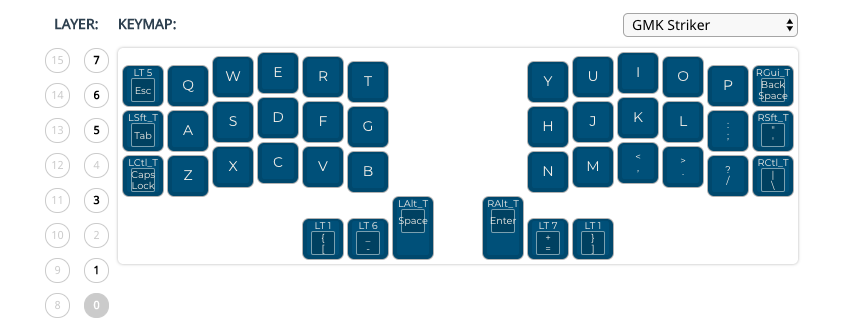
Notice RGUI_T in where the Backspace is, doesn't work.
I also tried using it with the Left and Right thumb cluster where I currently put LT6 and LT7, long pressing on them doesn't get recognized.
Here's the link.
https://github.com/jamztang/qmk_firmware/blob/139dab695ece448892dc8fbff90c6b5dc58b982f/james-2019-07-04.json
@jamztang that JSON file just has a Backspace where the RGUI_T is in your image. I thought it might be a Configurator issue but if I change it back to the RGUI_T and download the JSON again it's there.
fauxpark
on 8 Jul 2019
@fauxpark sorry I pointed to the wrong mapping file, link updated. The issue is that even if the GUI_T(kc) code is there, after flashing the hold gesture doesn't get recognized properly
jamztang
on 8 Jul 2019
I have a corne keyboard, and I did test this out. I can't reproduce the issue, at all.
So more than likely, this may be a bootmagic related issue.
Add the EEPROM Reset keycode to your keymap, and hit that. See if that fixes the issue for you.
If not .... I'm not sure, as it works correctly for both modes, for me.
drashna
on 8 Jul 2019
Bootmagic seems to be disabled on the Corne :/
fauxpark
on 8 Jul 2019
Correct, but the settings are used regardless if bootmagic is enabled or not. I really should say "magic".... but that may be more confusing.
Specifically, it sounds like LGUI is explicitly disabled. MAGIC_NO_GUI specifically.
drashna
on 8 Jul 2019
FYI, I am able to use the LGUI key, just not the LGUI_T. My two other friends with a couple of these keyboards has the same issue.
haven’t tried resetting the EEPROM tho, will try out soon.
jamztang
on 8 Jul 2019
Okay. I just used the configurator to generate a keymap with both LGUI_T, and RGUI_T, and both worked just fine.
So.... I don't think that this is firmware related. Are you using English US for the host system's keyboard layout?
And I tested this both on Windows 10 with EX SwitchHitter (RIP), and on MacOS Mojave, with the keyboard tester built into the QMK Configurator. Both register the RGUI_T and LGUI_T dual action keycode just fine.
drashna
on 8 Jul 2019
on an unrelated note, it may be worth splitting up the bootmagic doc page into "bootmagic" and "magic".
drashna
on 8 Jul 2019
Well, the feature formerly called "Magic" is now known as Command - the MAGIC_ keycodes are the Bootmagic Keycodes: https://docs.qmk.fm/#/feature_bootmagic
And in fact it seems Command still uses the MAGIC_ prefix for its config too.
Or are you suggesting the keycodes take over that name?
fauxpark
on 8 Jul 2019
Good news, I think after I reset the EEPROM, GUI_T seemed to work now!! Thanks a lot! Please feel free to close the topic if you guys are done with the conversation!
jamztang
on 8 Jul 2019
Bootmagic strikes again!
Well, glad we got it resolved!
drashna
on 9 Jul 2019
Related issues
 ralfkaa
·
36Comments
ralfkaa
·
36Comments
 Syzygies
·
27Comments
Syzygies
·
27Comments
 yurikhan
·
53Comments
yurikhan
·
53Comments
 kyren
·
24Comments
kyren
·
24Comments
 BeatVids
·
45Comments
BeatVids
·
45Comments