Qmk_firmware: [Help] Using non standard keyboard layouts like Commodore 64
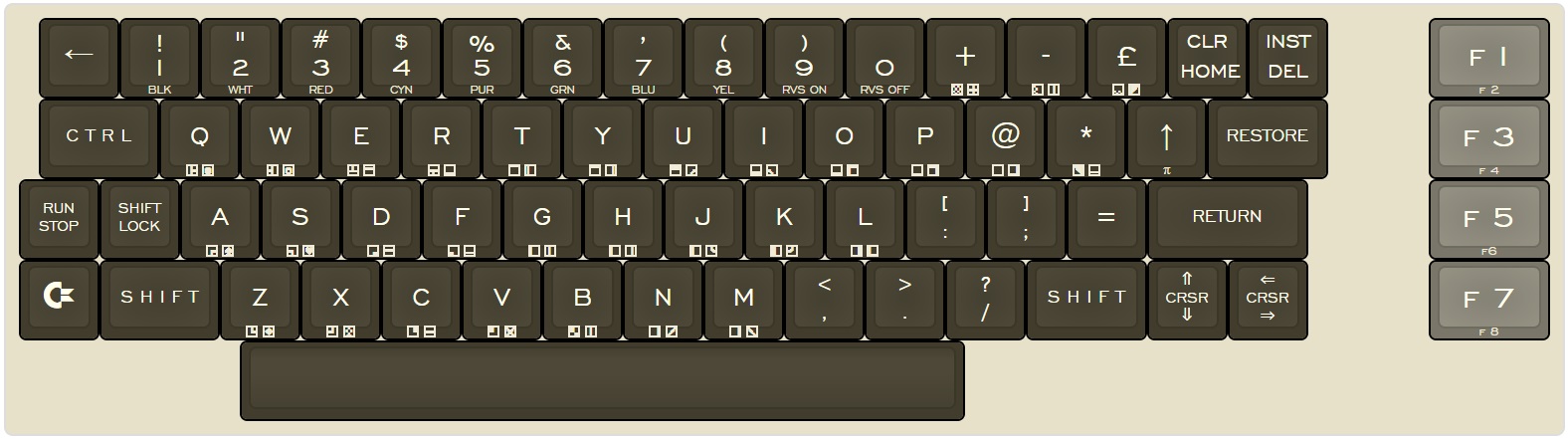
I'm trying to map a real C64 keyboard. Thing is some keys have non standard shifted function, like shifted KC_7 is ' instead of &.
Is it possible to make a keymap.c or something un order to change only the shifted function?
I tried making a different layer using the SHIFT ley, but that's not good because I loose the "real" shift key.
 K-rnivoro
All 18 comments
Yes, you have to change the *.h file that contains the matrix. You have to rearrange the keymap() to fit how the board is physically laid out, as compared to the brackets which is how the board is wired. I can't really explain it that well, but the retro refit's readme does a good job of explaining the gist of it
 zpar-ky
on 18 Oct 2017
zpar-ky
on 18 Oct 2017
I don't think that's the solution Sparky. My matrix is a 9x9 according C64 keyboard connector and it works except this issue.
The example you said is a standard PC keyboard, only with keys arranged physically different.
On the other side, a C64 keyboard have the _(parenthesis)_ in the 8 and 9 keys, instead of 9 and 0 keys.
So, if a press the 8 key i get an 8, but pressing SHIFT+8 gives me an asterisk (*) instead of a left parenthesis (().
I need a way to "replace" those shifted codes that are different than the standard.
K-rnivoro
on 18 Oct 2017
Ah, my apologies, I see what you mean. #61 talks about this, basically it seems like the solution is create an entire shift layer to accommodate for separate shift functionality.
zpar-ky
on 18 Oct 2017
You can hook into the key processing code from your keymap: https://docs.qmk.fm/custom_quantum_functions.html#programming-the-behavior-of-any-keycode
The tricky part right now is that we haven't documented this as well as we'd like yet, so there's a lot to noodle through. You can poke through other keymaps to see how people check and manipulate key state. Basically what you'll want to do looks something like this pseudo code:
bool process_record_user(uint16_t keycode, keyrecord_t *record) {
switch (keycode) {
case KC_7:
if ((record->event.pressed) && (shift is active)) {
unregister_code(KC_LSFT);
register_code(KC_QUOT);
} else {
unregister_code(KC_QUOT);
register_code(KC_LSFT);
}
return false;
}
}
Hop onto gitter and there should be people around who can help you figure this out more.
 skullydazed
on 18 Oct 2017
skullydazed
on 18 Oct 2017
Yes, That is my first approach. But I believe I can replace those particular keys using macros, so in the macro, I can decide to send the regular non-shifted character (eg: 8) or the shifted eg:( character.
Only thing I need to know is how to detect the SHIFT status in a Macro and ude it with an IF condition. Do you know how?
K-rnivoro
on 18 Oct 2017
what skullydazed posted is probably the best way to handle this. Alternatively, instead of a macro, custom key codes would work better (which is the "recommended" way to do a macro now, anyhow).
As for getting the modifiers: "get_mods();" will od this.
Add this to the top:
#define MODS_SHIFT_MASK  (MOD_BIT(KC_LSHIFT)|MOD_BIT(KC_RSHIFT))
#define MODS_CTRL_MASK  (MOD_BIT(KC_LCTL)|MOD_BIT(KC_RCTRL))
#define MODS_ALT_MASK  (MOD_BIT(KC_LALT)|MOD_BIT(KC_RALT))
And then use:
     if ( get_mods() & MODS_SHIFT_MASK) {
                 do_action(if_shifited);
       } else {
                  do_action(if_not_shifted);
       }
 drashna
on 18 Oct 2017
drashna
on 18 Oct 2017
Thanks for the help of drashna and skullydazed, I'm near than before, but I'm not really a coder so...
https://thepasteb.in/p/g5hxc39OQmKkRi6
I got errors in line 114 and I do not know why the { } are wrrong.
I think there should be a return true; somewhere too...
K-rnivoro
on 19 Oct 2017
You're very welcome. And I'm not really a coder either.
And yes, you do need a return true; at the end here. Insert it at line 99, and that should fix the process record error.
As for line 114, you need wrap the "layer_state" with "biton32()". So it should look like this:
uint8_t layer = biton32(layer_state);
Also, for simplicity here, maybe you should call "_off" for all of the LEDs first, and then selectively turn them on. It may end up looking a bit cleaner. So like this:
    c64_rshift_led_off();
    c64_power_led_off();
    c64_vice_led_off();
    if (viceMode) { c64_vice_led_on(); }
    if (commodorePressed) { c64_power_led_on(); }
    if (rshiftPressed) { c64_rshift_led_on(); }
But then again, that's personal preference. But it looks cleaner, and works a bit better. And assuming that these are LEDs, then you won't notice a flicker. I believe that this is because LEDs are PWM devices and ... that's how they work, actually. (less on for less brightness, so you could add a counter and run it only ever X intervals to dim the lights, or ... so I've seen reference to)
drashna
on 19 Oct 2017
Thank you drashna! I'll try that ASAIC.
And yes, those are LEDs. An RGB LED actually placed in the socket of the original one ;)
You can PWM them, but it easier with discrete resistors. I use 10K Ohm for green and blue, and 5K for red. It's cool (and usefull) when you switch between emulator and PC modes ;)
K-rnivoro
on 19 Oct 2017
I didn't have the chance to test yet, but I think I missed the
(record->event.pressed) sentence.
Line 87 should look like this: if ((record->event.pressed) & LShiftPressed) {
Am I right?
K-rnivoro
on 19 Oct 2017
Ah, yeah, I missed that. Yeah.
Well, rather, you'd want to the pressed to be inside the shift, and the return false there. That way, otherwise, it will return true, and then 7 will work properly. I believe.
drashna
on 19 Oct 2017
Well. I think I made it. Not the cleanest code I'm sure, but it works.
I replaced 2, 5, 6, 7,8 ,9, ;, : keys
Feel free to contribute.
https://thepasteb.in/p/O7h9crG2AnNZWt2
K-rnivoro
on 20 Oct 2017
Awesome!
(Also pastebin link is dead)
And I'm going to close this now. If needed, reopen or open a new issue.
drashna
on 25 Mar 2018
where is can read about this? my code doesn't work properly
#define MOD_SH  (MOD_BIT(KC_LSHIFT)|MOD_BIT(KC_RSHIFT))
...
...
        case KC_M:
        if ((record->event.pressed) && (MOD_SH)) {
            unregister_code(KC_LSFT);
            register_code(KC_RBRC);
        } else {
            unregister_code(KC_RBRC);
            register_code(KC_LSFT);
        }
        return false;
        break;
 mmiq
on 25 Apr 2018
mmiq
on 25 Apr 2018
This should be:
        case KC_M:
        if ((record->event.pressed) && (get_mods() & MOD_SH )) {
            unregister_code(KC_LSFT);
            register_code(KC_RBRC);
        } else {
            unregister_code(KC_RBRC);
            register_code(KC_LSFT);
        }
        return false;
        break;
But what If I just press the M key (without SHIFT)? What happens in that
case? The M appears because of the "break;" ?
Thanks
2018-04-25 15:50 GMT-03:00 Drashna Jaelre notifications@github.com:
This should be:
  case KC_M:
  if ((record->event.pressed) && (get_mods() & MOD_SH )) {
      unregister_code(KC_LSFT);
      register_code(KC_RBRC);
  } else {
      unregister_code(KC_RBRC);
      register_code(KC_LSFT);
  }
  return false;
  break;
—
You are receiving this because you authored the thread.
Reply to this email directly, view it on GitHub
https://github.com/qmk/qmk_firmware/issues/1861#issuecomment-384394946,
or mute the thread
https://github.com/notifications/unsubscribe-auth/AacoqCz_sryIA53L77C66C59gj591csnks5tsMVpgaJpZM4P-Dnd
.
K-rnivoro
on 26 Apr 2018
At me works not correctly.
Firstly, when press "MOD_SH" is typed symbol "5".
Secondly, the "KC_M" button typed the "]", and all letters are converted to upper case.
And thirdly, Shift + m does the same.
mmiq
on 27 Apr 2018
I've created a flag called lshift. For example having quotes as shifted 2
Key:
case TECLA_2:
if (record->event.pressed)
{
if (get_mods() & MOD_BIT(KC_LSFT))
{
lshift = 1;
register_code(KC_QUOT);
}
else
{
lshift = 0;
register_code(KC_2);
}
}
else
{
if (lshift == 1)
{
unregister_code(KC_QUOT);
}
else
{
unregister_code(KC_2);
}
}
return false;
- That works for me. But I'm not shure how to use de "break" so I
wouldn't need the REGISTER/UNREGISTER_code(KC_2) when LSHIFT is not pressed.
2018-04-27 11:58 GMT-03:00 loloArctic notifications@github.com:
At me works not correctly.
Firstly, when press "MOD_SH" is typed symbol "5".
Secondly, the "KC_M" button typed the "]", and all letters are converted
to upper case.
And thirdly, Shift + m does the same.—
You are receiving this because you authored the thread.
Reply to this email directly, view it on GitHub
https://github.com/qmk/qmk_firmware/issues/1861#issuecomment-384996339,
or mute the thread
https://github.com/notifications/unsubscribe-auth/AacoqCgryXgIrQLN-fUw2vMocBTft0a1ks5tszIzgaJpZM4P-Dnd
.
K-rnivoro
on 28 May 2018
Related issues
 BenRoe
·
3Comments
BenRoe
·
3Comments
 matz-e
·
4Comments
matz-e
·
4Comments
 helluvamatt
·
4Comments
helluvamatt
·
4Comments
 vokeio
·
3Comments
vokeio
·
3Comments
 fredizzimo
·
4Comments
fredizzimo
·
4Comments
Most helpful comment
what skullydazed posted is probably the best way to handle this. Alternatively, instead of a macro, custom key codes would work better (which is the "recommended" way to do a macro now, anyhow).
As for getting the modifiers: "get_mods();" will od this.
Add this to the top:
And then use: