Qiskit-terra: Show pi in the text drawer as π
What is the expected enhancement?
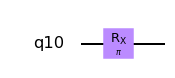
Based on a discussion in #4931, there's interest in displaying pi in the text drawer as πinstead of pi.
                   ┌─────────┐               ┌─────────┐
Change from   q_0: ┤ RX(pij) ├     to   q_0: ┤ RX(πj)  ├
                   └─────────┘               └─────────┘
To do this on all platforms requires completion of #4900 and modifying pi_check and 24 tests.
 enavarro51
All 10 comments
Can I be assigned this issue please? I'd like to give it a shot, I actually think it might be a good first issue.
 PaulMcElligott
on 25 Aug 2020
PaulMcElligott
on 25 Aug 2020
It's ok by me. @1ucian0 Ok by you?
enavarro51
on 26 Aug 2020
Sure
 1ucian0
on 26 Aug 2020
1ucian0
on 26 Aug 2020
ping @PaulMcElligott ! Any news?
1ucian0
on 6 Sep 2020
Still working on it.
Have been busy. I'll have more time tomorrow morning.
PaulMcElligott
on 9 Sep 2020
another ping @PaulMcElligott?
1ucian0
on 28 Sep 2020
Hi @1ucian0. I have managed to recreate the issue, but I'm having difficulty recreating it in a new environment. I have been following @aasfaw's episode closely. I am new to using git & anaconda.
Method to reproduce
from qiskit import *
import numpy as np
import sympy
from sympy.abc import pi
pi = np.pi
qr = QuantumRegister(1)
circuit_all = QuantumCircuit(qr)
circuit_all.rx(pi,0)
circuit_all.draw()
       ┌────────┐
q10_0: ┤ RX(pi) ├
       └────────┘
circuit_all.draw(output='mpl')
mpl (below) subtext uses the greek letter 'π' instead of the latinized 'pi'
Action plan
- Attempt pass in a greek letter π using sympy in the notebook.
- Inspect visualization.matplotlib.py to see what the mpl uses for greek letters and try to insert it in the code in visualiztions.txt.py
PaulMcElligott
on 28 Sep 2020
You might be overthinking this one.
Either inpt in pi_check can take the self.encoding as input, or you replace pi by π after that (if the encoding allows it).
1ucian0
on 30 Sep 2020
@PaulMcElligott are you still in it? can I try this one? @1ucian0
 alejomonbar
on 6 Oct 2020
alejomonbar
on 6 Oct 2020
Sure! Go ahead @alejomonbar
1ucian0
on 7 Oct 2020
Related issues
 kdk
·
4Comments
kdk
·
4Comments
 chowington
·
4Comments
chowington
·
4Comments
 indisoluble
·
3Comments
indisoluble
·
3Comments
 taalexander
·
6Comments
taalexander
·
6Comments
 we-taper
·
3Comments
we-taper
·
3Comments