Qiskit-terra: Jupyter Notebook: Stretched Bloch and Q-Spheres
Information
- Qiskit Terra version: 14.2
- Matplotlib version: 3.3.0
- Python version: 3.7.7
- Operating system: macOS
What is the current behavior?
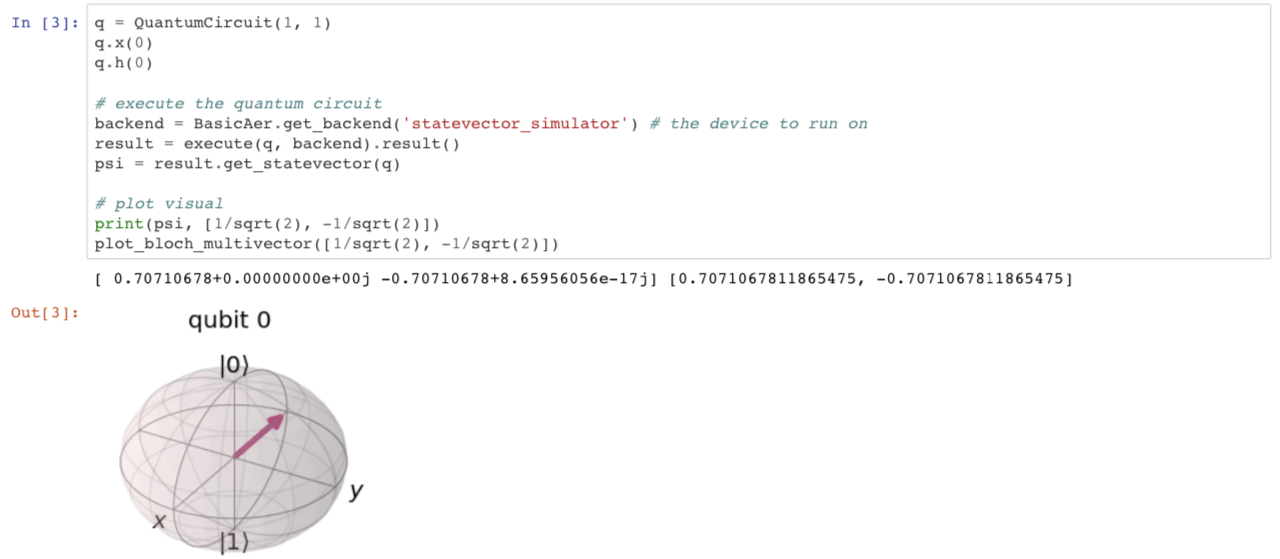
When I create a Bloch or Q-Sphere, the drawing displayed is horizontally stretched.
Steps to reproduce the problem
- Open a Jupyter Notebook
- Type the following into a cell:
from numpy import sqrt
from qiskit.visualization import plot_bloch_multivector

plot_bloch_multivector([1/sqrt(2), 1/sqrt(2)])
- Run the cell
What is the expected behavior?
I would expect the spheres to be shaped like spheres instead of ellipsoids.
Suggested solutions
Is it possible the backend (matplotlib?) needs to be updated?
 splch
splch
All 7 comments
What's your matplotlib version? Cause mine is 3.2.2 and Bloch shpere is fine for me.
Additionally, did you try adding %matplotlib inline or infact, try adding figsize param: plot_bloch_multivector([1/sqrt(2), 1/sqrt(2)], figsize=(10,10))?
 obliviateandsurrender
on 21 Jul 2020
obliviateandsurrender
on 21 Jul 2020
@obliviateandsurrender I'm running matplotlib version 3.3.0 (so this might be a version issue?) and neither figsize=(10,10) nor %matplotlib inline fixed the drawing.

splch
on 21 Jul 2020
I can also replicate the issue with matplotlib 3.3.0 but not with 3.2.2.
Likely due to https://matplotlib.org/3.3.0/users/whats_new.html#axes3d-no-longer-distorts-the-3d-plot-to-match-the-2d-aspect-ratio
 gschaffner
on 23 Jul 2020
gschaffner
on 23 Jul 2020
@gschaffner Do you think creating a default argument for set_box_aspect would fix the distortion?
splch
on 23 Jul 2020
Hey, looks like this has not been fixed yet. Mind if I take a look at this?
 e-eight
on 8 Aug 2020
e-eight
on 8 Aug 2020
@e-eight yes please do! i hope you can figure it out but let me know if i can help with anything
splch
on 9 Aug 2020
Cool. I'll let you know what I find.
e-eight
on 9 Aug 2020
Related issues
 delapuente
·
5Comments
delapuente
·
5Comments
 ajavadia
·
5Comments
ajavadia
·
5Comments
 1ucian0
·
6Comments
1ucian0
·
6Comments
 rraymondhp
·
4Comments
rraymondhp
·
4Comments
 taalexander
·
6Comments
taalexander
·
6Comments
Most helpful comment
Hey, looks like this has not been fixed yet. Mind if I take a look at this?