Qbittorrent: "Open destination folder" not going to exact torrent folder for torrents completed prior to 4.0.0
Please provide the following information
qBittorrent version and Operating System:
v4.0.0
Windows 10
If on linux, libtorrent and Qt version:
What is the problem:
Double clicking on a completed torrent in the torrents list (or right clicking and selecting "Open destination folder") does not open to that torrent's folder location. Instead it opens to the default save folder for all torrents.
Update: Only affects torrents completed prior to the update to 4.0.0.
What is the expected behavior:
Double clicking on a completed torrent (or right clicking and selecting "Open destination folder") should open to the exact folder that a torrent downloaded to.
Steps to reproduce:
Double click a completed torrent or right click on the torrent and select "Open destination folder".
Extra info(if any):
This just happened with the upgrade to v4.0.0
Want to back this issue? Post a bounty on it! We accept bounties via Bountysource.
 infernocloud
All 14 comments
Works as expected for me.
 thalieht
on 20 Nov 2017
thalieht
on 20 Nov 2017
Before 4.0.0, open destination folder will open the torrent folder. Now at 4.0.0, it will open the "Save Path" only. If this is intentional then please add an option to open the torrent folder in "Action on double-click".
 gorvinsky
on 20 Nov 2017
gorvinsky
on 20 Nov 2017
Update: it only happen to existing torrents. New torrents downloaded with 4.0.0 work fine.
gorvinsky
on 20 Nov 2017
Turns out i can reproduce this only with torrents who don't have a ratio limit set. I have 3 without ratio limits and out of 30-something, only these have this issue and as @gorvinsky said, only in existing torrents.
thalieht
on 20 Nov 2017
It works fine with new torrents, it opens the default folder only with the double click on the torrents downloaded on the old versions of app, just as mr. Gorvinsky said.
What a relief, I was worried there for a second.
 Xepoj87
on 20 Nov 2017
Xepoj87
on 20 Nov 2017
Ah yes my newest torrent just finished before I upgraded to 4.0.0. All of my torrents were prior to that update.
infernocloud
on 20 Nov 2017
Looks fixed in 4.0.1 autoupdated.
infernocloud
on 22 Nov 2017
I'm still experiencing this in 4.0.1.
 schmeat
on 24 Nov 2017
schmeat
on 24 Nov 2017
Also still experiencing this in 4.0.1 x64, on Windows 10 FCU x64
 LeRaldo
on 24 Nov 2017
LeRaldo
on 24 Nov 2017
Whoops sorry, yeah I didn't realize my RSS feed auto-downloaded a new torrent. Old torrents are still affected.
infernocloud
on 25 Nov 2017
Just upgraded from 3.3.12 to 4.0.4, and seeing this issue on all my existing torrents. Can confirm that none are using share ratio limits, though changing the share ratio limit doesn't change behavior. Still an issue even if I change download location to another folder.
New torrents added work fine.
 wescpdx
on 24 Feb 2018
wescpdx
on 24 Feb 2018
Still having this issue anno 2020
 HamburgerPlsdotexe
on 26 Jan 2020
HamburgerPlsdotexe
on 26 Jan 2020
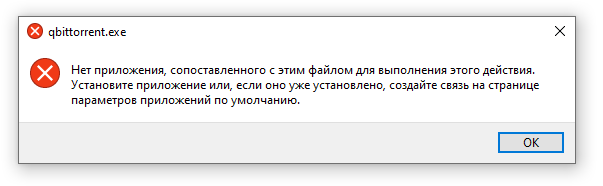
I have such problem on Windows 10 x64
 alabotski
on 21 Feb 2020
alabotski
on 21 Feb 2020
Fixed the title according to the developments in the comments. @Chocobo1 @glassez This must have to do with the .fastresume files, right?
Can someone upload here a .fastresume of a torrent added before 4.0.0? Preferably from a linux ISO torrent...
Also it would be helpful to know whether or not this is a Windows-only issue, if possible.
 FranciscoPombal
on 21 Feb 2020
FranciscoPombal
on 21 Feb 2020
Related issues
 dmxt
·
3Comments
dmxt
·
3Comments
 abc1236762
·
3Comments
abc1236762
·
3Comments
 rockrabbit
·
3Comments
rockrabbit
·
3Comments
 duytrung
·
3Comments
duytrung
·
3Comments
 slrslr
·
3Comments
slrslr
·
3Comments
Most helpful comment
Update: it only happen to existing torrents. New torrents downloaded with 4.0.0 work fine.