Qbittorrent: Increase font size of torrent list (or everything ?)
Is there a way to increase the font size globally via qt settings ? or just the torrent list ?
 ovidiubuligan
All 30 comments
Since you mentioned everything, maybe increase OS dpi scale? It's what i did.
 thalieht
on 27 Oct 2015
thalieht
on 27 Oct 2015
+1 for font selection for the entire gui
 UgurGumushan
on 31 Oct 2015
UgurGumushan
on 31 Oct 2015
I tested it by setting the "Size of all items" in windows 8.1 display setting and this is how it looks without restarting windows (there was a message saying that it may be that for some apps a restart is required):

The problem is that it is a Global setting and and there is only one hideous workaround around this: To overwrite this setting for all other apps individually , and no setting to only apply this for one app.
ovidiubuligan
on 1 Nov 2015
I doubt we can do it. Unless qt (our GUI framework) allows for such a setting in an app-wide sense.
@glassez @Chocobo1 @ngosang ideas? Maybe QApplication::setFont() or applying CSS style?
 sledgehammer999
on 1 Nov 2015
sledgehammer999
on 1 Nov 2015
I doubt we can do it. Unless qt (our GUI framework) allows for such a setting in an app-wide sense.
Don't try to change the font size for the whole GUI, just let OS handle it via DPI scaling. (otherwise it's just bloating the code)
Increase font size of torrent list
IMO it's reasonable to do so, if users find the default text too small for them.
Currently it's fine for me though...
 Chocobo1
on 2 Nov 2015
Chocobo1
on 2 Nov 2015
it's reasonable to do so, if users find the default text too small for them.
As an option, of course. Not everyone needs it.
 glassez
on 2 Nov 2015
glassez
on 2 Nov 2015
Of course as an option not as something hardcoded.
From my understanding using the OS's DPI setting may be undesirable. It will ALL applications bigger, but the user probably has a problem with the transferlist, not other applications.
sledgehammer999
on 2 Nov 2015
Font size is fine for me but you can add this as an optional feature. Btw, I don't know how to implement this.
 ngosang
on 3 Nov 2015
ngosang
on 3 Nov 2015
What valid values can be here?
I think we should not allow to enter custom size here. Maybe only a few predefined values? For example, normal and enlarged.
glassez
on 4 Nov 2015
I think we should not allow to enter custom size here. Maybe only a few predefined values? For example, normal and enlarged.
We could take a hint on what Windows does for DPI. It allows some value between 100% and 200%(IIRC). Regardless, of this I think we should hardcode only the max available value, and let the user customise inbetween. Because what is "large" for me and you it could be gigantic for others.
sledgehammer999
on 4 Nov 2015
I did some tests and came to the conclusion that I can do it (quickly if necessary), but under one condition: someone else implements the UI to change the size (I don't like that because of a lack of design talent).
It allows some value between 100% and 200%
I agree with this. I think this will be enough. You can use some slider in Options dialog to change this value from 100% to 200%.
glassez
on 4 Nov 2015
I can do it on top of you PR. Make the core code changes, and I'll plug it in the UI
sledgehammer999
on 4 Nov 2015
If suitable, it's better to use QFontDialog.
Chocobo1
on 4 Nov 2015
If suitable, it's better to use QFontDialog.
I think this is unnecessary, since we want to change only the size and only within certain limits.
@sledgehammer999 ?
glassez
on 4 Nov 2015
Using a very different font will break the native look&feel.
glassez
on 4 Nov 2015
Using a very different font will break the native look&feel.
If that is the user choice... (no further comments on this)
It all comes down to how customizable you want it to be...
Chocobo1
on 4 Nov 2015
Another question... It only needs to TransferListWidget?
glassez
on 4 Nov 2015
4057
glassez
on 4 Nov 2015
@glassez I think it would be nice for the setting to have a global effect .
I am also curious if the text in the app is tiny before any fix on retina displays or small 4k tvs.
ovidiubuligan
on 5 Nov 2015
@glassez I think it would be nice for the setting to have a global effect .
AFAIK we can't do that in qt5. If we apply an application-wide CSS style for fonts size it will probably everything. Plus, I am not fond of a global option.
HiDPI scaling works very well for qt(especially qt5). The users have reported problems only with the icons. But I don't have a HiDPI display to troubleshoot.
sledgehammer999
on 9 Nov 2015
PR #6196 implements this.
thalieht
on 14 Feb 2017
I find the GUI font size to be too small and detrimental to my eyes because of my myopia.
(I'm fine with the font size of other programs, don't need global scaling.)
Whether it's themes support or just changing font size in the Options dialog,
this would be a plus for User Experience.
 dogancelik
on 31 Oct 2018
dogancelik
on 31 Oct 2018
Really important feature. Interface doesn't scale well for 1080 resolution or more. As a result it's harmful to the eye and looks outdated.
 Ebuall
on 19 Jun 2019
Ebuall
on 19 Jun 2019
We still need it very much...
Please!!!
 XilefNori
on 15 May 2020
XilefNori
on 15 May 2020
@jagannatharjun, is it possible to customize fonts using custom UI theme?
glassez
on 15 May 2020
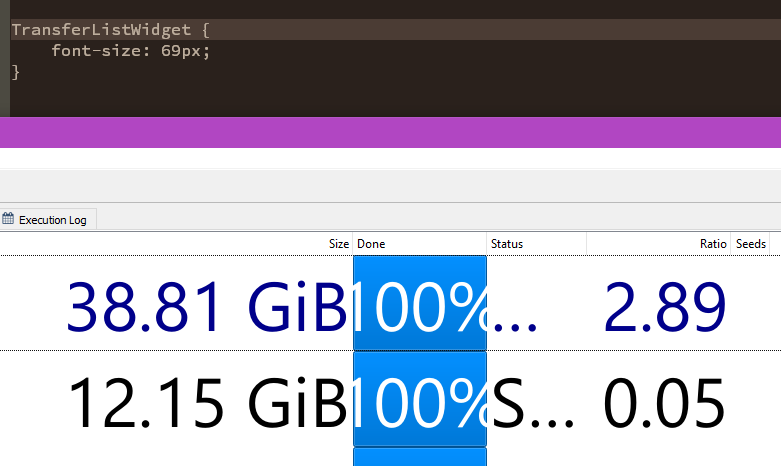
you can read more about creating themes here
https://github.com/qbittorrent/qBittorrent/wiki/Create-custom-themes-for-qBittorrent (Hi @FranciscoPombal I've updated wiki with latest version, mind taking a read)
 jagannatharjun
on 16 May 2020
jagannatharjun
on 16 May 2020
So I suppose it's resolved.
glassez
on 16 May 2020
@jagannatharjun
(Hi @FranciscoPombal I've updated wiki with latest version, mind taking a read)
Looks good, but I saw this:
and
config.jsonwhich currently only manages GUI colors.
It seems it can now handle at least font sizes as well, so that probably needs adjustments.
(also closing the issue as it is resolved - there now is a way to change font size, via custom themes)
 FranciscoPombal
on 17 May 2020
FranciscoPombal
on 17 May 2020
It seems it can now handle at least font sizes as well, so that probably needs adjustments
No font size can only be changed using stylesheet, it just like css, but you can't change some qbittorrent colors which are applied on some context based like transfer list row color or log colors, thats why config.json is introduced
jagannatharjun
on 17 May 2020
It seems it can now handle at least font sizes as well, so that probably needs adjustments
No font size can only be changed using stylesheet, it just like css, but you can't change some qbittorrent colors which are applied on some context based like transfer list row color or log colors, thats why config.json is introduced
Yeah I wasn't paying enough attention and thought the file edited in https://github.com/qbittorrent/qBittorrent/issues/4011#issuecomment-629593203 was json.
FranciscoPombal
on 18 May 2020
Related issues
 emanruse
·
3Comments
emanruse
·
3Comments
 PauluzzS
·
3Comments
PauluzzS
·
3Comments
 roboirc
·
3Comments
roboirc
·
3Comments
 Alepod
·
3Comments
Alepod
·
3Comments
 klepp0906
·
3Comments
klepp0906
·
3Comments
Most helpful comment
Really important feature. Interface doesn't scale well for 1080 resolution or more. As a result it's harmful to the eye and looks outdated.