Pytube: Playlist.video_urls giving empty list for a playlist url
I'm following the sample in readme to get the videos in a playlist but it return a empty list when I call Playlist.video_urls.
Here is my test code and it run on Python-3.7.9 and pytube-10.0.0.
>>> from pytube import Playlist
>>> p = Playlist('https://www.youtube.com/playlist?list=PLS1QulWo1RIaJECMeUT4LFwJ-ghgoSH6n')
>>> p
1
[]
>>> p.title
'Python Tutorial for Beginners (For Absolute Beginners)'
>>> p.playlist_id
'PLS1QulWo1RIaJECMeUT4LFwJ-ghgoSH6n'
>>> p.playlist_url
'https://www.youtube.com/playlist?list=PLS1QulWo1RIaJECMeUT4LFwJ-ghgoSH6n'
>>> p.video_urls
[]
 Winedays
All 31 comments
Thank you for contributing to PyTube. Please remember to reference Contributing.md
![github-actions[bot] picture](https://avatars2.githubusercontent.com/in/15368?v=4&s=40) github-actions[bot]
on 30 Nov 2020
github-actions[bot]
on 30 Nov 2020
Same here :/
 diego-aquino
on 2 Dec 2020
diego-aquino
on 2 Dec 2020
Me to :(
 P-T1ps
on 3 Dec 2020
P-T1ps
on 3 Dec 2020
Alright so I haven't used pytube in ages before this and my first time making a request it didn't work however when I connected to a vpn ("to change my ip") it worked fine....
P-T1ps
on 3 Dec 2020
For me it worked fine at first but from one day to another I had the same problem
 L-upo
on 3 Dec 2020
L-upo
on 3 Dec 2020
Hi, I'll try to look into this problem soon
 tfdahlin
on 3 Dec 2020
tfdahlin
on 3 Dec 2020
Help!!!!!
Same here :/
 Master-JS
on 4 Dec 2020
Master-JS
on 4 Dec 2020
https://github.com/nficano/pytube/pull/860 this PR fixes the problem for me locally. Once it passes tests, I'll merge it.
tfdahlin
on 5 Dec 2020
Should be fixed now.
You can install the latest update with python -m pip install git+https://github.com/nficano/pytube
tfdahlin
on 5 Dec 2020
I've installed the latest update, and the playlist still returns an empty list along with a "1."
 cwright1162
on 5 Dec 2020
cwright1162
on 5 Dec 2020
@cwright1162 can you provide the playlist url you're using so I can test it please?
tfdahlin
on 5 Dec 2020
@tfdahlin of course! I actually meant to paste it in - My Bad!
https://www.youtube.com/playlist?list=PLV8-xq2sXzY6kNkMU1X8e9ECG2AozLDWw
cwright1162
on 5 Dec 2020
When I try to access that page, I see this:

Are you sure you've copied the playlist link correctly?
tfdahlin
on 5 Dec 2020
When I try to access that page, I see this:
Are you sure you've copied the playlist link correctly?
Strange. Yes, I've definitely copied it correctly.
cwright1162
on 5 Dec 2020
Are you sure this is a public playlist?
tfdahlin
on 5 Dec 2020
with me is also giving the same thing
public_playlist = ['https://www.youtube.com/playlist?list=PL_PkvixazWavdvV-OBx5VQvag4QoUxpSA']
 kyoplank
on 6 Dec 2020
kyoplank
on 6 Dec 2020
Well, although I originally made this playlist public, I must not have saved it as such. I'll do more testing and come back if the issue remains.. Thank you!
cwright1162
on 6 Dec 2020
I am stacking on the same step.
The counting the number of playlist can be solved by this way shown below
https://stackoverflow.com/questions/64184927/pytube-playlist-is-returning-empty-array
This new list does not work in YouTube class from pytube, though...
 Shin0SAKA
on 6 Dec 2020
Shin0SAKA
on 6 Dec 2020
@KyoFL are you sure you've installed the most recent version of pytube? When I run against that playlist, I don't have any problems.
@Shin0SAKA what playlist are you having this problem with?
tfdahlin
on 6 Dec 2020
@KyoFL are you sure you've installed the most recent version of pytube? When I run against that playlist, I don't have any problems.
@Shin0SAKA what playlist are you having this problem with?
I've got the same problem(empty list in return and a "1") with this (public, correctly copied) playlist: https://www.youtube.com/playlist?list=PL2VSP-l20r1NbjSnx6Mey6iJ6SWMoDrUv
I've also installed the latest pytube version.
L-upo
on 6 Dec 2020
yeah I'm getting empty list in return and a "1" as well.
 tdheyes
on 6 Dec 2020
tdheyes
on 6 Dec 2020
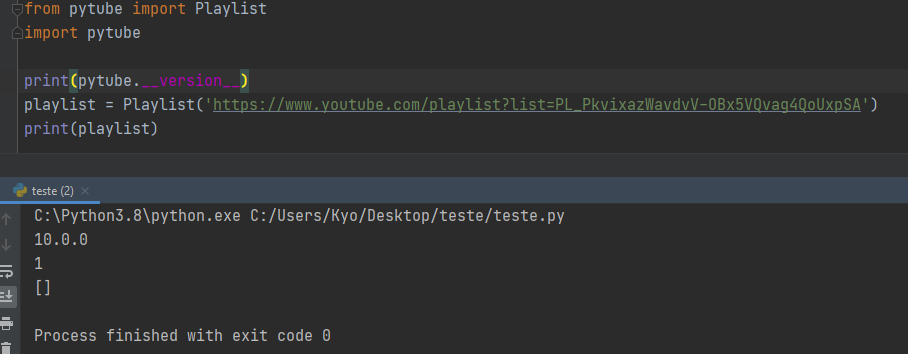
I just created a virtual environment and installed pytube again and I have the same error
@tfdahlin
kyoplank
on 6 Dec 2020
@KyoFL just to confirm, how did you install pytube? Did you run python -m pip install pytube, or python -m pip install git+https://github.com/nficano/pytube? The code has not yet been pushed to pypi, so you'll need to install directly from the github repo with the second command. I can't seem to replicate this problem when I install the code from source on my machine.
tfdahlin
on 6 Dec 2020
To @tdheyes ,
I had the same output/phenomenon as @KyoFL did.
If the playlist was sorted by re.function, I could count the number of list by len(playlist) as indicated in the link above.
But, the new list did not work as the url in YouTube class...
Shin0SAKA
on 6 Dec 2020
@tfdahlin I used git + https: //github.com/nficano/pytube
kyoplank
on 6 Dec 2020
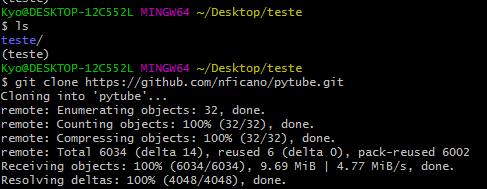
I still have the bash open @tfdahlin
kyoplank
on 6 Dec 2020
@kyoFL I think you're misunderstanding slightly. you don't need to use git clone here -- if you copy and paste this:
python -m pip install git+https://github.com/nficano/pytube
It will automatically install directly from the source code.
Can you run this and tell me what the output it gives you is please?:
>>> import inspect
>>> from pytube.extract import initial_data
>>> print(inspect.getsource(initial_data))
hmmm, I may have done something wrong @tfdahlin

kyoplank
on 6 Dec 2020
Yeah, you definitely still have the version of pytube that's on pypi, and not the current, updated source code.
Are you currently running this on a Windows machine that has powershell?
tfdahlin
on 6 Dec 2020
If so, try opening up powershell and running the following commands by copy and pasting them into powershell:
cd "C:\Python3.8
.\python.exe -m pip uninstall pytube
.\python.exe -m pip install git+https://github.com/nficano/pytube
tfdahlin
on 6 Dec 2020
it worked!! thank you very much dude s2 @tfdahlin
I think I needed to uninstall the old version first, right?
because I had already installed it directly from the repository

kyoplank
on 6 Dec 2020
Related issues
 twwwy
·
54Comments
twwwy
·
54Comments
 haroldfry
·
58Comments
haroldfry
·
58Comments
 RONNCC
·
20Comments
RONNCC
·
20Comments
 SnoopiACK
·
28Comments
SnoopiACK
·
28Comments
 Ircama
·
32Comments
Ircama
·
32Comments
Most helpful comment
it worked!! thank you very much dude s2 @tfdahlin
I think I needed to uninstall the old version first, right?
because I had already installed it directly from the repository