Pytorch3d: S3 wheels are broken
🐛 Bugs / Unexpected behaviors
I tried to install pytorch3d in colab, it was installed with no errors, but then during imports produces errors
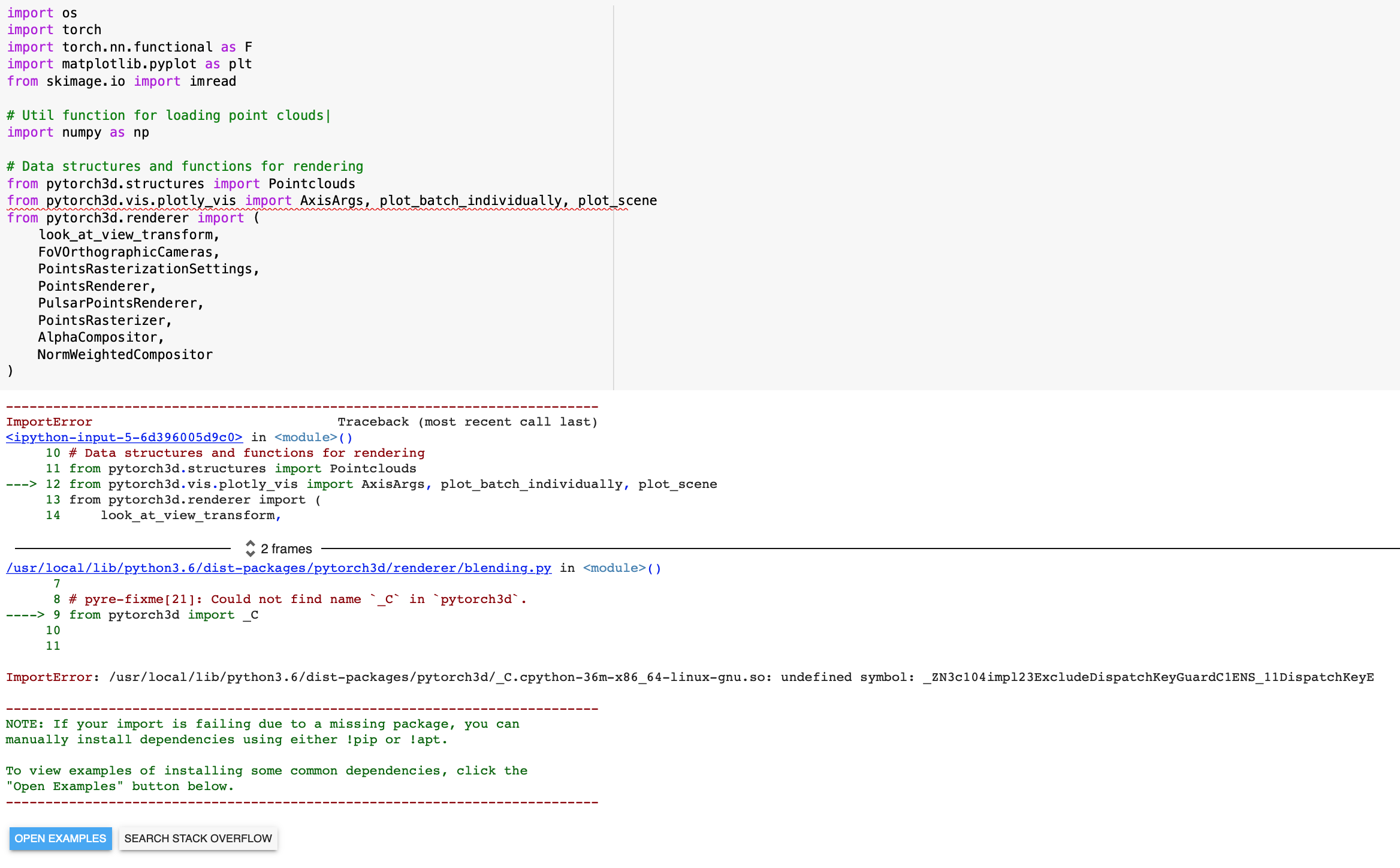
Instructions To Reproduce the Issue:
I put this code in the beginning of colab
!pip install torch torchvision
import os
import sys
import torch
need_pytorch3d=False
try:
    import pytorch3d
except ModuleNotFoundError:
    need_pytorch3d=True
if need_pytorch3d:
    if torch.__version__.startswith("1.7") and sys.platform.startswith("linux"):
        # We try to install PyTorch3D via a released wheel.
        version_str="".join([
            f"py3{sys.version_info.minor}_cu",
            torch.version.cuda.replace(".",""),
            f"_pyt{torch.__version__[0:5:2]}"
        ])
        !pip install pytorch3d -f https://dl.fbaipublicfiles.com/pytorch3d/packaging/wheels/{version_str}/download.html
    else:
        # We try to install PyTorch3D from source.
        !curl -LO https://github.com/NVIDIA/cub/archive/1.10.0.tar.gz
        !tar xzf 1.10.0.tar.gz
        os.environ["CUB_HOME"] = os.getcwd() + "/cub-1.10.0"
        !pip install 'git+https://github.com/facebookresearch/pytorch3d.git@stable'
p.s. in my environment there are also errors:

 rakhimovv
All 4 comments
The instructions for the s3 wheels have been committed to the tutorials on the master branch / main branch in preparation for the next release of PyTorch3D. It is not expected that this will work right now. If you want to run the tutorials now in Colab then the "correct" thing to do, unfortunately, is to force PyTorch3D to be installed from source. If you have no need of the latest changes in PyTorch3D, you can use the tutorials at the stable tag (i.e. the latest release, 0.3.0) together with the code of the stable tag.
Here is an explanation of what has "really" gone wrong in your notebook. This information is very temporary and not very important. The current release of PyTorch3D is 0.3.0. As a test of the idea of S3 wheels, last week I deployed a collection of wheels to S3 built with the current master branch. Note that they have the version number 0.3.0 but they contain all the changes in latest master (so they aren't really 0.3.0). When you run !pip install pytorch3d -f https://dl.fbaipublicfiles.com/pytorch3d/packaging/wheels/{version_str}/download.html right now in Colab, pip sees that the latest version of pytorch3d listed in the html file at that location is 0.3.0. It realises that this version is also in PyPI, so it installs the dependencies and pytorch3d itself from PyPI (or pythonhosted or wherever). If you look carefully at the pip output you will see that it never installed the wheel from S3. And the PyPI wheel for 0.3.0 is built with an old PyTorch (which no longer matches colab) so it doesn't work.
When we release the next version of PyTorch3D, we will make sure there are no linux wheels for it on PyPI, so that the commands actually work.
In fact, if you really want to use these temporary wheels you can see on S3 in colab right now, then you will need the --no-index flag on pip. Basically you will need to do "factory reset runtime" and then try something like
!pip install fvcore iopath
!pip install --no-index --no-cache pytorch3d -f https://dl.fbaipublicfiles.com/pytorch3d/packaging/wheels/{version_str}/download.html
 bottler
on 7 Feb 2021
bottler
on 7 Feb 2021
@bottler, thanks for the detailed explanation! The idea with prebuilt wheels on S3 is very cool
rakhimovv
on 8 Feb 2021
Thanks @bottler for the detailed explanation! @rakhimovv we will be releasing the next version of PyTorch3D this week!
 nikhilaravi
on 8 Feb 2021
nikhilaravi
on 8 Feb 2021
The release has happened and this works fine.
bottler
on 12 Feb 2021
Related issues
 OmriKaduri
·
3Comments
OmriKaduri
·
3Comments
 cihanongun
·
3Comments
cihanongun
·
3Comments
 abhi1kumar
·
3Comments
abhi1kumar
·
3Comments
 unlugi
·
3Comments
unlugi
·
3Comments
 MarkTension
·
3Comments
MarkTension
·
3Comments
Most helpful comment
The instructions for the s3 wheels have been committed to the tutorials on the master branch / main branch in preparation for the next release of PyTorch3D. It is not expected that this will work right now. If you want to run the tutorials now in Colab then the "correct" thing to do, unfortunately, is to force PyTorch3D to be installed from source. If you have no need of the latest changes in PyTorch3D, you can use the tutorials at the stable tag (i.e. the latest release, 0.3.0) together with the code of the stable tag.
Here is an explanation of what has "really" gone wrong in your notebook. This information is very temporary and not very important. The current release of PyTorch3D is 0.3.0. As a test of the idea of S3 wheels, last week I deployed a collection of wheels to S3 built with the current master branch. Note that they have the version number 0.3.0 but they contain all the changes in latest master (so they aren't really 0.3.0). When you run
!pip install pytorch3d -f https://dl.fbaipublicfiles.com/pytorch3d/packaging/wheels/{version_str}/download.htmlright now in Colab, pip sees that the latest version ofpytorch3dlisted in the html file at that location is 0.3.0. It realises that this version is also in PyPI, so it installs the dependencies andpytorch3ditself from PyPI (orpythonhostedor wherever). If you look carefully at the pip output you will see that it never installed the wheel from S3. And the PyPI wheel for 0.3.0 is built with an old PyTorch (which no longer matches colab) so it doesn't work.When we release the next version of PyTorch3D, we will make sure there are no linux wheels for it on PyPI, so that the commands actually work.
In fact, if you really want to use these temporary wheels you can see on S3 in colab right now, then you will need the
--no-indexflag on pip. Basically you will need to do "factory reset runtime" and then try something like