Pytorch3d: Pulsar produces empty images
🐛 Bugs / Unexpected behaviors
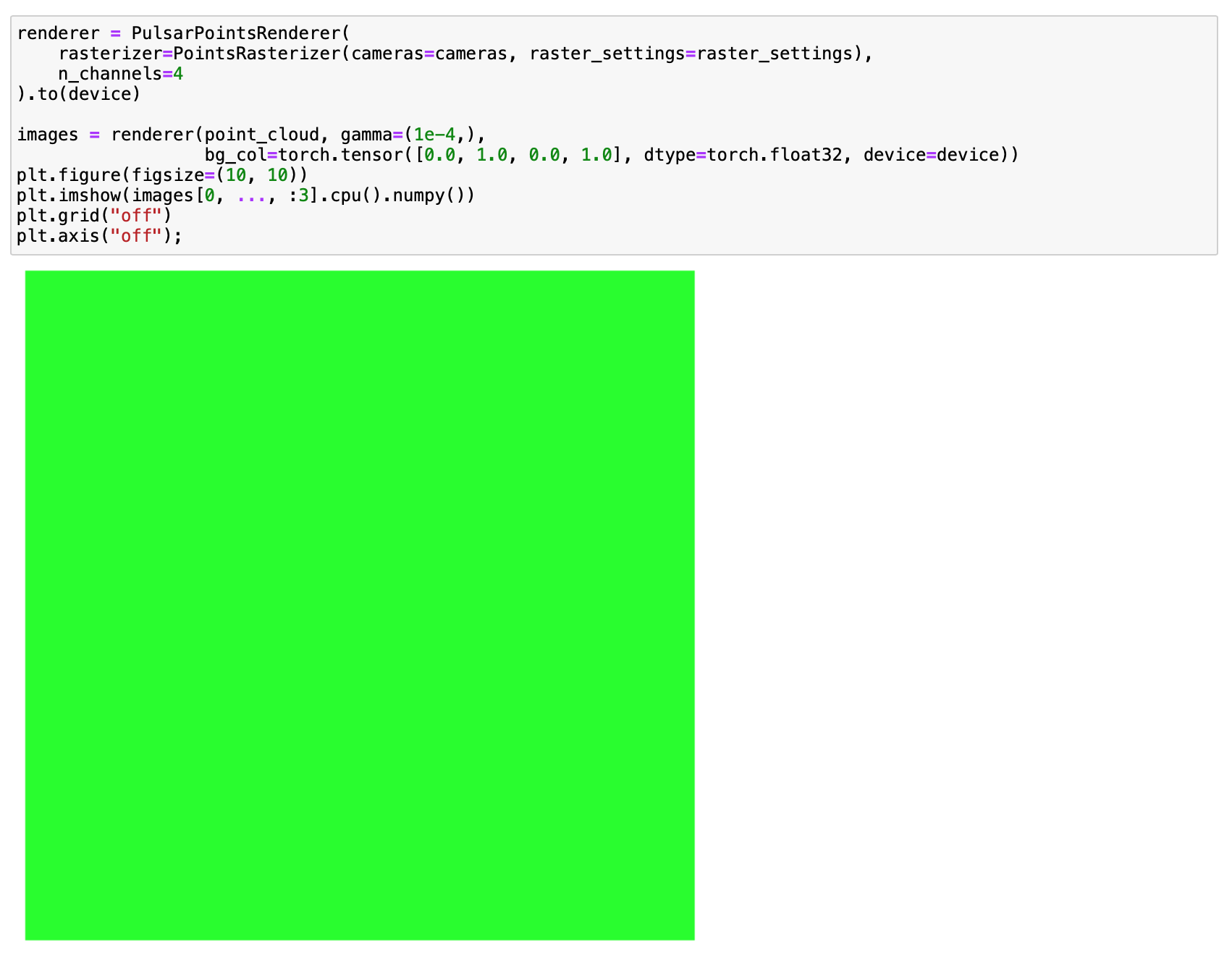
All examples from this repo which use pulsar produce almost empty images
Instructions To Reproduce the Issue:
Installation happened with no errors
curl -LO https://github.com/NVIDIA/cub/archive/1.10.0.tar.gz
tar xzf 1.10.0.tar.gz
export CUB_HOME=$PWD/cub-1.10.0
git clone https://github.com/facebookresearch/pytorch3d.git
cd pytorch3d
git checkout e42b0c4f704fa0f5e262f370dccac537b5edf2b1
pip install -e . --verbose
Environment info:
* CUDA:
    - GPU:
        - GeForce GTX 1080 Ti
    - available:         True
    - version:           10.2
* Packages:
    - numpy:             1.20.0
    - pyTorch_debug:     False
    - pyTorch_version:   1.7.1
* System:
    - OS:                Linux
    - architecture:
        - 64bit
        -
    - processor:         x86_64
    - python:            3.7.9
    - version:           #1 SMP Sun Jan 26 09:10:24 EST 2020
Screenshot from render_colored_points.ipynb. I changed nothing just ran all cells.
 rakhimovv
All 13 comments
python3 -m unittest test_render_points.py passes all tests, including those with a pulsar. In the meantime, while all other renderers produce something reasonable in the render_colored_points.ipynb, pulsar still produces only background color.
I also matched the environment to the one in collab demos (pytorch=1.7.0, cuda=10.1, stable version of pytorch3d) except the python version (3.7.9 vs. 3.6 in colab), but the same thing still happens only with a pulsar.
I also tried to look at the image produced in https://github.com/facebookresearch/pytorch3d/blob/master/docs/examples/pulsar_optimization.py. It also сontains the only background from the beginning.
Interestingly, if I change device to CPU, then pulsar works
rakhimovv
on 5 Feb 2021
@classner, could you please look into the issue?
rakhimovv
on 5 Feb 2021
Hi @rakhimovv ,
I am very sure this is a CUB version issue. What happens here is that the CUB sorting routine is breaking and returning a zero-initialized list for every pixel (no spheres are there), so you get an empty image. @bottler, what is the best way to be transparent about the CUDA version used during the build and debug that in detail? Is there log output? @rakhimovv, do you have multiple CUDA versions installed on your system, and are you sure that it uses the one that you expect to use? (Btw., that's why the CPU version works without problems.)
 classner
on 5 Feb 2021
classner
on 5 Feb 2021
The alternative is to use the pre-built library from conda, which should just work. :)
classner
on 5 Feb 2021
Thanks for the response, @classner . Yes, the cuda version on the machine is 10.2, but the torch is using 10.1
rakhimovv
on 5 Feb 2021
ok, I reinstalled torch with cuda 10.2, the problem stays. I will try to install CUB using conda
rakhimovv
on 5 Feb 2021
I tried everything
- installed cudatoolkit=10.2 using conda-> the problem remains
- installed cudatoolkit=10.2+nvidiacub using conda-> the problem remains
- installed cudatoolkit=10.2+nvidiacub using conda + built CUB from https://github.com/NVIDIA/cub/archive/1.10.0.tar.gz -> the problem remains
I have no idea what is wrong :( The installation of pytorch3d in all the 3 cases above happened from the source. I do not want to use conda for pytorch3d installation since it becomes difficult to update packages in the long run.
Also, one another point may be to move to cuda 11.0, but I see some contradiction in the docs, i.e.
In the setup.py, it is written that # With CUDA 11.0 we can't use the cudatoolkit's version of cub.
while in INSTALL.md, nothing is said that we need to set CUB_HOME or install it anyhow when we use CUDA 11.0
rakhimovv
on 5 Feb 2021
I made it work on a different machine with following configuration:
cuda driver version 11.2
cuda runtime version 11.0
cudatoolkit (conda) 11.0
pytorch 1.7.1 (cuda 10.2)
CUB from https://github.com/NVIDIA/cub/archive/1.10.0.tar.gz
pytorch3d is built from source
but I still do not understand what really brought the desired outcome
rakhimovv
on 5 Feb 2021
Hi @rakhimovv,
apologies for your extra effort on that end and thanks a lot for sharing this detailed information with us. Can you provide us with any additional background information on the differences between the two machines that might be relevant, for example the compilers and versions used, OS type and version? @bottler, do you think there's any more information about conda that could help us figure out why this is failing sometimes?
classner
on 15 Feb 2021
On the CUDA 11.0 question, there is nothing specific in INSTALL.md. That's because the instructions are the same for CUDA 11.0 - i.e. you need to download the recommended CUB and set CUB_HOME. The fact there is some verison of CUB inside CUDA is not useful to us.
I don't understand the build which is working. Surely PyTorch doesn't work when it was built with a different version of cuda from the one you are running. Did you build pytorch from scratch? Maybe worth pasting the good and bad versions of pip list and conda list.
It might be interesting to know if the working build works when you try to run it on the other machine (assuming the hardware is compatible).
 bottler
on 15 Feb 2021
bottler
on 15 Feb 2021
Apologies for the late answer, @classner, @bottler. Thanks again for your support. I tried different combinations. The result is the following:
1st machine (pulsar works) - gpu V100
ubuntu20.04
cuda driver version 11.2 (Driver Version: 460.32.03)
cuda runtime version 11.0
cudatoolkit (conda) 11.0
pytorch 1.7.1 (cuda 10.2)
CUB from https://github.com/NVIDIA/cub/archive/1.10.0.tar.gz
pytorch3d is built from source (4bb3fff52b7e26ec0f013021cb26fab7db3d8e0b)
2nd machine (pulsar works) - gpu V100
ubuntu18.04
cuda driver version 10.2 (Driver Version: 440.64)
cuda runtime version 10.2
cudatoolkit (conda) 10.2
pytorch 1.7.1 (cuda 10.2)
CUB from https://github.com/NVIDIA/cub/archive/1.10.0.tar.gz
pytorch3d is built from source (4bb3fff52b7e26ec0f013021cb26fab7db3d8e0b)
3rd machine (pulsar does not work) - gpu 1080Ti
ubuntu20.04
cuda driver version 11.2 (Driver Version: 460.32.03)
cuda runtime version 11.0
cudatoolkit (conda) 11.0
pytorch 1.7.1 (cuda 10.2)
CUB from https://github.com/NVIDIA/cub/archive/1.10.0.tar.gz
pytorch3d is built from source (4bb3fff52b7e26ec0f013021cb26fab7db3d8e0b)
I installed pytorch using just pip on all machines. It works on all machines. torch.cuda.is_available() produces True. I checked that I did not forget to export CUB_HOME in the 1st place.
rakhimovv
on 7 Mar 2021
pip list output under virtualenv I am working under for the 3d machine (the same as for the 1st machine)
Package                Version
---------------------- ------------------
absl-py                0.11.0
aiohttp                2.3.10
antlr4-python3-runtime 4.8
argon2-cffi            20.1.0
async-generator        1.10
async-timeout          3.0.1
attrs                  20.3.0
backcall               0.2.0
bleach                 3.3.0
cachetools             4.2.1
certifi                2020.12.5
cffi                   1.14.5
chardet                4.0.0
cycler                 0.10.0
decorator              4.4.2
defusedxml             0.6.0
entrypoints            0.3
fsspec                 0.8.7
future                 0.18.2
fvcore                 0.1.3.post20210306
google-auth            1.27.0
google-auth-oauthlib   0.4.2
grpcio                 1.36.0
hydra-core             1.0.6
idna                   2.10
idna-ssl               1.1.0
imageio                2.9.0
importlib-metadata     3.7.0
importlib-resources    5.1.0
iopath                 0.1.4
ipykernel              5.5.0
ipython                7.21.0
ipython-genutils       0.2.0
ipywidgets             7.6.3
jedi                   0.18.0
Jinja2                 2.11.3
jsonschema             3.2.0
jupyter                1.0.0
jupyter-client         6.1.11
jupyter-console        6.2.0
jupyter-core           4.7.1
jupyterlab-pygments    0.1.2
jupyterlab-widgets     1.0.0
kiwisolver             1.3.1
Markdown               3.3.4
MarkupSafe             1.1.1
matplotlib             3.3.4
mistune                0.8.4
multidict              5.1.0
nbclient               0.5.3
nbconvert              6.0.7
nbformat               5.1.2
nest-asyncio           1.5.1
notebook               6.2.0
numpy                  1.20.1
oauthlib               3.1.0
omegaconf              2.0.6
opencv-python          4.5.1.48
packaging              20.9
pandas                 1.1.5
pandocfilters          1.4.3
parso                  0.8.1
pexpect                4.8.0
pickleshare            0.7.5
Pillow                 8.1.0
pip                    20.2.4
portalocker            2.2.1
prometheus-client      0.9.0
prompt-toolkit         3.0.16
protobuf               3.15.3
ptyprocess             0.7.0
pyasn1                 0.4.8
pyasn1-modules         0.2.8
pycparser              2.20
Pygments               2.8.0
pyparsing              2.4.7
pyrsistent             0.17.3
python-dateutil        2.8.1
pytorch-lightning      1.2.1
pytorch3d              0.4.0
pytz                   2021.1
PyYAML                 5.3.1
pyzmq                  22.0.3
qtconsole              5.0.2
QtPy                   1.9.0
requests               2.25.1
requests-oauthlib      1.3.0
rsa                    4.7.2
scipy                  1.6.1
Send2Trash             1.5.0
setuptools             50.3.2
six                    1.15.0
tabulate               0.8.9
tensorboard            2.4.1
tensorboard-plugin-wit 1.8.0
termcolor              1.1.0
terminado              0.9.2
test-tube              0.7.5
testpath               0.4.4
torch                  1.7.1
torch-scatter          2.0.6
torchvision            0.8.2
tornado                6.1
tqdm                   4.58.0
traitlets              5.0.5
trimesh                3.9.8
typing-extensions      3.7.4.3
urllib3                1.26.3
wcwidth                0.2.5
webencodings           0.5.1
Werkzeug               1.0.1
wheel                  0.35.1
widgetsnbextension     3.5.1
yacs                   0.1.8
yarl                   1.6.3
zipp                   3.4.0
conda list output (the same as for the 1st machine)
_libgcc_mutex             0.1                 conda_forge    conda-forge
_openmp_mutex             4.5                       1_gnu    conda-forge
appdirs                   1.4.4                    pypi_0    pypi
blessings                 1.7                      pypi_0    pypi
brotlipy                  0.7.0           py37h5e8e339_1001    conda-forge
ca-certificates           2020.12.5            ha878542_0    conda-forge
cachecontrol              0.12.6                   pypi_0    pypi
cachy                     0.3.0                    pypi_0    pypi
certifi                   2020.12.5        py37h89c1867_1    conda-forge
cffi                      1.14.4           py37hc58025e_1    conda-forge
chardet                   4.0.0            py37h89c1867_1    conda-forge
cleo                      0.8.1                    pypi_0    pypi
clikit                    0.6.2                    pypi_0    pypi
conda                     4.9.2            py37h89c1867_0    conda-forge
conda-package-handling    1.7.2            py37hb5d75c8_0    conda-forge
crashtest                 0.3.1                    pypi_0    pypi
cryptography              3.3.1            py37h7f0c10b_1    conda-forge
cudatoolkit               11.0.221             h6bb024c_0
distlib                   0.3.1                    pypi_0    pypi
filelock                  3.0.12                   pypi_0    pypi
gpustat                   0.6.0                    pypi_0    pypi
html5lib                  1.1                      pypi_0    pypi
idna                      2.10               pyh9f0ad1d_0    conda-forge
importlib-metadata        1.7.0                    pypi_0    pypi
jeepney                   0.6.0                    pypi_0    pypi
keyring                   21.8.0                   pypi_0    pypi
ld_impl_linux-64          2.35.1               hea4e1c9_2    conda-forge
libffi                    3.3                  h58526e2_2    conda-forge
libgcc-ng                 9.3.0               h2828fa1_18    conda-forge
libgomp                   9.3.0               h2828fa1_18    conda-forge
libstdcxx-ng              9.3.0               h6de172a_18    conda-forge
lockfile                  0.12.2                   pypi_0    pypi
msgpack                   1.0.2                    pypi_0    pypi
ncurses                   6.2                  h58526e2_4    conda-forge
nvidia-ml-py3             7.352.0                  pypi_0    pypi
openssl                   1.1.1i               h7f98852_0    conda-forge
packaging                 20.9                     pypi_0    pypi
pastel                    0.2.1                    pypi_0    pypi
pexpect                   4.8.0                    pypi_0    pypi
pip                       21.0.1             pyhd8ed1ab_0    conda-forge
pkginfo                   1.7.0                    pypi_0    pypi
poetry                    1.1.4                    pypi_0    pypi
poetry-core               1.0.0                    pypi_0    pypi
psutil                    5.8.0                    pypi_0    pypi
ptyprocess                0.7.0                    pypi_0    pypi
pycosat                   0.6.3           py37h5e8e339_1006    conda-forge
pycparser                 2.20               pyh9f0ad1d_2    conda-forge
pylev                     1.3.0                    pypi_0    pypi
pyopenssl                 20.0.1             pyhd8ed1ab_0    conda-forge
pyparsing                 2.4.7                    pypi_0    pypi
pysocks                   1.7.1            py37h89c1867_3    conda-forge
python                    3.7.9           hffdb5ce_0_cpython    conda-forge
python_abi                3.7                     1_cp37m    conda-forge
readline                  8.0                  he28a2e2_2    conda-forge
requests                  2.25.1             pyhd3deb0d_0    conda-forge
requests-toolbelt         0.9.1                    pypi_0    pypi
ruamel_yaml               0.15.80         py37h5e8e339_1004    conda-forge
secretstorage             3.3.0                    pypi_0    pypi
setuptools                49.6.0           py37h89c1867_3    conda-forge
shellingham               1.4.0                    pypi_0    pypi
six                       1.15.0             pyh9f0ad1d_0    conda-forge
sqlite                    3.34.0               h74cdb3f_0    conda-forge
tk                        8.6.10               h21135ba_1    conda-forge
tomlkit                   0.7.0                    pypi_0    pypi
tqdm                      4.56.0             pyhd8ed1ab_0    conda-forge
urllib3                   1.26.3             pyhd8ed1ab_0    conda-forge
virtualenv                20.4.2                   pypi_0    pypi
webencodings              0.5.1                    pypi_0    pypi
wheel                     0.36.2             pyhd3deb0d_0    conda-forge
xz                        5.2.5                h516909a_1    conda-forge
yaml                      0.2.5                h516909a_0    conda-forge
zipp                      3.4.0                    pypi_0    pypi
zlib                      1.2.11            h516909a_1010    conda-forge
Machine 1 works, and machine 3 doesn't, and their environments are the same. Just a different GPU.
There could be some background difference in the compiler or something. It would be interesting to take a build from machine 1 and see if it works on machine 3.
Machine 3 will need compute capability 6.1, whereas machine 1 needs 7.0. I think you would need to do another build in a new environment on machine 1, setting TORCH_CUDA_ARCH_LIST="6.1;7.0", and then copy over the _C shared library file over to machine 3.
bottler
on 7 Mar 2021
Related issues
 aluo-x
·
3Comments
aluo-x
·
3Comments
 AndreiBarsan
·
3Comments
AndreiBarsan
·
3Comments
 farhanrw
·
3Comments
farhanrw
·
3Comments
 OmriKaduri
·
3Comments
OmriKaduri
·
3Comments
 TSKongLingwei
·
3Comments
TSKongLingwei
·
3Comments
Most helpful comment
On the CUDA 11.0 question, there is nothing specific in INSTALL.md. That's because the instructions are the same for CUDA 11.0 - i.e. you need to download the recommended CUB and set CUB_HOME. The fact there is some verison of CUB inside CUDA is not useful to us.
I don't understand the build which is working. Surely PyTorch doesn't work when it was built with a different version of cuda from the one you are running. Did you build pytorch from scratch? Maybe worth pasting the good and bad versions of
pip listandconda list.It might be interesting to know if the working build works when you try to run it on the other machine (assuming the hardware is compatible).