Pytorch3d: Silhouette rendering with an unexpected scale problem
When I follow the silhouette rendering offered in tutorials fit_textured_mesh.ipynb. I found that the silhouette renderer can produce a silhouette of an object, while the silhouette does not completely coincide with the edge of the rendered color image. It seems larger than the rendered color image.
- the rendered color image:
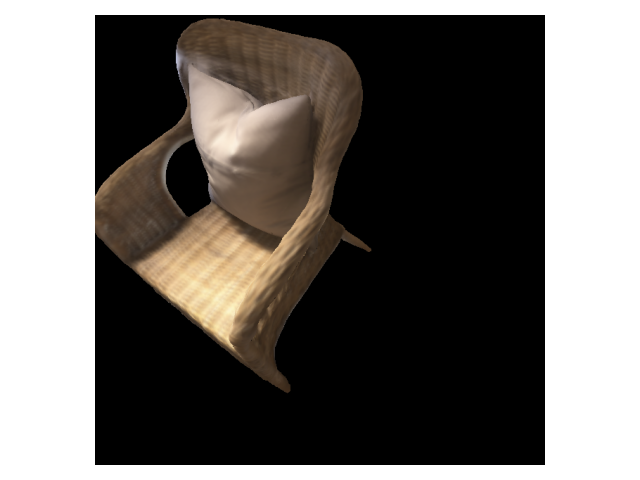
the 4-th channel of the rendered color image:

the result produced by silhouette renderer:
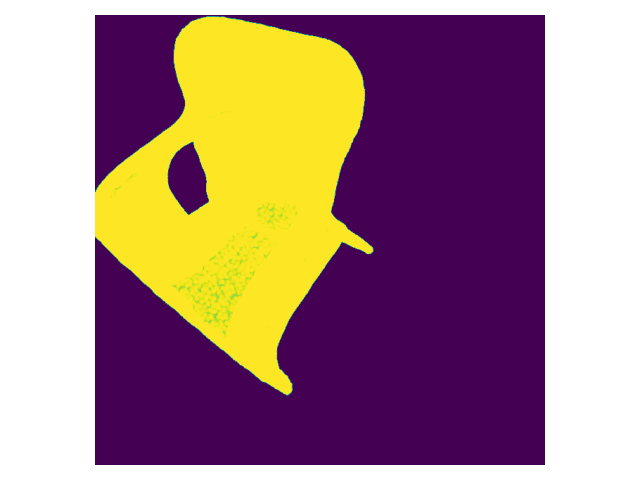
I assume this is because the blur_radius > 0 in the silhouette renderer:
sigma = 1e-4
raster_settings_soft = RasterizationSettings(
image_size=128,
blur_radius=np.log(1. / 1e-4 - 1.)*sigma,
faces_per_pixel=50,
)
renderer_silhouette = MeshRenderer(
rasterizer=MeshRasterizer(
cameras=camera,
raster_settings=raster_settings_soft
),
shader=SoftSilhouetteShader()
)
But, how can I obtain a rendered silhouette with an accurate scale?
 Eckert-ZJB
All 8 comments
If you set blur radius to 0.0 then you should get the same scale - if the blur is different between the color and silhouette renderer settings, then the image sizes will be different.
 nikhilaravi
on 2 Dec 2020
nikhilaravi
on 2 Dec 2020
@nikhilaravi But if I set blur radius to 0.0, the pixel value of the rendered silhouette image is not 0 or 1, most of them are around 0.5. What is mean of these value? I assume that the value of the silhouette image should be 0 or 1.
Eckert-ZJB
on 7 Dec 2020
@nikhilaravi is there any solutions to get a rendered silhouette image where the pixel value is 0 or 1?
Eckert-ZJB
on 15 Dec 2020
@Eckert-ZJB Do you have solution for your question, I use post-processing but the gradient easily get to 0.
 wangsen1312
on 3 Feb 2021
wangsen1312
on 3 Feb 2021
Was this problem ever resolved?
 towardsautonomy
on 17 Mar 2021
towardsautonomy
on 17 Mar 2021
Well, does anyone know how to get a 0 1 silhouette ? :(
 MengXinChengXuYuan
on 1 Apr 2021
MengXinChengXuYuan
on 1 Apr 2021
@MengXinChengXuYuan renderer = MeshRenderer(
rasterizer=rasterizer,
shader=SoftSilhouetteShader(blend_params=BlendParams(sigma=0, gamma=0))
)
Change the sigma and gamma to zero will get the 0/1 silhouette. but this will not differentialable.
wangsen1312
on 1 Apr 2021
Folks,
The output of the silhouette renderer is in [0, 1] and not in {0, 1}. Remember that we want the silhouette renderer to be differentiable so the blending produces probabilities for each pixel that determine the "occupancy" in image space. This is computed here
The sigma value determines the sharpness of the peak in the normal distribution used in the blending function. You can set sigma to something very small and the silhouette will become shaper though still in [0, 1]. If you want a {0, 1} silhouette then you can threshold the alpha channel, but then you have lost differentiability.
 gkioxari
on 5 May 2021
gkioxari
on 5 May 2021
Related issues
 NotAnyMike
·
3Comments
NotAnyMike
·
3Comments
 OmriKaduri
·
3Comments
OmriKaduri
·
3Comments
 ruslanvasylev
·
3Comments
ruslanvasylev
·
3Comments
 zhjscut
·
3Comments
zhjscut
·
3Comments
 TheshowN
·
3Comments
TheshowN
·
3Comments