Pytorch3d: Mesh rasterizer clips unnecessary faces when camera.znear < 0
🐛 Bugs / Unexpected behaviors
Since the view space Z coordinates are retained in the transformation to screen coordinates in rasterizer.py
https://github.com/facebookresearch/pytorch3d/blob/fc7a4cacc36ecf2b8feb996bdfb1203dee5d836b/pytorch3d/renderer/mesh/rasterizer.py#L109-L118
And the CheckPointOutsideBoundingBox in rasterize_meshes clips all z values smaller than kEpsilon (see for example the naive cpu implementation)
https://github.com/facebookresearch/pytorch3d/blob/fc7a4cacc36ecf2b8feb996bdfb1203dee5d836b/pytorch3d/csrc/rasterize_meshes/rasterize_meshes_cpu.cpp#L73-L76
It means that faces with z_values smaller than 0 are always rejected
https://github.com/facebookresearch/pytorch3d/blob/fc7a4cacc36ecf2b8feb996bdfb1203dee5d836b/pytorch3d/csrc/rasterize_meshes/rasterize_meshes_cpu.cpp#L206-L210
But if the camera z_near is smaller than 0 it means that many valid faces will be deemed invalid by the rasterizer and therefore rejected.
I'm assuming the best fix is to retain the screen z coordinates and not replace them with the z view coordinates, e.g. remove this line https://github.com/facebookresearch/pytorch3d/blob/fc7a4cacc36ecf2b8feb996bdfb1203dee5d836b/pytorch3d/renderer/mesh/rasterizer.py#L118
In addition, it might be worthwhile to check whether the z coordinates (screen coordinates) of the face are between 0 and 1 in the CheckPointOutsideBoundingBox function.
Instructions To Reproduce the Issue:
Try to render any mesh whose vertices have negative z_values with a camera whose z_near is also negative
Quick workaround
A quick workaround for now is to add z_near to dist in the look_at_view_transform function, e.g.:
R, T = look_at_view_transform(dist=abs(z_near) + dists, elev=elevs, azim=azimuths)
Edit
I've seen that issue #345 describes a similar problem. However, in this issue, all of the mesh faces are still in front of the camera, they are just not rendered because they have negative z values
 royorel
All 10 comments
If the vertices have negative z values then how are they in front of the camera?
According to the PyTorch3D coordinate conventions, the camera lives on the z=0 plane and a shape is in front of the camera if z>0. Currently, if a vertex in a face has negative z value (so it lives behind the camera) our rasterizer clips it. We are working on a more principled fix for this, which is also differentiable.
 gkioxari
on 26 Nov 2020
gkioxari
on 26 Nov 2020
If camera.znear = -100 for instance, the vertices can have negative view coordinates, but positive screen coordinates. An FoVOrthographicCameras with znear=-100 will transfrom a z_view = -100 into z_screen=0 but because of this assignment
https://github.com/facebookresearch/pytorch3d/blob/fc7a4cacc36ecf2b8feb996bdfb1203dee5d836b/pytorch3d/renderer/mesh/rasterizer.py#L118
the rasterizer gets z_view and will discard the face even though it's actually visible.
It happened to me while trying to rewrite the PIFu data generation pipeline in pytorch3d. They use an orthogaphic camera with z_near=-100, z_far=100 over there.
royorel
on 26 Nov 2020
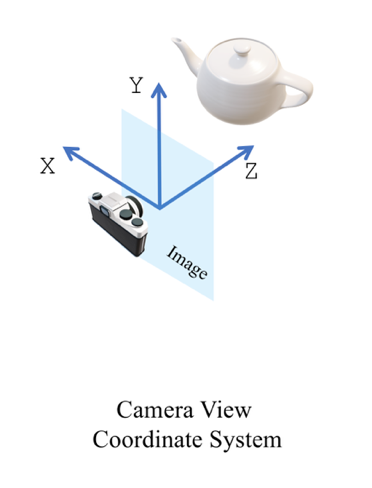
The cameras in PyTorch3D should be defined in accordance to the PyTorch3D rendering/camera convention, meaning that +Z points from the image plane (Z=0) to the scene. Anything with z<0 in camera view is considered behind the camera. The camera view coordinate conventions are explained here: https://github.com/facebookresearch/pytorch3d/blob/master/docs/notes/cameras.md
If I understand your case correctly, you have a mesh that has z<0 vertices and you want to render it by bringing it in front of the camera. First, you need to transform it in order to bring it in front of the camera, such that z>0 in camera view (this is the verts_view[..., 2]. You should transform the mesh with R and T in order to achieve this in cameras:
Once your mesh is placed in camera view, the camera projects with its near/far field clip (or any other projection based on the camera type). Currently, you are trying to transform the mesh to camera view by using the camera projection matrix, which is why you are running into this issue. The transforms should go as follows world view -> camera view(R, T) -> project(K). You are trying to do world view -> project(K) directly.
The world view -> camera view(R, T) -> project(K) is done here:
Another issue, which is not what you are referring to, but what I was responding to previously is what happens when a face is partially behind the camera (e.g. two vertices with z>0 and one vertex with z<0), when the mesh is placed in camera view. In this case, we don't render this face which is not a desirable behaviour. We are adding a fix soon to this so that we can render the clipped face (only belonging to the front of the camera) in a differentiable manner.
gkioxari
on 26 Nov 2020
Thanks for pointing me to the camera conventions page, it was really helpful!!
However, the problem still persists, even when the correct R and T are provided. Another edge case is that the rasterizer will render faces with verts_view[..., 2]>0 & verts_view[..., 2]<znear even though it shouldn't. Once again, because of the verts_screen[..., 2] = verts_view[..., 2] assignment. Such faces should be clipped, because before this assignment, verts_screen[..., 2]<0. (For simplicity, let's assume the verts_view[..., 2]>0 & verts_view[..., 2]<znear condition holds for all three of the face vertices)
royorel
on 26 Nov 2020
The rasterizer will rasterize all vertices with z_view > 0 and is oblivious to near/far fields. The shader that will render the final image can choose to render only the ones in the near/far field. This happens for example in the softmax_rgb_blend in a smooth manner to admit gradients.
If you want hard clipping, then you can modify this blending function to clip based on far/near fields based on the fragments.zbuf which holds the z_view of each point. The reason we don't make hard decisions in the softmax blending function is because it's not friendly for learning. If you don't care about learning, and only care about the forward pass, then you should write your own blending function that does it. The intended use of PyTorch3D is for users to customize their shader based on their needs.
gkioxari
on 26 Nov 2020
So if I understand correctly, In sofmax_rgb_blend the weights are determined according to
    z_inv = (zfar - fragments.zbuf) / (zfar - znear) * mask
    # pyre-fixme[16]: `Tuple` has no attribute `values`.
    # pyre-fixme[6]: Expected `Tensor` for 1st param but got `float`.
    z_inv_max = torch.max(z_inv, dim=-1).values[..., None].clamp(min=eps)
    # pyre-fixme[6]: Expected `Tensor` for 1st param but got `float`.
    weights_num = prob_map * torch.exp((z_inv - z_inv_max) / blend_params.gamma)
That means that faces with fragments.zbuf > zfar will indeed get (smoothly) clipped because their weight will be smaller than delta. But a face with fragments.zbuf < znear will get a higher weight, and it will not be clipped in any manner.
In addition, in hard_rgb_blend no clipping in the z axis is taking place.
So, if I'm still correct up to that point (and I'm probably not... :) ), it seems like the znear parameter has no effect on the output (and neither does zfar in case of hard blending), and it's up to the user to make sure that only the desired faces/vertices will have z>0 with correct R and T transform, or write his own shader to handle the z axis clipping/soft clipping.
If that's indeed the case, then the cameras documentation is slightly misleading. Over there the NDC coordinate system is defined as:
This is the normalized coordinate system that confines in a volume the renderered part of the object/scene.
Also known as view volume. Under the PyTorch3D convention, (+1, +1, znear) is the top left near corner, and (-1, -1, zfar) is
the bottom right far corner of the volume.
This definition, along with the diagram for the NDC coordinate system can make the user (or at least me) believe a clipping in the z axis w.r.t znear and zfar takes place somewhere along the rendering pipeline.
Regardless, this library is awesome!!! You guys are doing a great service to the entire Computer vision community. Thanks a lot!
royorel
on 26 Nov 2020
The cameras documentation talks about the cameras and how they transform the points. Each camera transforms points differently, some accept near/far fields, some don't. The NDC explanation in the documentation is with regards to that. Cameras are not only used with rendering. They can be used anywhere.
Now, the issue is how cameras affect the rasterizer and the renderer. When integrating with the PyTorch3D rasterizer, we use cameras to get the (x,y) screen coordinates (this is after projecting with the camera matrix) but use the raw camera view coordinate for z. This is because we care about the raw distance of each point from the camera (stored in zbuf) which is also necessary in other parts of the computation. Actually, z_screen is not usable there merely because different cameras transform z in different ways, e.g. in PerspectiveCameras, z_screen = 1 / z_view which would lead to wrong barycentric coordinates and other such issues. Using the raw z is important.
You are right about the softmax blending function. This function is just a reimplementation of SoftRas' equivalent function and honestly I don't quite remember what it does! :) But I mentioned it as an example of how you can customize the rendering output based on zbuf. (Btw, SoftRas also uses z_view instead of z_screen in the rasterizer for the same reasons I mentioned above).
In general, I agree with you that it is confusing that near/far is not used in the rasterizer in a definitive way and that the use of z_view instead of z_screen is not immediately obvious to users. To some degree the clarity is sacrificed in the name of modularity and differentiability.
Now to your issue, if you want to render only a carved-out space of the camera view (=view volume), e.g. znear=1 and zfar=2, I would mask out all the fragment outputs for which fragments.zbuf is not within that range.
E.g. mask = fragments.pix_to_face >= 0 & znear <= fragments.zbuf <= zfar. Note that this needs to happen at the fragment level and not prior to the rasterizer because of faces that can partially exist within the view volume. So what you actually want to check is whether the ray starting at pixel (x,y) hits the shape within the view volume or not. Note that this wouldn't be an exact solution, there is a fix underway to render faces that are partially in front of the camera in a differentiable manner and the same fix would be applied here too for the view volume.
gkioxari
on 26 Nov 2020
Thanks @gkioxari for the detailed explanation!!
This clarifies everything. I now fully understand the considerations behind using z_view in the rasterizer, and why carving out the view volume should be done in the blending function. Maybe it would be worthwhile to add an optional Z-axis carving flag to the the default blending functions. It can be useful for inference mode (e.g. .eval() in pytorch) when gradients are no longer needed and you only want to render the final output, according to all camera parameters. That flag would provide an equivalent to OpenGL rendering.
royorel
on 26 Nov 2020
@gkioxari
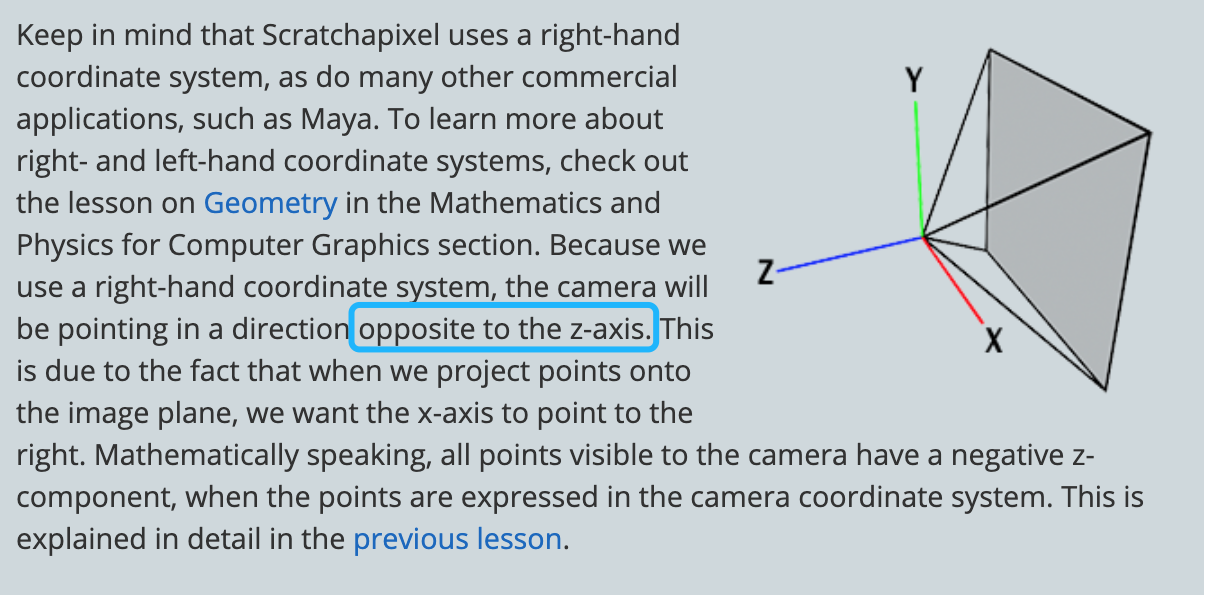
Thank you for your reply. The camera orientation defined in pytorch3d is opposite to that in many other 3D tools, such as OpenGL、Maya, where Z ranges from -near to -far.
 liuzhihui2046
on 22 Feb 2021
liuzhihui2046
on 22 Feb 2021
Yup every library has their own coordinate system convention. This is why before using one, you need to read through and understand the system convention of each tool you are using.
gkioxari
on 22 Feb 2021
Related issues
 zhjscut
·
3Comments
zhjscut
·
3Comments
 aluo-x
·
3Comments
aluo-x
·
3Comments
 elcronos
·
3Comments
elcronos
·
3Comments
 udemegane
·
3Comments
udemegane
·
3Comments
 unlugi
·
3Comments
unlugi
·
3Comments
Most helpful comment
Yup every library has their own coordinate system convention. This is why before using one, you need to read through and understand the system convention of each tool you are using.