Pytorch3d: Facing problem in mapping texture information when using TexturesAtlas method.
🐛 Bugs / Unexpected behaviors
I am using Pytorch3d in my research work and it is extremely helpful. I would also like to thank the contributors for their active support in solving numerous bugs and querries with detailed explanations.
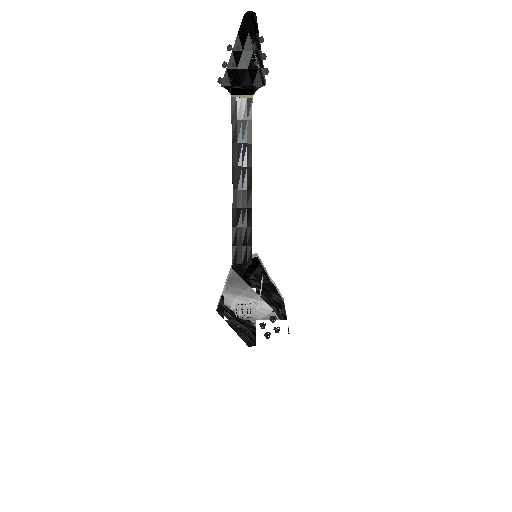
I am facing an error while rendering objects with multiple texture maps. Instead of warping the texture information based on given UV coordinates, I am getting triangles of average color being rendered on the respective faces of the mesh.
This is the rendered image of a guitar generated using my code:
This is how it looks when I open it in Blender:
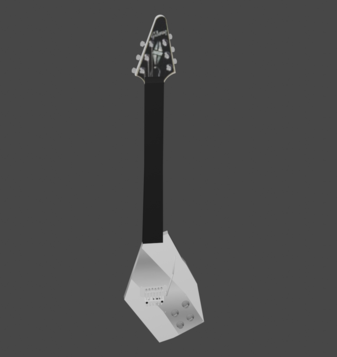
I followed the explanation provided here to understand different methods to read texture information, followed the tutorials, and decided to use the TexturesAtlas method but could not figure out why this is happening.
I am sharing the code and the 3D model I used.
Instructions To Reproduce the Issue:
import os
import torch
from skimage.io import imread
import cv2
import random
import numpy as np
# Util function for loading meshes
from pytorch3d.io import load_objs_as_meshes, load_obj

# Data structures and functions for rendering
from pytorch3d.structures import Meshes
from pytorch3d.vis.plotly_vis import AxisArgs, plot_batch_individually, plot_scene
from pytorch3d.vis.texture_vis import texturesuv_image_matplotlib
from pytorch3d.renderer import (
    look_at_view_transform,
    FoVPerspectiveCameras,
    OpenGLPerspectiveCameras,
    PointLights,
    diffuse,
    Materials,
    RasterizationSettings,
    MeshRenderer,
    MeshRasterizer,
    SoftPhongShader,
    TexturesAtlas,
    BlendParams,
)

BlendParams.background_color = (1.,1.,1.)

if torch.cuda.is_available():
    device = torch.device("cuda:0")
    torch.cuda.set_device(device)
else:
    device = torch.device("cpu")

random.seed(43)

def random_rot_mat():
    r"""Function to rotate the 3D coordinates about the origin

    This function randomly rotates the object about the origin.

    Returns
    -------
    R: Numpy array
    Random rotation matrix.

    """
    alpha = random.random()*2*np.pi
    beta = random.random()*2*np.pi
    gamma = random.random()*2*np.pi

    rx = np.array([
                    [1, 0, 0],
                    [0, np.cos(alpha), -np.sin(alpha)],
                    [0, np.sin(alpha), np.cos(alpha)]
                    ])

    ry = np.array([
                    [np.cos(beta), 0, np.sin(beta)],
                    [0, 1, 0],
                    [-np.sin(beta), 0, np.cos(beta)]
                    ])

    rz = np.array([
                    [np.cos(gamma), -np.sin(gamma), 0],
                    [np.sin(gamma), np.cos(gamma), 0],
                    [0, 0, 1]
                    ])

    R = np.matmul(rz,np.matmul(ry,rx))

    return R

# Set paths
DATA_DIR = "./data_folder"
# obj_filename = os.path.join(DATA_DIR, "obj1/models/model_normalized.obj")

# Get the rotation and translation matrix for the desired camera pose
R, T = look_at_view_transform(1.25, 35, 180)

# Applying the rotation and translation to update the camera mtrix
cameras = FoVPerspectiveCameras(device=device, R=R, T=T)

# Settings for rasterization
raster_settings = RasterizationSettings(
    image_size=512,
    blur_radius=0.0,
    faces_per_pixel=1,
)

# Setting the lights
lights = PointLights(
    ambient_color=((0.7, 0.7, 0.7), ),
    diffuse_color=((0.1, 0.1, 0.1), ),
    specular_color=((0.1, 0.1, 0.1), ),
    device=device,
    location=[[0.0, 0.0, 1.5]])

# Setting the renderer
renderer = MeshRenderer(
    rasterizer=MeshRasterizer(
        cameras=cameras,
        raster_settings=raster_settings
    ),
    shader=SoftPhongShader(
        device=device,
        cameras=cameras,
        lights=lights
    )
)

# Load obj file
verts, faces, aux = load_obj(obj_filename, load_textures=True, create_texture_atlas=True)
mesh = Meshes(
    verts=[verts],
    faces=[faces.verts_idx],
    textures=TexturesAtlas(atlas=[aux.texture_atlas]),
)

mesh = mesh.to(device)


# Rendering the image
images = renderer(mesh)
img = cv2.cvtColor(images[0].cpu().numpy(), cv2.COLOR_BGR2RGB)
cv2.imshow("img", img)
cv2.waitKey(0)
Link to the 3D model:
data_folder.zip
 kaustubh-sadekar
All 2 comments
Hi @kaustubh-sadekar thanks for sharing a detailed explanation of the issue and code for reproducing it. I can look into it this week and get back to you. In the meantime one easy thing you can try is to increase the texture atlas resolution.
 nikhilaravi
on 16 Nov 2020
nikhilaravi
on 16 Nov 2020
Thank you so much @nikhilaravi for the help. By setting texture_atlas_size=64 I got great results. Even the fretboard designs are visible.
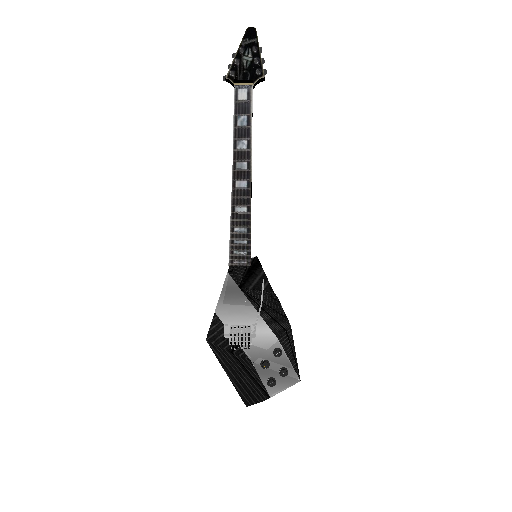
For future reference, I would like to highlight another change that I did to the shared code. I changed the rasterization setting parameters, based on the explanation provided in #348, as follows:
raster_settings = RasterizationSettings(
    image_size=512,
    blur_radius=0.0,
    faces_per_pixel=1,
    max_faces_per_bin = 50000,
)
This helped me to avoid glitches in the rendered image.
kaustubh-sadekar
on 17 Nov 2020
Related issues
 farhanrw
·
3Comments
farhanrw
·
3Comments
 OmriKaduri
·
3Comments
OmriKaduri
·
3Comments
 cihanongun
·
3Comments
cihanongun
·
3Comments
 ruslanvasylev
·
3Comments
ruslanvasylev
·
3Comments
 eliemichel
·
3Comments
eliemichel
·
3Comments