Pytorch3d: UserWarning: Faces have invalid indices.
Log:
python3.6/site-packages/pytorch3d/io/utils.py: 49: UserWarning: Faces have invalid indices.
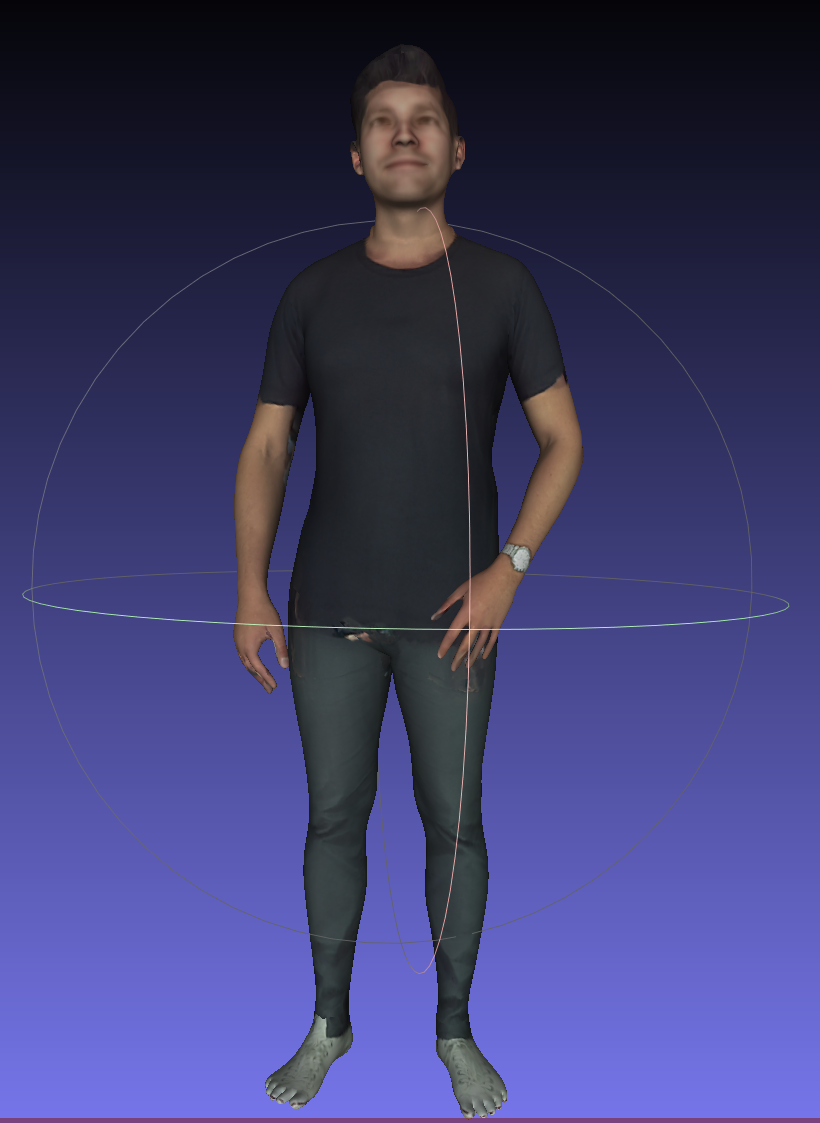
Attached is my obj file which works well in MeshLAB.
Thank you in advance!
Plus, I also tried DIRT (also one differentiable render, but in tensorflow) and it works well for me.
 Frank-Dz
All 13 comments
 Frank-Dz
on 7 Oct 2020
Frank-Dz
on 7 Oct 2020
DATA_DIR = "./data"
obj_filename = os.path.join(DATA_DIR, "human/1.obj")
# Load obj file
mesh = load_objs_as_meshes([obj_filename], device=device)
texture_image=mesh.textures.maps_padded()


...
Which version of PyTorch3D are you using?
 gkioxari
on 7 Oct 2020
gkioxari
on 7 Oct 2020
https://github.com/facebookresearch/pytorch3d/blob/master/INSTALL.md
I installed this week according to the install.md
Frank-Dz
on 7 Oct 2020

Frank-Dz
on 7 Oct 2020
Which version of PyTorch3D are you using?
I think this may be caused by the .OBJ file reading method.
Frank-Dz
on 7 Oct 2020
The obj io spits out the warning here:
https://github.com/facebookresearch/pytorch3d/blob/5d65a0cf8c9a1fb755fd09ce098bcedb0c670d80/pytorch3d/io/obj_io.py#L509-L511
This is because your obj file is rather incomplete. It contains face normals indices. For example, in the obj file faces are defined as
f 17250/18249/17250 3501/3819/3501 17247/18246/17247
(which is parsed as f v1/vt1/vn1 v2/vt2/vn2 v3/vt3/vn3. Read more here) but your obj file does not contain any normals vn. So in other words, the obj file defines normal indices but does not define the normals.
Now, this is just a user warning. The vertices, faces and textures have been read correctly and the mesh loading should work just fine, apart from the normals of course due to the file corruption. But if you don't care about the normals then you are good to go!
gkioxari
on 7 Oct 2020
Yes as @gkioxari says this is only a warning so you should still be able to use this loaded mesh with the PyTorch3D renderer and other mesh operators!
 nikhilaravi
on 7 Oct 2020
nikhilaravi
on 7 Oct 2020
The obj io spits out the warning here:
https://github.com/facebookresearch/pytorch3d/blob/5d65a0cf8c9a1fb755fd09ce098bcedb0c670d80/pytorch3d/io/obj_io.py#L509-L511This is because your obj file is rather incomplete. It contains face normals indices. For example, in the obj file faces are defined as
f 17250/18249/17250 3501/3819/3501 17247/18246/17247(which is parsed as
f v1/vt1/vn1 v2/vt2/vn2 v3/vt3/vn3. Read more here) but your obj file does not contain any normalsvn. So in other words, the obj file defines normal indices but does not define the normals.Now, this is just a user warning. The vertices, faces and textures have been read correctly and the mesh loading should work just fine, apart from the normals of course due to the file corruption. But if you don't care about the normals then you are good to go!
Wow thank you!
But when I run:
obj_filename = os.path.join(DATA_DIR,'human_mesh/0.obj')
mesh1  = load_objs_as_meshes([obj_filename],device =device)
texture_image = mesh1.textures.maps_padded()
images = renderer(mesh1)
I got:

Frank-Dz
on 7 Oct 2020
I think if you are ok, you can try to render it in this way:
obj_filename = os.path.join(DATA_DIR,'human_mesh/0.obj')
mesh1  = load_objs_as_meshes([obj_filename],device =device)
texture_image = mesh1.textures.maps_padded()
images = renderer(mesh1)
I got Nonetype.
Frank-Dz
on 7 Oct 2020
I am looking into this.
gkioxari
on 7 Oct 2020
The issue is that the obj file is missing the following usemtl 0. This line specifies which material to use for the mesh from the provided mtl file. If you add this line to the obj file it all works fine.
We will likely add a fix so that when the material name is missing, it will revert to the provided material in the mtl by default, with a warning message though that the material was not specified.
gkioxari
on 7 Oct 2020
The issue is that the obj file is missing the following
usemtl 0. This line specifies which material to use for the mesh from the provided mtl file. If you add this line to the obj file it all works fine.
We will likely add a fix so that when the material name is missing, it will revert to the provided material in the mtl by default, with a warning message though that the material was not specified.
Thank you!
Yes, it is.
Hope we can make the code support read the MTL in a more flexible way.
Thank you again!
Frank-Dz
on 8 Oct 2020
Related issues
 unlugi
·
3Comments
unlugi
·
3Comments
 zhjscut
·
3Comments
zhjscut
·
3Comments
 TSKongLingwei
·
3Comments
TSKongLingwei
·
3Comments
 TheshowN
·
3Comments
TheshowN
·
3Comments
 aluo-x
·
3Comments
aluo-x
·
3Comments