Pytorch3d: Rendering from inside a surface results in uninterpretable images
🐛 Bugs / Unexpected behaviors
Hello,
I'm trying to render views of an equirectangular panorama, just like Street View does. I have a sphere with normals pointing inward the surface, a parameterization in lat/long for texture coordinates and the equirectangular image as texture.
From outside the surface, I can see a view as expected.
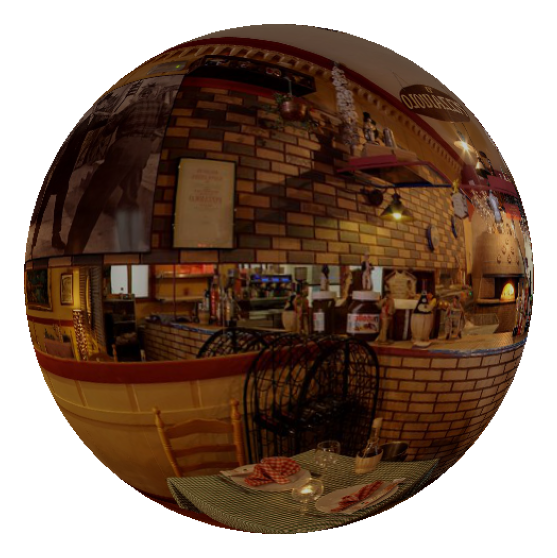
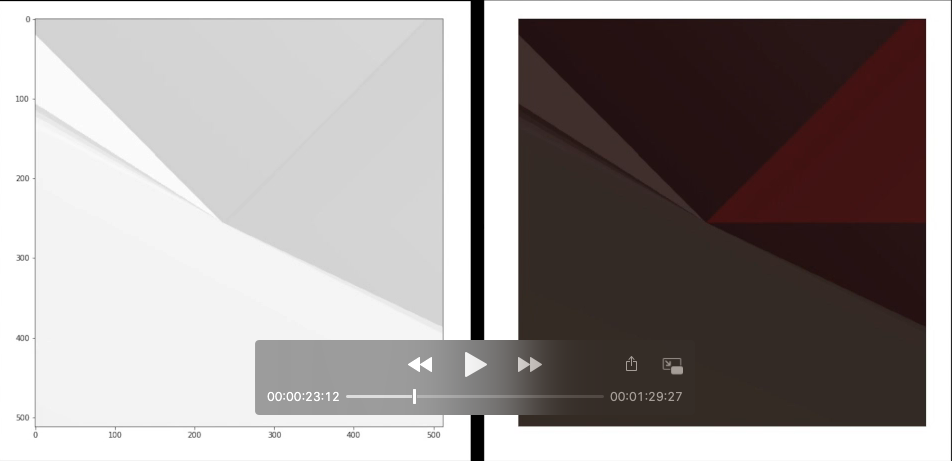
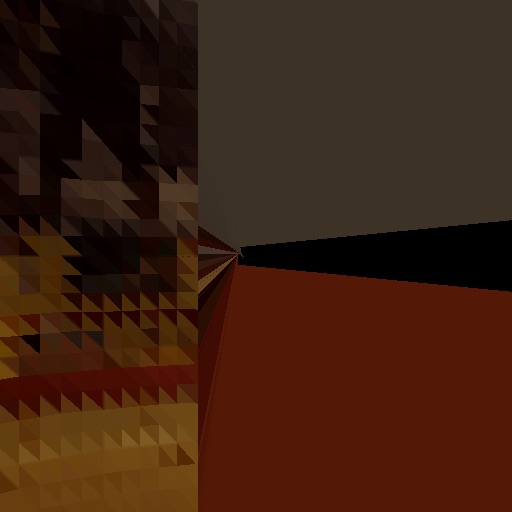
However, when I put the camera inside the surface I see images like these (the pattern changes depending on the position, but are similar):
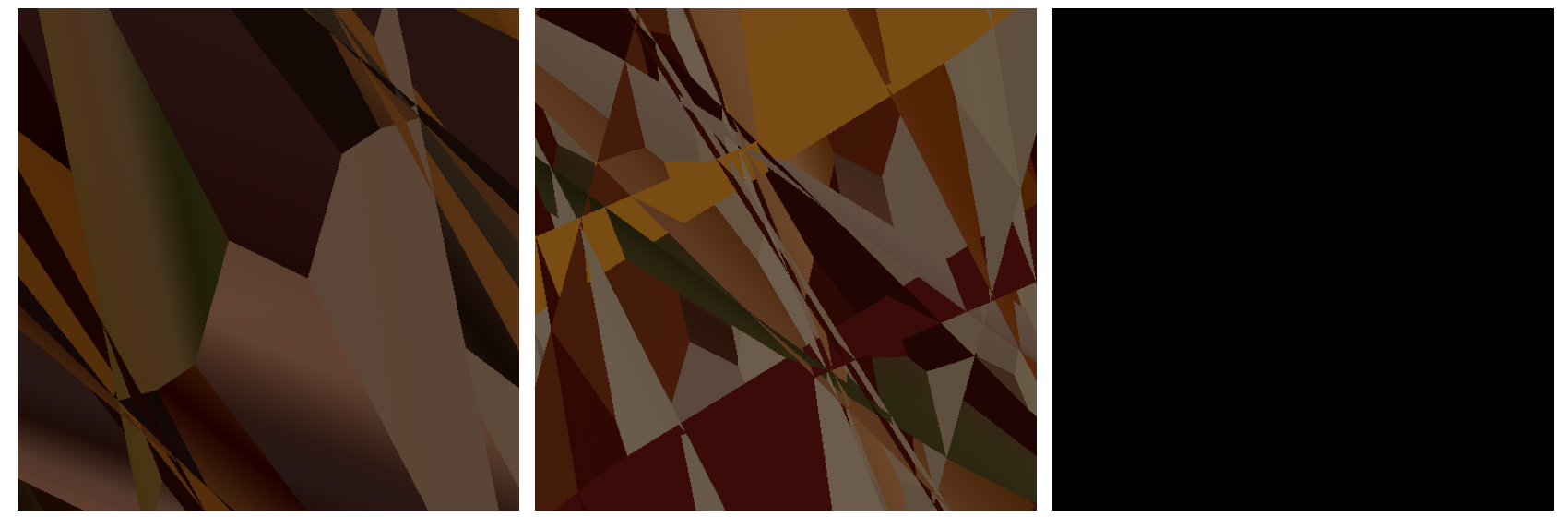
I have a very detailed explanation of my steps here, as a report of research. The main conclusions are:
- Using Blender or Meshlab, I can see everything as expected (vídeo).
- If I move the câmera inside the cow in the tutorial "Render a textured mesh", I get the same unexpected result.
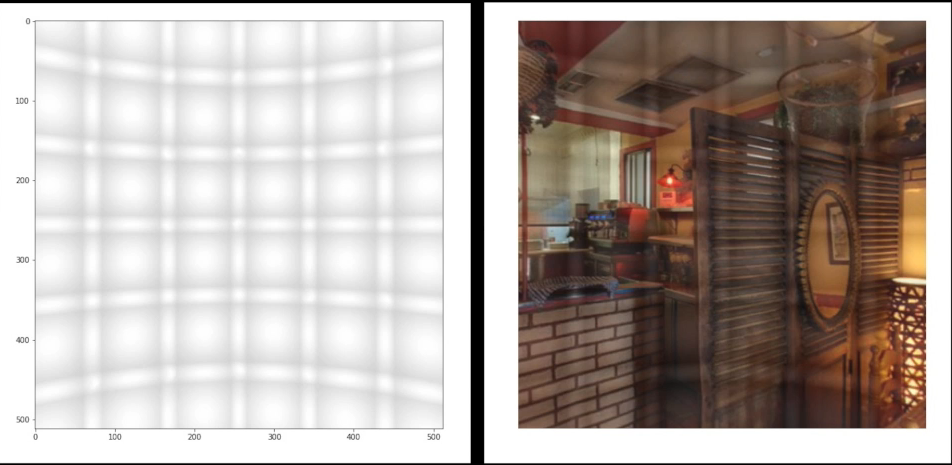
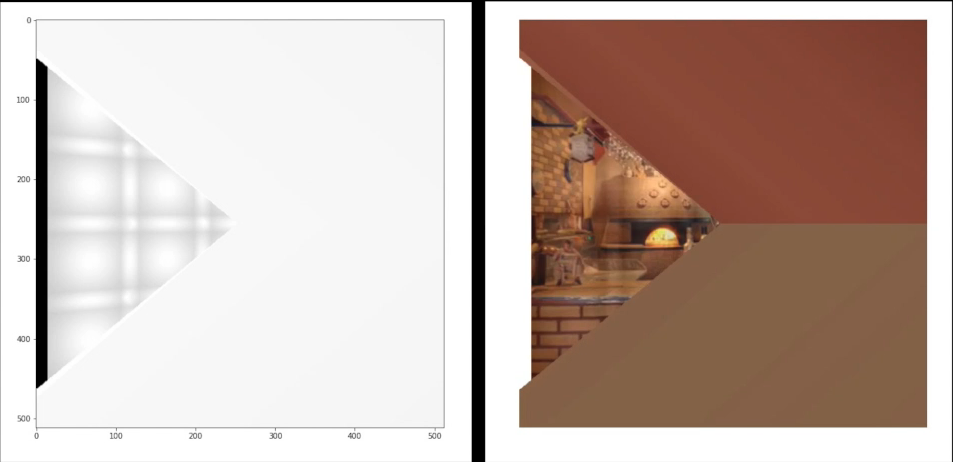
I deleted more than half of the sphere, using only 135º, refined the mesh to small polygons and rendered a 360º tour around the up axis. This time, I could see some good images, but most of them presented the same unexpected pattern. This can be observed when rendering with and without texture. You can check this video for the complete tour, but the images are like below.
 hallpaz
All 9 comments
Hi @hallpaz
Thank you for bringing this up! We are running into a similar issue and we will be looking into this. This might be a simple bug in our rasterizer computation for negative z-distances. We will report back as soon as we have a fix!
 gkioxari
on 23 Jun 2020
gkioxari
on 23 Jun 2020
I found a similar problem using Soft Rasterizer (https://github.com/ShichenLiu/SoftRas), specially when rendering views that should be blank due to the camera pointing in the opposite direction of the object. Using one half of the sphere, it was very clear that the weird patterns were starting at the boundary of the mesh, but I could see some artifacts looking at the sphere too. As SoftRas is one of the inspirations for this renderer, I'm registering it here.
After some experiments, I managed to render my scene with SoftRas using a very refined mesh and decreasing the parameter sigma. It worked with the complete sphere (my initial goal). However, I still can't render using PyTorch3D I couldn't find any clue to solve it yet.

hallpaz
on 27 Jun 2020
@hallpaz thanks for the update. We will look into this issue!
 nikhilaravi
on 29 Jun 2020
nikhilaravi
on 29 Jun 2020
So for neural mesh renderer (pytorch) we also saw the same issue. Meshes were rendered correctly as long as no faces were behind the camera.
We ultimately fixed the issue with a culling step to preprocess the mesh before feeding it to the differentiable renderer. The culling step was simply projecting the vertices of the mesh using a camera matrix, and deleting all faces that referenced vertices with negative z. This results in missing segments if the faces are too large, so this necessitates a remeshing step before culling to make the edges small.
 aluo-x
on 30 Jun 2020
aluo-x
on 30 Jun 2020
Hi all! Thank you for bringing this up! We are currently looking into this issue and will report back with our findings!
gkioxari
on 10 Jul 2020
@aluo-x would you be able to share more details about your re-meshing solution? We are discussing options for solving this problem and would be interested to hear how you implemented this and how it is working for your use case!
nikhilaravi
on 22 Jul 2020
This is code from our recent 3D-SLN paper which used Neural Mesh Renderer (daniilidis version). The entire code base should be public soonish, but here are the bits that matter.
I think our approach is pretty brute force, and not particularly efficient. I think there must be a way to use the z-buffer/fragments to do more efficient culling on the GPU, but this was the "python" solution we came up with.
Not sure if Pytorch3D suffers from the same issue, since I've been using it to render objects instead of scenes.
Remeshing - basically using PyMesh to get split long edges.
def custom_load_obj(filename_obj):
    try:
        obj_info = pwf.Wavefront(filename_obj, strict=1, collect_faces=True)
    except Exception as e:
        print("Loading obj failed inside new load func")
        print(e)
        return np.array([]).astype(np.float32), np.array([]).astype(np.int32)
    vert = obj_info.vertices
    total_mesh = []
    mesh_buffer = obj_info.mesh_list
    num_mesh = len(mesh_buffer)
    for mesh_id in range(num_mesh):
        total_mesh = total_mesh + mesh_buffer[mesh_id].faces
    output_vertices, output_faces, info = pymesh.split_long_edges_raw(np.array(vert).astype(np.float32), np.array(total_mesh).astype(np.int32), 0.6)
    return output_vertices.astype(np.float32), output_faces.astype(np.int32)
For selecting faces that are valid:
    culling = True
    eps = 0.06
    if culling:
        vertices_buf_new = torch.matmul(vertices_buf, rot_mat.transpose(1, 2)) + trans_mat
        culling_arr = vertices_buf_new[:, :, 2]
        # Get the depth dimension
        face_buf_offset = culling_arr[:, face_buf.long()][0]
        face_buf_old_shape = face_buf.shape[1]
        # We use this to initialize the texture later
        invalid = torch.any(face_buf_offset < eps, dim=2)
        # Any face that references a vertex that is behind camera
        valid_offset = ~invalid
        face_buf = face_buf[:, valid_offset[0], :].detach()
For modifying the texture:
textures_unculled = torch.zeros(1, face_buf_old_shape, texture_size, texture_size, texture_size, 3, dtype=torch.float32).cuda()
# An example of textures of [0,0,0]
textures = textures_unculled[:, valid_offset[0], :]
Thanks for finding this issue and the detailed information. We added a partial fix to this problem that works for the sphere panorama that was just added to the PyTorch3D master code. Similar to the solution of @aluo-x this culls triangles that are partially behind the camera. We are working on a more complete solution that will clip triangles based on the portion that is inside the view frustum.
 sbranson
on 21 Aug 2020
sbranson
on 21 Aug 2020
Here is a link to the commit with the fix: https://github.com/facebookresearch/pytorch3d/commit/9aaba0483c08c9a40c26db0858f8c0688f33e850.
We can leave this issue open until the more complete solution is added.
nikhilaravi
on 21 Aug 2020
Related issues
 unlugi
·
3Comments
unlugi
·
3Comments
 OOF-dura
·
3Comments
OOF-dura
·
3Comments
 eliemichel
·
3Comments
eliemichel
·
3Comments
 NotAnyMike
·
3Comments
NotAnyMike
·
3Comments
 AndreiBarsan
·
3Comments
AndreiBarsan
·
3Comments
Most helpful comment
Thanks for finding this issue and the detailed information. We added a partial fix to this problem that works for the sphere panorama that was just added to the PyTorch3D master code. Similar to the solution of @aluo-x this culls triangles that are partially behind the camera. We are working on a more complete solution that will clip triangles based on the portion that is inside the view frustum.