Pytorch3d: how to set the projection of camera?
❓ Questions on how to use PyTorch3D
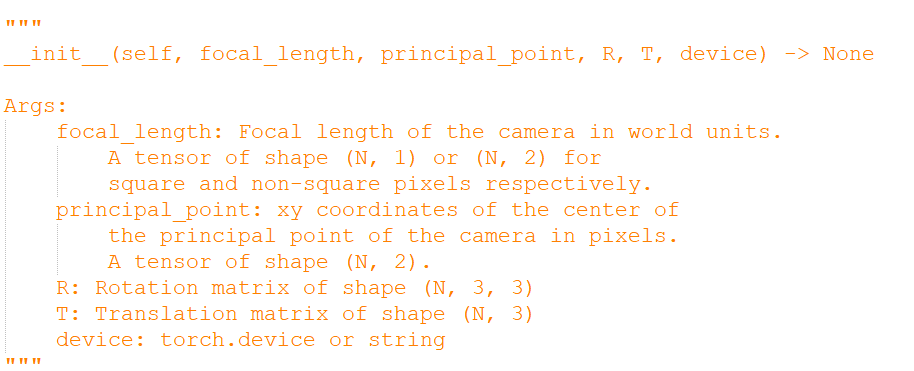
I have the camera intrinsics matrix K(33), the rotation matrix R (33) , the translation matrix t(1*3) and the 3D model, how to render the model with projection mode? Can you provide an example?
thanks!!
NOTE:
If you encountered any errors or unexpected issues while using PyTorch3D and need help resolving them,
please use the "Bugs / Unexpected behaviors" issue template.We do not answer general machine learning / computer vision questions that are not specific to
PyTorch3D, such as how a model works or what algorithm/methods can be
used to achieve X.
 ldepn
ldepn
All 8 comments
I think you might use pytorch3d.renderer.SfMPerspectiveCameras.
 tszhang97
on 1 Apr 2020
tszhang97
on 1 Apr 2020
@willie1997 I tried to use SfMPerspectiveCameras,But, this is no use.
my code
`import os
import torch
import matplotlib.pyplot as plt
from skimage.io import imread
from pytorch3d.io import load_objs_as_meshes
from pytorch3d.structures import Meshes, Textures
from pytorch3d.renderer import (
look_at_view_transform,
OpenGLPerspectiveCameras,
PointLights,
DirectionalLights,
Materials,
RasterizationSettings,
MeshRenderer,
MeshRasterizer,
TexturedSoftPhongShader
)
from pytorch3d.renderer.cameras import (
OpenGLOrthographicCameras,
OpenGLPerspectiveCameras,
SfMOrthographicCameras,
SfMPerspectiveCameras,
camera_position_from_spherical_angles,
get_world_to_view_transform,
look_at_rotation,
look_at_view_transform,
)
from pytorch3d.transforms import Transform3d
import sys
import os
sys.path.append(os.path.abspath(''))
from utils import image_grid
from pytorch3d.io import load_obj
import numpy as np
device = torch.device("cuda:0")
torch.cuda.set_device(device)
DATA_DIR = "./data"
obj_filename = "/home/hsy/ldp/code/3D/data/002.obj"
mesh = load_objs_as_meshes([obj_filename], device=device)
texture_image=mesh.textures.maps_padded()
K =torch.Tensor([[1066.778, 0.0,312.9869],[0,1067.487,241.3109], [0.0, 0.0, 1.0]]).unsqueeze(0)
R = torch.Tensor([[0.6155, -0.7872, -0.0377], [-0.1989, -0.1089, -0.9739], [0.7626, 0.6070, -0.2236]]).unsqueeze(0)
t=torch.Tensor([[-0.0306, -0.0210, 0.8650]]).unsqueeze(0)
K_n = np.array([[1066.778, 0.0,312.9869],[0,1067.487,241.3109], [0.0, 0.0, 1.0]])
R_n = np.array([[0.6155, -0.7872, -0.0377], [-0.1989, -0.1089, -0.9739], [0.7626, 0.6070, -0.2236]])
t_n = np.array([[-0.0306, -0.0210, 0.8650]])
cameras = SfMPerspectiveCameras(device=device,
focal_length=((K_n[0,0], K_n[1,1]),),
principal_point=((K_n[0,2], K_n[1,2]),),R=np.expand_dims(R_n,axis=0),T=t_n)
vertices,faces,aux = load_obj(obj_filename,load_textures=True)
vertices_new = cameras.transform_points(vertices.unsqueeze(0).cuda())
print(vertices_new.shape)
tex_maps = aux.texture_images
verts_uvs = aux.verts_uvs[None, ...].to(device) # (1, V, 2)
faces_uvs = faces.textures_idx[None, ...].to(device) # (1, F, 3)
image = list(tex_maps.values())[0].to(device)[None]
tex = Textures(verts_uvs=verts_uvs, faces_uvs=faces_uvs, maps=image)
mesh_new = Meshes(verts=[vertices_new.squeeze(0)], faces=[faces.verts_idx.to(device)], textures=tex)
raster_settings = RasterizationSettings(
image_size=512,
blur_radius=0.0,
faces_per_pixel=1,
bin_size = None, # this setting controls whether naive or coarse-to-fine rasterization is used
max_faces_per_bin = None # this setting is for coarse rasterization
)
lights = PointLights(device=device, location=[[0.0, 0.0, -3.0]])
renderer = MeshRenderer(
rasterizer=MeshRasterizer(
cameras=cameras,
raster_settings=raster_settings
),
shader=TexturedSoftPhongShader(
device=device,
cameras=cameras,
lights=lights
)
)
images = renderer(mesh_new) # images = renderer(mesh)
plt.figure(figsize=(10, 10))
plt.imshow(images[0, ..., :3].cpu().numpy())
plt.grid("off");
plt.axis("off");
plt.show()
`
ldepn
on 1 Apr 2020
thanks to wangg12 https://gist.github.com/wangg12/32250e352671c7f8c9a42ddb437142a6
I use OpenGLRealPerspectiveCameras:
cameras = OpenGLRealPerspectiveCameras(device=device, focal_length=focal, principal_point=principal_point, R=R, T=T, w=256, h=256)
This works for me.
tszhang97
on 1 Apr 2020
@willie1997
When I use the code of wangg12, I meet the follow bug. I have python setup.py install
RuntimeError: Not compiled with GPU support (RasterizeMeshesNaive at /home/hsy/ldp/code/pytorch3d/pytorch3d/csrc/rasterize_meshes/rasterize_meshes.h:96)
frame #0: c10::Error::Error(c10::SourceLocation, std::string const&) + 0x47 (0x7fa3d24f3627 in /home/hsy/anaconda3/envs/3d/lib/python3.7/site-packages/torch/lib/libc10.so)
frame #1: RasterizeMeshesNaive(at::Tensor const&, at::Tensor const&, at::Tensor const&, int, float, int, bool) + 0x16a (0x7fa36f03585a in /home/hsy/ldp/code/3D/pytorch3d/pytorch3d/_C.cpython-37m-x86_64-linux-gnu.so)
ldepn
on 1 Apr 2020
@ldepn Not compiled with GPU support is an unrelated issue - please refer to the Installation instructions in INSTALL.md for correctly installing PyTorch3D with CUDA support and if you still have problems open a separate issue about this.
What was the issue with using SfMPerspectiveCameras?
 nikhilaravi
on 1 Apr 2020
nikhilaravi
on 1 Apr 2020
@nikhilaravi If the image size is non-square pixels,how to set the image size for SfMPerspectiveCameras ?
ldepn
on 1 Apr 2020
@ldepn we currently do not support rendering of non square images. See #17 for further discussion.
nikhilaravi
on 1 Apr 2020
Currently one solution is to render a square image with the longest side and crop it.
 wangg12
on 1 Apr 2020
wangg12
on 1 Apr 2020
Related issues
 aluo-x
·
3Comments
aluo-x
·
3Comments
 AndreiBarsan
·
3Comments
AndreiBarsan
·
3Comments
 unlugi
·
3Comments
unlugi
·
3Comments
 udemegane
·
3Comments
udemegane
·
3Comments
 abhi1kumar
·
3Comments
abhi1kumar
·
3Comments
Most helpful comment
Currently one solution is to render a square image with the longest side and crop it.