Pytorch3d: Translucent Overlap in the rendered Image
🐛 Bugs / Unexpected behaviors
There is a translucent layer on top of the rendered image that most likely shouldn't be there. Shown below is the rendered image
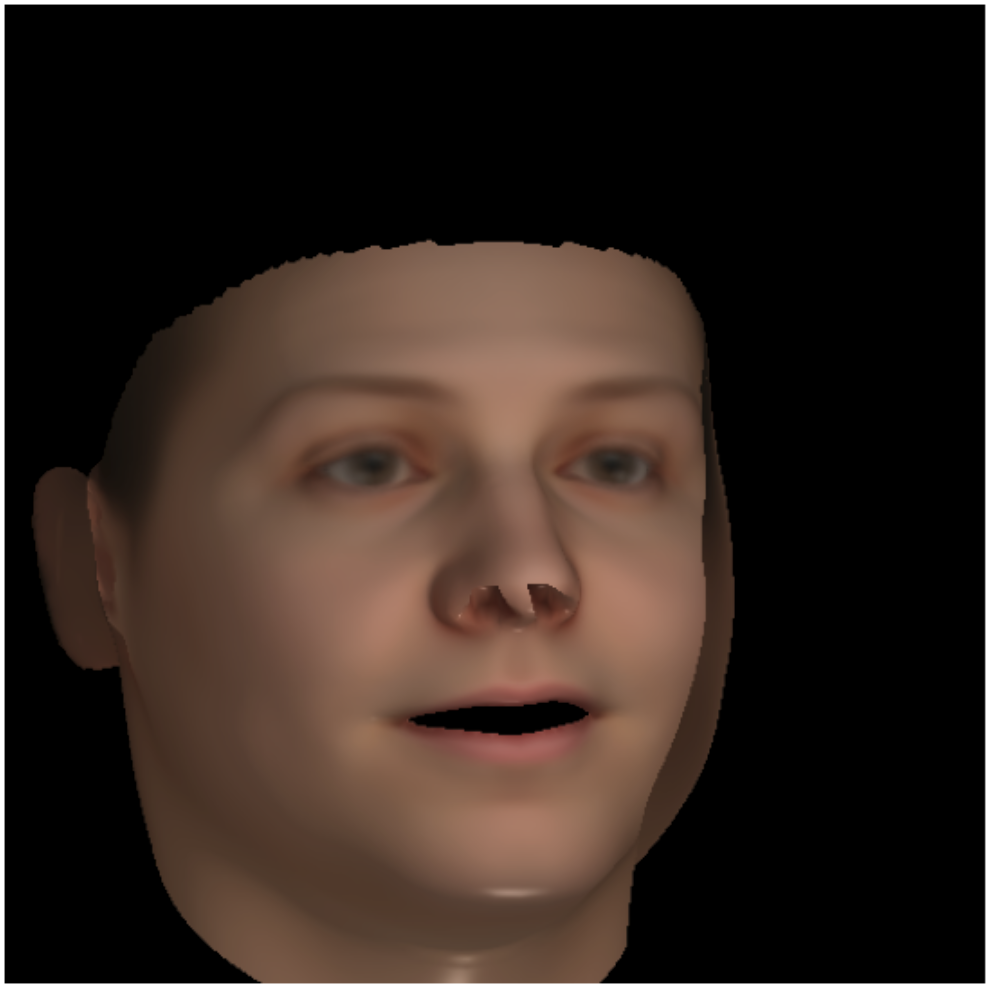
I'm using the Basel Face Model and the vertex colors are set to the mean albedo of BFM. The rendering and rasterization settings as as follows
raster_settings = RasterizationSettings(
    image_size=512,
    blur_radius=0.0,
    faces_per_pixel=1,
    bin_size=0
)


lights = PointLights(device=device, location=[[10.0, 0.0, 200.0]])

class BlendParams(NamedTuple):
    sigma: float = 1e-4
    gamma: float = 1e-4
    background_color: Sequence = (0.0, 0.0, 0.0)

shader = SoftPhongShader(
         device=device,
         cameras=cameras,
         lights=lights,
         blend_params=BlendParams())

renderer = MeshRenderer(
    rasterizer=MeshRasterizer(
        cameras=cameras,
        raster_settings=raster_settings
    ),
    shader=shader,
)
 srxdev0619
All 11 comments
Hi @srxdev0619 are you rendering the RGBA image or just the RGB component (i.e. image[..., :3])?
 nikhilaravi
on 19 Mar 2020
nikhilaravi
on 19 Mar 2020
Just the RGB image as follows
images = renderer(mesh)
img_render = images[0, ..., :3].cpu().numpy()
plt.figure(figsize=(10, 10))
plt.imshow(img_render)
plt.grid("off")
plt.axis("off")
@srxdev0619 ok thanks for clarifying. Can you provide a minimal script for reproducing the error? I can download the basel model and try to debug.
Can you also try the HardPhongShader to see if it also produces the same artifact?
nikhilaravi
on 20 Mar 2020
Sure thing @nikhilaravi, minimal_example_pytorch3d.zip contains the relevant data and a minimal notebook (named RenderMesh_pytorch3d.ipynb) to reproduce the bug. You just need to put the BFM2017 model2017-1_bfm_nomouth.h5 file inside ./BFM2017/, after which you should be able to reproduce the render as shown above. I've also given the HardPhongShader a try and it too produces the same artifact. Thank you!
srxdev0619
on 21 Mar 2020
Any update on this? :)
srxdev0619
on 27 Mar 2020
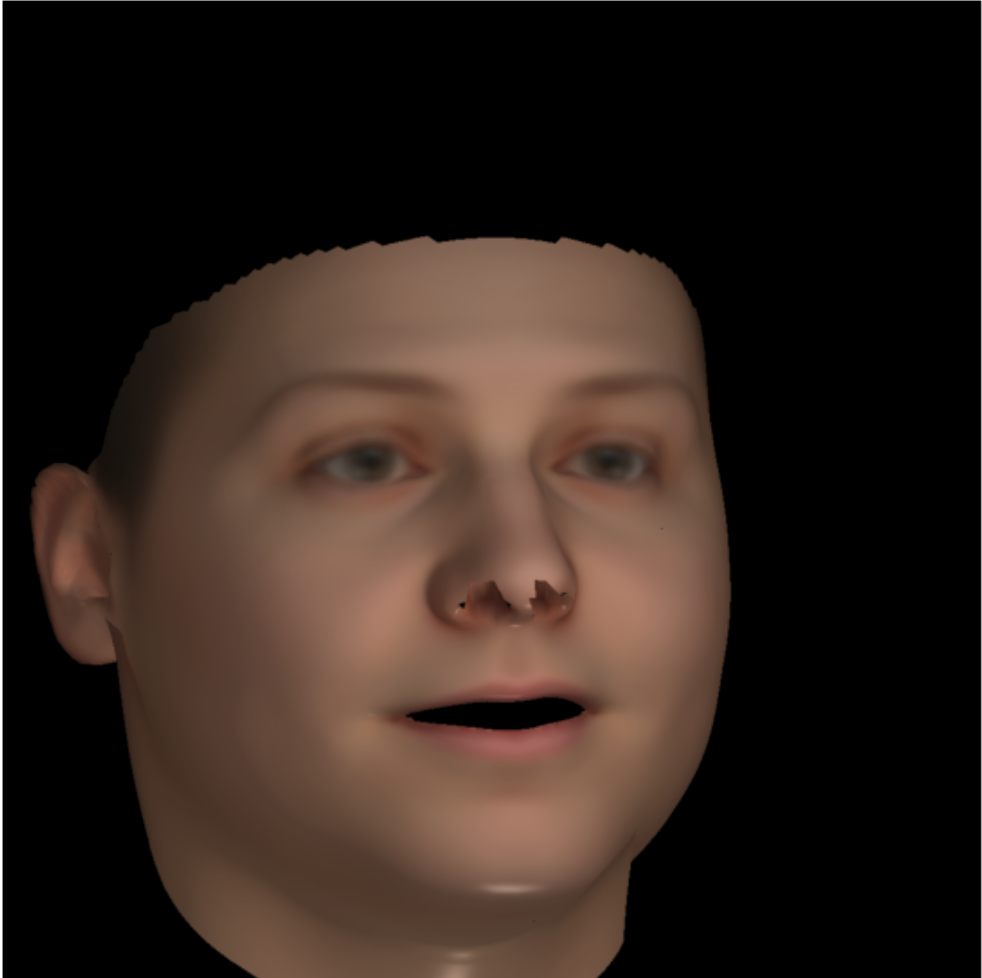
Not sure if this helps, but the overlap disappears when I mask out the vertices that are not in view. The rendered image now looks like this using the SoftPhongShader
srxdev0619
on 29 Mar 2020
@srxdev0619 Apologies for the delayed response. I will try your minimal example code and get back to you!
nikhilaravi
on 30 Mar 2020
Sure, thank you!
srxdev0619
on 31 Mar 2020
Need to transform z -> -z and x -> -x to ensure input BFM mesh is correctly oriented in pytorch3D's world coordinates. See #149 for details.
srxdev0619
on 17 Apr 2020
@srxdev0619 glad this is now resolved! We are adding an option for backface culling which should help with debugging these issues in future! If you enable the backface culling setting then in the very first image you posted you wold not have seen the front face textures as the back of the face was facing the camera.
nikhilaravi
on 17 Apr 2020
@nikhilaravi Indeed that would be really helpful! Thank you so much!
srxdev0619
on 18 Apr 2020
Related issues
 abhi1kumar
·
3Comments
abhi1kumar
·
3Comments
 cihanongun
·
3Comments
cihanongun
·
3Comments
 TheshowN
·
3Comments
TheshowN
·
3Comments
 shersoni610
·
3Comments
shersoni610
·
3Comments
 zhjscut
·
3Comments
zhjscut
·
3Comments