Pytorch3d: object depth and blurred rasterisation
Thank you for publishing such a powerful tool for 3D computer vision!
I am interested in a differentiable rendering of the object depth.
As far as I understood, I can infer pixel depth from fragments.zbuf
But I am confused with the difference in fragments.zbuf between "hard" and "soft" renderings.
I am using objects from Linemod dataset.
Phone object:

I've rendered this object with two settings:
- "hard" rasterisation :
hard_raster_settings = RasterizationSettings(
    image_size=128,
    blur_radius=0.0,
    faces_per_pixel=1,
    bin_size=0
)
- "soft" rasterisation :
blend_params = BlendParams(sigma=1e-5, gamma=1e-4)
soft_raster_settings = RasterizationSettings(
    image_size=128,
    blur_radius=np.log(1. / 1e-4 - 1.) * blend_params.sigma,
    faces_per_pixel=10,
    bin_size=0
)
For both settings I've taken depth from zbuf = fragments.zbuf[:, :, :, 0]
For the visualisation purposes I've normalised both depth tensors to [0, 1] range and inverted the values so that the smallest value of zbuf gets mapped to 1 and largest to 0. Background values are set to 0.
I'm wondering why are the resulted depths so different in these "soft" and "hard" settings?
Here are different images of zbuf rendered with "soft" and "hard" settings:
- Front view:
"hard" rasterization:

"soft" rasterization:

Side view:
"hard" rasterization:
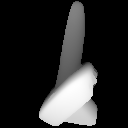
"soft" rasterization:
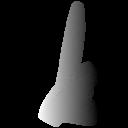
Top view:
"hard" rasterization:

"soft" rasterization:

How could one infer differentiable object depth in pytorch3d?
 ivan-pavlov
All 12 comments
Hi @ivan-pavlov! Yes fragments.zbuf is the correct way of retrieving the rendered depth.
However zbuf = fragments.zbuf[:, :, :, 0] is not guaranteed to give the same result for soft and hard blending. With hard blending we only save the closest face for each pixel and only record the face if it completely overlaps with the center of the pixel (lets call this a primary face).
With soft blending, we use a blur_radius during rasterization and save the top K faces which overlap with the pixel - this means even if a particular pixel is overlapped completely by a face (which is the primary face output by hard blending), it could also fall in within the blur boundary of multiple adjacent faces. These faces could have smaller z values (e.g. see what is meant by blurring below. When we sort the topK values in the zbuffer, the value at zbuf = fragments.zbuf[:, :, :, 0] might not be the same as with hard blending.
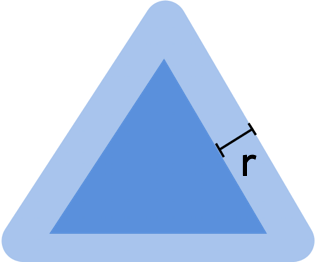
We recently added a change where you can clip the barycentric coordinates to the range [0, 1] and re-interpolate the zbuffer. If you do this, then the barycentric coordinates for a pixel when it is in the blur boundary of a face will be be clipped to the values at the edges of the face (which might be the same as for the primary face covering the pixel). You could try this and then re sort sort the top K z values per pixel.
from renderer.mesh.utils import _clip_barycentric_coordinates, _interpolate_zbuf
...
clipped_bary_coords = _clip_barycentric_coordinates(fragments.bary_coords)
clipped_zbuf = _interpolate_zbuf(fragments.pix_to_face, clipped_bary_coords, meshes_world)
zbuf_sorted = clipped_zbuf.sort(dim=-1)
I have not tested this so cannot guarantee that this will solve the problem but you could try it :)
 nikhilaravi
on 3 Mar 2020
nikhilaravi
on 3 Mar 2020
How do you get proper depth images? My depth images always result in 1 depth value for all points of the object (i.e. if I render a point cloud with depth, rgb, and intrinsics the object is only planar).

The image above has all the same pixel values instead of varying pixel values to capture the shape of the chicken.
Me code is like this:
raster_settings_depth = RasterizationSettings(
        image_size=image_shape,
        blur_radius=0.0, #np.log(1. / 1e-4 - 1.) * blend_params.sigma,
        faces_per_pixel=1,
        bin_size=0,
        perspective_correct = True
    )

raster = MeshRasterizer(
        cameras=cameras,
        raster_settings=raster_settings_depth
    )

   # Acquire depth information
    fragments = raster(mesh).zbuf.view(image_shape, image_shape)
    # Make depth image
    depth_image = fragments.cpu().numpy()
Your phone depth image clearly has texture whereas mine is just one value for the object. What am I doing wrong? I have verified my mesh object in meshlab.
 t-walker-21
on 3 Mar 2020
t-walker-21
on 3 Mar 2020
@t-walker-21 I have used the orignial value * 1000 to make it's uint from m to mm. it seems workable. When you try to save it, you should change it int16.
 wangsen1312
on 3 Mar 2020
wangsen1312
on 3 Mar 2020
@ivan-pavlov were you able to resolve your original issue?
nikhilaravi
on 16 Mar 2020
@nikhilaravi thank you a lot for your response and detailed answer!
Excuse me for the delayed reply, I had to postpone the investigation of this problem but I am still interested in finding the proper way to infer the "soft" depth.
I've tested your proposed solution but unfortunately it doesn't seem to solve the problem.
The "soft" depth produced by this approach is still a lot different from the "hard" depth.
I was able to find a workaround but it allows me to produce only the depth with respect to the object centered coordinate system.
I am more interested in the absolute depth with respect to the camera coordinate system and I am currently looking for a way to infer that.
ivan-pavlov
on 16 Mar 2020
Hi, @nikhilaravi
I'm wondering why z coordinates of meshes_world is used instead of meshes_screen/meshes_view in _interpolate_zbuf for raster_settings.blur_radius > 0.0 case?
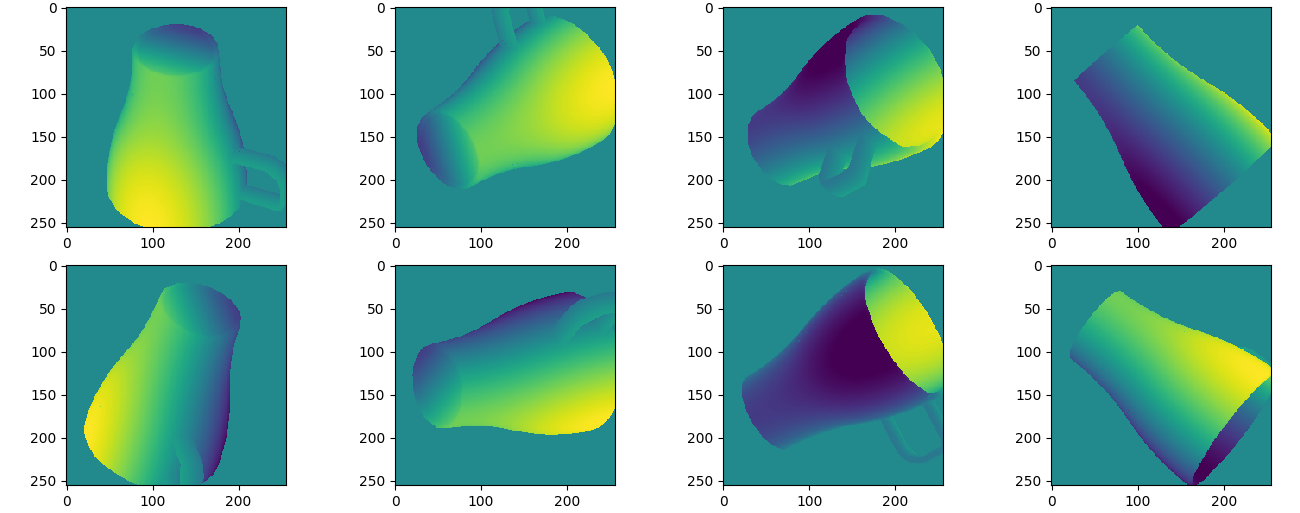
With meshes_world the zbuf won't repect to camera frame any more. @ivan-pavlov 's view images also show that the depth value of soft rasterization is invariant to different views.
 marlinilram
on 10 Apr 2020
marlinilram
on 10 Apr 2020
I have made similar observations.
Using blur_radius = 0 results in view-centric depth maps:
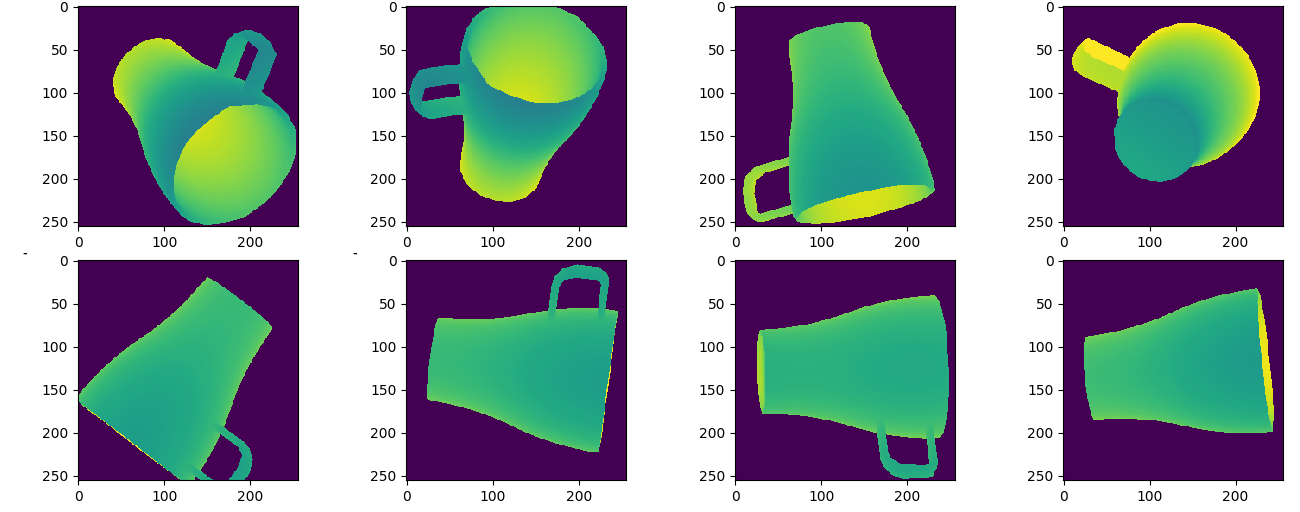
But using blur_radius > 0 results in what appears to be object-centric depth maps:

Another example with blur_radius > 0with the same object but rotated 90 degrees:
 shbe-aau
on 22 Apr 2020
shbe-aau
on 22 Apr 2020
@shbe-aau and @marlinilram this is a good point!! When blur_radius > 0 we do the z interpolation outside of the rasterization step after clipping the barycentric coordinates and you're right, it should use the view space z coordinates instead of the world space z. I will submit a fix for this!
nikhilaravi
on 22 Apr 2020
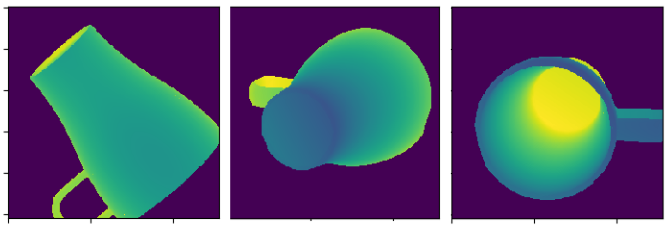
@nikhilaravi I think I managed to fix it based on your input.
I replaced:
clipped_zbuf = _interpolate_zbuf(
                fragments.pix_to_face, clipped_bary_coords, meshes_world
            )
with:
meshes_screen = self.rasterizer.transform(meshes_world, **kwargs)
            clipped_zbuf = _interpolate_zbuf(
                fragments.pix_to_face, clipped_bary_coords, meshes_screen
            )
In renderer/mesh/renderer.py
It seems to produce sensible depth images for blur_radius > 0 after applying this fix. But I am not familiar enough with the code base to figure out if I have forgotten something.
Output:
shbe-aau
on 27 Apr 2020
Closing this!
 gkioxari
on 1 Oct 2020
gkioxari
on 1 Oct 2020
@ivan-pavlov Could you please share your code. What kind of camera are you using!
Thanks
 Babaee
on 2 Mar 2021
Babaee
on 2 Mar 2021
How do you get proper depth images? My depth images always result in 1 depth value for all points of the object (i.e. if I render a point cloud with depth, rgb, and intrinsics the object is only planar).
The image above has all the same pixel values instead of varying pixel values to capture the shape of the chicken.
Me code is like this:
raster_settings_depth = RasterizationSettings(
        image_size=image_shape,
        blur_radius=0.0, #np.log(1. / 1e-4 - 1.) * blend_params.sigma,
        faces_per_pixel=1,
        bin_size=0,
        perspective_correct = True
    )

raster = MeshRasterizer(
        cameras=cameras,
        raster_settings=raster_settings_depth
    )

   # Acquire depth information
    fragments = raster(mesh).zbuf.view(image_shape, image_shape)
    # Make depth image
    depth_image = fragments.cpu().numpy()
Your phone depth image clearly has texture whereas mine is just one value for the object. What am I doing wrong? I have verified my mesh object in meshlab.
what kind of camera are you using
Babaee
on 2 Mar 2021
Related issues
 ruslanvasylev
·
3Comments
ruslanvasylev
·
3Comments
 zhjscut
·
3Comments
zhjscut
·
3Comments
 OmriKaduri
·
3Comments
OmriKaduri
·
3Comments
 farhanrw
·
3Comments
farhanrw
·
3Comments
 cihanongun
·
3Comments
cihanongun
·
3Comments
Most helpful comment
I have made similar observations.
Using

blur_radius = 0results in view-centric depth maps:But using

blur_radius > 0results in what appears to be object-centric depth maps:Another example with

blur_radius > 0with the same object but rotated 90 degrees: