Python-socketio: socketio.exceptions.ConnectionError: OPEN packet not returned by server
I want to run my Socket-IO Client with Docker, but I get the following error message when trying to connect to my Socket-IO Server (written in JavaScript).
Traceback (most recent call last):
  File "client.py", line 14, in <module>
    sio.connect('http://' + server_address + ':3000')
  File "/usr/local/lib/python3.8/dist-packages/socketio/client.py", line 280, in connect
    raise exceptions.ConnectionError(exc.args[0]) from None
socketio.exceptions.ConnectionError: OPEN packet not returned by server
Socket-IO Client:
import socketio
import os, sys

# Connect to socket io server
sio = socketio.Client()

server_address = os.environ.get('SERVER_ADDRESS')
if server_address:
    print('http://' + server_address + ':3000')
    sio.connect('http://' + server_address + ':3000')
else:
    sio.connect('http://<default ip>:3000')
Dockerfile:
FROM ubuntu:latest

ARG SERVER_ADDRESS
ENV SERVER_ADDRESS $SERVER_ADDRESS

RUN apt-get update -y && apt-get install -y python3 python3-pip

RUN pip3 install pyserial python-socketio requests

COPY ./flir-config .

COPY ./find_serial_device.py .

CMD ["python3", "client.py"]
 TannerGilbert
All 14 comments
The error indicates that your server is not returning the expected OPEN packet. Make sure you are using a compatible server.
 miguelgrinberg
on 14 Dec 2020
miguelgrinberg
on 14 Dec 2020
The JavaScript server uses:
- Socket.IO: 2.3.0
- Express 4.17.1
and in Python I'm using:
- python-socketio[client]==4.6.0
- requests==2.22.0
I took a look at the Version compatibility page and the versions should be able to work without problems.
The thing I find strange is that it works outside of Docker but it doesn't work with Docker.
For reference here is the code of my JS Server:
const http = require('http')
const express = require('express')
const app = express()

const port = process.env.PORT || '3000'
app.set('port', port)

const errorHandler = error => {
    if (error.syscall !== 'listen') {
        throw error
    }
    const address = server.address()
    const bind = typeof address === 'string' ? 'pipe ' + address : 'port: ' + port
    switch (error.code) {
    case 'EACCES':
        console.error(bind + ' requires elevated privileges.')
        process.exit(1)
        break
    case 'EADDRINUSE':
        console.error(bind + ' is already in use.')
        process.exit(1)
        break
    default:
        throw error
    }
}

const server = http.createServer(app)

server.on('error', errorHandler)
server.on('listening', () => {
    const address = server.address()
    const bind = typeof address === 'string' ? 'pipe ' + address : 'port ' + port
    console.log('Listening on ' + bind)
})

// Web sockets
const io = require('socket.io')(server)

// Listen to events on our socket
io.sockets.on('connection', (socket) => {
    console.log('Client connected: ' + socket.id)

    socket.on('disconnect', () => console.log('Client has disconnected'))
})

server.listen(port)
did you pin the version of python-engineio to a compatible version? It should be a 3.x for you.
miguelgrinberg
on 14 Dec 2020
No I didn't fix the python-engineio version so it used 4.0.0 (Latest). I now fixed it to 3.14.2 and it works now. Thanks for your help.
TannerGilbert
on 14 Dec 2020
I have the same error and situation as you, could you summarise what you did as I didn't understand your last comment...
 Nathan1258
on 4 Jan 2021
Nathan1258
on 4 Jan 2021
@Nathan1258 My Socket.IO server is written in JavaScript using socket.io v.2.3.0. To communicate with the server in Python, the right versions for python-socketio and python-engineio need to be chosen.
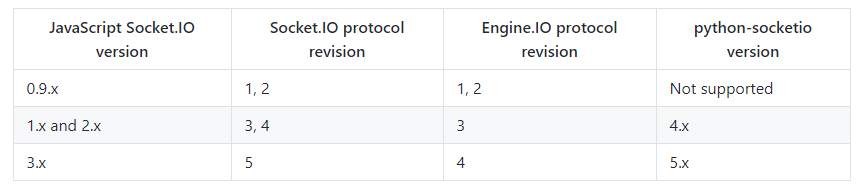
In my case, I forgot to fix the python-engineio version to 3.x, which resulted in the error. To fix it, I installed version 3.14.2.
pip install python-engineio==3.14.2 python-socketio[client]==4.6.0
Ah! Thank you, yep the different versions was doing me over too !
Nathan1258
on 4 Jan 2021
Hi
I have the same issues. I am a newbie in general, so bear with me. The problem went away on my mac installation when I changed the versions, but it came back on my raspberry pi, using the same configuration as my mac.
Here is my pip freeze (on raspi):
arandr==0.1.9
asn1crypto==0.24.0
automationhat==0.2.0
blinker==1.4
blinkt==0.1.2
buttonshim==0.0.2
Cap1xxx==0.1.3
certifi==2018.8.24
chardet==3.0.4
Click==7.0
colorama==0.3.7
colorzero==1.1
configparser==3.5.0b2
cookies==2.2.1
cryptography==2.6.1
drumhat==0.1.0
entrypoints==0.3
enum34==1.1.6
envirophat==1.0.0
ExplorerHAT==0.4.2
Flask==1.0.2
fourletterphat==0.1.0
funcsigs==1.0.2
gpiozero==1.5.1
idna==2.6
ipaddress==1.0.17
itsdangerous==0.24
Jinja2==2.10
keyring==17.1.1
keyrings.alt==3.1.1
MarkupSafe==1.1.0
microdotphat==0.2.1
mock==2.0.0
mote==0.0.4
motephat==0.0.3
numpy==1.16.2
oauthlib==2.1.0
olefile==0.46
pantilthat==0.0.7
pbr==4.2.0
phatbeat==0.1.1
pianohat==0.1.0
picamera==1.13
piglow==1.2.5
pigpio==1.44
Pillow==5.4.1
pycairo==1.16.2
pycrypto==2.6.1
pygame==1.9.4.post1
PyGObject==3.30.4
pyinotify==0.9.6
PyJWT==1.7.0
pyOpenSSL==19.0.0
pyserial==3.4
python-engineio==3.14.2
pyxdg==0.25
rainbowhat==0.1.0
requests==2.21.0
requests-oauthlib==1.0.0
responses==0.9.0
RPi.GPIO==0.7.0
RTIMULib==7.2.1
scrollphat==0.0.7
scrollphathd==1.2.1
SecretStorage==2.3.1
sense-hat==2.2.0
simplejson==3.16.0
six==1.12.0
skywriter==0.0.7
sn3218==1.2.7
spidev==3.4
touchphat==0.0.1
twython==3.7.0
unicornhathd==0.0.4
urllib3==1.24.1
Werkzeug==0.14.1
 neuromathic-ai
on 11 Jan 2021
neuromathic-ai
on 11 Jan 2021
@neuromathic-ai you don't have python-socketio in your requirements file, so I don't see how you could have this same problem.
miguelgrinberg
on 11 Jan 2021
Thanks. Here it is again. Not sure why it did not show up.
arandr==0.1.9
asn1crypto==0.24.0
automationhat==0.2.0
blinker==1.4
blinkt==0.1.2
buttonshim==0.0.2
Cap1xxx==0.1.3
certifi==2018.8.24
chardet==3.0.4
Click==7.0
colorama==0.3.7
colorzero==1.1
configparser==3.5.0b2
cookies==2.2.1
cryptography==2.6.1
drumhat==0.1.0
entrypoints==0.3
enum34==1.1.6
envirophat==1.0.0
ExplorerHAT==0.4.2
Flask==1.0.2
fourletterphat==0.1.0
funcsigs==1.0.2
gpiozero==1.5.1
idna==2.6
ipaddress==1.0.17
itsdangerous==0.24
Jinja2==2.10
keyring==17.1.1
keyrings.alt==3.1.1
MarkupSafe==1.1.0
microdotphat==0.2.1
mock==2.0.0
mote==0.0.4
motephat==0.0.3
numpy==1.16.2
oauthlib==2.1.0
olefile==0.46
pantilthat==0.0.7
pbr==4.2.0
phatbeat==0.1.1
pianohat==0.1.0
picamera==1.13
piglow==1.2.5
pigpio==1.44
Pillow==5.4.1
pycairo==1.16.2
pycrypto==2.6.1
pygame==1.9.4.post1
PyGObject==3.30.4
pyinotify==0.9.6
PyJWT==1.7.0
pyOpenSSL==19.0.0
pyserial==3.4
python-engineio==3.14.2
python-socketio==4.6.0
pyxdg==0.25
rainbowhat==0.1.0
requests==2.21.0
requests-oauthlib==1.0.0
responses==0.9.0
RPi.GPIO==0.7.0
RTIMULib==7.2.1
scrollphat==0.0.7
scrollphathd==1.2.1
SecretStorage==2.3.1
sense-hat==2.2.0
simplejson==3.16.0
six==1.12.0
skywriter==0.0.7
sn3218==1.2.7
spidev==3.4
touchphat==0.0.1
twython==3.7.0
unicornhathd==0.0.4
urllib3==1.24.1
Werkzeug==0.14.1
I get the following as soon as the python app is starting:
line 39, in
sio.connect('http://raspberrypi.local:3000/')
File "/home/pi/.local/lib/python3.7/site-packages/socketio/client.py", line 284, in connect
raise exceptions.ConnectionError(exc.args[0]) from None
socketio.exceptions.ConnectionError: OPEN packet not returned by server`
On my mac I have python3.8 and raspi latest is python3.7. This is the only thing I can see that differs.
Yes, the problem has seemed to move from line 282, to the above 284, when I moved the line sio.connect('http://raspberrypi.local:3000/') to before the definition of event handlers. I had it after the definition of event handlers earlier. (Not sure if this matters)
neuromathic-ai
on 11 Jan 2021
@neuromathic-ai version of your Socket.IO server?
miguelgrinberg
on 11 Jan 2021
It is NodeJS, "socket.io": "^2.0.4"
neuromathic-ai
on 11 Jan 2021
@neuromathic-ai That is not the version that is installed, that specifies a range of versions, which is open-ended at the right side. You see that you are not really following the version compatibility table, right?
miguelgrinberg
on 11 Jan 2021
Yes. I went through it again. I think I got it mixed up between pip and pip3. Thanks for your patience :-) It now works.
neuromathic-ai
on 11 Jan 2021
Related issues
 sdvcrx
·
3Comments
sdvcrx
·
3Comments
 amckinley
·
3Comments
amckinley
·
3Comments
 WaleedMeselhy
·
3Comments
WaleedMeselhy
·
3Comments
 exinmusic
·
5Comments
exinmusic
·
5Comments
 rstuckey
·
4Comments
rstuckey
·
4Comments
Most helpful comment
@Nathan1258 My Socket.IO server is written in JavaScript using socket.io v.2.3.0. To communicate with the server in Python, the right versions for python-socketio and python-engineio need to be chosen.
In my case, I forgot to fix the python-engineio version to 3.x, which resulted in the error. To fix it, I installed version 3.14.2.