Python-socketio: AttributeError: module 'socketio' has no attribute 'Client'
I'm trying to use the Socket.io client. I've seen #190 and #198 and I've made sure I've installed python-socketio and don't have socketio installed.
I run the test program:
print("one")

import socketio

print("two")
print(socketio)
print(dir(socketio))
print("---")

sio = socketio.Client()

print("three")
and I get the output:
$ python3 socket.py
one
one
two
<module 'socketio' from '/usr/local/lib/python3.7/site-packages/socketio/__init__.py'>
['__builtins__', '__cached__', '__doc__', '__file__', '__loader__', '__name__', '__package__', '__path__', '__spec__', 'sys']
---
Traceback (most recent call last):
  File "socket.py", line 3, in <module>
    import socketio
  File "/usr/local/lib/python3.7/site-packages/socketio/__init__.py", line 3, in <module>
    from .client import Client
  File "/usr/local/lib/python3.7/site-packages/socketio/client.py", line 5, in <module>
    import engineio
  File "/usr/local/lib/python3.7/site-packages/engineio/__init__.py", line 7, in <module>
    from .asyncio_server import AsyncServer
  File "/usr/local/lib/python3.7/site-packages/engineio/asyncio_server.py", line 1, in <module>
    import asyncio
  File "/usr/local/Cellar/python/3.7.2_2/Frameworks/Python.framework/Versions/3.7/lib/python3.7/asyncio/__init__.py", line 8, in <module>
    from .base_events import *
  File "/usr/local/Cellar/python/3.7.2_2/Frameworks/Python.framework/Versions/3.7/lib/python3.7/asyncio/base_events.py", line 23, in <module>
    import socket
  File "/Users/sampo/Odysseus/odysseus-python/socket.py", line 10, in <module>
    sio = socketio.Client()
AttributeError: module 'socketio' has no attribute 'Client'
````

I have no idea why `one` is printed out twice.

I'm running on MacOS Mojave with Python 3.7.2 installed with Homebrew.  Some diagnostics:
$ python3 --version
Python 3.7.2
$ pip3 freeze
python-engineio==3.4.3
python-socketio==3.1.2
six==1.12.0
$ pip3 show python-socketio
Name: python-socketio
Version: 3.1.2
Summary: Socket.IO server
Home-page: http://github.com/miguelgrinberg/python-socketio/
Author: Miguel Grinberg
Author-email: [email protected]
License: MIT
Location: /usr/local/lib/python3.7/site-packages
Requires: python-engineio, six
Required-by:
$ pip3 show socketio
$ head -n20 /usr/local/lib/python3.7/site-packages/socketio/client.py | tail -n7
class Client(object):
"""A Socket.IO client.
This class implements a fully compliant Socket.IO web client with support
for websocket and long-polling transports.
$ tail /usr/local/lib/python3.7/site-packages/socketio/__init__.py
__version__ = '3.1.2'
__all__ = ['__version__', 'Client', 'Server', 'BaseManager', 'PubSubManager',
'KombuManager', 'RedisManager', 'ZmqManager', 'Namespace',
'ClientNamespace', 'WSGIApp', 'Middleware']
if AsyncServer is not None: # pragma: no cover
__all__ += ['AsyncClient', 'AsyncServer', 'AsyncNamespace',
'AsyncClientNamespace', 'AsyncManager', 'AsyncRedisManager',
'ASGIApp', 'get_tornado_handler']
```
Thanks for any assistance!
 plaa
plaa
All 18 comments
You can't have a file named socket.py in your top-level directory, because it shadows the socket module from the Python standard library. Rename that file to some other name and try again.
 miguelgrinberg
on 5 Mar 2019
miguelgrinberg
on 5 Mar 2019
Thanks. I just realized the same thing as I was testing another socket.io library and it _still_ printed out the one. Had no idea you could accidentally override system libraries in Python.
plaa
on 5 Mar 2019
yeah, I've seen people trip on this so many times! What I found to be a good practice to avoid this type of issue is to not put your application in the top-level directory of your project. Instead, put it inside a package, and just put a run.py or similar in the top-level that imports the package. Inside the application package you don't have a problem because now those modules are not in the Python path, import socket goes to Python, and from app import socket goes to your app. No collisions.
miguelgrinberg
on 5 Mar 2019
I get the same issue with the filename being called myFile.py. Also, don't have any files named socket.py
import socketio
sio = socketio.Client() // AttributeError: module 'socketio' has no attribute 'Client'
UPDATE:
I think it might be because socketio breaks my Flask app by reinstalling setuptools from 39 to 3.3 which gives this message:
virtualenv 16.2.0 has requirement setuptools>=18.0.0, but you'll have setuptools 3.3 which is incompatible.
ipython 7.3.0 has requirement setuptools>=18.5, but you'll have setuptools 3.3 which is incompatible
 Rolandisimo
on 4 Aug 2019
Rolandisimo
on 4 Aug 2019
@Rolandisimo Are you sure the package python-socketio is installed? Check the output of pip freeze. I bet you don't have it and instead have something other unrelated socketio package.
miguelgrinberg
on 4 Aug 2019
@miguelgrinberg I see what happened. I opened https://python-socketio.readthedocs.io/en/latest/intro.html# and didn't find any install command . So instead I inferred this import socketio to be pip install socketio which seems to be either deprecated or something unrelated.
Fixed by running pip install python-socketio
Rolandisimo
on 4 Aug 2019
@miguelgrinberg I have a Tornado app and trying to use python-socketio as socketio client to connect with one of our socketio server from this tornado app. I have installed python-socketio. But having this issue:
import socketio
sio = socketio.Client() // AttributeError: module 'socketio' has no attribute 'Client'
Python version is 2.7
Do you have any clue if there is any issue if python-socketio used as socketio client with tornado app?
Thanks
 akimul
on 10 Jun 2020
akimul
on 10 Jun 2020
@akimul My guess is that you are using an old version of python-socketio, from before a client was added. Note that Python 2.7 has been dropped a while ago, so when you upgrade your package you may find problems as I am not testing on that release anymore and don't plan to fix issues anymore going forward.
miguelgrinberg
on 10 Jun 2020
@miguelgrinberg I am using the following versions:
python-engineio==3.13.0
python-socketio==4.6.0
akimul
on 10 Jun 2020
Please show me the complete error.
miguelgrinberg
on 10 Jun 2020
File "/home/akimul/virtual-python-envs/robot-2.7-soc-th/local/lib/python2.7/site-packages/socketio/client.py", line 106, in __init__
    self.eio = self._engineio_client_class()(**engineio_options)
  File "/home/akimul/virtual-python-envs/robot-2.7-soc-th/local/lib/python2.7/site-packages/engineio/client.py", line 82, in __init__
    threading.current_thread() == threading.main_thread():
AttributeError: 'module' object has no attribute 'main_thread'
It seems issue with my python version 2.7 as threading.main_thread() intoduced in python3.4
Can you please suggest which version of python-socketio has support for python 2.7
akimul
on 10 Jun 2020
Try these:
python-engineio==3.11.2
python-socketio==4.4.0
@miguelgrinberg Downgrading to 3.11.2 and 4.4.0 resolved the AttributeError: 'module' object has no attribute 'main_thread'. I also am using python 2.7. At this time, our project does not support python 3.
 brandonrussell270
on 7 Jul 2020
brandonrussell270
on 7 Jul 2020
Hi, Please help me, since I am facing the similar issue.
_Traceback )most recent call last):
File "singleboard.py", line 52, in
@socketio.event
AttributeError: 'SocketIO' object has no attribute 'event'_
Please suggest! Thanks.
 Ash-S
on 30 Mar 2021
Ash-S
on 30 Mar 2021
@Ash-S the event decorator is relatively new. Are you using a recent version?
miguelgrinberg
on 30 Mar 2021
Hi @miguelgrinberg seems, its latest.
Would you please let me know more I need to check to resolve this error? pip freeze gives me this....
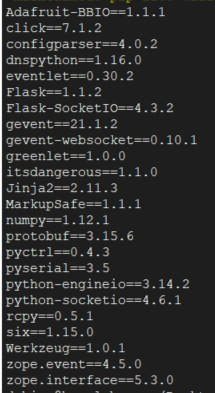
Please suggest.
Ash-S
on 30 Mar 2021
@Ash-S Check the change log: https://github.com/miguelgrinberg/Flask-SocketIO/blob/master/CHANGES.md. The event decorator was added in version 5 of Flask-SocketIO.
miguelgrinberg
on 30 Mar 2021
Thank you @miguelgrinberg for your suggestion. I was needed to update python version and seems, it works with v3.7.0 which updated flask-socket >= 5.0.0. Thanks.
Ash-S
on 6 Apr 2021
Related issues
 DevJhns
·
8Comments
DevJhns
·
8Comments
 amckinley
·
3Comments
amckinley
·
3Comments
 YuqiaoS
·
8Comments
YuqiaoS
·
8Comments
 scottquach
·
8Comments
scottquach
·
8Comments
 kamranhossain
·
7Comments
kamranhossain
·
7Comments
Most helpful comment
@miguelgrinberg I see what happened. I opened https://python-socketio.readthedocs.io/en/latest/intro.html# and didn't find any install command . So instead I inferred this
import socketioto bepip install socketiowhich seems to be either deprecated or something unrelated.Fixed by running
pip install python-socketio