Python-socketio: Not emitting from callback
Hello,
I try to create a socketio server with a binance websocket server.
The binance websocket server fire a callback every 5seconds or so. (Line 30 ) in my code => #1
The callback is fire from another thread created by the binance websocket.
( Line 22 ) in my code => #2
It doesn't work when i try to emit from the callback.
( Line 16 ) in my code => #3
But when i emit from the main thread it works.
I made my code as simple as possible to understand.
Do you have an idea what i'm doing wrong ?
import socketio
import eventlet
import eventlet.wsgi
from flask import Flask, render_template
from binance.websockets import BinanceSocketManager
from binance.client import Client
from binance.enums import *

sio = socketio.Server(logger=False, engineio_logger=False)
app = Flask(__name__)

@sio.on('connect')
def connect(sid, environ):
    sio.enter_room(sid, "room_test")
    # IS EMITING. OK  <========================================================== #3
    sio.emit("markets", ["CONNECT"], room="room_test", namespace="/")


def callback(msg):
    print("msg : ",msg["s"])
    # NOT EMITING. CLIENT RECEIVE NOTHING  <===================================== #2
    sio.emit("markets", ["CALLBACK"], room="room_test", namespace="/")

if __name__ == '__main__':

    client = Client("key",
                    "apikey")

    # The binance websocket start in another thread <============================ #1
    bm = BinanceSocketManager(client)
    bm.start_kline_socket('BNBBTC', callback, interval=KLINE_INTERVAL_1MINUTE)
    bm.start()

    app = socketio.Middleware(sio, app)
    eventlet.wsgi.server(eventlet.listen(('', 8060)), app)
 adrian410
All 22 comments
You realize that Flask-SocketIO installs its own websocket server? What's the purpose of using a second websocket server?
My guess is that the problem is related to an incompatibility between eventlet and your websocket server, I would just remove it and start a regular background thread as I show in the example application in this repository.
 miguelgrinberg
on 16 Jan 2018
miguelgrinberg
on 16 Jan 2018
I have to use the second websocket to get essential informations, like the klines ( candles of a chart in real time ) Link to doc of the binance function
The binance websocket doesn't communicate with my client but only with the binance api.
This is what i want to do in my server :
1- Fetch stock data with Binance API in real time
2- Send the fetched data to my JS client in real time with python socketio
Binance Server === FETCH DATA FROM BINANCE & TRIGGER CALLBACK ===> Socket IO Receive data from callaback === SEND DATA VIA ROOM ===> JS Client
I managed to do it in a JS socket io server, but it will be easier for my application to do everything in python at once.
I tried nearly all of your exemple the past 3days. But nothing worked.
I also found this issue you resolved ( with monkey patch ) but it didn't worked for us : https://github.com/miguelgrinberg/python-socketio/issues/49
I don't know where i could found a way to do it now.
adrian410
on 16 Jan 2018
Does everything work if you uninstall eventlet? That would prove my theory.
miguelgrinberg
on 16 Jan 2018
I uninstalled the eventlet and used your first exemple with aiohttp.
But i get also an error on the callback :
/usr/local/lib/python3.6/site-packages/binance/websockets.py:30: RuntimeWarning: coroutine 'emit_callback' was never awaited
self.factory.callback(payload_obj)
The error occur when the BinanceAPI try to fire the callback at this line :
https://github.com/sammchardy/python-binance/blob/3c1e986845ac6488b81ec74733881ae125e363ed/binance/websockets.py#L30
As you can see the BinanceAPI is using the crossbar autobahn websocket library that is based on the twisted library.
Do you think there could be a solution to mix your library python-socket io with autobahn or you think it's impossible because they are incompatible ?
from aiohttp import web
import socketio
from binance.websockets import BinanceSocketManager
from binance.client import Client
from binance.enums import *
sio = socketio.AsyncServer()
app = web.Application()
sio.attach(app)
@sio.on('connect')
async def connect(sid, environ):
sio.enter_room(sid, "room_test")
await sio.emit("markets", ["CONNECT"], room="room_test", namespace="/")
async def emit_callback(resp):
print("EMIT CALLBACK") <========================================= # NEVER GET HERE #
await sio.emit("markets", ["CALLBACK"], room="room_test", namespace="/")
if __name__ == '__main__':
client = Client("apikey",
"secretKey")
# Starting another thread
bm = BinanceSocketManager(client)
bm.start_kline_socket('BNBBTC', emit_callback, interval=KLINE_INTERVAL_1MINUTE)
bm.start()
web.run_app(app, port = 8060)
Sorry, but you are complicating things by introducing asyncio in the mix.
Does your binance websocket server use asyncio or not? I assume it does not, so then using asyncio for the SocketIO side is going to break your binance side.
What I asked you to do was simpler. Just run the application without any async framework. Uninstall eventlet, gevent, etc. and re-run your application to see if that makes everything work using regular threads. This isn't a production configuration, but it will tell us if the problem is an incompatibility between binance and eventlet.
miguelgrinberg
on 18 Jan 2018
I misunderstood your first answer. What exemple with a background thread were you talking about ?
Are you asking me to remove also the socketIO for testing with only "regular threads" ?
Or use socketIo with "regular threads" ? Because i can't find an exemple with socketIO and regular threads.
Sorry, i'm a little bit lost.
adrian410
on 18 Jan 2018
All I asked you to do is to uninstall eventlet and re-run your application. No need to change anything in the code.
Flask-SocketIO looks at the packages that you have installed and finds the best way to configure itself based on that. Because you had eventlet installed, it went with eventlet. If you remove it, it will pick something else. If it does not find any asynchronous framework installed, it will use regular threads. This is not a great platform to use in production, but it is the most compatible one. If your binance server works well when running in threading mode, that proves my theory that binance does not see eye to eye with eventlet.
miguelgrinberg
on 18 Jan 2018
Got it.
I removed the following packages :
````
aiohttp==2.3.8
eventlet==0.22.0
gevent-websocket==0.10.1
gevent==1.1.2
````
And kept only the following ones for socketio:
python-socketio==1.8.4
flask==0.12.2
In my first exemple i start the socket server with eventlet at the last line :
eventlet.wsgi.server(eventlet.listen(('', 8060)), app)
How can i start the server without eventlet or aiohttp ?
Can't find an exemple without one of these.
adrian410
on 18 Jan 2018
Since you are using Flask, you can run the Flask web server:
app.run(threaded=True)
Note that the threaded=True option is required when using SocketIO.
miguelgrinberg
on 18 Jan 2018
I changed the last line like you said with :
app.run(threaded=True)
But i got this error :
AttributeError: 'Middleware' object has no attribute 'run'
Did i missed something ?
Here is my full code :
`````
import socketio
from flask import Flask, render_template
from binance.websockets import BinanceSocketManager
from binance.client import Client
from binance.enums import *
sio = socketio.Server(logger=False, engineio_logger=False)
app = Flask(__name__)
@sio.on('connect')
def connect(sid, environ):
sio.enter_room(sid, "room_test")
# IS EMITING. OK <========================================================== #3
sio.emit("markets", ["CONNECT"], room="room_test", namespace="/")
def callback(msg):
print("msg : ",msg["s"])
# NOT EMITING. CLIENT RECEIVE NOTHING <===================================== #2
sio.emit("markets", ["CALLBACK"], room="room_test", namespace="/")
if __name__ == '__main__':
client = Client("key",
"secretKey")
# The binance websocket start in another thread <============================ #1
bm = BinanceSocketManager(client)
bm.start_kline_socket('BNBBTC', callback, interval=KLINE_INTERVAL_1MINUTE)
bm.start()
app = socketio.Middleware(sio, app)
app.run(threaded=True)
`````
adrian410
on 18 Jan 2018
Do it like this:
app.wsgi_app = socketio.Middleware(sio, app.wsgi_app)
app.run(threaded=True)
Thanks !
adrian410
on 18 Jan 2018
The middleware is required, that is what hooks up SocketIO to your application.
miguelgrinberg
on 18 Jan 2018
I tried to do the same as in this exemple.
EXEMPLE
The server run correctly on threading mode ( see screen below ) without errors :
````
async_mode = None
import socketio
from flask import Flask, render_template
from binance.websockets import BinanceSocketManager
from binance.client import Client
from binance.enums import *
sio = socketio.Server(logger=True, engineio_logger=True,async_mode=async_mode)
app = Flask(__name__)
app.wsgi_app = socketio.Middleware(sio, app.wsgi_app)
@sio.on('connect')
def connect(sid, environ):
sio.enter_room(sid, "room_test")
# IS EMITING. OK <========================================================== #3
sio.emit("markets", ["CONNECT"], room="room_test", namespace="/")
def callback(msg):
print("msg : ",msg["s"])
# NOT EMITING. CLIENT RECEIVE NOTHING <===================================== #2
sio.emit("markets", ["CALLBACK"], room="room_test", namespace="/")
if __name__ == '__main__':
client = Client("key",
"secretKey")
# The binance websocket start in another thread <============================ #1
bm = BinanceSocketManager(client)
bm.start_kline_socket('BNBBTC', callback, interval=KLINE_INTERVAL_1MINUTE)
bm.start()
app.run(threaded=True, port=8060, host="localhost")
````
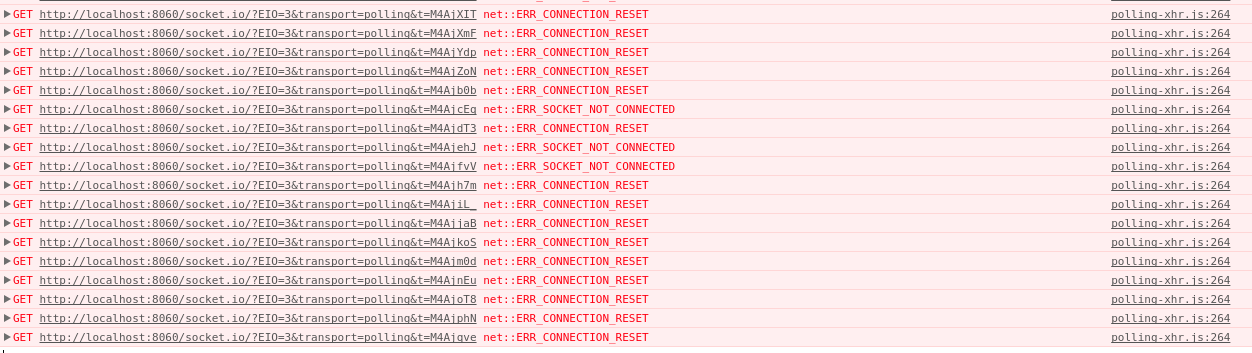
But my client doesn't seem to receive anything now, or connect to the server.
Screenshots :

I also tried to remove the binance API :
````
async_mode = None
from flask import Flask, render_template
import socketio
sio = socketio.Server(logger=True, engineio_logger=True,async_mode=async_mode)
app = Flask(__name__)
app.wsgi_app = socketio.Middleware(sio, app.wsgi_app)
@sio.on('connect')
def connect(sid, environ):
sio.enter_room(sid, "room_test")
# IS EMITING. OK <========================================================== #3
sio.emit("markets", ["CONNECT"], room="room_test", namespace="/")
def callback(msg):
print("msg : ",msg["s"])
# NOT EMITING. CLIENT RECEIVE NOTHING <===================================== #2
sio.emit("markets", ["CALLBACK"], room="room_test", namespace="/")
if __name__ == '__main__':
app.run(threaded=True, port=8060, host="localhost")
````
I get the same result without the BinanceAPI. The client can't connect to the server.
adrian410
on 18 Jan 2018
Try removing the host argument in your app.run() call.
miguelgrinberg
on 18 Jan 2018
I put manually the localhost after it didn't work without.
I tried again without, same result.
The only difference i get is the second console line (127.0.0.1 instead of localhost ) :
````
- Running on http://127.0.0.1:8060/ (Press CTRL+C to quit)
````
I change also to the default port 5000 with only :
app.run(threaded=True)
Running on http://127.0.0.1:5000/ (Press CTRL+C to quit)
And on client side i change the address to this :
http://127.0.0.1:5000
And i get the same error on the chrome console.
adrian410
on 18 Jan 2018
Does my example on which you based this one work well?
miguelgrinberg
on 18 Jan 2018
I run on docker and tried without it.
Your exemple worked.
Tried my exemple and it worked.
Weird that docker doesn't send data through the port this time with threading, altough I expose the ports.
The final working code is this one :
````
async_mode = None
import socketio
from flask import Flask, render_template
from binance.websockets import BinanceSocketManager
from binance.client import Client
from binance.enums import *
sio = socketio.Server(logger=True, engineio_logger=True,async_mode="threading")
app = Flask(__name__)
app.wsgi_app = socketio.Middleware(sio, app.wsgi_app)
@sio.on('connect')
def connect(sid, environ):
sio.enter_room(sid, "room_test")
# IS EMITING. OK <========================================================== #3
sio.emit("markets", ["CONNECT"], room="room_test", namespace="/")
def callback(msg):
print("msg : ",msg["s"])
# NOT EMITING. CLIENT RECEIVE NOTHING <===================================== #2
sio.emit("markets", ["CALLBACK"], room="room_test", namespace="/")
if __name__ == '__main__':
client = Client("key",
"secretKey")
# The binance websocket start in another thread <============================ #1
bm = BinanceSocketManager(client)
bm.start_kline_socket('BNBBTC', callback, interval=KLINE_INTERVAL_1MINUTE)
bm.start()

app.run(threaded=True, port=8040)
````
Thank you very much Miguel for your patience and your implication to my problem with very fast answers.
You saved me a lot of time, can't express how much I feel a relief right now that's it's finally solved after all these days.
Love you.
No homo.
adrian410
on 18 Jan 2018
You guys saved me also a gazillion amount of time. Just integrating with rtmidi and I also used flask-socketio.
I also used your code @adrian410 and now it works like a charm. Had the same issue of not receiving output on my client with vue-socketio.
 schuster-rainer
on 14 Dec 2018
schuster-rainer
on 14 Dec 2018
Glad I could help you ! :)
adrian410
on 18 Dec 2018
I still have some issues with this setup, namely ... I just get long polling. That might be due to CORS ?! Don't know really, didn't investigate yet.
schuster-rainer
on 18 Dec 2018
@adrian410 @miguelgrinberg Thanks a lot for this discussion. Saved me a lot of time
 JayjeetAtGithub
on 13 Oct 2019
JayjeetAtGithub
on 13 Oct 2019
Related issues
 LilyHolms
·
4Comments
LilyHolms
·
4Comments
 alcupe
·
5Comments
alcupe
·
5Comments
 exinmusic
·
5Comments
exinmusic
·
5Comments
 feikiss
·
3Comments
feikiss
·
3Comments
 cetteup
·
6Comments
cetteup
·
6Comments
Most helpful comment
I run on docker and tried without it.
Your exemple worked.
Tried my exemple and it worked.
Weird that docker doesn't send data through the port this time with threading, altough I expose the ports.
The final working code is this one :
````
async_mode = None
import socketio
from flask import Flask, render_template
from binance.websockets import BinanceSocketManager
from binance.client import Client
from binance.enums import *
sio = socketio.Server(logger=True, engineio_logger=True,async_mode="threading")
app = Flask(__name__)
app.wsgi_app = socketio.Middleware(sio, app.wsgi_app)
@sio.on('connect')
def connect(sid, environ):
sio.enter_room(sid, "room_test")
# IS EMITING. OK <========================================================== #3
sio.emit("markets", ["CONNECT"], room="room_test", namespace="/")
def callback(msg):
print("msg : ",msg["s"])
# NOT EMITING. CLIENT RECEIVE NOTHING <===================================== #2
sio.emit("markets", ["CALLBACK"], room="room_test", namespace="/")
if __name__ == '__main__':
client = Client("key",
"secretKey")
````
Thank you very much Miguel for your patience and your implication to my problem with very fast answers.
You saved me a lot of time, can't express how much I feel a relief right now that's it's finally solved after all these days.
Love you.
No homo.