Python-slack-sdk: Updated pop up modal view seen for a second and closed immediately
Description
Not sure what’s is missing , pasting the exact code.When I use below method I'm able to see pop getting update on click of submit button but its closing within approximately 2 seconds
def send_views(user_name):
    form_json = json.loads(request.form.get('payload'))

    open_dialog1 = slack_client.api_call("views.update",
                                          trigger_id=form_json[ "trigger_id" ],
                                          view_id = form_json["view"]["id"],
                                          hash=form_json["view"]["hash"],
                                          view=views2
                                          )
Below is views2 json
views2 = {
   "title": {
      "type": "plain_text",
      "text": "My App",
      "emoji": True
   },
   "type": "modal",
   "close": {
      "type": "plain_text",
      "text": "Cancel",
      "emoji": True
   },
   "blocks": [
      {
         "type": "section",
         "text": {
            "type": "plain_text",
            "text": "Submitted Successfully",
            "emoji": True
         }
      }
   ]
}
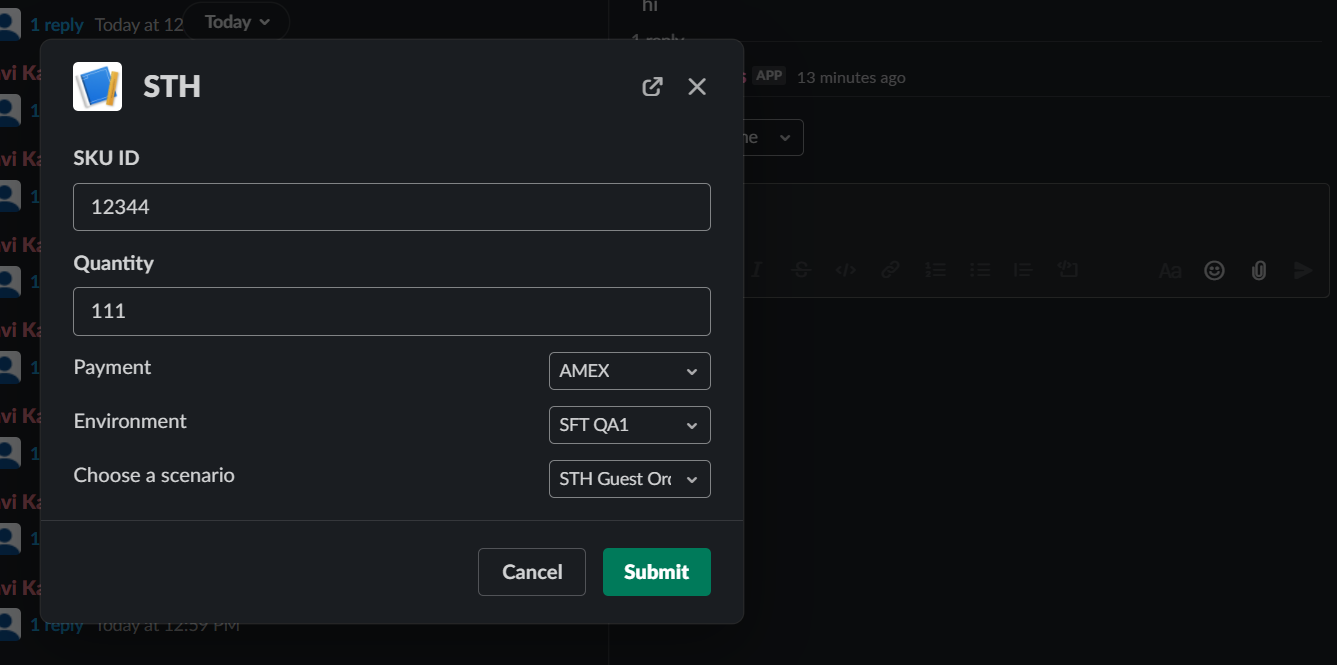
Initial view
What type of issue is this? (place an x in one of the [ ])
- [ ] bug
- [ ] enhancement (feature request)
- [ x] question
- [ ] documentation related
- [ ] testing related
- [ ] discussion
Requirements (place an x in each of the [ ])
- [x ] I've read and understood the Contributing guidelines and have done my best effort to follow them.
- [x] I've read and agree to the Code of Conduct.
- [ x] I've searched for any related issues and avoided creating a duplicate issue.
Bug Report
Filling out the following details about bugs will help us solve your issue sooner.
Packages:
Select all that apply:
- [ ]
@slack/web-api - [x]
@slack/events-api - [x]
@slack/interactive-messages - [ ]
@slack/rtm-api - [ ]
@slack/webhooks - [ ]
@slack/oauth - [ ] I don't know
Reproducible in:
package version:
node version:
OS version(s):
Steps to reproduce:
1.
2.
3.
Expected result:
I want to see initial view getting update to "view2"
Actual result:
Updated pop up only seen for split second on clicking submit button and closes
What actually happened
Attachments:
Logs, screenshots, screencast, sample project, funny gif, etc.
 ravi7271973
All 10 comments
I transferred this question from node-slack-sdk to python-slack-sdk project.
 seratch
on 11 Jan 2021
seratch
on 11 Jan 2021
@ravi7271973 In this scenario, you can use "response_action": "update" body in response to the view_submission request. views.update API method is used not for view_submission but for block_actions request handling.
https://api.slack.com/surfaces/modals/using#updating_views
{
  "response_action": "update",
  "view": {
    "type": "modal",
    "title": {
      "type": "plain_text",
      "text": "Updated view"
    },
    "blocks": [
      {
        "type": "section",
        "text": {
          "type": "plain_text",
          "text": "I've changed and I'll never be the same. You must believe me."
        }
      }
    ]
  }
}
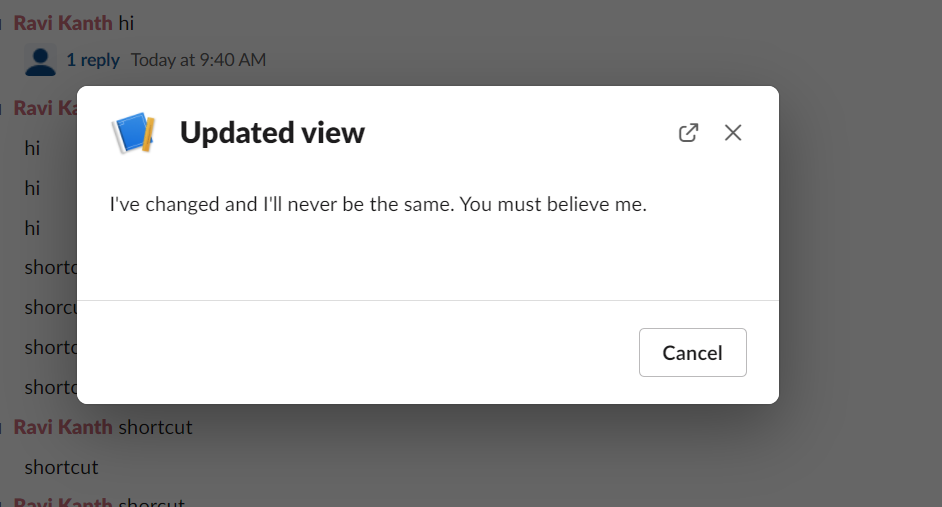
@seratch I update this way the pop is just getting closed,pasted the screenshot of the output I'm getting .Can you please help on what I'm missing here unable to figure out
def send_views(user_name):
    form_json = json.loads(request.form.get('payload'))
    print("printing exct json", form_json)
    print("entered updated if")
    return {
        "response_action": "update",
        "view": {
            "type": "modal",
            "title": {
                "type": "plain_text",
                "text": "Updated view"
            },
            "blocks": [
                {
                    "type": "section",
                    "text": {
                        "type": "plain_text",
                        "text": "I've changed and I'll never be the same. You must believe me."
                    }
                }
            ]
        }
    }
Output

ravi7271973
on 11 Jan 2021
@ravi7271973 Here is a minimal working example.
pip install "Flask>=1.1,<2" "slack_sdk==3.1.1"
export SLACK_SIGNING_SECRET=***
export SLACK_BOT_TOKEN=xoxb-***
python3 app.py
import logging
logging.basicConfig(level=logging.DEBUG)

import os
import json

from slack_sdk import WebClient
from slack_sdk.errors import SlackApiError
from slack_sdk.signature import SignatureVerifier

client = WebClient(token=os.environ["SLACK_BOT_TOKEN"])
signature_verifier = SignatureVerifier(os.environ["SLACK_SIGNING_SECRET"])

from flask import Flask, request, make_response, jsonify

app = Flask(__name__)


@app.route("/slack/events", methods=["POST"])
def slack_app():
    if not signature_verifier.is_valid_request(request.get_data(), request.headers):
        return make_response("invalid request", 403)

    if "payload" in request.form:
        payload = json.loads(request.form["payload"])

        if (
            payload["type"] == "shortcut"
            and payload["callback_id"] == "test-shortcut"
        ):
            # Open a new modal by a global shortcut
            try:
                api_response = client.views_open(
                    trigger_id=payload["trigger_id"],
                    view={
                        "type": "modal",
                        "callback_id": "modal-id",
                        "title": {"type": "plain_text", "text": "Awesome Modal"},
                        "submit": {"type": "plain_text", "text": "Submit"},
                        "close": {"type": "plain_text", "text": "Cancel"},
                        "blocks": [
                            {
                                "type": "input",
                                "block_id": "b-id",
                                "label": {"type": "plain_text", "text": "Input label",},
                                "element": {
                                    "action_id": "a-id",
                                    "type": "plain_text_input",
                                },
                            }
                        ],
                    },
                )
                return make_response("", 200)
            except SlackApiError as e:
                code = e.response["error"]
                return make_response(f"Failed to open a modal due to {code}", 200)

        if (
            payload["type"] == "view_submission"
            and payload["view"]["callback_id"] == "modal-id"
        ):
            # Handle a data submission request from the modal
            submitted_data = payload["view"]["state"]["values"]
            return jsonify(
                {
                    "response_action": "update",
                    "view": {
                        "type": "modal",
                        "title": {"type": "plain_text", "text": "Updated view"},
                        "blocks": [
                            {
                                "type": "section",
                                "text": {
                                    "type": "plain_text",
                                    "text": "I've changed and I'll never be the same. You must believe me.",
                                },
                            }
                        ],
                    },
                }
            )

    return make_response("", 404)


if __name__ == "__main__":
    # pip3 install flask slack_sdk
    # export SLACK_SIGNING_SECRET=***
    # export SLACK_BOT_TOKEN=xoxb-***
    # export FLASK_ENV=development
    app.run("localhost", 3000)

# ngrok http 3000
@seratch thanks for the code , I have tried and its working
Just one more question
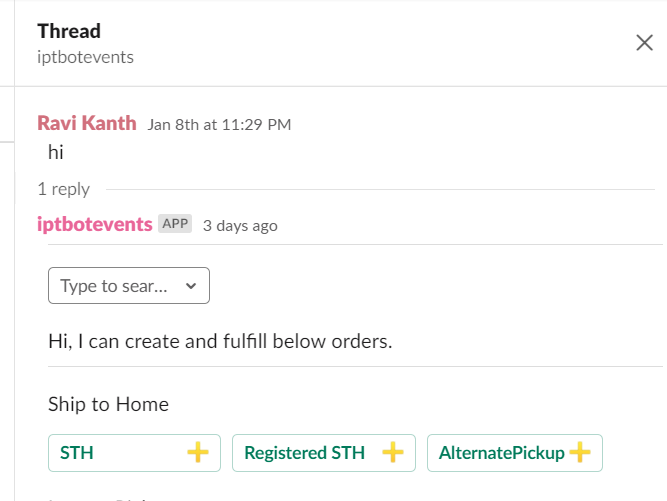
There are lot many methods where am Im using slack_client.api_call("chat.postMessage" in my current code , So what is alternative for below thing to work? I cannot use views open as this is for bot message
#method that gets triggered on user ping of "hi"
def send_options_to_user(slack_client, channel, thread_ts):


    slack_client.api_call("chat.postMessage",
                          channel=channel,
                          thread_ts=thread_ts,
                          text="Hi, I can create and fulfill below orders \n",
                          blocks=dialogtrigger1
                          )
something like below # dialogtrigger1
ravi7271973
on 12 Jan 2021
thanks I was able to figure out from your example itself
ravi7271973
on 12 Jan 2021
@seratch can you also share me example of push view? i have tried but updated pop up is just closing , below is code snippet I used
    if (payload[ "type" ] == "view_submission" and payload[ "view" ][ "callback_id" ] == "sthpush"):
        print("entered push")

    try:
        dialog1=slack_client.views_push(
                        trigger_id=payload[ "trigger_id" ],
                        # view_id=payload[ "view" ][ "id" ],
                        # # String that represents view state to protect against race conditions
                        # hash=payload[ "view" ][ "hash" ],
                        # View payload with updated blocks
                        view = {
            "type": "modal",
            "title": {
                "type": "plain_text",
                "text": "Updated view"
            },
            "blocks": [
                {
                    "type": "image",
                    "image_url": "https://api.slack.com/img/blocks/bkb_template_images/plants.png",
                    "alt_text": "Plants"
                },
                {
                    "type": "context",
                    "elements": [
                        {
                            "type": "mrkdwn",
                            "text": "_Two of the author's cats sit aloof from the austere challenges of modern society_"
                        }
                    ]
                }
            ]
        }
        )
        return make_response("", 200)
    except SlackApiError as e:
        code = e.response[ "error" ]
        return make_response(f"Failed to open a modal due to {code}", 200)

ravi7271973
on 12 Jan 2021
@ravi7271973 Instead of calling views.push API method (the code slack_client.views_push in your app), you can return the following JSON body in response to view_submission requests. In other words, using "response_action": "push" in response.
return jsonify(
    {
        "response_action": "push",
        "view": {
            "type": "modal",
            "title": {"type": "plain_text", "text": "Updated view"},
            "blocks": [
                {
                    "type": "section",
                    "text": {
                        "type": "plain_text",
                        "text": "I've changed and I'll never be the same. You must believe me.",
                    },
                }
            ],
        },
    }
)
@ravi7271973 I think the reason the modal was opening and then closing is due to the
return make_response("", 200)
after pushing the view
from the docs it should close the current view and remove it from the stack
https://api.slack.com/surfaces/modals/using#close_current_view
 ruberVulpes
on 14 Jan 2021
ruberVulpes
on 14 Jan 2021
@ruberVulpes Thanks for jumping in!
@ravi7271973 It seems you've already added a reaction to my reply. Could you close this issue if we do not have any further topic to discuss here? (I will be closing this after waiting for your response for a few more days)
seratch
on 14 Jan 2021
Related issues
 tinoargentino
·
3Comments
tinoargentino
·
3Comments
 LMPK
·
3Comments
seratch
·
3Comments
LMPK
·
3Comments
seratch
·
3Comments
 Terrance
·
3Comments
Terrance
·
3Comments
 marshallino16
·
3Comments
marshallino16
·
3Comments